Newer improved Microsoft Teams alerts
Improvement
Your Microsoft Teams alerts have improved a notch. Besides the information on incidents, you will now also see buttons to action on an incident.
The two action buttons are Acknowledge and Resolve
Your Microsoft Teams alerts have improved a notch. Besides the information on incidents, you will now also see buttons to action on an incident.
The two action buttons are Acknowledge and Resolve

Discord has gained great traction and many more dev teams are moving from Slack. We are committed to send incident alerts to every developer on a channel of their choice and want to continue to pave this way with Discord alert channel.
Thanks to Paul for requesting this.
Longer detailed messages for your incidents
Quick links from your incident details
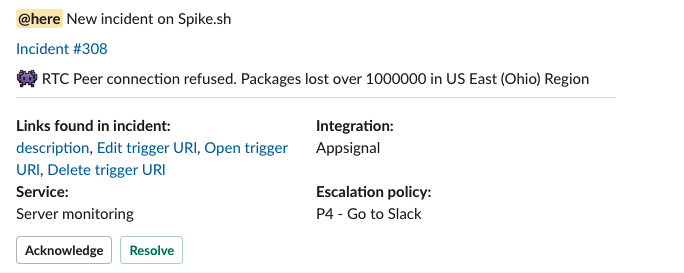
Integrations like Sentry, AppSignal, New Relic, etc do send quick links which will be captured and sent to you in our new Slack message format.
Thanks to Kyle for this feature request.
Here's how it looks ๐

We've added many more integrations to help you get alerts from across your tool stack. Here are the new integrations -
Whew!
Phone calls are now extended to 420 characters to give you more clarity on an incident. We have improved the format so you can change incident statuses at any point in time during the call.
Press -
Special thanks to our customer Adam ๐
Acknowledge or resolve an incident by sending us an SMS (any of our registered numbers) with the below format -
You must still SMS us on our numbers, both of which are based in United States.
It's imperative to take mark your incident as acknowledged or resolved soon as you get an alert from us. Instead of having to make your way to the dashboard, you can reply to our email alert and take actions.
When you get an email alert for say, for example incident #123, reply with these reserved keywords -
#ack - Acknowledges incident #123
#res - Resolves incident #123
Don'ts
Do not reply with incident id, for example: #ack incident 123
Do not send in any attachments and only respond with the keywords
Upon feature request, we promptly looked in and released a new feature on our Slack app.
If any number of Slack alert(s) been sent for a new incident and you managed to resolve it from either Phone, SMS, Email or Dashboard or if the incident was automatically resolved, then the Slack message with automatically reflect the resolved state killing ambiguity on the status of an incident.
No actions are needed from your end and this will be available to all the existing and new Slack app installations.
Our integration list keeps growing! The newest integrations are Nixstats (server performance) and Server Density (infrastructure monitoring).
You can now build flexible on-call schedules with On-call Layers!
Create different layers to handle weekday/weekend schedules, assign team members for Follow-the-sun model and create overrides. You can also use slots to create on-call shifts for specific parts of the day or week.