

TL;DR
PagerDuty’s base plans start at $25/user/month, but that’s rarely what teams end up paying. Status pages, AIOps, and live call routing are all sold separately, and those costs add up fast. To budget accurately, you need to look at base plans and add-ons together. Spike is the best affordable PagerDuty alternative for teams that need on-call scheduling, alerting, and incident management. It starts at $7/user/month with status pages included on every plan.
| PagerDuty Professional | PagerDuty Business | Spike Starter | |
|---|---|---|---|
| Monthly Price | $25/user/month | $49/user/month | $7/user/month |
| Status Pages | $89/month add-on | $89/month add-on | Included |
| Live Call Routing | Custom pricing add-on | Custom pricing add-on | Included |
| Stakeholder Access | Starting at $150 | Starting at $150 | Included |
| Out-of-office Routing | Not available | Not available | Included |
Slack @channel / @here mentions | Not available | Not available | Included |
PagerDuty’s pricing page lists four tiers and makes the math look straightforward. But once you factor in status pages, AIOps, and live call routing, the number looks very different from the advertised per-user rate. This breakdown covers every plan, every add-on, and what teams of 10, 25, and 200 engineers actually pay so you can budget accurately before committing.
PagerDuty pricing breakdown
| Plan | Monthly Price | Annual Price | User Cap | Best For |
|---|---|---|---|---|
| Free | $0 | $0 | 5 users | Evaluation only |
| Professional | $25/user/month | $21/user/month | Unlimited | Small teams |
| Business | $49/user/month | $41/user/month | Unlimited | Growing organizations |
| Enterprise | Custom | Custom | Unlimited | Large enterprises |
Free plan
The Free plan is capped at 5 users. It includes 100 international phone and SMS notifications per month, one on-call schedule, and one escalation policy. You also get access to 750+ integrations. Phone call alerts are not available on the Free plan. For teams testing PagerDuty before buying, it covers the basics.
Professional ($25/user/month)
The Professional plan is where most teams start. It includes Slack and Microsoft Teams integration, SSO, post-incident reviews, and 2 predefined incident roles. You also get more on-call schedules and escalation policies, plus an external status page capped at 250 subscribers. It also includes 1,000 one-time PagerDuty Advance credits for generative AI features.
However, the limitations show up quickly. You get only 2 teams and 3 predefined incident types. Workflow automation is available but restricted to a single major incident workflow template with limited triggers. Most growing teams outgrow Professional within a year.
Business ($49/user/month)
The Business plan adds custom fields, up to 3 custom incident types, and multi-year historical data access. You also get advanced admin features, advanced ITSM integrations, and a status page subscriber cap of 500. It includes 5,000 PagerDuty Advance credits.
AIOps, live call routing, and stakeholder licenses are not included. All three are sold as separate add-ons, so teams that need any of them will pay significantly more than $49/user/month.
Enterprise (custom pricing)
The Enterprise plan includes advanced incident workflows with conditionals and loops. You also get 10 custom incident roles, up to 100 custom incident types, and bi-directional ServiceNow sync.
Several add-ons that cost extra on lower tiers are bundled here: premium status pages, stakeholder licenses, and live call routing. AIOps is still a separate purchase at this tier.
Key point: PagerDuty’s advertised price is just the starting point. The add-on model means most teams on Professional and Business plans pay well above it.
PagerDuty add-on costs
| Add-On | Price | Included In |
|---|---|---|
| AIOps | $799/month | Not included on any plan |
| Status pages | $89/month per page | Enterprise only |
| PagerDuty advance (AI) | $415/month | Credits on all paid plans |
| Live call routing | Custom pricing | Enterprise only |
| Runbook automation | $59–$125/user/month | Not included on any plan |
| Stakeholder license | Starting at $150 | Enterprise only |
AIOps ($799/month)
AIOps adds machine learning-based alert grouping, noise reduction, and pattern detection. For teams managing high alert volumes, it’s genuinely useful. For teams on the Business plan, it is also an additional $799/month on top of the per-user subscription. There is no lighter version at a more affordable price point.
Status pages ($89/month per page)
Status pages are a paid add-on on every PagerDuty plan except Enterprise. A team on the Professional or Business plan that wants a public status page pays $89/month on top of their per-user fees. That’s an extra $1,068/year for a feature tools like Spike include on every plan at no additional cost.
PagerDuty Advance ($415/month)
PagerDuty Advance provides generative AI features for incident management: drafting postmortems, summarizing incidents, and suggesting next steps. Each paid plan includes a one-time credit allocation. Once credits are used, continued access requires a separate Advance subscription at $415/month.
Live call routing (custom pricing)
Live call routing routes incoming calls to the on-call engineer. It is available as an add-on on Professional and Business plans and is included on Enterprise. PagerDuty does not publish a standard price for this add-on. It is quoted per account.
Runbook automation ($59–$125/user/month)
Runbook automation handles automated remediation workflows. It is not included in any standard plan. Pricing ranges from $59/user/month for the basic tier to $125/user/month for the managed cloud version. For teams that need automated runbooks, this is a substantial additional cost.
Stakeholder license (Starting at $150)
Stakeholder licenses give non-technical team members read-only access to incident updates without a full PagerDuty seat. They’re useful for business leaders or support teams that need visibility into active incidents without being part of the on-call rotation. On Professional and Business plans, stakeholder licenses are a separate purchase. They are included on Enterprise.
Key point: AIOps, status pages, live call routing, runbook automation, and stakeholder licenses are all sold separately on Professional and Business plans. The add-on costs can easily double the advertised per-user rate.
What PagerDuty actually costs
These three scenarios show what teams of different sizes actually pay once standard add-ons are factored in.
10-person team on Professional plan
A 10-person team on the PagerDuty Professional plan pays $250/month in base subscription fees ($25 x 10 users). Add a status page at $89/month and the total reaches $339/month, or $4,068/year. A team that also needs AIOps pays an additional $799/month, bringing the annual total to $13,656.
Advertised cost: $3,000/year
Actual cost: $4,068 to $13,656/year, depending on add-ons
25-person team on Business plan
A 25-person team on PagerDuty Business pays $1,225/month in base subscription fees ($49 x 25 users). Add a status page ($89/month) and AIOps ($799/month) and the monthly total reaches $2,113, or $25,356/year.
Advertised cost: $14,700/year
Actual cost: $25,356/year once standard add-ons are included
200-person engineering team
Enterprise pricing is custom, but PagerDuty’s rate for large organizations typically falls in the $60–$90/user/month range. At $60/user/month for 200 users, the base subscription alone is $144,000/year. AIOps adds $9,588/year.
Advertised cost: Based on the rate agreed during the sales process
Actual cost: $144,000/year for the base subscription plus $9,588/year for AIOps, totaling $153,588/year
Why is PagerDuty so expensive?
PagerDuty’s pricing model is built around three patterns that push the real cost above the advertised rate.
- Tiered feature gating: PagerDuty places features strategically across tiers to create natural upgrade pressure. A team that needs more than 2 teams or more than 2 incident roles hits the ceiling of the Professional plan and moves to Business. A team that needs conditionals in their incident workflows moves to Enterprise. Each jump represents a significant per-user price increase.
- The add-on model: Features that competing tools include in their base plans are sold separately by PagerDuty. Status pages, live call routing, and advanced noise reduction all cost extra. A team that wants a complete incident management stack often ends up paying for 3 to 5 separate line items.
- Renewal increases: PagerDuty’s annual contracts typically include price increases at renewal. It’s worth asking your sales rep about renewal pricing before signing, since year-two costs can differ meaningfully from what you paid in year one.
Key point: PagerDuty’s advertised rate is rarely what teams end up paying. Tiered feature gating and the add-on model push the real cost significantly higher.
Is PagerDuty worth the price?
For the right team, yes. For others, the answer depends on how much of the feature set they’ll actually use.
PagerDuty is worth the price for large enterprise organizations. It offers 750+ integrations, deep runbook automation, bi-directional ServiceNow sync, and enterprise-grade compliance capabilities. If your incident management requirements are genuinely complex, with multiple workflow conditionals, custom incident roles, and advanced event orchestration, the feature depth is there.
For teams that want on-call scheduling, alerting, and a status page, PagerDuty is likely more than they need. The pricing is built around enterprise scale, and teams that don’t operate at that scale end up paying for it anyway.
It’s also worth noting what PagerDuty doesn’t cover at any price point. There’s no support for Slack @channel or @here mentions in alerts. There’s no email acknowledgment by reply. For teams that run incident response primarily through Slack or email, those are workflow gaps that affect day-to-day operations.
Key point: PagerDuty makes sense for organizations that need enterprise-grade incident management at scale. For teams with straightforward on-call and alerting needs, the cost is hard to justify.
Spike: The best affordable PagerDuty alternative
Spike covers the full incident management workflow: on-call schedules, escalation policies, alert routing, status pages, and incident response. Everything is included in the base plan. There are no add-ons to purchase separately.
Spike’s pricing breakdown
| Plan | Monthly Price | Best For |
|---|---|---|
| Starter | $7/user/month | Small to mid-sized teams |
| Business | $14/user/month | Growing teams needing advanced workflows |
| Enterprise | Custom | Large organizations |
The Starter plan includes 100 phone and SMS alerts per month, on-call schedules, escalation policies, and a public status page. You also get unlimited integrations and ChatOps with Slack, Teams, and Discord.
The Business plan adds unlimited phone and SMS alerts and private status pages. You also get war rooms, JIRA/ClickUp/Linear integration, alert routing, and role-based access control.
The Enterprise plan is custom-priced and built for larger organizations. It includes everything in Business, plus SSO and a dedicated support channel. You also get live call routing managed by Spike, tailored incident insights, and priority access to feature requests.
How Spike differs from PagerDuty
| Feature | Spike Starter ($7/user/mo) | PagerDuty Professional ($25/user/mo) |
|---|---|---|
| Status pages | Included | $89/month add-on |
Email ack (#ack / #res) | Yes | No |
| Out-of-office routing | Yes | No |
Slack @channel / @here mentions | Yes | No |
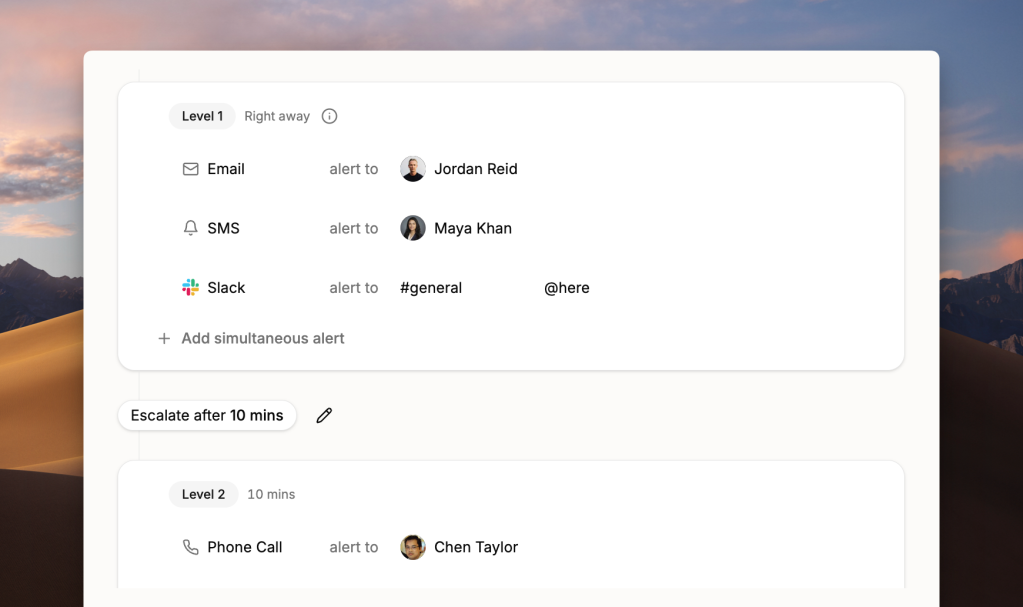
In Spike, you can specify how each person gets alerted at each step: call this person, SMS that person, ping this Slack channel. PagerDuty controls who gets alerted but leaves the delivery method entirely up to individual user preferences. For teams where managers need to control how alerts are delivered, that’s a meaningful gap.
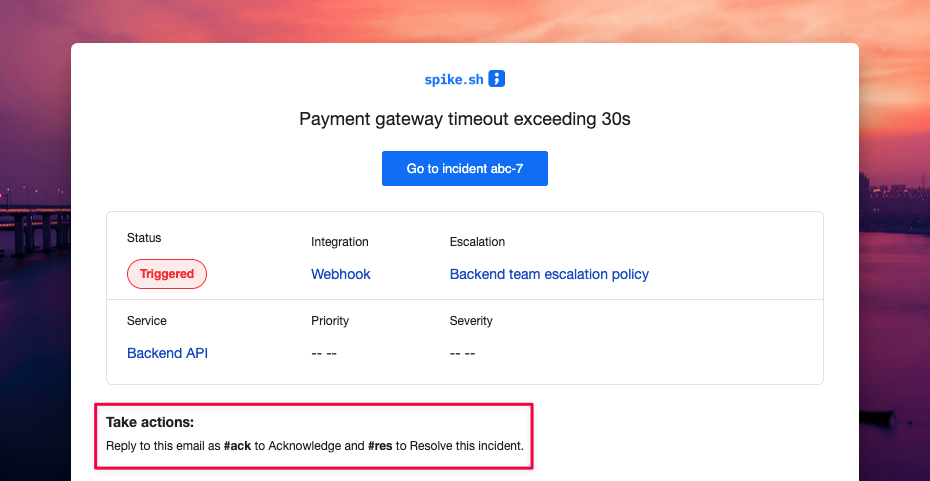
Spike also supports email acknowledgment by reply. Send #ack or #res in reply to an alert email and the incident updates automatically. PagerDuty does not support this.
For a detailed side-by-side comparison, see our blog post PagerDuty vs Spike
Spike has processed over 15 million incidents, rotated 90,000+ on-call shifts, and sent 750,000+ total alerts. Average migration time is 2–3 hours with no formal training required.
Teams migrating from OpsGenie get 50% off their first six months on Spike.
Key point: Spike starts at $7/user/month with status pages, on-call scheduling, and alerting all included. PagerDuty charges $25/user/month for a comparable base plan and bills status pages separately.
PagerDuty or an alternative: how to decide
If you need 750+ integrations, advanced runbook automation, and enterprise compliance capabilities, PagerDuty is the right call. The feature depth is there, and the cost reflects it.
If you need on-call scheduling, alerting, and incident management at an affordable price, Spike is the best choice. Spike covers the full workflow at $7/user/month with status pages included.
If you’re already deep in the Atlassian ecosystem, Jira Service Management (JSM) is worth evaluating. That said, JSM carries several of OpsGenie’s limitations. [To dig deeper, read this post →]
If you need an open-source option, GoAlert, OneUptime, and Keep are the strongest options. All three are free but require self-hosting.
Final Thoughts
PagerDuty’s pricing makes sense if you’re running incident management at enterprise scale and need everything it offers. For most other teams, the add-ons push the cost well beyond what the base price suggests.
If you want a tool that covers on-call scheduling, alerting, and status pages without the layered pricing, give Spike a try. It starts at $7/user/month, and OpsGenie users get 50% off their first six months.
FAQs
How much does PagerDuty cost per user?
PagerDuty’s paid plans start at $25/user/month on a monthly contract for the Professional plan, or $21/user/month on an annual contract. The Business plan costs $49/user/month, or $41/user/month annually. Enterprise pricing is custom and requires a sales conversation. These figures cover the base subscription only. Add-ons like status pages ($89/month), AIOps ($799/month), and runbook automation ($59–$125/user/month) are billed separately.
What is included in PagerDuty’s free plan?
PagerDuty’s free plan is capped at 5 users and includes 100 international phone and SMS notifications per month, one on-call schedule, one escalation policy, and access to 750+ integrations. Phone call alerts are not available on the free plan. The 5-user cap makes it impractical for professional teams beyond initial evaluation.
Why is PagerDuty so expensive?
PagerDuty’s pricing is expensive for three reasons. First, the add-on model separates features like status pages, AIOps, and live call routing from the base subscription, so teams building a complete stack pay for multiple line items. Second, tiered feature gating places capabilities like workflow conditionals and advanced incident roles on higher tiers, pushing teams toward more expensive plans. Third, annual contracts typically include price increases at renewal, meaning the cost grows each year.
Does PagerDuty charge extra for status pages?
Yes, PagerDuty charges extra for status pages. Status pages are a paid add-on on PagerDuty’s Professional and Business plans, starting at $89/month per page. They are included on the Enterprise plan only. Spike includes status pages on every plan, including the Starter plan at $7/user/month, at no additional cost.
How much does PagerDuty AIOps cost?
PagerDuty AIOps starts at $799/month. It adds machine learning-based alert grouping, noise reduction, and pattern detection. It is available as an add-on on Business and Enterprise plans and is not included in any base plan.
What is PagerDuty’s cheapest paid plan?
PagerDuty’s cheapest paid plan is Professional at $25/user/month billed monthly, or $21/user/month on an annual contract. It includes unlimited on-call schedules and escalation policies, Slack and Teams integration, and SSO. You also get an external status page for up to 250 subscribers. Status pages beyond that cap, AIOps, and live call routing require separate purchases.
Is there a free alternative to PagerDuty?
Several open-source tools cover parts of PagerDuty’s feature set at no cost. GoAlert handles on-call scheduling and alerting. OneUptime covers the full stack, including monitoring and status pages. Keep focuses on alert noise reduction and correlation. All three require self-hosting and the engineering capacity to maintain them. For teams that want a managed solution, Spike is the best affordable paid alternative, starting at $7/user/month with a 14-day free trial.
How does PagerDuty pricing compare to Spike?
PagerDuty Professional costs $25/user/month and does not include status pages, which are an $89/month add-on. Spike‘s Starter plan costs $7/user/month and includes status pages on every plan. Spike also supports email acknowledgment by reply, out-of-office routing, and Slack @channel and @here mentions in alerts. None of those are available on PagerDuty. Both platforms offer an Enterprise plan for larger organizations.
Does PagerDuty offer discounts for annual billing?
Yes, PagerDuty offers a discount for annual billing, approximately 16% off across paid plans. The Professional plan drops from $25/user/month to $21/user/month, and the Business plan drops from $49/user/month to $41/user/month. The discount requires an upfront annual commitment. Teams that prefer monthly billing pay the full rate.