Changelog

All new releases and improvements to Spike

Slack notifications to give you a gist πŸ”₯πŸ‘©β€πŸ’»βœ…

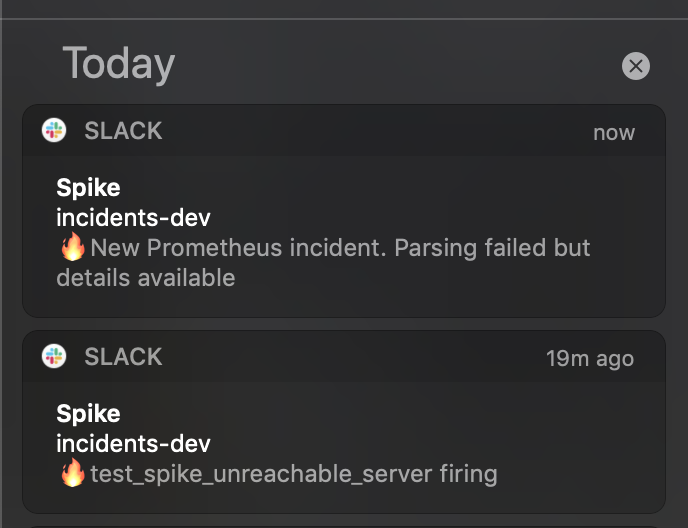
Small enhancements for our Slack app - we now send incident messages in notification previews.

Each emoji in preview represents the state of incident -

πŸ”₯ - triggered

πŸ‘©β€πŸ’» - acknowledged

⏱ - acknowledge timeout

βœ… - resolved


We have also fixed a 🐞which was resulting in no notifications if incident message fails to parse.

Fail-safe kicks in and notifications are now flawlessly sent. Below is an example when parsing works and when it fails.

Thank you for reporting this !

Screenshot 2020-08-13 at 1.05.54 PM.png

This widget doesn't bounce anymore

First, one person complained about the bouncy changelog animation and then many of the others did 😝

So, from now on this changelog doesn't bounce anymore.

Sorry and thanks for the feedback.

Azure, Honeybadger, Rollbar and Twilio

New integrations alert πŸ“£

Thanks to Divyansh, our new member on our tiny team for building these integrations. More integrations releasing soon

Don't see an integration you want? Head over to our integrations page and fill out your request. Most of these integrations were actually requests from either visitors and our customers.

Integrations 1.png

Phone number verification

Thanks to our user for reporting an error in changing phone number section under settings. An edge case which ended in failure to set new phone number has now been fixed.

Mute incidents optimised

Some P3 incidents like basic CPU monitoring, auto-scaling alerts could repeat on for a while. In a case like that, mute these incidents alerts immediately.

Our previous update caused a few issues notably with our persistent storage for scheduled unmuting. We are now using the same persistent storage but optimised with a better engine.

Your dashboard, redesigned

new-ui.png

Our new dashboard reflects our importance and weightage to ease of managing incidents with clutter free UI focusing back on Simplicity.

To our customers, thank you so much for your support.

Γ— Zoomed Image