


You probably spend most of your day next to an AI now. Code reviews, debugging, writing, it all happens in Claude Code, Cursor, or a chat window. But when an incident fires, you still have to leave. Open Spike, read the payload, copy the important bits over, explain the background, and only then start fixing.
That gap is gone. Spike now has an MCP server. Your AI can fetch incident payloads, dig into root causes, acknowledge and resolve incidents, and set up on-call schedules and escalation policies. You describe what you want, Spike does it.
It’s live today for every AI tool that supports MCP.
Why we built it
Some of our customers manage Spike entirely through code. On-call schedules, escalation policies, teams, all defined in Terraform and scripts, living next to the rest of their infrastructure.
The setup worked, but building it was a chore. For every schedule, they had to fetch users and teams from the API, copy the right IDs into YAML, and push. Any change meant doing it all again.
None of this was a knowledge problem. These teams knew exactly what they wanted. The friction was purely mechanical, moving data between our API and their tooling, and mechanical friction is exactly what a language model removes. Describe the schedule, and all the wiring happens behind the sentence.
Root cause before your coffee gets cold
You’re on-call. An incident comes in at 9 am. Now you have to find out what broke.
That used to mean a lot of manual work. Open Spike, read the payload, figure out which parts matter, paste them into your AI, explain the background, then start asking questions. The AI part was quick. Getting everything in front of it wasn’t.
Now you skip all of that. Ask your AI to pull the incident from Spike and it reads the full payload on its own. Ask what went wrong and it tells you where to look. If your error tracker has an MCP server too, connect both. The AI can match the incident to the exact error and point at the file causing it.
You can act from the same conversation. Acknowledge the incident, add a note with what you found, mute it while you fix, resolve it when you’re done. Spike stays updated and you never opened another tab.
Triage was a dozen small steps across different tools. Now it’s one conversation.
“I want a day and night shift” is now a valid config
On-call schedules carry a lot of detail. Who’s on, when shifts start and end, how rotations repeat, what happens on weekends. Any tool that handles all of this, ours included, makes you decide these things one by one as you build.
Now there’s a shortcut.You already know your schedule, just say it:
“Day and night shift. Two people each. Day runs 9 to 11, night covers the rest.”
Spike builds it and sends you a link. If something’s missing, it asks.
Overrides work the same way. Someone’s sick or on holiday, you say who covers and when, done.
What you can do with it
Once Spike is connected, the use cases stack up fast. A few we keep coming back to:
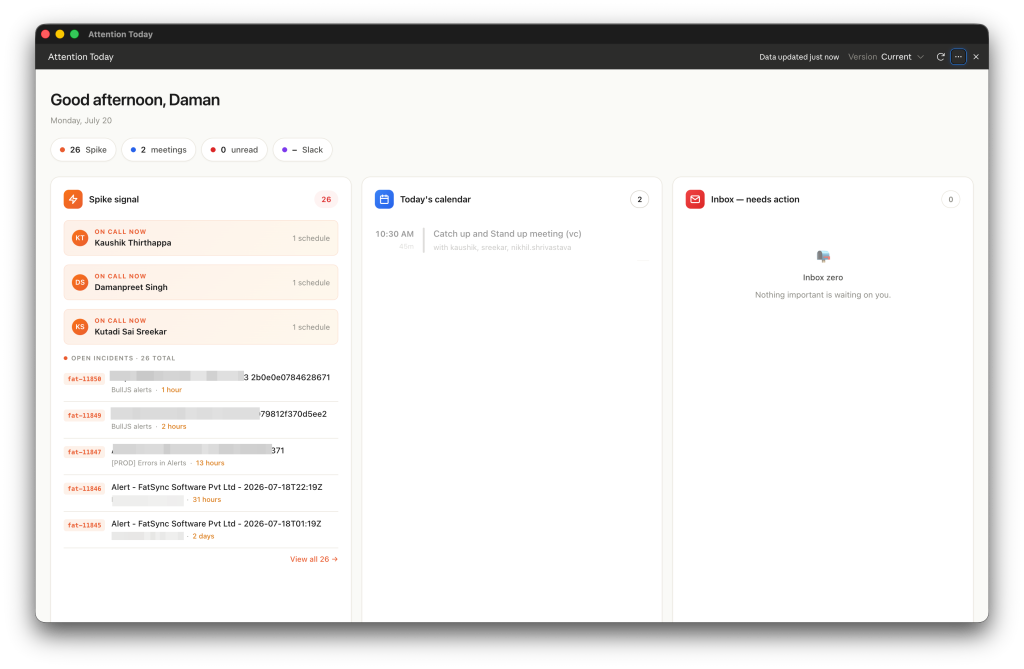
Start your day with a plan. Ask “what needs my attention today?” and your AI pulls open incidents, sorts them by severity, and lays out your morning. One of us runs this as a dashboard that refreshes at 7am, pulling from Spike, Linear, Slack, and GitHub into a single list. Open it with your coffee, plan the day, start working.
Ask instead of digging. “What came in last night?” “Which incidents are still unacknowledged?” “Show me everything that hit the payments service this week.” You’d normally answer these by filtering and scrolling through the dashboard. Now you just ask.
Set up faster. New to Spike? Your AI can walk you through the whole setup. Teams, schedules, escalation policies, described in plain words instead of built click by click.
Check on things from wherever you are. Terminal, editor, desktop app. If your AI runs there, Spike’s data is one question away.
Incident opens, PR appears
Everything so far has you in the loop, asking questions and making calls. But nothing says you have to be.
MCP servers work with AI agents too, and agents can run on their own. Set one to check Spike every couple of hours. If there’s a new incident, it pulls the payload, digs into the error, finds the file causing it, and raises a PR with a suggested fix. You wake up to an incident and a fix waiting for review, side by side.
The fix won’t always be right. It’s a starting point, and you still review before anything ships. But even a wrong draft beats a blank page at 3am.
This is where incident response is heading. Spike catches the problem, your AI takes the first swing, you decide.
Try it today
You need two things: a Spike account and any AI tool that supports MCP.
Claude Code
One command in your terminal:
claude mcp add --transport http Spike https://mcp.spike.sh/mcp
Claude Desktop
No terminal needed. Go to Settings → Connectors → Add custom connector, and paste:
https://mcp.spike.sh/mcp
Cursor and everything else
Add this to your MCP config:
{ "mcpServers": { "Spike": { "url": "https://mcp.spike.sh/mcp" } }}
Once connected, here’s what we recommend you to try:
Show me my open incidents, sorted by severity
Create an on-call schedule for my team, ask me whatever you need
Who’s on-call right now? Set an override for tomorrow, [name] covers for [name]
And if you’re new to Spike, connect the MCP server right after signing up. Setting up your teams, integrations, and schedules by describing them is the easiest onboarding we can offer.
We’d love to hear what you build with it. Write to us at [email protected] with workflows, ideas, or things you wish it should do.