

Tested on November 4, 2026 on JSM’s Free plan. Plan limits checked against Atlassian’s pricing page and docs.
Verdict: Jira Service Management (JSM) is good enough for on-call and alerting if your OpsGenie team already works in Jira and has the budget for JSM Premium. JSM is a service desk platform first, and an on-call tool second. For a 10-person team, JSM Premium costs $616 a month. So, a team that only needs on-call and alerting is likely to find a standalone on-call tool more affordable and a better fit.
JSM at a glance
| Best for | OpsGenie teams already on Jira or a JSM service desk who want alerts and incidents next to their Jira work |
| Less suited to | OpsGenie teams who used it only for on-call and alerting and don’t need a service desk |
| Price | Free for 3 agents. For 10 agents billed monthly, Standard costs $269 a month and Premium $616. Billed annually, that’s $2,700 or $6,200 a year. |
| Plan for OpsGenie-like escalations | Premium |
| Tested on | JSM Free, November 2026 |
| G2 rating | 4.3 out of 5 from 1,001 reviews (November 4, 2026) |
TL;DR
- OpsGenie shuts down on April 5, 2027, and Atlassian recommends its customers move to JSM. Our OpsGenie shutdown guide covers the details.
- Alerts still reach your team on every JSM plan by email, SMS and mobile push. Free caps SMS at 200 a month and has no voice calls.
- JSM doesn’t work like OpsGenie on Free or Standard. Alerting the next person in a rotation and repeat escalation need Premium.
- JSM is priced per agent, and everyone on a schedule needs a licence. For 10 people that’s $269 a month on Standard or $616 on Premium, billed monthly.
- Status pages come only with JSM Enterprise. On other plans, you’d pay for Statuspage.io separately, from $29 a month.
Atlassian is shutting OpsGenie down, and its official replacement is JSM. JSM is a service desk that now includes OpsGenie’s alerting and on-call features. This review is for OpsGenie teams who used it for alerts and on-call and want to know if JSM does the job.
I set up JSM on our own site this month on the Free plan. I built escalation policies and on-call schedules, and triggered test alerts. Where a feature sits on a paid plan, I checked Atlassian’s pricing page and docs. Testing on Free turned out to be useful, since it shows exactly where the plan limits bite.
The review covers four areas: alerting and escalations, incident response, on-call schedules and pricing. Each area lists what I liked and what I didn’t. A table near the end maps your situation to the right choice.
What you get on each JSM plan
Here’s what each JSM plan includes for on-call, alerting and incidents.
| Feature | Free | Standard | Premium | Enterprise |
|---|---|---|---|---|
| On-call schedules and overrides | ✅ | ✅ | ✅ | ✅ |
| Alerts by email, SMS and mobile push | ✅ (200 SMS a month) | ✅ | ✅ | ✅ |
| Voice call alerts | ❌ | ✅ | ✅ | ✅ |
| Routing rules per team | 1 | 100 | 100 | 100 |
| Alert the next or previous person in a rotation | ❌ | ❌ | ✅ | ✅ |
| Repeat escalation | ❌ | ❌ | ✅ | ✅ |
| Heartbeats | ❌ | ❌ | ✅ | ✅ |
| Incidents as Jira work items | ✅ | ✅ | ✅ | ✅ |
| Incident work in Slack, Teams and Zoom | ❌ | ❌ | ✅ | ✅ |
| Stakeholder updates and post-incident reviews | ❌ | ❌ | ✅ | ✅ |
| Status pages | ❌ | ❌ | ❌ | ✅ |
| Price for 10 agents, billed monthly | $0 (up to 3 agents) | $269 a month | $616 a month | Annual only, from 201 agents |
Two gaps I found on Free don’t appear in Atlassian’s plan lists. You can’t pick the channel for each escalation step, and overrides have no comment field.
1. Alerting and escalations
JSM keeps OpsGenie’s alerting and escalations model. An escalation policy decides who gets alerted and when. And each person’s own settings decide how.
What I liked
Personal alert settings are thorough. Each person adds email, SMS, voice and mobile push as contact methods. They then set rules for each event, such as a new alert, an acknowledgement or the start of their shift. Quiet hours, a mute button and notification forwarding sit on the same page. An admin can also hide a contact method from non-admins.

The alert activity log is a useful debugging tool. It shows the path an alert took, from routing rule to escalation policy to schedule. It also records each delivery by channel. My test alert showed the email as sent and the mobile push as failed, along with the reason.
An “Escalate to next” action sits on the alert page itself. A responder can pass an alert on without waiting for the timer.
What I didn’t like
Each escalation rule has four parts: a condition, a delay, a notify type and one target. There’s no field for the channel. A policy can’t say “call the on-call engineer, then text the lead”. JSM uses each person’s own rules instead.
The delay counts from when the alert was created. A step set to 15 minutes fires 15 minutes after the alert, not 15 minutes after the previous step. It’s a small thing, but you need to do the math when you add a step in the middle.
On Free, three notify types are greyed out: the next person in the rotation, the previous person and a random team member. Atlassian’s escalation docs say they aren’t on Free or Standard, and the same goes for repeat escalation. You need Premium or Enterprise for all four.
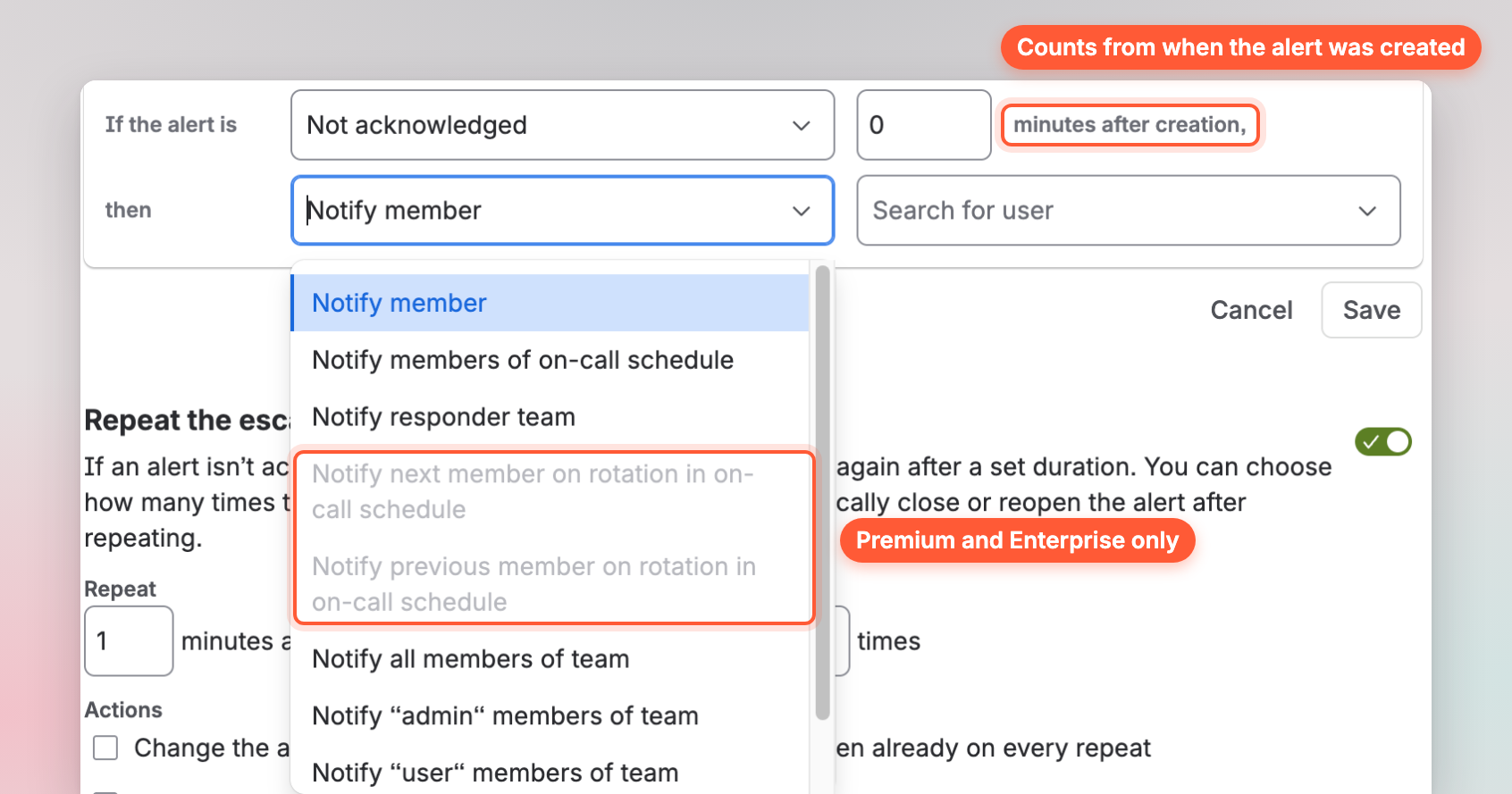
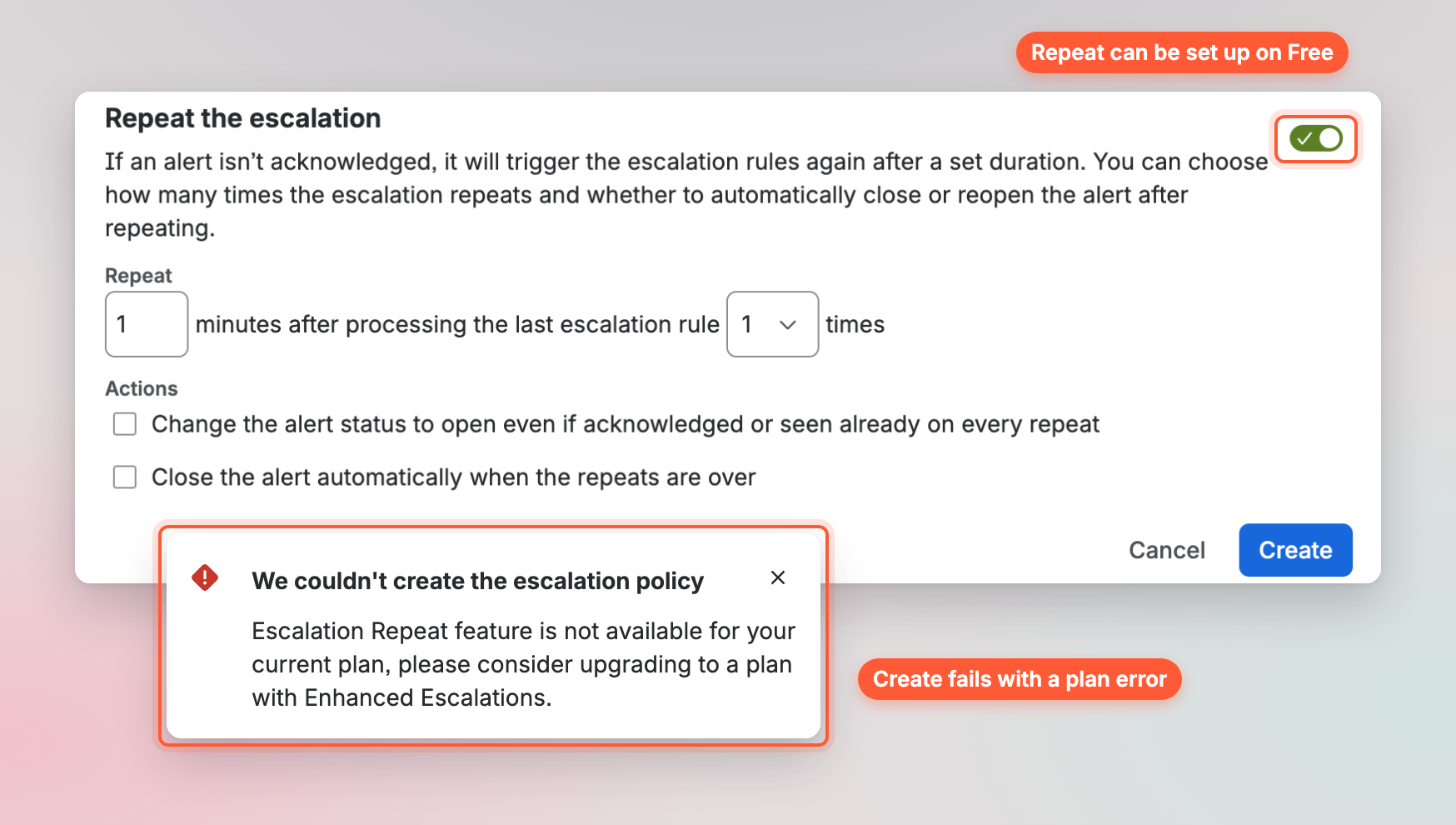
Repeat escalation surprised me the most. The toggle works on Free, so you can set the delay, the number of repeats and what happens at the end. Then you click Create and see “Escalation Repeat feature is not available for your current plan”. Nothing on the form warns you first. You only learn the feature isn’t on your plan after you’ve set it all up.
Free also allows one routing rule per team. Standard and above allow 100, according to Atlassian’s OpsGenie feature changes in JSM.
What an OpsGenie policy looks like in JSM
A common OpsGenie policy looks like this:
- Alert the on-call engineer straight away.
- After 5 minutes, alert the next person in the rotation.
- After another 10 minutes, alert the team lead.
- Repeat until someone acknowledges.
On Free or Standard, the first and third steps work. The third step needs a delay of 15 minutes, since delays count from the start. The second step is the catch. Each JSM step names who to alert, and alerting whoever is next in the rotation needs the notify type “Notify next user in schedule”. That option is Premium and Enterprise only. On Standard, the step has to name a fixed person or the whole team instead. Alerting the whole team comes closest, but it wakes more people. The repeat needs Premium too. A personal setting called “Keep notifying me even after the alert is seen” is available on Free, but it only alerts the same person again.
2. Incident response
In JSM, an incident is a Jira work item. For OpsGenie teams already on Jira, that’s the biggest reason to pick JSM. Incidents sit next to the tickets and fixes they lead to. But incident work in Slack and post-incident reviews need Premium. Free and Standard get only basic incidents.
What I liked
Incidents live next to the rest of your Jira work. You can link an alert to a work item, attach files and keep notes in one place. Jira Automation adds rules with triggers, conditions and branches. An alert can then create an incident or change status on its own.
On Premium, an incident gets buttons to start a Zoom or Teams call and its own Slack channel. Atlassian also adds post-incident reviews and a “Notify stakeholders” option on Premium.
What I didn’t like
Most incident features aren’t on Free or Standard. Atlassian’s feature changes doc lists incident management in Slack, Teams and Zoom as Premium and Enterprise only. Stakeholder updates, post-incident reviews and AI alert grouping are Premium too. So an OpsGenie team on Standard would need to move up to Premium, which costs more than twice as much per agent ($61.60 against $26.90).
On the Free plan, I clicked “Create incident” on my test alert. It opened the same Jira form you’d use for any task, with fields for a summary and a description. There was no separate incident view with responders, a timeline or a call button.
Status pages come only with JSM Enterprise. On Free, Standard or Premium, you’d buy Statuspage.io as a separate product. Its paid public plans cost $29, $99, $399 or $1,499 a month.
3. On-call schedules
JSM builds schedules inside teams, the same way OpsGenie did. You open a team under Operations and add schedules from its On-call tab.
What I liked
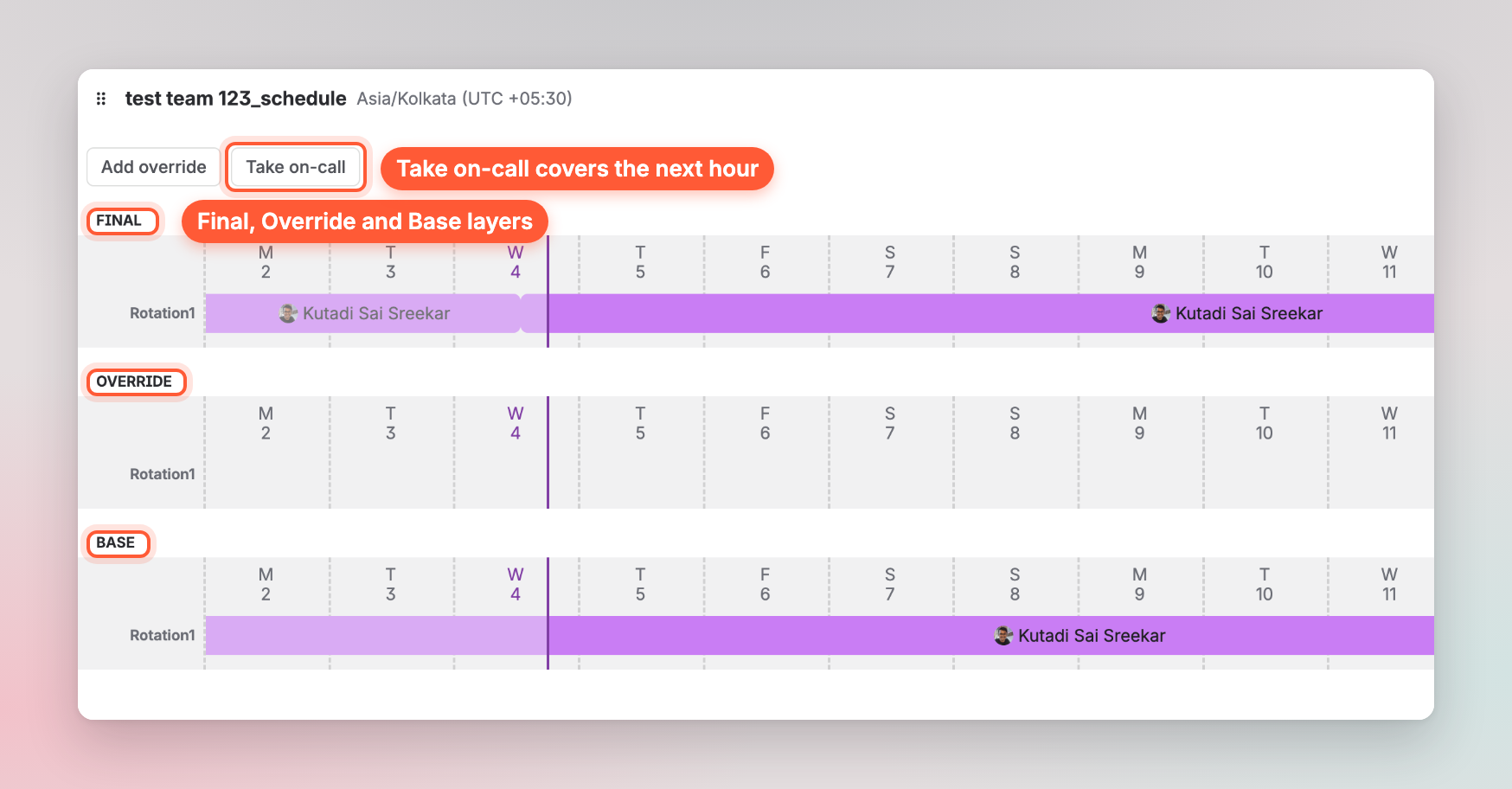
The schedule editor shows a live preview beside the form. It splits into three layers: Base for the planned rotation, Override for changes and Final for who is actually on call. You can switch the view between a day, a week, two weeks and a month.
Shift presets save time. There are ready options for weekdays 8 to 5, weeknights, weekends and round-the-clock cover. A custom option covers anything else. Schedules can be duplicated, exported as an .ics file or added to a calendar.
Overrides are quick. You click a shift or use “Add override”, and a “Take on-call” button lets someone cover the next hour in one click.
What I didn’t like
Overrides have no comment or reason field. The form only asks for the time, the rotation and the person. The person stepping in doesn’t see why they’re covering.

Schedule changes don’t show on the schedule itself. JSM records them only in an admin audit log under Jira settings. My test override appeared there a minute or two later as “Schedule override added”, with raw schedule and user IDs instead of names. This matters when a shift swap goes wrong. Say an alert reached the wrong person at 3am. The team can’t open the schedule and see who changed the shift or why. Someone has to ask an admin to search the log and match the IDs to names.
4. Pricing
JSM is priced per agent, and everyone on an on-call schedule needs an agent licence in practice.
| Team size | JSM Standard (monthly) | JSM Premium (monthly) |
|---|---|---|
| 10 agents | $269 a month | $616 a month |
| 25 agents | $605 a month | $1,461 a month |
| 50 agents | $1,109 a month | $2,804 a month |
Prices were read on Atlassian’s pricing page in November 2026. Annual billing is more affordable: 10 agents cost $2,700 a year on Standard and $6,200 on Premium. Free covers 3 agents with 200 SMS a month and no voice calls.
Atlassian points OpsGenie Standard customers to JSM Premium if they want the same features. Usage-based billing for automation runs and AI credits also starts on December 3, 2026. Our JSM pricing breakdown covers every plan and the extra costs.
What other JSM users say
A thread on r/jira asked people about their friction with JSM. A few replies match what I saw on the on-call side.
- OpsGenie feels bolted on. One Atlassian admin called OpsGenie “kind of tacked on” inside JSM. They said alerting and on-call share almost no settings with the rest of JSM. Who can see alerts is set up in one place and who can see tickets in another. For an OpsGenie team moving over, that means extra setup and two sets of access rules to keep in sync.
- Microsoft Teams works differently depending on setup. Another user warned that JSM’s Teams integration has gotchas for incident management. Some incident features work with one way of connecting Teams and not the other. If your team runs incidents in Teams, it’s worth testing the setup before you migrate.
- Incoming call routing needs your own Twilio account. The same user said this OpsGenie feature (a phone number that turns calls into alerts) now needs their own Twilio account. Atlassian’s phone number guide confirms it: OpsGenie-provided numbers aren’t supported in JSM, so you move them to your own Twilio account. The user also said voicemails arrive as a link that only opens with API access. Incoming call routing is a Premium and Enterprise feature.
- Price is the main reason to stay. One recent reply put it this way: “for the price it’s hard to beat if you’re already on Atlassian”. That matches what I found. JSM makes the most sense when your team already pays for Jira.
Should you pick JSM?
| Your situation | What fits |
|---|---|
| Your OpsGenie team already runs Jira or a JSM service desk and wants incidents as work items | JSM |
| Your OpsGenie policies alert the next person in a rotation or repeat | JSM Premium, or a standalone tool with these on every plan |
| You used OpsGenie only for alerting and on-call | A standalone on-call tool like Spike |
| You need a status page | A tool with a status page built in, or Statuspage.io alongside JSM |
| Budget for 10 responders is under $150 a month | A standalone on-call tool like Spike ($70 a month on Standard or $140 on Business). JSM Standard costs $269. |
Spike: on-call and alerting without the service desk
Spike is standalone incident management software, like OpsGenie. If JSM’s plan limits don’t fit your team, you could consider it. A few things differ from what I found in JSM:
- Each escalation level names the channel for each person, so one policy can call first and send an SMS after. One level can alert several people at once.
- Repeat escalations work on both plans, up to 5 times.
- Overrides take a comment, and every plan includes a status page.

For 10 people billed monthly, Spike costs $70 on Standard or $140 on Business. Standard covers one on-call schedule with any number of people. OpsGenie users get 20% off their first year on an annual plan. Our JSM vs. Spike comparison goes through both tools side by side.
FAQs
Is JSM good for on-call?
It depends on whether your team already uses Atlassian. If your OpsGenie team works in Jira, JSM is a good choice. Premium needs to fit your budget too, since OpsGenie-like escalations sit there. If you used OpsGenie only for on-call and alerting, a standalone on-call tool like Spike usually works best. It costs less and doesn’t come with a service desk you won’t use.
Does JSM work like OpsGenie?
Mostly, yes. JSM uses the same building blocks: teams, routing rules, escalation policies and on-call schedules. The difference is in the plans. On Free and Standard, escalations can’t alert the next person in a rotation or repeat. Heartbeats aren’t included either. OpsGenie’s behaviour comes back on Premium.
Will my OpsGenie setup move to JSM?
Atlassian’s migration tool moves alerts, schedules, escalation policies, incident history, audit logs and integrations. Features that aren’t on your new plan stop working, such as heartbeats below Premium. Slack and Teams connections need to be authorised again. Our guide to migrating from OpsGenie to JSM walks through each step.
Does JSM include a status page?
Only on the Enterprise plan. Below Enterprise, JSM teams buy Statuspage.io as a separate product. Paid public pages start at $29 a month.
Is JSM free for on-call?
JSM Free covers up to 3 agents. It includes on-call schedules, escalation policies, unlimited alerts and email notifications. SMS is capped at 200 a month. It has no voice calls, one routing rule per team and no repeat escalation.
What’s the difference between Jira and JSM?
Jira plans and tracks project work. JSM handles service requests, incidents, alerts and on-call. They’re separate products with separate licences. Our guide on what JSM is explains it in more detail.
Is JSM a good fit for a small team?
It can be, if the team already uses Jira. A small team that only needs alerting and on-call will probably find JSM heavy for the job. It will also need Premium for repeat escalation. A standalone on-call tool is a better fit here. Spike includes repeat escalation and a status page on both plans. It costs $70 a month for 10 people on Standard. Our list of JSM alternatives for teams that keep Jira compares seven on-call tools on Jira sync and cost.
Final thoughts
JSM does the on-call basics well, and the alert log is better than I expected. The catch is that OpsGenie-style escalation and incident features sit on Premium. If your team already lives in Jira, it’s worth budgeting for Premium before April 5, 2027. If you only need on-call and alerting, it can be useful to try a standalone tool first. Good luck with the move.