


Prices and features checked October 31, 2026
Quick answer: For enterprise teams with 100 or more people on-call, Spike is the closest match to OpsGenie with the move done for you. Its team sets up every account, moves your teams in phases and supports you in a private Slack channel. All of it comes in one yearly quote. PagerDuty suits enterprises that run ServiceNow or want AIOps add-ons. JSM fits organisations that run IT service management on Atlassian. Incident.io suits enterprises that want postmortems and follow-ups built in, with AI that drafts the postmortem for you.
TL;DR
This guide is for enterprise teams that need to move every team off OpsGenie without missing an alert, keep control of who can access what and know their yearly cost before they sign. OpsGenie support ends on April 5, 2027, and Atlassian deletes any data you haven’t moved by then. The move is a chance to fix what OpsGenie got wrong without relearning what it got right. Spike is the better move for that need. Spike’s team creates every account, moves one team at a time and stays with you in a private Slack channel. Spike’s Enterprise plan is one yearly quote with phone alerts, SMS, status pages, SSO and support included, so nothing is metered. Plus, OpsGenie users get 20% off their first year on an annual plan. We built Spike, so this guide also shows where the other six tools are the better pick.
| Tool | Best for | Enterprise pricing |
|---|---|---|
| Spike | Enterprises that want every team moved for them, with unlimited phone alerts, SSO and private Slack support in one yearly quote | Custom yearly quote |
| PagerDuty | Enterprises that run ServiceNow or want AIOps and runbook automation | Platform plans from $2,800 a year, Ultimate custom |
| JSM | Organisations that run IT service management on Atlassian | Enterprise on request, billed yearly |
| incident.io | Enterprises that want postmortems and follow-ups built in, with AI-drafted postmortems | Custom |
| xMatters | Enterprises already using Everbridge | Advanced on request |
| Rootly | Teams that want heavy workflow automation around incidents | Custom volume pricing |
| Grafana Cloud IRM | Organisations whose monitoring runs on Grafana Cloud | Custom, at least $25,000 a year |
An enterprise move off OpsGenie isn’t one switch. It means dozens of teams, hundreds of schedules and escalation policies, a security review and a procurement cycle. All of it has to happen before April 5, 2027. Every team has to keep getting alerts while the move happens, and access has to stay locked down the whole way.
Most “best OpsGenie alternatives” lists skip those parts and compare feature checklists instead. Every tool in this guide alerts, schedules and escalates, so the checklist rarely decides anything. What decides an enterprise move is who does the migration work, what the yearly quote includes and how the tool holds up when 500 people are on it.
The seven tools below are compared on exactly those points. Spike is one of them, and it’s our product. That bias is why every tool here gets a “where it falls short” section, Spike included.
Before the tools, the guide sets out the dates your plan works back from, the five things an enterprise needs and how each vendor prices its enterprise plan. After them come head-to-head comparisons with Spike and a phased plan for moving every team off OpsGenie.
OpsGenie shutdown dates and your enterprise timeline
OpsGenie shuts down on April 5, 2027, when Atlassian ends support and deletes any data you haven’t moved. There are two other dates that matter too.
| Date | What happens | What it means for you |
|---|---|---|
| June 4, 2025 | End of sale. Atlassian stopped selling OpsGenie to new customers | You can still add seats to your current plan |
| Your JSM migration date | If you move to JSM, OpsGenie turns off 120 days later | Your 120 days start on the date you pick, which can be well before April 5, 2027 |
| April 5, 2027 | End of support. OpsGenie access stops | Data you haven’t moved is deleted |
Our post on the OpsGenie shutdown covers why Atlassian is retiring it and what maintenance mode means for you.
For a large organisation, the useful date is the one you plan backwards from. A typical enterprise move has five stages:
- Security review of the new vendor, with your DPA and security questionnaire.
- Procurement and contract.
- A pilot team that runs both tools side by side.
- The remaining teams, moved in phases.
- OpsGenie switched off once every alert shows up in the new tool.
How long this takes depends on the number of teams and integrations you have. It also depends on how quickly your security and procurement teams move, so it probably helps to start the review now rather than in early 2027.
What enterprise teams need from an OpsGenie replacement
At 100 or more responders, the list price is rarely the deciding number. Five things separate these tools for an enterprise.
- Access and governance: SAML SSO you can enforce, roles with fine-grained permissions, audit logs and room for every team in one account. The question is which plan includes them, because some vendors keep them for their top tier.
- Migration at scale: the question is who does the work. Some vendors give you an importer, some give you scripts and some set up every account for you. Running both tools side by side for as long as you need matters just as much.
- Transparent pricing: an enterprise budget runs in years, so the yearly quote should be the bill. Some vendors meter phone alerts, seats or AI features. The final cost then depends on usage.
- Support: a large rollout needs a named team you can reach quickly. Dedicated channels and 24/7 support often sit on the top plan only.
- Scalability: the plan that fits 100 responders should still fit 500. Each tool below has a scalability note on where its plan stops.
OpsGenie alternatives for enterprise compared
The first table shows where each tool keeps the features an enterprise review asks about. Plans and features were checked on October 31, 2026.
| Tool | SSO | Audit logs | Unlimited phone and SMS | Status pages | OpsGenie migration help | Support on the top plan |
|---|---|---|---|---|---|---|
| Spike | Enterprise (Business on request), enforceable | Yes | Yes | Public and private | Our team creates every account and moves teams in phases | Private Slack channel, 24/7 |
| PagerDuty | Professional and up | Platform plans only | Included, no cap stated | Private pages on Platform plans | Expert hours for the first 50 qualifying customers | Not stated on the pricing page |
| JSM | Enterprise, or Atlassian Guard on lower plans | Standard and up | Standard and up | Enterprise only | Atlassian’s migration tool | 24/7 dedicated senior support on Enterprise |
| incident.io | Pro and up | Enterprise only | Included, varies by country | Unlimited on Enterprise | Importer for schedules and escalation policies | Not stated on the pricing page |
| xMatters | Starter and up | One-year audit reports | Advanced only | Advanced only | Manual checklist | 24/7 phone and email from Base |
| Rootly | All plans | Enterprise only | Not stated per plan | With Incident Response | Rootly’s team imports and runs both side by side | Dedicated success team on Enterprise |
| Grafana Cloud IRM | SAML available | Enabled on request | No extra cost for calls or SMS | Not part of IRM pricing | Open-source migrator | Premium support on Enterprise |
The second table shows how each vendor prices its enterprise plan. Most enterprise prices are custom quotes. The table shows the published price, the enterprise pricing model and what you pay for on top.
| Tool | Published price | Enterprise pricing | Billing | Paid on top |
|---|---|---|---|---|
| OpsGenie Enterprise (today) | $31.90 per user per month billed yearly | Published | Yearly or monthly | Statuspage.io is a separate product |
| Spike | $14 per user per month on Business | Custom yearly quote | Yearly, by invoice or wire transfer | Nothing metered. Phone alerts, SMS, status pages, SSO and support are in the quote |
| PagerDuty | $21 per user per month on Professional billed yearly. Platform plans from $2,800 a year | Ultimate is custom | Platform plans yearly, paid upfront | AIOps, Runbook Automation and status pages on Professional. Extra seats come in credit packs that expire each year |
| JSM | $21.50 per agent per month on Standard at 75 agents | Enterprise on request | Enterprise billed yearly only | Atlassian Guard for SSO below Enterprise, at $4.35 per user per month |
| incident.io | $25 + $20 on-call per user per month on Pro | Custom | Pro and Enterprise billed yearly only | On-call on top of each plan. Investigations is an add-on |
| xMatters | $39 per user per month on Base | Advanced on request | Not stated | Unlimited phone alerts and status pages need Advanced |
| Rootly | $20 + $20 per user per month for Incident Response and On-Call | Custom volume pricing | Not stated | On-call is a separate product. AI SRE is priced on request |
| Grafana Cloud IRM | From $20 per active user per month plus a $19 platform fee | Custom, with a $25,000 minimum yearly commit | Yearly commit | None stated for calls or SMS |
The pattern is clear once both tables sit side by side. Audit logs, private status pages and dedicated support often live on a vendor’s top plan. Some vendors still meter seats or phone alerts on top of that. Spike’s Enterprise quote includes all of them, so the number you sign is the number you budget.
The 7 best OpsGenie alternatives for enterprise teams
1. Spike
Best for: Spike suits enterprise teams that want every team moved off OpsGenie for them, with on-call, unlimited phone alerts, SSO and private Slack support in one yearly quote.
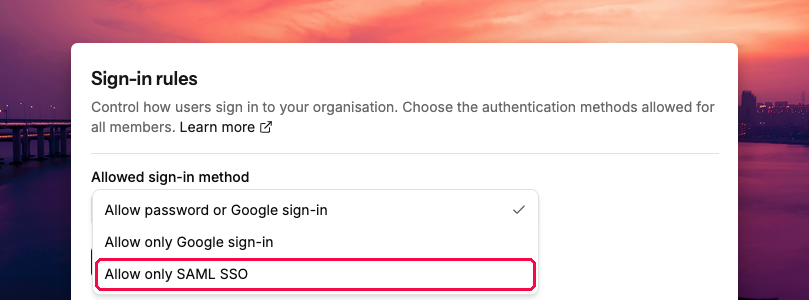
Enterprise fit: admins can allow only SAML SSO for sign-in and restrict which email domains can join. Custom roles set permissions for each part of Spike, such as integrations, escalation policies, alert routing and services. Audit logs record who changed what, and every team runs in the same account with its own schedules and policies. Each escalation step can call one person, text another and post in a Slack channel. That way every team keeps the alerting it needs.

Coming from OpsGenie: escalation policies, schedules and alert routing cover the same ground as OpsGenie, so the concepts carry over. Our concept mapping sheet shows how each OpsGenie idea maps to Spike. Spike’s team creates every account from one CSV file. Admins set up on-call and escalations first, then release access when the setup is ready. Teams move one at a time, and both tools run side by side for as long as you need. Two-way Jira sync, Terraform, the API and the MCP server cover the rest. Spike also signs DPAs and fills in security questionnaires.
Pricing: Spike’s Enterprise plan is a custom yearly quote, billed by invoice or wire transfer. Phone alerts, SMS, status pages, SSO and the dedicated support channel are all in the quote. Nothing is metered. For reference, Business costs $14 per user per month. OpsGenie users get 20% off their first year on an annual plan.
Scalability: there’s no cap on schedules, alert rules or phone alerts. One account holds every team. Sportskeeda runs Spike across a company of more than 1,000 people, with three weekly on-call schedules. If a tool you use isn’t on Spike’s list of 80+ integrations, Spike usually builds it within 72 hours of a request.
Where it falls short: Spike has no ServiceNow integration, so organisations that run incidents through ServiceNow are better served by PagerDuty or JSM. Spike has no postmortem templates either, so postmortems go out through a playbook webhook to your docs tool. If you want a full IT service management suite with tickets, assets and change management, JSM is built for that.
What customers say: Thndr is a trading app with more than 200 people. It runs a separate on-call rotation for each department on Spike. Its Head of Engineering Mohammad Hani said:
The support we get from Spike through our private Slack channel is incredible.
Pick it if: you want the move off OpsGenie done for you one team at a time, with one yearly quote and a support team you can reach in Slack.
2. PagerDuty
Best for: PagerDuty suits enterprises that run ServiceNow or want AIOps and runbook automation, and have the budget for its platform plans.
Enterprise fit: SSO comes with Professional and every plan above it, along with team-based permissions. Audit trail reporting and private status pages come only with the PD Reliability Platform plans. PagerDuty is a long-established vendor with a wide integration catalogue, ServiceNow included.
Coming from OpsGenie: PagerDuty has no self-serve importer for OpsGenie. Its migration offer gives up to 80 expert service hours over the first three weeks, but only to the first 50 qualifying customers and for setups of up to 250 users. Alerting works as it did in OpsGenie. An escalation step picks who gets alerted, and each person’s notification rules decide how they’re reached.
Pricing: Professional costs $21 per user per month on yearly billing. The PD Reliability Platform plans charge a flat yearly fee paid upfront: Starter is $2,800 for 10 seats, Essential is $12,000 for 20 and Plus is $48,000 for 50. Ultimate covers 500 seats at a custom price. Our PagerDuty pricing breakdown covers each plan and add-on.
Scalability: Professional stops at 2 teams, so a large organisation moves to a platform plan. Extra seats, events and AI actions come in credit packs that expire each year. Seats are counted at the highest month and include stakeholders.
Where it falls short: the yearly cost depends on seats, credits and add-ons. That makes it harder to predict. Audit trail and private status pages need a platform plan.
Pick it if: your stack depends on ServiceNow, or you want PagerDuty’s AIOps and automation and the budget isn’t a concern.
3. Jira Service Management (JSM)
Best for: JSM suits organisations that run IT service management on Atlassian and want on-call in the same product.
Enterprise fit: JSM Enterprise includes Atlassian Guard Standard for SSO, status pages, a 99.95% uptime SLA and 24/7 dedicated senior support. Audit logs come from Standard. Below Enterprise, SSO needs a separate Guard subscription.
Coming from OpsGenie: JSM is Atlassian’s official replacement, and Atlassian’s migration tool moves users, schedules, escalation policies and most integrations. OpsGenie then turns off 120 days after your migration date. Alert actions and incident rules don’t carry over, so each team rebuilds them in Jira Automation. A team lead still can’t choose how each person is alerted at each step.
Pricing: Enterprise is priced on request and billed yearly only. For reference, Standard is $21.50 per agent per month at 75 agents. JSM is now sold as part of Atlassian’s Service Collection.
Scalability: Atlassian’s per-agent price falls in tiers as you add agents. Enterprise covers up to 150 sites.
Where it falls short: on-call sits inside a service desk, so teams that only need alerting still take on a full ITSM product. Status pages need Enterprise.
Pick it if: your organisation already runs on Atlassian ITSM and wants one vendor for tickets and on-call.
4. incident.io
Best for: Incident.io suits enterprises that want postmortems, follow-ups and debriefs built into their incident response. Its AI drafts the postmortem for you.
Enterprise fit: SAML SSO comes with Pro and Enterprise. Audit logs with one year of history, custom roles and unlimited public, internal and customer status pages come only with Enterprise.
Coming from OpsGenie: the importer brings over schedules and escalation policies. Notification preferences come across without OpsGenie’s criteria or time restrictions, so each team checks them after import. Its OpsGenie Rescue Program lets you run both tools at no extra cost until your OpsGenie contract ends.
Pricing: Enterprise is a custom price. For reference, Pro costs $25 per user per month plus $20 for on-call and is billed yearly only.
Scalability: Pro has unlimited schedules. Audit logs and custom roles need Enterprise, which most security reviews will ask for.
Where it falls short: on-call is sold on top of each plan. Each person’s own settings decide how they get alerted, so a team lead can’t set the channel for each step.
Pick it if: postmortems and follow-ups matter more to you than alert control, and you want AI to draft them.
5. xMatters (Everbridge)
Best for: xMatters suits enterprises that already use Everbridge for critical event management.
Enterprise fit: SSO and role-based permissions come with every paid plan, and audit reports keep one year of history. Base includes 24/7 phone and email support with a 99.90% uptime SLA. Advanced raises it to 99.95%.
Coming from OpsGenie: xMatters has no OpsGenie importer. Everbridge offers a checklist for the move: export schedules and escalation policies, rebuild them, run both tools and cut over.
Pricing: Base costs $39 per user per month, and the page doesn’t say how it’s billed. Advanced is priced on request.
Scalability: Base caps each user at 100 SMS and 20 voice calls a month. Unlimited phone alerts and status pages need Advanced.
Where it falls short: every schedule and escalation policy is rebuilt by hand. Phone alert caps below Advanced make cost harder to predict for large teams.
Pick it if: you already run Everbridge and want alerting from the same vendor.
6. Rootly
Best for: Rootly suits teams that want heavy workflow automation around incidents.
Enterprise fit: SSO with SAML comes on every plan. Audit logs and custom roles come with Enterprise, along with a dedicated success team and priority 24/7 support.
Coming from OpsGenie: Rootly’s team imports schedules, escalation policies and users on every plan, then runs both tools side by side.
Pricing: Incident Response and On-Call are separate products at $20 per user per month each. Enterprise has custom volume pricing.
Scalability: Enterprise adds unlimited schedules, so large organisations on lower plans may hit limits first.
Where it falls short: on-call and incident response are two products to buy and manage. Audit logs need Enterprise.
Pick it if: you want detailed workflow automation for incident response and are happy to buy on-call alongside it.
7. Grafana Cloud IRM
Best for: Grafana Cloud IRM suits organisations whose monitoring already runs on Grafana Cloud.
Enterprise fit: Enterprise comes with premium support and a choice of public cloud, federal cloud or your own cloud. Phone calls and SMS carry no extra cost.
Coming from OpsGenie: Grafana’s open-source migrator moves notification rules, schedules, overrides, escalation policies and supported integrations. Schedules with time restrictions don’t carry over, and Grafana’s Professional Services can run the move for you.
Pricing: Pro starts at $20 per active user per month plus a $19 platform fee. Enterprise is a custom price with a minimum commit of $25,000 a year.
Scalability: Pro is billed per active user with automatic volume discounts. Enterprise pricing scales with the yearly commit.
Where it falls short: most of its value comes from the rest of the Grafana stack. An enterprise contract starts at $25,000 a year.
Pick it if: your teams already monitor everything in Grafana Cloud and want alerting in the same place.
Spike vs. each OpsGenie alternative
Every tool in this guide alerts, schedules and escalates. The useful comparison covers pricing, the move off OpsGenie, access control, support and scalability, plus when the other tool is the better pick.
Spike vs. PagerDuty
Spike’s Enterprise plan is one yearly quote with nothing metered. PagerDuty’s platform plans add credit packs for extra seats, events and AI actions. The move is lighter with Spike too. Spike’s team creates every account and moves teams in phases, while PagerDuty keeps hands-on help for its first 50 qualifying customers. A team lead in Spike can also set the channel for each person at every escalation step, which PagerDuty leaves to each person. PagerDuty is the better pick if you run ServiceNow or want its AIOps and automation, and the budget isn’t a concern.
Spike vs. JSM
JSM is a service desk first, with on-call added on. Spike is standalone incident management software like OpsGenie, so teams that only need alerting don’t take on a full ITSM product. Spike includes a status page on every plan, while JSM keeps status pages for Enterprise. Spike also offers SSO from Business on request, while JSM needs a separate Guard subscription below Enterprise. A team lead in Spike can also choose how each person is alerted at every step. JSM is the better pick if your organisation already runs on Atlassian ITSM and wants tickets and on-call from one vendor.
Spike vs. incident.io
Spike includes on-call in its price, while incident.io sells on-call on top of each plan. The move also works differently. Incident.io gives you an importer. Each team then checks its notification rules, because OpsGenie’s criteria don’t come across. Spike’s team creates every account and moves teams in phases with you. Spike also goes deeper on alerting, because a team lead can set the channel for each person at every escalation step. Incident.io is the better pick if built-in postmortems and follow-ups matter more to you than alert control.
Spike vs. xMatters
The biggest difference is the move. xMatters gives you a checklist, and your teams rebuild every schedule by hand. Spike’s team creates the accounts and moves teams in phases. xMatters caps phone alerts below Advanced, while Spike’s phone alerts are unlimited. xMatters is the better pick if you already run Everbridge for critical event management.
Spike vs. Rootly
Rootly sells incident response and on-call as two products, each priced per user. Spike covers alerting, on-call and status pages in one plan and one quote. Spike also goes deeper on alerting, because a team lead can set the channel for each person at every escalation step. Both vendors help with the migration and run both tools side by side. Rootly is the better pick if detailed workflow automation for incident response is your main need.
Spike vs. Grafana Cloud IRM
Grafana’s enterprise contract starts at a $25,000 yearly commit and is built around the Grafana stack. Spike works with whatever monitoring each team uses, through 80+ integrations. Grafana’s migrator is a tool your team runs, while Spike’s team does the setup for you. Grafana Cloud IRM is the better pick if every team already monitors in Grafana Cloud.
Can a smaller vendor support an enterprise?
Yes. Spike has run as an independent company since 2019. It has processed over 30 million incidents and rotated over 200,000 on-call shifts. It runs at 99.99% uptime, sends phone and SMS alerts in over 100 regions and offers 24/7 support. Sportskeeda has more than 1,000 people, SocialBee has more than 500 and Thndr has more than 200. All three run on-call on Spike. SocialBee‘s co-founder and CTO Vlad Ardelean said:
Spike has been a constant in our growth. As our team scaled, we never had to worry if our incident management could keep up.
How to move every team off OpsGenie
A large move works best in phases, whichever tool you pick.
- Export your OpsGenie data first. Atlassian deletes anything you haven’t moved on April 5, 2027. Our export guide lists what you can and can’t export.
- Set up accounts and access before anyone moves. With Spike, our team creates every account from one CSV. Admins then set up SSO, roles and on-call before releasing access.
- Move a pilot team and run both tools side by side until every alert shows up in both. HitPath ran OpsGenie and Spike together for about a month.
- Move the remaining teams one at a time, then switch OpsGenie off.
Our page on Spike for enterprise teams covers how we run each phase with you. The migration resources include a checklist and a parallel run plan.
Which OpsGenie alternative should your enterprise pick?
The right choice depends on who should do the migration work, what your stack already runs on and how you budget.
- The move done for you, with one yearly quote that meters nothing: Spike.
- ServiceNow, AIOps or runbook automation: PagerDuty.
- Atlassian ITSM across the organisation: JSM.
- Built-in postmortems and follow-ups: incident.io.
- Already on Everbridge: xMatters.
- Heavy workflow automation: Rootly.
- Monitoring on Grafana Cloud: Grafana Cloud IRM.
Our verdict: for an enterprise with 100 or more people on-call, Spike is the closest match to OpsGenie. The whole move is done for you, and one yearly quote meters nothing. PagerDuty is the strongest choice if ServiceNow and AIOps sit at the centre of your operations.
FAQ
How long does an enterprise OpsGenie migration take?
It depends on the number of teams and integrations you have. Your security review and procurement add their own time. The setup itself is often the quicker part. Running a pilot team side by side and then moving the other teams in phases takes the most time. Starting the vendor review well before April 5, 2027 leaves room for each phase.
Will an OpsGenie alternative sign our DPA and fill in our security questionnaire?
Spike signs DPAs and fills in security questionnaires for enterprise teams. Other vendors handle this through their sales teams, so it’s worth raising early in each conversation.
Can we keep our Jira workflows?
Yes. Spike’s two-way Jira sync is available on every plan, so incidents and Jira issues stay in step. JSM runs inside Jira itself, and the other tools in this guide offer Jira integrations of their own.
Can we move one team at a time?
Yes. Every tool in this guide can run alongside OpsGenie while you move teams. With Spike, our team moves teams in phases with you and both tools run side by side for as long as you need.
What happens to our OpsGenie data on April 5, 2027?
Atlassian deletes any OpsGenie data you haven’t moved. If you move to JSM, OpsGenie turns off 120 days after your migration date. That date can come earlier. Our export guide lists what you can and can’t export.
The move off OpsGenie is a chance to fix what it got wrong without relearning what it got right. For an enterprise, the first step is a plan for each team before the deadline gets close. If you’d like help with that plan, we’ll map the move with you on a short call with a migration expert.
If your team is smaller, our guide to the best OpsGenie alternatives for startups compares the tools at 10, 25 and 50 users.
Good luck with the switch.