

TL;DR
Incident.io base plan starts at $19/user/month, but on-call scheduling is sold as a separate add-on costing $12–20/user/month. That pushes the real cost to $31–45/user/month depending on the tier. Spike is the best Incident.io alternative because on-call is built in at $7/user/month, not billed separately, with full control over alert delivery.
| Incident.io Team | Incident.io Pro | Spike Starter | Spike Business | |
|---|---|---|---|---|
| Base price (monthly) | $19/user/mo | $25/user/mo | $7/user/mo | $14/user/mo |
| On-call | Add-on: +$12/user/mo | Add-on: +$20/user/mo | Included | Included |
| Real cost with on-call | $31/user/mo | $45/user/mo | $7/user/mo | $14/user/mo |
| Granular control over alert delivery | No | No | Yes | Yes |
| Built-in status pages | Yes | Yes | Yes | Yes |
Incident.io built its reputation running incident response inside Slack. Triage, communication, and post-incident reviews all happen in Slack channels, and that is genuinely useful.
But the part that trips people up is the pricing. The number you see on the pricing page is for incident response only, not on-call. On-call scheduling is a separate add-on, and it increases the total bill by $12–20 per user per month.
This breakdown covers Incident.io’s pricing plans, add-on costs, and what teams of 10, 25, and 50 engineers actually pay so you can budget before committing.
Incident.io pricing breakdown
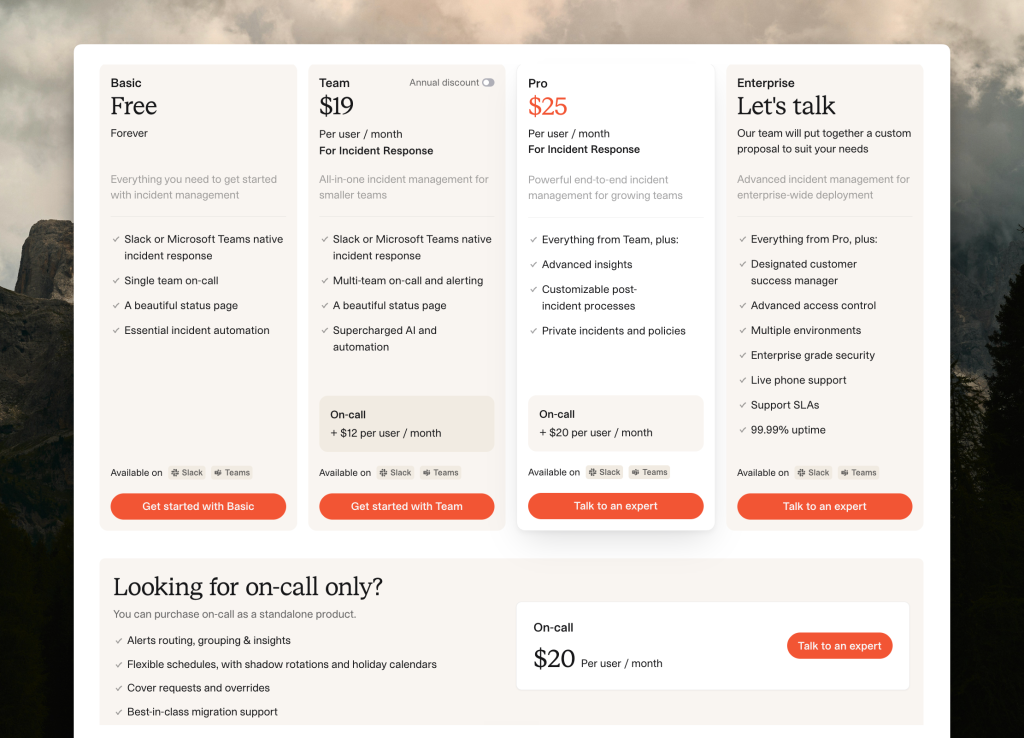
Incident.io has four tiers. Three have published prices. Enterprise requires a call with their sales team.
| Tier | Billed monthly | Billed annually | Key features |
|---|---|---|---|
| Basic | Free | Free | Up to 5 users, Slack/Teams response, 1 team on-call, 1 status page |
| Team | $19/user/mo (base) + $12/user/mo (on-call) = $31/user/mo total | $15/user/mo (base) + $10/user/mo (on-call) = $25/user/mo total | Multi-team on-call, AI automation, unlimited integrations |
| Pro | $25/user/mo (base) + $20/user/mo (on-call) = $45/user/mo total | $25/user/mo (base) + $20/user/mo (on-call) = $45/user/mo total | Advanced insights, customizable post-incident processes, private incidents |
| Enterprise | Custom | Custom | Advanced access control, dedicated CSM, multi-environment, 99.99% uptime SLA |
Basic plan (free)
The free tier covers up to 5 users. You get Slack-native incident response, a single team on-call schedule, and one status page. For a small team just getting started, it is genuinely useful.
Team plan ($19/user/mo + $12/user/mo )
The Team plan shows $19/user/month on the pricing page, but that figure covers incident response only. On-call scheduling is a separate add-on at $12/user/month, which brings the real cost to $31/user/month.
Pro plan ($25/user/mo + $20/user/mo)
Pro adds advanced analytics on incident trends, customizable post-incident processes, and private incidents. The base price is $25/user/month on both monthly and annual billing cycles. Add on-call and the total is $45/user/month.
Enterprise (custom pricing)
Enterprise uses custom pricing with no per-user figure published. You get a designated CSM, advanced access control, multiple environment support, live phone support, and a 99.99% uptime SLA.
Key point: The prices on Incident.io’s pricing page are base incident-response costs only. Adding on-call raises the monthly bill by $12–20 per user depending on the tier.
Incident.io on-call add-on pricing
| Plan | Monthly billing | Annual billing |
|---|---|---|
| Team + on-call | +$12/user/mo | +$10/user/mo |
| Pro + on-call | +$20/user/mo | +$20/user/mo |
The add-on covers multi-team on-call scheduling, shadow rotations, holiday calendars, and more. If you only need on-call without the incident workflow, there is also a standalone plan at $20/user/month.
Key point: On-call is priced as an add-on on every paid tier, not bundled into any of them. The only exception is the Basic free plan, which includes a single team on-call schedule.
What Incident.io actually costs
These three scenarios show what teams of different sizes actually pay once the on-call add-on is included.
10-person team on Team plan
A 10-person team on the Team plan pays $190/month in base subscription fees ($19 x 10 users). The on-call add-on costs $120/month ($12 x 10 users). The total comes to $310/month, or $3,720/year.
Advertised cost: $190/month ($2,280/year)
Actual cost: $310/month ($3,720/year) with on-call included
25-person team on Pro plan
A 25-person team on Pro pays $625/month in base fees ($25 x 25 users). Add the on-call add-on at $500/month ($20 x 25 users) and the total reaches $1,125/month, or $13,500/year.
Advertised cost: $625/month ($7,500/year)
Actual cost: $1,125/month ($13,500/year) with on-call included
50-person team on Team plan
A 50-person team on Team pays $950/month in base fees ($19 x 50 users). The on-call add-on adds $600/month ($12 x 50 users), bringing the total to $1,550/month, or $18,600/year.
Advertised cost: $950/month ($11,400/year)
Actual cost: $1,550/month ($18,600/year) with on-call included
Key point: Across all three scenarios, the on-call add-on adds 40–44% on top of the base subscription. The advertised per-user rate is not what teams with on-call actually pay.
Is Incident.io worth the price?
For teams that run incident response inside Slack, it makes sense. Triage, runbooks, and post-incident reviews are built around Slack workflows, and teams that operate that way get genuine value from it.
For teams that need on-call scheduling as a core feature, not an add-on, the pricing model works against them. You are paying a base price for incident workflow tooling, then paying again for on-call on top of that.
There is also one limitation worth knowing about. Incident.io’s escalation policies let you specify who gets alerted at each step, but not how. The delivery method is controlled by each person’s own notification preferences.
Key point: Incident.io earns its price for Slack-first teams that use the full incident workflow. For teams where on-call is the priority, the add-on model and the alert delivery limitations make it a harder fit.
Spike: The best Incident.io alternative
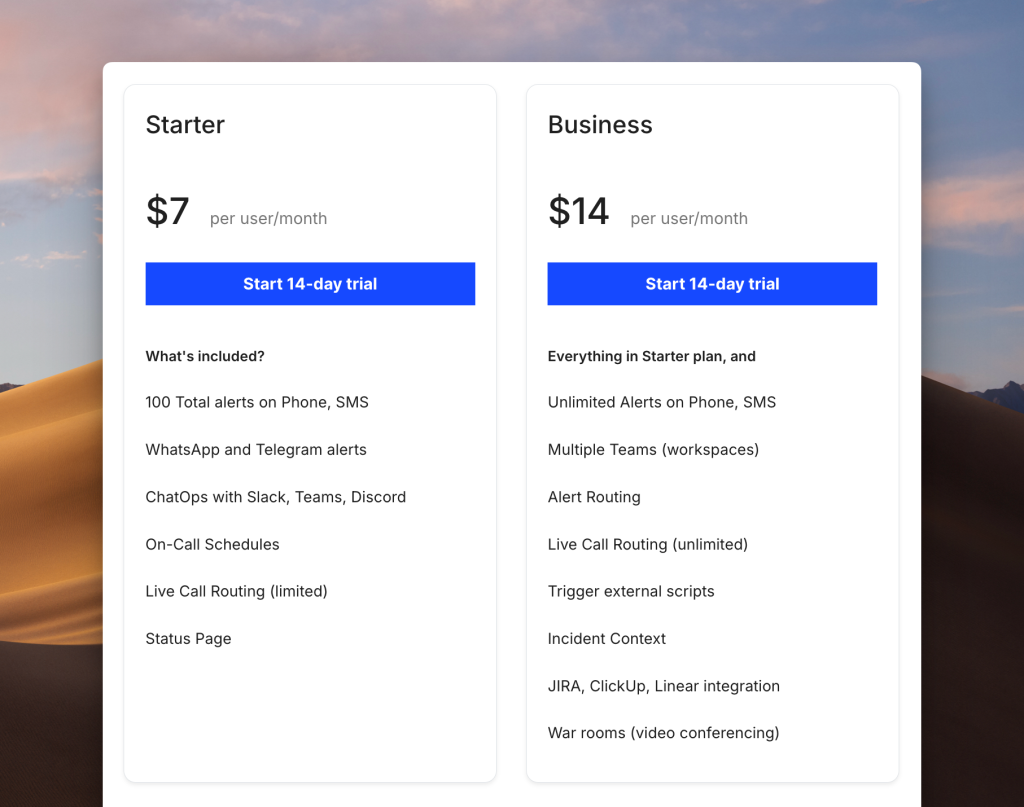
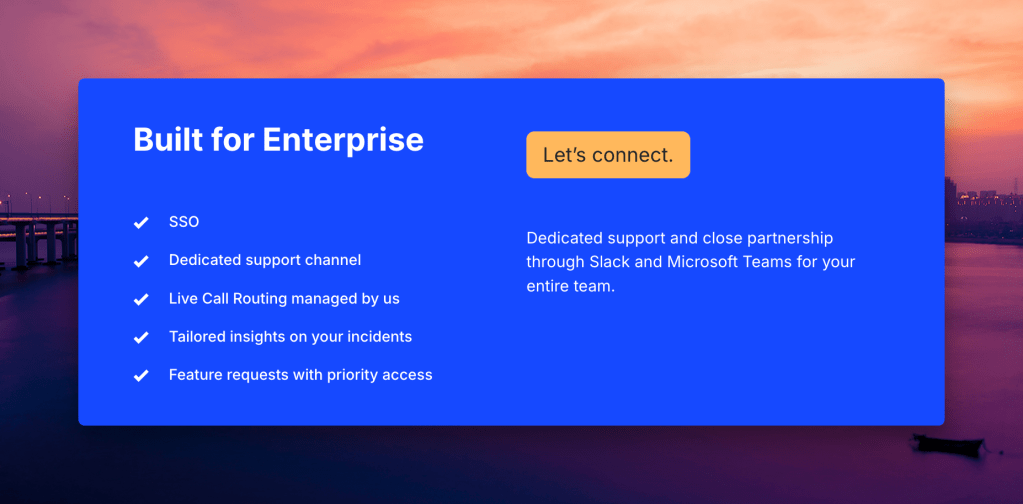
| Spike Starter | Spike Business | Spike Enterprise | |
|---|---|---|---|
| Price | $7/user/mo | $14/user/mo | Custom |
| On-call included | Yes | Yes | Yes |
| Built-in status pages | Yes | Yes | Yes |
| Dual alert control (team and individual level) | Yes | Yes | Yes |
The core difference between Incident.io and Spike is how on-call is priced. Spike includes it in every plan: Starter is $7/user/month and Business is $14/user/month (on-call is not a separate line item on either).
On alert delivery, Spike gives managers control over both who gets alerted and how. You can specify that Jordan gets alerted via phone call at a specific escalation step, while the next step goes to SMS for someone else. Jordan can then override their own delivery method with personal alert overrides. Incident.io’s escalation policies only control who gets alerted at each step. How the alert arrives is determined by each person’s own notification preferences.
On-call scheduling in Spike shows you a live calendar as you configure your schedule. Templates are there if you want a starting point. Override comments let the person covering a shift see exactly why the change was made. Escalation policies can alert multiple people at once at a given step, and acknowledgment timeouts are configurable per integration. Built-in status pages are included on every plan.
Key point: Spike prices on-call into every plan starting at $7/user/month, instead of charging $12–20/user/month as a separate add-on. Managers set the delivery method per escalation step, and individual engineers can override it for themselves.
How to decide between Incident.io and Spike
- If your team runs triage, runbooks, and post-incident reviews in Slack and that workflow is central to how you work: Incident.io is built for this.
- If you need an in-built on-call at no extra cost: Spike is the right choice. It includes on-call in every plan.
- If you want post-incident retrospectives and action tracking built in: Incident.io has this natively.
- If you need both team-level and individual-level control over alert delivery: Spike gives managers control over who gets alerted and how, and individual engineers can override their own delivery method. Incident.io controls who, not how.
- If you are evaluating Enterprise: both platforms use custom pricing at that tier. Get quotes from both before committing.
Final thoughts
Incident.io is built for Slack-first incident response. Teams that run triage, runbooks, and post-incident reviews inside Slack get genuine value from it.
The pricing question comes down to what you are buying it for. If incident response is the priority and on-call is secondary, the add-on model is manageable. If on-call is the primary driver, the math is harder to ignore. The standalone on-call plan costs $20/user/month. Spike‘s Business plan includes both on-call and incident response at $14/user/month.
Spike is the best Incident.io alternative for teams that want on-call built into the plan, not billed separately, with full control over how alerts get delivered.
FAQs
How much does Incident.io cost per user?
The Team plan base is $19/user/month. Add on-call and the total is $31/user/month. The Pro plan base is $25/user/month. Add on-call and the total is $45/user/month.
What is included in Incident.io’s free plan?
The Basic plan is free for up to 5 users. It includes Slack or Microsoft Teams-native incident response, a single team on-call schedule, and one status page. Essential incident automation is included. Multi-team on-call and AI workflow features are not available on the free plan.
Why does Incident.io cost more than the pricing page shows?
The headline figures show the base incident-response cost only. On-call is a separate add-on at $12/user/month for Team and $20/user/month for Pro.
Does Incident.io charge extra for on-call scheduling?
Yes, Incident.io charges extra for on-call scheduling. On-call is a separate add-on on both Team and Pro plans. Team costs $12/user/month and Pro costs $20/user/month. There is also a standalone on-call-only plan at $20/user/month for teams that do not need the full incident-response platform.
How does Incident.io pricing compare to Spike?
Spike Starter is $7/user/month and Spike Business is $14/user/month, both with on-call included. Incident.io Team with on-call is $31/user/month and Pro with on-call is $45/user/month. For a 25-person team on Spike Business versus Incident.io Pro, the difference is $9,300/year.
Can you use Incident.io without paying for on-call?
Yes, you can use Incident.io without paying for on-call. The Team and Pro base plans include the incident-response workflow without the on-call add-on. If you manage on-call elsewhere and just need incident triage, base prices are $19/user/month for Team and $25/user/month for Pro.
How does Incident.io pricing scale for larger teams?
There is no published volume discount below Enterprise. A 50-person team on Pro with on-call pays $45 x 50 = $2,250/month ($27,000/year). There is no published tier between Pro and Enterprise, so any team that outgrows Pro goes straight to custom pricing. Contact Incident.io’s sales team for a quote.
What happens to my Incident.io bill if my team grows?
The per-user cost stays the same as headcount grows. There is no volume discount below Enterprise. A team that moves from 10 to 50 users on the Pro plan with on-call goes from $450/month to $2,250/month at the same $45/user/month rate. Once you outgrow Pro, the next option is Enterprise with custom pricing. There is no published tier in between.