Get phone and SMS alerts fromdbt Cloud
dbt Cloud runs the transformation jobs that keep your warehouse models fresh, and a failed run quietly leaves dashboards stale. Spike turns a failed job run into an incident for the data engineer on rotation, by phone, SMS, Slack, or email, and escalates until someone picks it up.
Set up with AI
I use dbt Cloud for monitoring and Spike for on-call and incident management. Walk me through connecting them: create a dbt Cloud integration in Spike, copy its webhook URL, and add that webhook to dbt Cloud alert settings. Then help me send a test alert to confirm incidents show up in Spike.
What is dbt Cloud?
dbt Cloud is the hosted platform for dbt, the tool data teams use to build and test the models behind their dashboards, reports, and machine-learning features. Scheduled jobs rebuild those models every night or every hour, and when a run fails the tables downstream stop updating while everything still looks healthy.
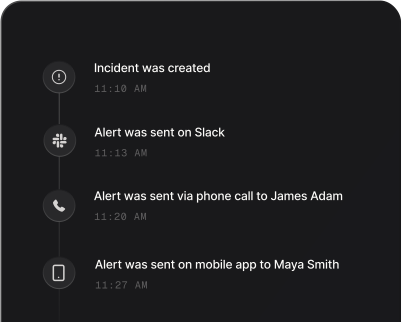
A dbt Cloud failure on its own lands in an email or a Slack channel that nobody reads at 3am. Routed to Spike, it becomes an incident with an owner: the on-call data engineer gets a phone call and an SMS within seconds, the alert escalates to the next person on the rotation if it goes unacknowledged, and further failed runs of the same job are added to the same incident instead of arriving as another page.
Who gets paged, at what severity, and how fast it climbs is decided in Spike: alert rules read the job, environment, and project each failure arrives with, so a broken production build doesn’t wake up the same people as a failing development job. And because Spike reads the result of each run, the incident closes itself when the same job next succeeds — no leftover pages to sweep up by hand.
How to set up dbt Cloud alerts
Every Spike integration is a unique webhook URL. Paste it into dbt Cloud and alerts start flowing — no agents, no code.
Step 1: Create a dbt Cloud integration in Spike
In your Spike dashboard, open Integrations and choose dbt Cloud. Spike generates a unique webhook URL for this integration — copy it.
Step 2: Create a webhook in dbt Cloud
In dbt Cloud, go to Account settings → Webhooks and create a webhook. Paste the Spike webhook URL, select the Run errored and Run completed events (Run completed brings the successful run that resolves the incident), and choose the jobs that should page someone.
Step 3: Test with a failing run
When a selected job run fails, it opens an incident in Spike within seconds. Repeat failures of the same job join that incident, and the job's next successful run resolves it.
That's it — dbt Cloud alerts now page whoever is on call.