Get phone and SMS alerts fromChronosphere
Chronosphere watches your cloud-native metrics and fires monitors when something drifts. Spike turns each notification into an incident and pages the on-call engineer until someone acknowledges it.
Set up with AI
I use Chronosphere for monitoring and Spike for on-call and incident management. Walk me through connecting them: create a Chronosphere integration in Spike, copy its webhook URL, and add that webhook to Chronosphere alert settings. Then help me send a test alert to confirm incidents show up in Spike.
What is Chronosphere?
Chronosphere is an observability platform for cloud-native teams, built to collect, store, and query metrics at scale. Its monitors evaluate queries against your metrics and notify a policy when a series crosses a threshold, whether that is a rising error rate or a queue that keeps growing.
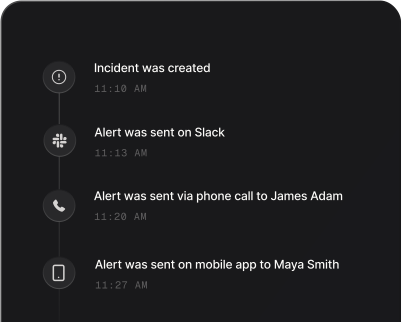
Those notifications are easy to lose in a channel nobody is watching. Sent to Spike through a webhook notifier, each one becomes an incident that calls or texts the engineer on rotation and escalates to the next tier if no one acknowledges it. Repeat notifications for the same alert series join the open incident instead of piling up new pages, and the incident closes on its own when Chronosphere reports the alert as resolved.
How to set up Chronosphere alerts
Every Spike integration is a unique webhook URL. Paste it into Chronosphere and alerts start flowing — no agents, no code.
Step 1: Create a Chronosphere integration in Spike
In your Spike dashboard, open Integrations and choose Chronosphere. Spike generates a unique webhook URL for this integration — copy it.
Step 2: Add a webhook notifier in Chronosphere
In Chronosphere, create a webhook notifier and paste the Spike webhook URL as its endpoint. Turn on the option to send resolved notifications so recoveries reach Spike.
Step 3: Route a monitor to the notifier and test
Add the notifier to a notification policy used by one of your monitors. When the monitor fires, an incident opens in Spike using the monitor's summary annotation as its title, and a resolved notification closes it.
That's it — Chronosphere alerts now page whoever is on call.