

TL;DR
Incident management automation uses predefined workflows to handle the repetitive work involved with an incident. Alert Routing rules set severity from the alert payload and route it to the team that owns the service. Playbooks can then create a Jira ticket, pull logs and update your status page before an engineer opens the incident. The result is lower MTTA and MTTR, with fewer pages for the people on call.
What is incident management automation?
Incident management automation uses predefined rules and workflows to handle repetitive incident tasks. You define the rules once, and they run the same way on similar incidents.
For example, let’s say a checkout alert fires with a surge of 5xx errors. A rule sets it to SEV1 and routes it to the checkout team, while a playbook opens the Jira ticket with the error logs attached.
So your engineers start with every detail in hand and can get the incident resolved faster.
What to automate at each stage of an incident lifecycle
An incident response lifecycle involves five stages, from detection to postmortem. And here’s what you can automate at each stage.
| Stage | What to automate |
| Detection | Send alerts from all your monitoring tools to one place, and group duplicates so one problem doesn’t page you ten times |
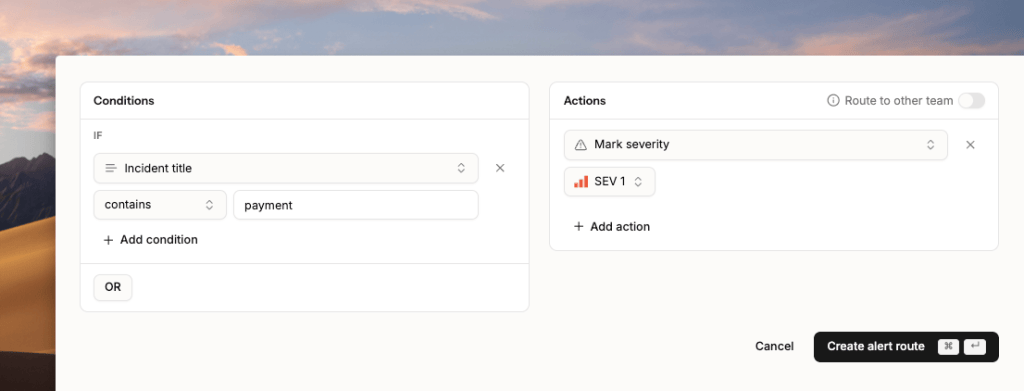
| Triage | Set severity and priority from the incident payload with Alert Routing rules. For example, “payment” in the title means SEV1 |
| Response | Page the on-call engineer, escalate if no one replies, open a Slack channel, and update your status page |
| Resolution | Run a Playbook to collect logs, and auto-resolve self-healing incidents with Resolve by Timer |
| Post-incident review | Capture the timeline and create follow-up tickets in Jira or Linear, so drafting postmortem becomes easier |
Tip: If you can only automate one stage, start with Incident Response. It’s where most of the manual work happens.
What to keep human
Everything that is critical, be it a service, process, etc should involve a human in the loop.
All external communication, like sharing updates to customers, should include a human so there aren’t any gaps in the information.
Business decisions like SLOs, error budgets and what counts as critical should always be set by people.
Best practices for incident management automation
1. Write down your current process before you automate anything, including who sets severity and which team owns each service. Then cut the steps nobody needs and automate what’s left.
2. Begin with severity rules and ticket creation, since they fire on every incident and follow simple conditions.
3. Group duplicate alerts and send low-priority ones to Slack before you set up routing. Otherwise, automation only pages people faster for things that don’t matter.
4. Simulate an incident for each critical service before you go live. Check that the alert gets the right severity and reaches the right owner.
5. Set up alerts for failed webhooks and stalled playbooks, so a broken rule shows up before a real incident exposes it.
Core benefits of incident management automation
1. Your MTTA drops because severity and routing happen the moment an alert fires. The right engineer gets it with context attached, so nobody spends ten minutes working out who owns the service.
2. Incidents get resolved faster, which lowers your MTTR. Engineers start debugging right away because the ticket and logs are already attached.
3. Every incident is handled the same way. The same rules set severity, open tickets and send stakeholder updates to whoever is on call. Nothing gets missed in the rush of a stressful incident.
4. Engineers only wake up for incidents that need them. Duplicates get grouped and low-priority alerts wait for business hours, which helps prevent on-call burnout.
5. You always have an audit-ready record. Every automated action is logged with a timestamp, ready for SOC 2 or ISO 27001 reviews.
Tools you need for incident management automation
| Tool type | What it does | Examples |
| Monitoring | Spots problems in your systems | Datadog, Prometheus, Grafana, Sentry |
| On-call and incident response | Pages the right person and escalates | Spike, PagerDuty, Rootly and FireHydrant |
| Chat | Gives the team one place to talk | Slack, Microsoft Teams |
| Status page | Keeps customers updated | Spike Status Page and Atlassian Statuspage |
| Ticketing | Tracks follow-up work | Jira, Linear |
Where AI fits in incident management automation
AI makes incident management automation smarter at every stage. Instead of only following fixed rules, it can read an incident, connect it to other signals and suggest what to do next. Key ways AI helps in incident management are:
Spotting problems early: AI learns what normal looks like for your metrics and logs, then flags anything unusual. It can catch a slow memory leak at 60% usage, long before your 90% alert ever fires.
Grouping related alerts: It links alerts that share a cause into one incident, so engineers see one problem instead of fifty pages.
Triage and routing: It suggests a severity based on the alert and its impact, then points the incident to the team most likely to fix it.
Finding the root cause faster: It reads logs, recent deploys and service dependencies to narrow down where things broke.
Running known fixes: For familiar issues it can trigger a runbook or a self-healing script. Risky steps should still wait for a person to approve them.
Writing updates and postmortems: It drafts status page updates, stakeholder summaries and the first version of the postmortem from the incident timeline.
How you can automate your Incident Management with Spike
1. Set severity automatically with Alert Routing rules
Alert Routing rules read each incoming alert and act on what it says. For example, any alert with “payment” in the title is marked SEV1.
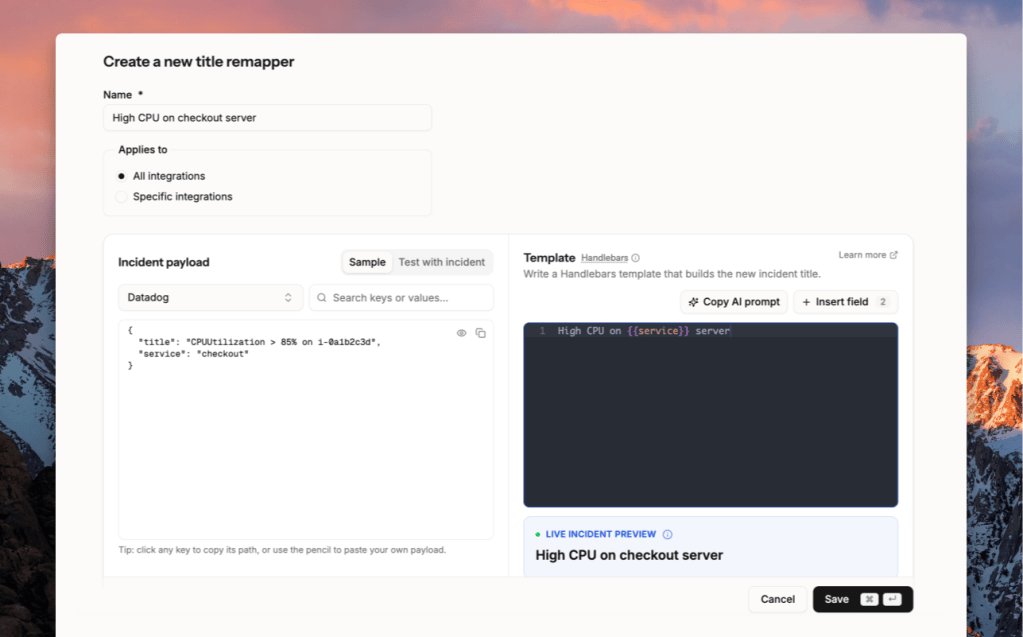
2. Make alerts readable with Title Remapper
Raw alert titles are often hard to read, like CPUUtilization > 85% on i-0a1b2c3d. Spike’s Title Remapper rewrites them programmatically into something your team understands at a glance, like “High CPU on checkout server”.
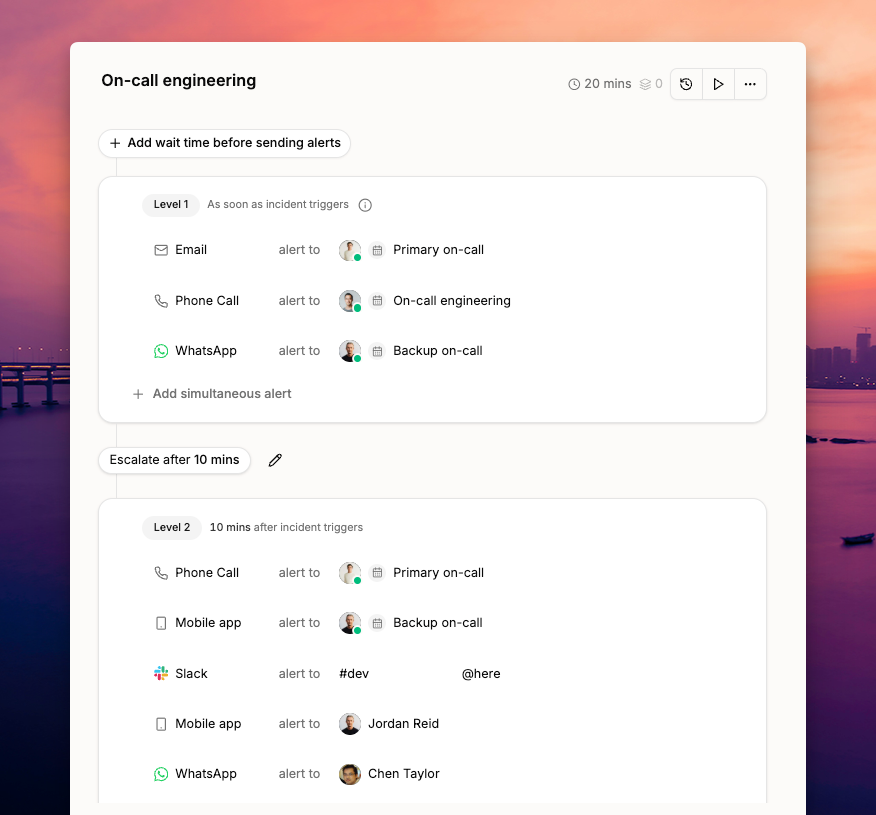
3. Page the right person with escalation policies
Escalation policies page the on-call engineer first. If no one acknowledges within a few minutes, Spike moves to the next person, by phone, SMS, Slack, or WhatsApp.
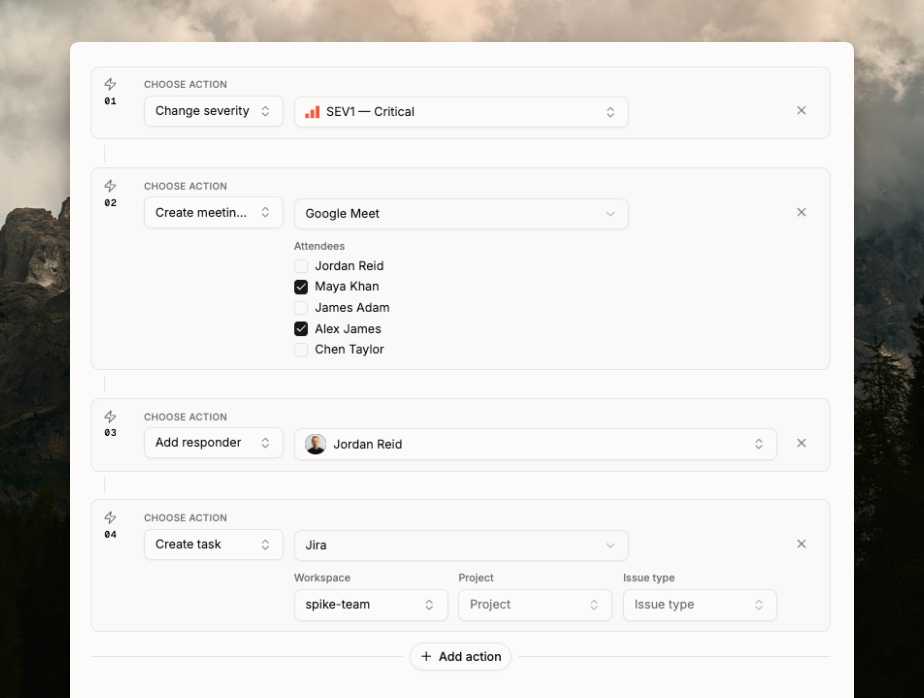
4. Run multi-step responses automatically with Playbooks
Playbooks run a set of actions whenever an incident matches your conditions.
Say a database latency alert fires at 2:14 AM. Immediately, the playbook marks it SEV1, opens a Zoom war room, and adds the database on-call engineer. It also creates a Jira ticket, so the engineer joins the call with everything ready.
Conclusion
You don’t need to automate everything at once. Start with the tasks that repeat on every incident, such as severity rules and ticket creation. Once those run reliably, add playbooks and auto-resolution. The goal isn’t to take engineers out of incidents. It’s to make sure their time goes into the fix.
FAQs
1. How to automate the incident management process?
You automate incident management by mapping your current process and connecting your monitoring tools to one platform. Then you set up rules that assign severity and route each incident to the team that owns it. Finally, add playbooks for repeat tasks like ticket creation and keep a human approval step for risky fixes.
2. What are P1, P2, P3, and P4 incidents?
P1 to P4 are priority levels that tell your team how urgently an incident needs attention. P1 means a core service like checkout is down for most users and needs an all-hands response right away. P2 is a major problem for a large group of users that needs a fix within hours. P3 is a minor issue with a workaround and P4 is cosmetic, so both can wait for normal working hours.
3. What is MTTA and MTTR?
MTTA and MTTR are incident metrics that show how fast your team responds to and fixes problems. MTTA (Mean Time to Acknowledge) is the average time from an alert firing to someone acknowledging it. MTTR (Mean Time to Resolve) is the average time from the alert to the incident being fully resolved.
4. What are the best incident management automation tools?
The best incident management automation tools include Spike, PagerDuty, Rootly, FireHydrant and incident.io. Most teams pair one of these with monitoring tools like Datadog or Grafana, and with Jira or Linear for tickets.
5. What are some examples of incident management automation?
Common examples of incident management automation include grouping duplicate alerts into one incident and setting severity from the alert payload. Teams also auto-create a war room and a Jira ticket for every SEV1, and auto-resolve health checks that recover on their own. After the incident, automation can capture the timeline and create follow-up tasks for the postmortem.