


TL;DR
On-call scheduling tools look similar until the edge cases surface: holiday coverage, last-minute handoffs, and scheduling history. I tested six tools on exactly those edges, and most fell short on at least one. Spike is the best on-call scheduling software for DevOps and SRE teams because it handles the full on-call scheduling lifecycle, from automated holiday coverage to scheduling history, starting at $7/user/month.
| Tool | Best For | Key Strength |
|---|---|---|
| Spike | Teams that need flexible schedule building with a complete audit trail of every shift change | Scheduled layers with preset dates, gaps in rotation, override comments, on-call activity log |
| PagerDuty | Teams managing on-call across many services who need handoff notifications scoped per service | Service-scoped shift-change notifications |
| Incident.io | Teams that handle frequent ad-hoc overrides and need concurrent shift support | Plain-language override input, concurrent shifts, before/after schedule edit preview |
| Squadcast | Teams that need to catch coverage gaps while building their on-call schedules | Coverage gap detection on the schedule calendar, round-robin rotation |
| Zenduty (now Xurrent IMR) | Teams that need override history visible on the schedule dashboard | Override history |
| Jira Service Management | Teams that want on-call schedules and Jira incident tickets in the same platform | Native Jira integration, instant override button |
| Tool | Scheduled layers with preset dates | Override comments | Override history | On-call activity log | Coverage gap detection | On-call add-on required | Starting price |
|---|---|---|---|---|---|---|---|
| Spike | ✓ | ✓ | ✓ | ✓ | $7/user/month | ||
| PagerDuty | $25/user/month | ||||||
| Incident.io | ✓ | $31/user/month | |||||
| Squadcast | ✓ | $20/user/month | |||||
| Zenduty | ✓ | $6/user/month | |||||
| JSM | $20/agent/month |
Choosing on-call scheduling software is one of those decisions that looks straightforward until you get into it. The feature lists look similar on the surface. The differences show up when you’re three weeks in and trying to cover a holiday gap or track who was on-call last Tuesday.
I picked six on-call scheduling tools: Spike, PagerDuty, Incident.io, Squadcast, Zenduty, and Jira Service Management (JSM). I work at Spike, so I already knew the product well. For the other five, I set up accounts, built schedules from scratch, and tested them hands-on. I went into this making sure I wasn’t biased toward any one tool, Spike included.
Each of the six tools gets its own section. For every tool, I’ve covered key features, pros & cons, and who it’s the right fit for.
1. Spike
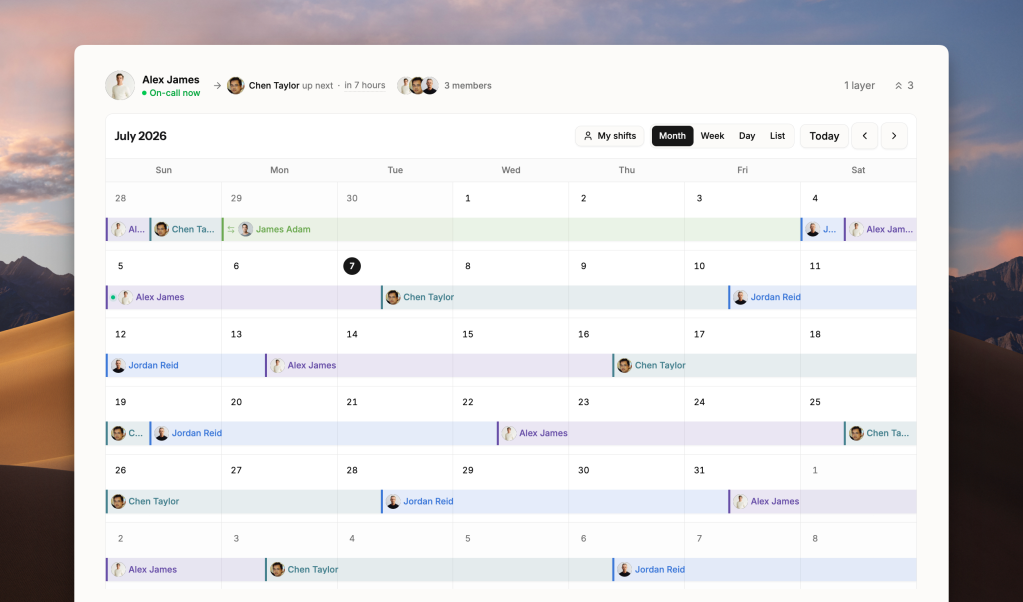
Spike is an incident management and on-call scheduling platform. It covers the broadest set of on-call scheduling features of any tool in this list. Most tools handle schedule creation and overrides well. Where Spike goes further is what surfaces after your schedule is live: who covered what, why overrides happened, and whether holiday coverage manages itself.
Key on-call scheduling features
- Scheduled layers support start and end dates. Set up holiday coverage that activates on a specific date and deactivates after. No manual intervention needed.
- Every schedule has an on-call activity log and a separate override history. You can always see who covered a shift, when, and why, without asking around or digging through Slack.
- Override comments give the person taking your shift the reason before they start.
- Admins can set Out of Office for anyone on the team, not just individual users for themselves. The whole team sees who is away and when, so coverage gaps get flagged before they happen.
- With Gaps, you can insert an empty slot into a rotation. When the Gap occurs, the next layer steps in automatically.
| Pros | Cons |
|---|---|
| Handoff days give you control over which day of the week the rotation switches | No automatic coverage gap detection. Uncovered slots don’t get flagged on the calendar. |
| Drag across empty dates to create an override, or click a shift to overwrite it | No plain-language override input. Overrides require date and user selection from a form. |
| Add a company holiday calendar so holidays show up on the on-call view | |
| On-call shift notifications go to a specific Slack or Teams channel per schedule | |
| Side-by-side schedule builder with four pre-built templates |
Pricing
Spike’s Starter plan is $7/user/month. Business is $14/user/month. Enterprise is custom pricing.
Best for
Teams that need the full on-call scheduling lifecycle in one tool, from automated holiday coverage to a complete shift-change history.
Key point: Spike is the only tool in this roundup that covers all three: override comments, an on-call activity log, and a separate override history.
2. PagerDuty
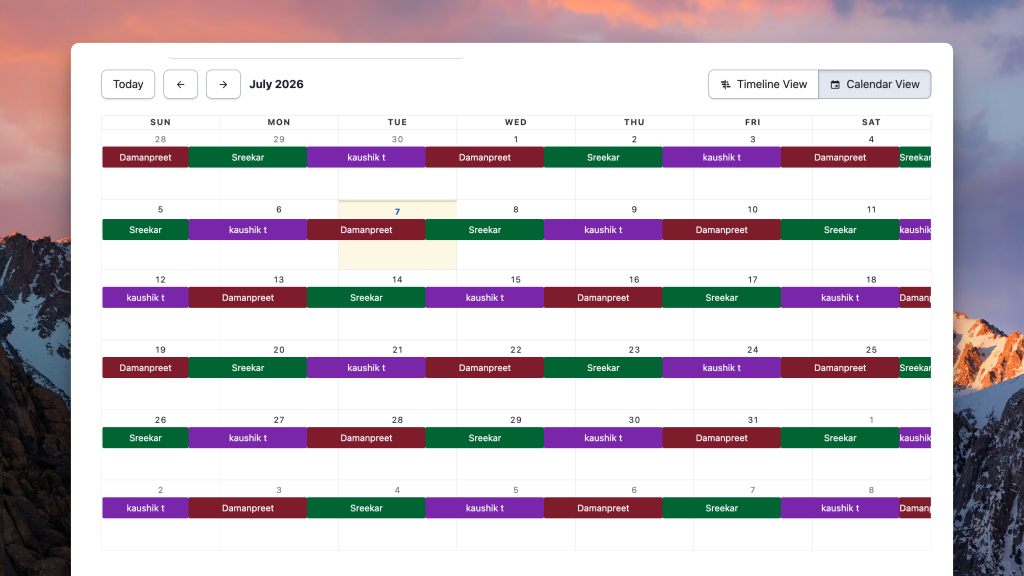
PagerDuty is one of the most established incident management platforms. On the on-call scheduling side, the core functionality is there: multiple schedules, layered rotations, and handoff notifications you can scope to specific services. The scheduling interface hasn’t kept pace with some of the newer tools on this list. No schedule cloning, no side-by-side preview, and no scheduling history.
Key on-call scheduling features
- On-call handoff notifications can be scoped to specific services, so engineers only receive shift-change alerts for the services they own.
- You can set up multiple layers to cover different time windows in the same schedule. Daily, weekly, and custom rotation lengths all work.
- The free tier includes one on-call schedule and one escalation policy, enough for a single small team rotation.
- If your team runs on Jira, the bi-directional sync means on-call incidents link directly to Jira tickets.
| Pros | Cons |
|---|---|
| On-call schedules sync to Google Calendar, Outlook, and iCal | No override history, override comments, or on-call activity log |
| Mobile app for checking your schedule and creating overrides on the go | No schedule cloning. Duplicate layers require manual rebuilding. |
| Schedule management is available through PagerDuty’s API for teams building internal tooling |
Pricing
PagerDuty’s free plan includes one schedule and one escalation policy. Professional is $25/user/month. Business is $49/user/month. Enterprise is custom pricing.
Best for
Teams managing on-call across many services who need handoff notifications scoped per service, and have the budget for PagerDuty.
Key point: PagerDuty’s on-call scheduling is functional but not deep. You get all the basics, but features like scheduling history, override context, and any kind of audit trail are missing entirely.
3. Incident.io
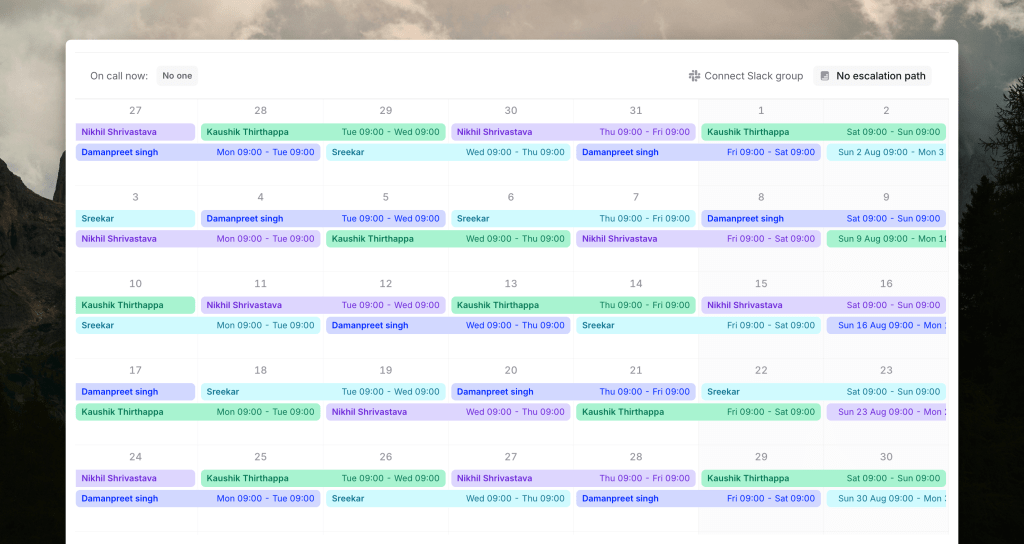
Incident.io‘s on-call scheduling is a paid add-on, not included in the base plan. Worth knowing before you budget for it. The on-call module has some genuinely distinctive features, especially around overrides and concurrent shifts.
Key on-call scheduling features
- Concurrent shifts assign two or more people to the same rotation slot. Useful when you’re onboarding someone and want them shadowing the primary on-call engineer without a separate schedule.
- Before you save any schedule change, a before/after preview shows exactly which shifts are affected. You see the impact before it goes live.
- Overrides can be typed in plain language: something like “Jordan today from 11 pm to tomorrow 7 am.”
- You can also create an override by clicking directly on any slot in the schedule calendar.
| Pros | Cons |
|---|---|
| The on-call module is available as a standalone purchase, without adopting the full platform | No override history or on-call activity log |
| Incident.io is built around Slack, so on-call notifications and shift changes surface where your team already works | On-call scheduling is a paid add-on, not included in the base plan |
| Clean schedule calendar with no nested menus to navigate |
Pricing
Incident.io’s base Team plan is $19/user/month. The on-call add-on costs an additional $12-20/user/month depending on the tier, bringing the real cost for on-call to $31-39/user/month. Enterprise is custom pricing.
Best for
Teams that handle frequent ad-hoc overrides and need concurrent shift support.
Key point: Incident.io gives you two ways to create overrides: type it in plain language or click directly on the calendar. What it doesn’t give you is any record of those overrides after they happen.
4. Squadcast
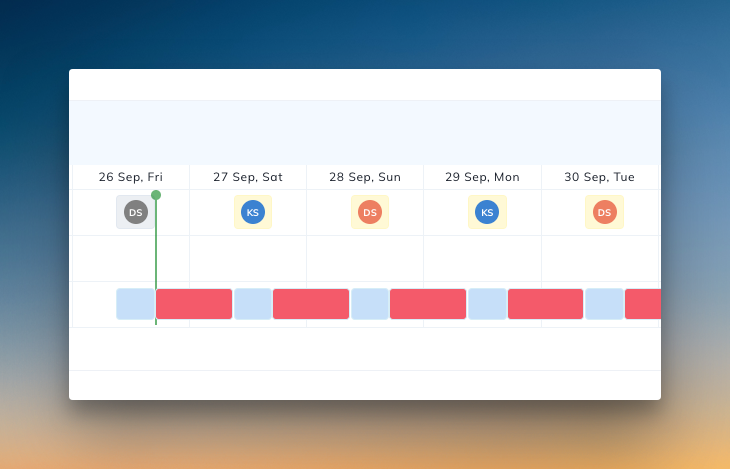
Squadcast is now part of SolarWinds. For teams already running SolarWinds monitoring, keeping scheduling and monitoring under the same vendor makes sense. The standout on-call feature is a coverage gap detector that flags uncovered windows directly on the schedule calendar.
Key on-call scheduling features
- The View Gaps toggle highlights uncovered on-call windows in red on the calendar, both while building a schedule and after it goes live.
- Round-robin rotation distributes on-call load evenly across team members, so no single person carries the rotation indefinitely.
- Schedule layers support standard rotation lengths: daily, weekly, and custom intervals.
- If your team already runs SolarWinds monitoring, Squadcast keeps on-call scheduling and monitoring alerts under the same vendor.
| Pros | Cons |
|---|---|
| On-call scheduling is included in the base plan, no add-on required | No override history, override comments, or on-call activity log |
| Free plan available for teams up to 5 users | Adding rotation layers to an existing schedule takes several clicks |
Pricing
Squadcast’s free plan covers up to 5 users. Pro is $20/user/month. Premium is $29/user/month. Enterprise is custom pricing.
Best for
Teams already running SolarWinds monitoring who want on-call scheduling and monitoring alerts under the same vendor.
Key point: Squadcast’s View Gaps toggle is genuinely useful. Uncovered windows show up in red on the calendar as you build. What Squadcast doesn’t have is any record of what happened after the schedule went live.
5. Zenduty
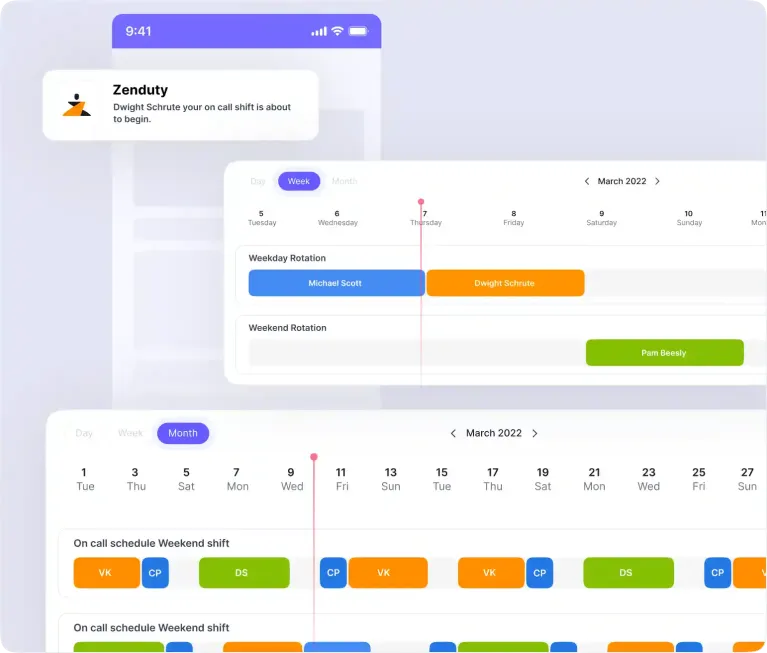
Zenduty has rebranded to Xurrent IMR. The on-call scheduling is basic but functional. The one thing worth calling out is override history: past and upcoming overrides are visible right on the schedule dashboard.
Key on-call scheduling features
- Override history shows both past and upcoming overrides on the schedule dashboard in one view.
- On-call schedules support multiple rotation layers. Standard daily, weekly, and custom intervals all work.
- Overrides can be created directly from the schedule view without going into a separate editor.
| Pros | Cons |
|---|---|
| At $6/user/month, it has the lowest-priced paid plan of the six tools | No override comments or on-call activity log |
| If your team is already in the Xurrent ecosystem, keeping on-call under the same platform removes a vendor | Schedule management is nested inside team context: Teams → team → Schedules. Not accessible directly from the on-call tab. |
| The schedule dashboard shows who is currently on-call across teams at a glance |
Pricing
Zenduty’s Starter plan is $6/user/month, limited to 5 users and 1 team. Growth is $16/user/month for up to 50 users and 5 teams. Enterprise is custom pricing.
Best for
Small teams that need basic on-call scheduling at the lowest price point, or teams already in the Xurrent ecosystem.
Key point: Zenduty has override history but no override comments and no on-call activity log. You can see that a shift was covered, but not the context behind why it changed.
6. Jira Service Management (JSM)
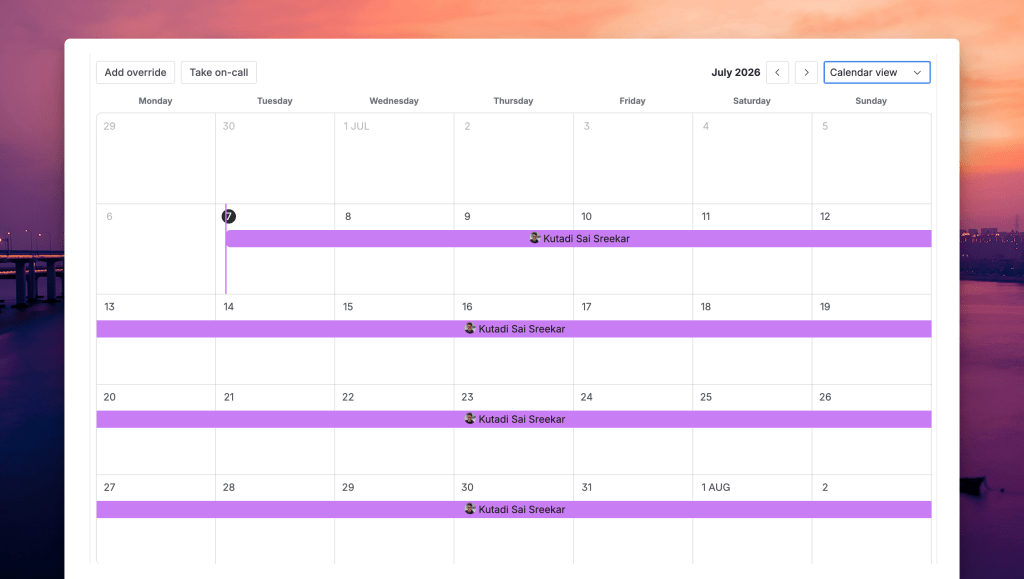
Jira Service Management (JSM) is Atlassian’s on-call and incident management product. For teams already running Jira, on-call schedules and incident management stay in the same workspace. The trade-off is a scheduling interface that takes some navigating to get to.
Key on-call scheduling features
- The “Take on-call” button creates an instant one-hour override directly from the on-call dashboard, without opening the schedule editor.
- The schedule builder has a side-by-side layout: configuration on the left, calendar preview on the right.
- When an alert fires, JSM creates a Jira ticket automatically. If your team already tracks incidents in Jira, the on-call and ticket workflows connect without extra setup.
- On-call schedules support multiple rotation layers with standard daily, weekly, and custom intervals.
| Pros | Cons |
|---|---|
| Free plan available for up to 3 agents with basic on-call scheduling | No override history, override comments, or on-call activity log |
| On-call is included in JSM paid plans, no separate add-on required | Navigation to schedules is four levels deep: Operations → Overview → team → On-Call |
Pricing
JSM’s free plan supports up to 3 agents with basic on-call. Standard is $20/agent/month. Premium is $51.42/agent/month. Enterprise is custom pricing.
Best for
Teams already running Jira and Confluence daily who want on-call schedules and incident tickets in the same platform.
Key point: JSM works well if Jira is already your incident command center. For teams that need scheduling history, override context, or a simpler navigation path to their on-call schedule, it falls short on all three
On-call scheduling feature checklist
| Feature | Spike | PagerDuty | Incident.io | Squadcast | Zenduty | JSM |
|---|---|---|---|---|---|---|
| Side-by-side schedule preview | ✓ | ✓ | ✓ | ✓ | ✓ | |
| Schedule templates | ✓ | ✓ | ||||
| Scheduled layers with start/end dates | ✓ | |||||
| Gaps in rotation (auto next-layer fallback) | ✓ | |||||
| Handoff day configuration | ✓ | |||||
| Admin OOO management | ✓ | |||||
| Holiday calendar integration | ✓ | |||||
| External calendar linking | ✓ | ✓ | ||||
| Granular calendar sync options | ✓ | ✓ | ||||
| Webhook on shift start/end | ✓ | |||||
| Concurrent shifts | ✓ | |||||
| Coverage gap detection | ✓ | |||||
| Override comments | ✓ | |||||
| Override history | ✓ | ✓ | ||||
| On-call activity log | ✓ | |||||
| Slack/Teams notifications on shift start/end | ✓ | |||||
| Round-robin rotation | ✓ | |||||
| Before/after schedule edit preview | ✓ | |||||
| Plain-language override input | ✓ | |||||
| Instant override button | ✓ | |||||
| On-call add-on required | ✓ |
How to choose on-call scheduling software
If you need to audit who was on-call and why shifts changed: Choose Spike. It is the only tool in this list with override comments, an on-call activity log, and a separate override history.
If you run on-call across many services and need shift-change notifications scoped per service: Choose PagerDuty. That is the one scheduling feature that stands apart from the rest of this list.
If you handle frequent ad-hoc overrides or need concurrent shifts for onboarding: Choose Incident.io. You get plain-language override input, a before/after edit preview, and the option to assign two engineers to the same shift. Budget for the on-call add-on; it is not included in the base plan.
If you need to catch coverage gaps while building your schedule, or your team already runs SolarWinds monitoring: Choose Squadcast. The View Gaps toggle flags uncovered windows in real time, and on-call scheduling is included in the base plan.
If your team is small and price is the main constraint: Choose Zenduty. It has the lowest-priced paid plan at $6/user/month, and the free plan covers up to 5 users.
If your team runs Jira and Confluence and wants on-call schedules and incident tickets in the same platform: Choose JSM. But there is no on-call activity log or override history.
Final thoughts
After testing six on-call scheduling tools, here is what I found: the scheduling part is not where these tools differ. It is what comes after. Who was on-call last Tuesday? Why did that shift change? Most tools cannot answer those questions.
Spike is the best on-call scheduling software for DevOps and SRE teams, starting at $7/user/month. It is the only tool in this list that covers the full on-call scheduling lifecycle: automated holiday coverage, handoff context, and a complete shift-change history.
FAQs
What is the best on-call scheduling software for DevOps teams?
Spike is the best on-call scheduling software for DevOps and SRE teams. It covers the full on-call scheduling lifecycle, from automated holiday coverage to handoff context to a complete shift-change history. Pricing starts at $7/user/month.
What is on-call scheduling software?
On-call scheduling software manages who is responsible for responding to incidents and when. It handles rotations, coverage gaps, overrides, and handoff workflows across your team. The right tool makes it easy to build a schedule, manage changes, and see what happened after it went live.
Is there a free on-call scheduling tool?
Yes, several tools in this list offer free plans with basic on-call scheduling. PagerDuty’s free plan covers one schedule, and JSM’s free plan covers up to 3 agents. Both Squadcast and Zenduty offer free plans for teams up to 5 users. For teams that need more than the basics, Spike’s Starter plan is $7/user/month with no user limit.
Does Incident.io include on-call scheduling in the base plan?
On-call scheduling in Incident.io is not included in the base plan. It is a paid add-on starting at $12/user/month, on top of the Team plan at $19/user/month. A 10-person team with on-call enabled pays $310/month, not $190/month.
How do I choose on-call scheduling software?
Start with the basics: how easy is it to create a schedule, set up rotation layers, and make changes without friction? Once that works, go deeper. Can you see coverage gaps while building the schedule? Can you create overrides directly from the calendar without navigating away? Does the tool keep an override history and a log of shift changes? Those are the features that matter when something goes wrong.
What is the difference between on-call scheduling and incident management?
On-call scheduling defines who is responsible for responding to incidents and when, covering rotations, overrides, handoffs, and coverage windows. Incident management is what happens after something breaks: triage, communication, and resolution. Most tools in this category handle both, but the depth varies. Some are built primarily around incident response workflows. Others give equal weight to the scheduling side.
What is an on-call override?
An on-call override is a temporary change to the schedule that replaces a scheduled shift with a different person for a specific time window. Overrides are used when the scheduled person is unavailable or needs to swap shifts with a colleague. In most tools, you create one by clicking directly on the calendar. Some also accept plain-language input, where you type the override in natural language and the tool parses it.
How does on-call rotation work?
An on-call rotation is a repeating schedule that defines when each team member is responsible for responding to incidents. You set the rotation length (daily, weekly, or custom), add participants, and the tool cycles through them automatically. Most tools support multiple rotation layers in the same schedule, so you can have a primary on-call and a secondary backup in parallel. When a rotation ends, the next person in line takes over.