Summary
On December 4th, 2025, we discovered an issue where the person shown as on-call on the dashboard didn’t match who was scheduled in the calendar.
When we started investigating, we learnt that this only affected schedules with weekly rotations or weekly layers combined with custom timings.
The root cause was wild: our old code had a bug that ignored schedule start dates for weekly layers, activating them before the start time instead of waiting for the configured start time. When users created schedules months ago, the calendar UI showed what they expected, so nobody noticed anything wrong. Then we fixed the bug in a recent release, the calendar corrected itself to show the right sequence, but our queuing system was still running jobs based on the old, incorrect sequence. The result was pure chaos. Calendar showed one person on-call, but another person was actually on-call who was also receiving alerts.
Detection
A user reported this issue earlier today- the person on the platform didn’t match their calendar, and alerts were going to the wrong user. We thought it might be a queuing error from a recent deployment, so we reset their schedule. It worked. Problem solved, right?
Nope. Another customer reported the same issue. That’s when we knew this was systemic. We declared an incident and started investigating.
Debug
We tried reproducing it in our test environment but everything worked fine. Then we had an idea – what if we replicated one of the actual problematic schedules exactly? So we did.
The calendar rendered correctly, but something was off. Users were going on-call back-to-back instead of alternating, for example , Person A would be on-call, then Person A again, then Person B, then Person B, then Person C. Not wrong, but… weird
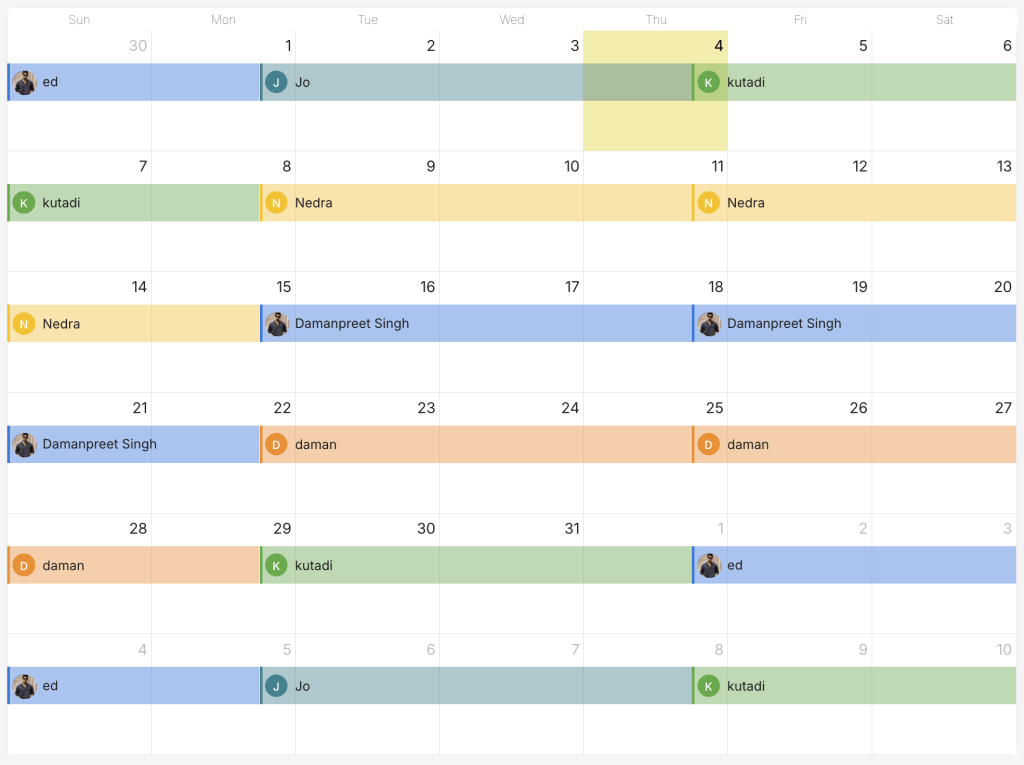
We dug into the history and found these schedules had been running since June, 2025. We plotted what the calendar should look like according to our current code – it matched perfectly. So why were customers complaining?
Here’s where we got creative: we pulled up an old release from when these schedules were created and rendered the same schedule using that old code. Suddenly everything made sense.
The old code showed a completely different sequence. What looked weird in our current code looked totally normal in the old code.
The bug: Our legacy code ignored start dates when activating weekly interval layers. Set a weekly rotation to start June 20? The old code started it a few days early – on June 16. The actual on-call shifts began earlier, which resulted in starting one layer earlier and threw off the entire on-call sequence.
- Schedules with weekly interval layers
- Schedules with weekly layers combined with custom timings
Daily rotations and other interval types weren’t impacted.
The fix that broke things: We recently fixed this bug so weekly layers now properly respect start dates. The calendar immediately corrected itself. But our queuing system doesn’t pre-calculate all shifts – it waits for one shift to end, then calculates the next person. So when we deployed the fix:
- The calendar showed the corrected rotation (Person A on-call)
- The queue was still running a shift from the old rotation (Person B receiving alerts)
- They wouldn’t sync until the current shift ended
That’s why resetting the schedule worked temporarily – it cleared the old queued jobs.
Recovery
Once we understood the issue, the fix was straightforward:
- Identified all affected schedules (weekly interval layers or weekly + custom timings created between when the bug was introduced and when we fixed it)
- Synced them all with the correct data
- Cleared pending queue jobs operating on the old sequence
- Verified the calendar matched who was actually on-call
- Resolved the status page incident
- Prepared to notify affected customers
Lessons Learned
The big takeaway: Bugs can hide for months when the UI masks the underlying issue, especially when they only affect specific configurations like weekly layers. Then when you fix them, the fix itself can expose the problem in ways that impact customers.
What we need to do better:
- Better testing: End-to-end tests that validate both calendar display AND alert routing across different layer types (daily, weekly, custom). Test alignment between calendar and queue states for each interval type.
- Rethinking the on-call engine: A new on-call engine is in the cards. One where we can properly handle cross-timezone settings, store calendar data for both the past and near future, and compute the rest in real-time. Users love the infinite on-call calendar and we’re not complaining about it either – we’ve seen teams add on-call overrides for Christmas in April, and that seamlessness is worth keeping.
If you have feedback or thoughts, please reach out to us at [email protected]. I’m also available on LinkedIn or @its_damanpreet.