
On average, every developer commits their code at least once a day.
Having some git aliases help you quickly make changes and push your code.
No more typos
One of my daily frustrations in the past 🤬 –
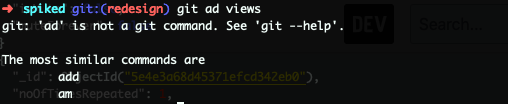
Avoiding common pitfalls are super important, it helps increase productivity in the long term.
Table of contents
- git status
- git commit
- git push
- git add and commit
- git add, commit and push
- git stash
- git stash apply
- git push –set-upstream
- git checkout
ps: These are aliases I have been using personally, feel free to create and share your own ☺️
1. git status 👉 gs
git statusgs
alias gs='git status'
2. git commit 👉 gc
git commit -m 'Adding integration test cases'
gc 'Adding integration test cases'
alias gc='git commit -m $2'
3. git push 👉 gp
git push
gp
alias gp='git push'
4. git add . && git commit -m 👉 gac
git add .
git commit -m 'Adding integration test cases'
gac 'Adding integration test cases'
alias gac='git add . && git commit -m $2'
5. git add . && git commit -m && git push 👉 gacp
git add .
git commit -m 'Adding integration test cases'
git push
gacp 'Adding integration test cases'
alias gacp='git add . && git commit -m $2 && git push'
6. git stash 👉 gst
git stash
gst
alias gst='git stash'
7. git stash apply 👉 gsta
git stash apply
gsta
alias gsta='git stash apply'
8. git push –set-upstream origin 👉 gpst
This syntax is the one I forget the most 🤷♀️
git push --set-upstream origin integration-tests
gpst integration-tests
alias gpst='git push --set-upstream origin $1'
9. git checkout 👉 gco
git checkout staging
gco staging
alias gco='git checkout $1'
These are the aliases that I use everyday for the past few years. No typos, no errors and super handy.