Every incident arrives with a payload, and that payload usually tells you far more than whether something broke. It points to which service is affected and how serious the issue looks. It also carries context about which customers are on the receiving end of that failure.
The service name, severity, customer context — all of it can feed directly into routing decisions. This guide explores how to read those parts of the payload and use them to route incidents automatically. You will find suggestions on what to look for in a payload and how to turn those signals into practical decisions around triage, loading escalation policies, and noise reduction.
What’s in an incident payload
The incident payload has two parts your routing rules can act on: the incident title and the incident details.
The title usually names the service or system affected. Something like “payment-processor: connection timeout” tells you which service is in trouble. The details carry more context. You’ll find metric values and error codes there. Region names and customer identifiers sometimes appear too, along with stack traces and anything else your monitoring tool chooses to send.
Together they give routing rules something specific to match on. The more structured and readable that payload is, the more precise your rules can be.
What to look for in an incident payload
Not everything in a payload is worth routing on. A few classes of signals are usually the most useful.
Service and environment names
Service names in the title are usually the most reliable routing signal. Identifiers like service names and API names rarely change, so rules that match on them stay reliable over time.
Environment context matters too. An incident title containing “prod” carries different weight than one containing “staging”. A rule that matches on environment name can load a completely different escalation policy without any manual action.
IF title contains "prod" AND title contains "checkout-api" THEN load → checkout critical escalation policy
IF title contains "staging" AND title contains "checkout-api" THEN auto-resolve
Keywords that signal severity
Certain words in the details consistently point to high-severity situations. These are worth keeping an eye on:
- “timeout”
- “unreachable”
- “crash”
- “failed”
Words like “fraud” or “breach” often carry security implications that warrant a separate escalation path entirely.
IF Incident details [key: "message"] contains "fraud" OR Incident details [key: "message"] contains "unauthorized access" OR Incident details [key: "message"] contains "breach"THEN mark severity as SEV-1 AND load → security escalation policy
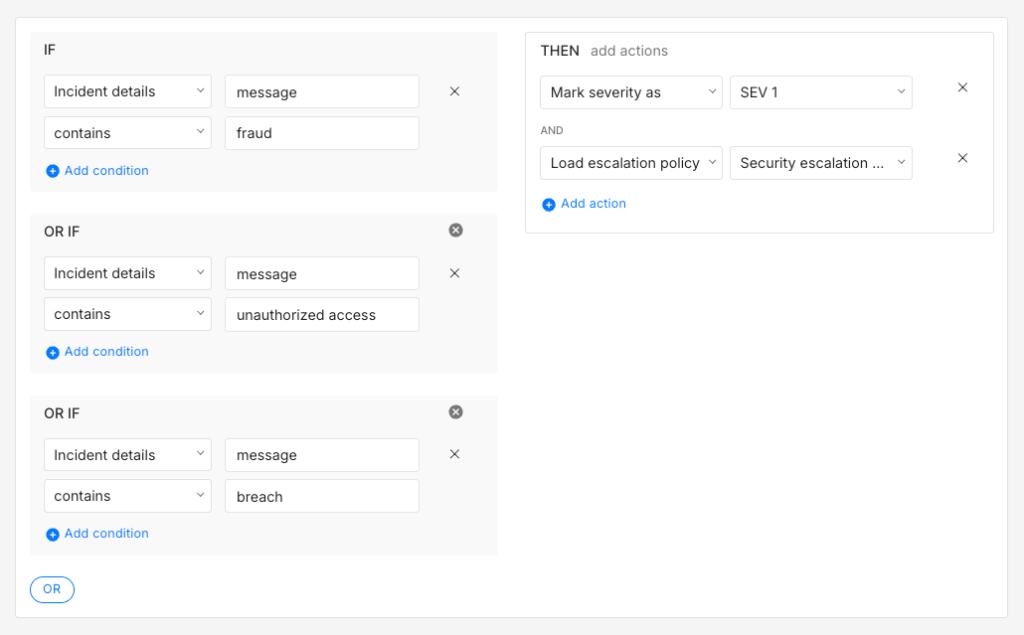
The
keyname here ismessagebecause that is what most monitoring tools use for the main error or event description. Your payload may use a different key. Inspecting a sample payload from your integration is the quickest way to confirm the right key name before writing the rule.
Numeric metric values
When the payload carries metric values, comparators give you more precision than keyword matching alone. A rule that checks whether p99_latency_ms > 2000 is more reliable than one matching on a phrase that might change when your monitoring tool updates.
IF title contains "api-gateway" AND Incident details [key: "p99_latency_ms"] > 2000THEN mark severity as SEV-1 AND mark priority as P1
IF title contains "api-gateway" AND Incident details [key: "p99_latency_ms"] > 800 AND Incident details [key: "p99_latency_ms"] <= 2000THEN mark severity as SEV-2 AND mark priority as P2
Business context
The payload often carries information about who is affected, not just what broke. A customer plan field or region identifier can signal priority just as clearly as the error type itself.
A fintech team might find that any incident mentioning an enterprise customer name in the payload is a priority situation, regardless of which service it affects.
IF Incident details [key: "plan"] contains "enterprise"THEN mark priority as P1 AND load → enterprise accounts escalation policy
It often helps to think about your payload in terms of business impact rather than purely technical severity.
Spike has a library of ready-to-use alert routing rule templates built around common payload patterns. They are a good starting point if you want something working quickly before you fine-tune rules for your own setup.
When the incident payload isn’t readable yet
Raw error codes create a specific problem for routing rules. A title like 211007 or TypeError: Cannot read properties of undefined gives a rule nothing reliable to match on. You can write a rule around 211007 but that only works if you already know what the code means. Anyone reading the incident later probably won’t.
This is where Spike’s Title Remapper is worth setting up before you write payload-based rules. It works by taking a small template written in HandlebarsJS syntax and rewriting incident titles using fields from the payload itself. The setup requires a bit of configuration. You pick the integration, inspect the payload it sends, and write a template that pulls the fields you care about into a readable title.
The result is worth the effort. After setup, 211007 can become “Destination not reachable”. A generic TypeError can become “checkout-api: TypeError: Cannot read properties of undefined”. The title now carries the service name and a human-readable description rather than a code you have to decode each time an incident triggers.
Once your titles are structured, routing rules become much more straightforward to write and maintain. A rule matching on “checkout-api” routes to the checkout team. A rule matching on “Destination not reachable” routes to the infrastructure team. The rule knows what to do without anyone having to interpret the raw payload first.
Acting on what the incident payload says
Once you can read the payload reliably, three kinds of actions become possible: triage, routing, and noise reduction. Each one serves a different purpose and they often work together in a single rule.
Triage: severity, priority, and ownership
Triage is about answering three questions before a responder ever touches the incident:
- What is the severity?
- What is the priority?
- Who should own it?
Some monitoring tools include severity and priority directly in the payload. When that is the case, routing rules can read those values and act on them straight away. When the payload does not carry that information, rules can set severity and priority based on other signals in the title or details.
The details section usually carries enough context to make that call. A database running out of connections in production is probably SEV-1 P1. The same issue in a staging environment might be SEV-3 P3.
IF title contains "db-primary" AND Incident details [key: "message"] contains "max_connections exceeded" AND Incident details [key: "env"] contains "prod"THEN mark severity as SEV-1 AND mark priority as P1 AND load → database on-call escalation policy
IF title contains "db-primary" AND Incident details [key: "message"] contains "max_connections exceeded" AND Incident details [key: "env"] contains "staging"THEN mark severity as SEV-3 AND mark priority as P3 AND auto-acknowledge
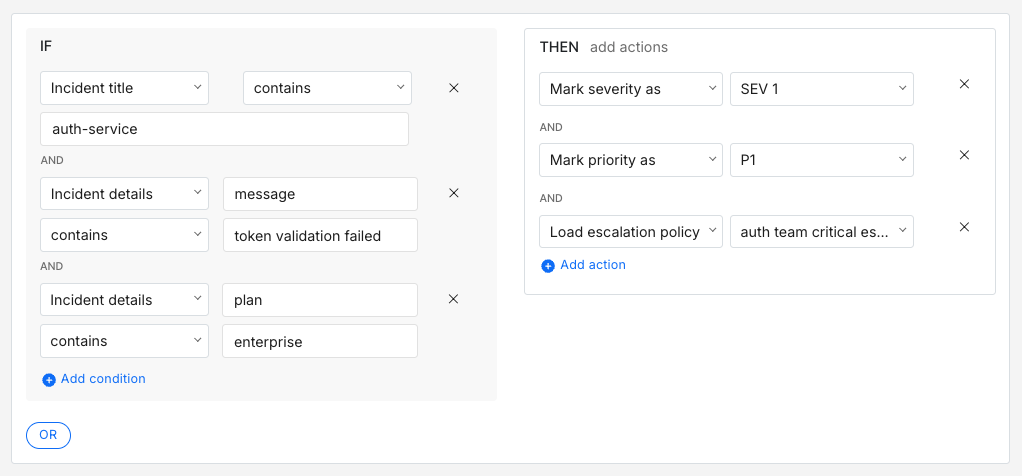
For ownership, the service name in the title is usually the clearest signal. A rule routing incidents with “auth-service” in the title to the auth team’s escalation policy handles ownership automatically. Rules get more precise when you combine the service name with error type and customer context from the details.
IF title contains "auth-service" AND Incident details [key: "message"] contains "token validation failed" AND Incident details [key: "plan"] contains "enterprise"THEN mark severity as SEV-1 AND mark priority as P1 AND load → auth team critical escalation policy
Route: load the right escalation policy
Routing comes down to one action: loading the right escalation policy. Triage rules set the severity and priority. Routing then acts on those values.
A good place to start is two policies. One for critical incidents with phone call alerts and short wait times, and a default policy for everything else.
IF severity is SEV-1 OR priority is P1 THEN load → critical escalation policy (phone call, 5-minute wait time)
As incident patterns get clearer, routing by service area usually gives you more control than routing by severity alone. It also means the right team gets paged directly rather than everything funnelling into one critical policy.
IF title contains "payments-processor" OR title contains "billing-service" OR title contains "stripe-webhook" THEN load → payments on-call escalation policy
IF title contains "k8s" OR title contains "node" OR title contains "pod" THEN load → infrastructure on-call escalation policy
Noise reduction
Not every incident that triggers needs a human to act on it. Payload conditions in the title and details are usually the most direct way to catch these cases. There are four actions worth knowing:
- Auto-acknowledge: Stops the escalation policy from running. Good for known low-priority signals your team tracks but does not need to act on right away
- Auto-resolve: Closes the incident immediately. Works well for signals that always self-correct
- Resolve by timer: Waits for a set period and resolves if nothing changes. Useful for incidents that often clear up on their own
- Do not create incident: Suppresses the incident before it enters the queue. Worth using carefully and only for signals you are completely confident are irrelevant
Grouping multiple known low-signal patterns into one rule is usually cleaner than a separate rule for each one.
IF title contains "integration-test" OR title contains "health-check-ping" OR title starts with "ALARM: CPU over 25% on dev-" THEN do not create incident
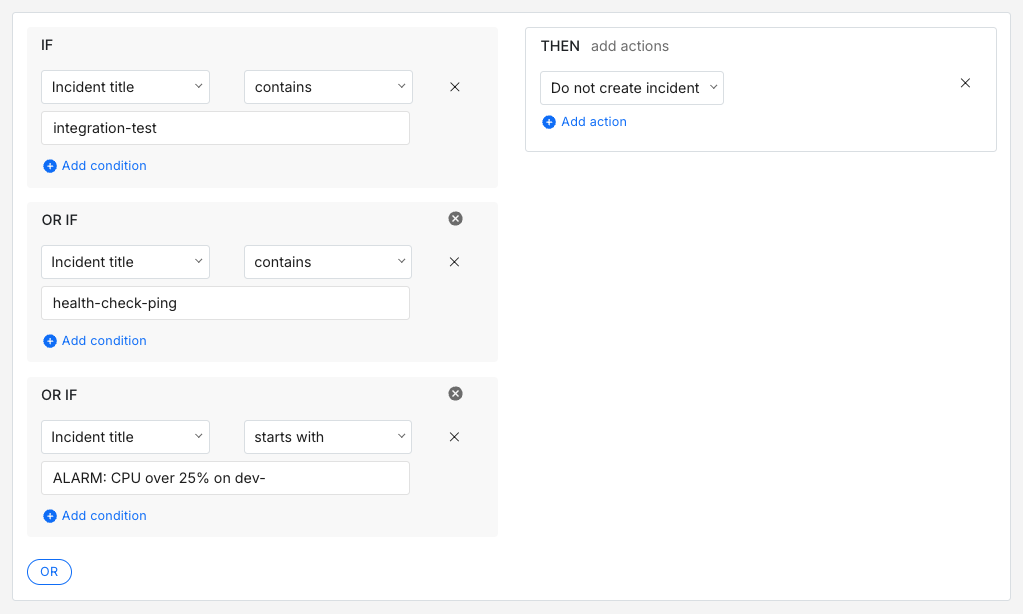
For incidents worth seeing but not worth escalating, auto-resolve with a notification keeps visibility without the noise.
IF title contains "staging" AND Incident details [key: "message"] contains "memory warning"THEN resolve incident and send notification
Frequency-based conditions work well alongside payload conditions. A single HTTP 503 from a search service is probably a blip. Fifteen of them within ten minutes is a pattern worth escalating.
IF title contains "search-service" AND incident triggers > 5 times within 15 minutes THEN mark severity as SEV-1 AND load → search team escalation policy
IF title contains "search-service" AND incident triggers <= 5 times within 15 minutes THEN auto-resolve
Payload-based routing is one of those things that starts simple and gets more useful over time. A handful of rules covering your most critical services is probably enough to get started. As you learn more about your incident patterns, the rules get sharper and the setup gradually reflects how your team actually responds in practice.
The goal is not a perfect ruleset on day one. It is to remove the small decisions your team makes repeatedly and make them automatic. Which team should see this? How urgent is it? Does this need attention at all? Over time, answering those questions automatically adds up to faster responses and less mental load for the people on call.
If you are ready to set up payload-based routing rules, Spike is a good place to start.
FAQs
How do routing rules handle a malformed or empty payload?
A rule that checks for a specific field or keyword will simply not match if the payload is malformed or missing that field. The incident falls through to the default escalation policy. It is worth watching which incidents consistently land there with no rule matches. That pattern often means an integration’s payload format has changed after a tool upgrade and your rules are silently no longer matching.
How do you handle flapping incidents where the same incident keeps opening and closing rapidly?
Frequency conditions are the most useful tool here. A rule that only escalates after an incident triggers more than a set number of times within a short window filters out the noise from flapping without missing a genuinely sustained problem. Resolve by timer can also help by giving the incident time to self-correct before any escalation fires.
How do global routing rules interact with team-level routing rules when you have multiple teams on the same account?
Global rules typically run first and can classify or suppress an incident before it reaches team-level rules. This is useful for organisation-wide noise reduction. Team-level rules then handle the more specific routing decisions within each team’s own services. The risk is that a global rule inadvertently suppresses or misclassifies an incident before the team-level rule has a chance to act on it, so it is worth being deliberate about which decisions belong at which level.
Can routing rules trigger outbound webhooks or external actions?
Yes, routing rules in Spike can trigger outbound webhooks as an action. That makes it possible to wire up automated remediation alongside routing. An incident could page the on-call team and simultaneously trigger a webhook that attempts a server restart. The escalation policy wait time acts as a buffer, so if the automated action resolves the issue first, the page never fires.
For more complex action sequences like creating a JIRA ticket and updating a status page in a specific order, Spike’s Playbooks are worth exploring. They support chained actions that run in the exact sequence you define.