Critical incidents have a direct impact on your business revenue and the trust your customers place in you. The longer a critical incident goes unnoticed, the higher the stakes. A reliable alert routing setup automatically catches these incidents the moment they trigger and gets them to the right person without delay.
This guide walks you through how to build that reliable routing setup. You’ll find suggestions on defining what counts as a critical incident, spotting the gaps in routing setup, and closing them before they cause real damage.
If you’re new to Alert Routing, we recommend you start here: How to set up Incident Alert Routing rules effectively
Define what “critical” means for your business
Without a clear definition of what counts as critical in your system, your routing rules have nothing reliable to act on.
The simplest way to get that definition is to ask yourself one question: which incident would wake you up at 3 AM?
The answer is different depending on what your business does. For a logistics platform, it might be the fleet tracking service going silent. For a financial platform, it might be a reconciliation job failing mid-run.
Once you write those incidents down, you can recognize patterns in their payloads. A few things worth looking for:
- Service names that point to revenue-critical or customer-facing systems
- Keywords that signal severity:
replication_failed,data_loss,quorum_lost,breach - Numeric thresholds like error rates crossing a percentage or queue depth beyond a set limit
- Customer context such as an enterprise tenant or a high-value region in the payload details
Those patterns are what you’ll translate into routing rules.
Start with two escalation policies
Before writing any routing rules, it helps to have two escalation policies ready: one for critical incidents and one for everything else. Your routing rules then simply decide which of the two loads for each incoming incident.
The critical policy is where speed matters. An immediate phone call to the on-call responder works well here. If there’s no acknowledgement, the incident escalates to a secondary responder within five minutes.
The default policy can be less aggressive. A push notification or Slack message with a longer wait before escalation often does the job.
To learn how to set up a critical escalation policy, read this: Escalation policy for critical incidents
To learn how to set up a default escalation policy, read this: Escalation policy for low-priority incidents
As your routing rules mature, you can add more specific policies by team or service. But these two are a good starting point that gives you a clear view of what’s routing to critical and what isn’t.
Routing your critical incidents
With your escalation policies in place, the next step is setting up routing rules that catch your critical incidents and load the right policy. Below are a few common types of critical incidents and how to write rules around each one.
Service and infrastructure failures
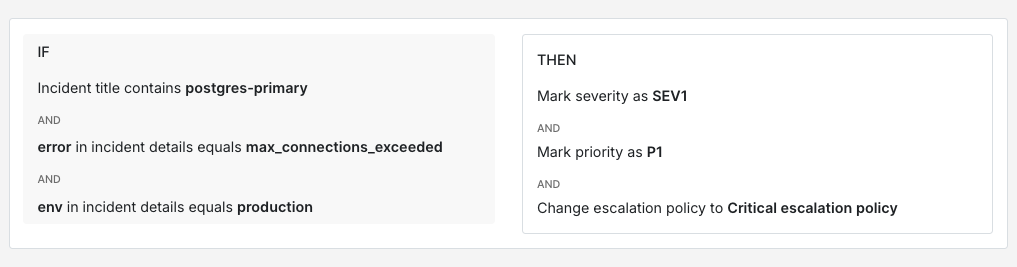
Infrastructure failures are often the clearest candidates for critical routing because the impact is immediate. A primary Postgres instance running out of connections in production is worth a phone call. The same thing in staging probably isn’t.
IF title contains "postgres-primary"AND incident details [key: "error"] = "max_connections_exceeded"AND incident details [key: "env"] = "production"THEN mark severity as SEV-1AND mark priority as P1AND load → critical escalation policy
Kubernetes node failures follow a similar pattern. A single node going NotReady in a large cluster is manageable. Three or more nodes going NotReady at the same time is worth escalating immediately.
IF title contains "k8s-node-monitor"AND incident details [key: "status"] = "NotReady"AND incident details [key: "nodes_affected"] >= 3THEN mark severity as SEV-1AND mark priority as P1AND load → critical escalation policy
Security and compliance signals
Security incidents usually warrant their own escalation path regardless of which service reports them. An unauthorised access elevation or an unexpected root login is critical, no matter where it comes from.
IF incident details [key: "event_type"] = "unauthorised_access_elevation"OR incident details [key: "event_type"] = "root_login_detected"OR incident details [key: "event_type"] = "permission_rules_changed"THEN mark severity as SEV-1AND mark priority as P1AND load → security critical escalation policy
Compliance violations often need a more precise rule. A PCI-scoped service logging cardholder data is worth treating as critical straight away. Combining the service name with the specific violation type gives you a reliable match.
IF title contains "pci-scoped-service"AND incident details [key: "violation_type"] = "cardholder_data_logged"OR IF title contains "pci-scoped-service"AND incident details [key: "violation_type"] = "unencrypted_pan_detected"THEN mark severity as SEV-1AND mark priority as P1AND load → compliance critical escalation policy
Business-critical thresholds
Not every critical incident is a technical failure. Some of the most important signals are business-level thresholds that standard infrastructure monitoring wouldn’t catch on its own.
A payment processing queue backing up is worth looking at through two lenses: how deep the queue is and how long the oldest item has been sitting there. A deep queue that’s moving is less urgent than a shallow one where items are stuck.
IF title contains "payment-processing-queue"AND incident details [key: "queue_depth"] > 1000AND incident details [key: "oldest_item_age_seconds"] > 300THEN mark severity as SEV-1AND mark priority as P1AND load → payments critical escalation policy
Customer tier is another useful signal. An API latency spike affecting enterprise customers probably deserves a faster response than the same spike on a free tier.
IF title contains "api-gateway"AND incident details [key: "p99_latency_ms"] > 3000AND incident details [key: "customer_tier"] = "enterprise"THEN mark severity as SEV-1AND mark priority as P1AND load → enterprise critical escalation policy
Cascading failures
Cascading failures are harder to catch because no single incident looks critical on its own. The signal is in the pattern. When multiple related services start reporting errors within a short window, it’s worth treating that correlation as critical.
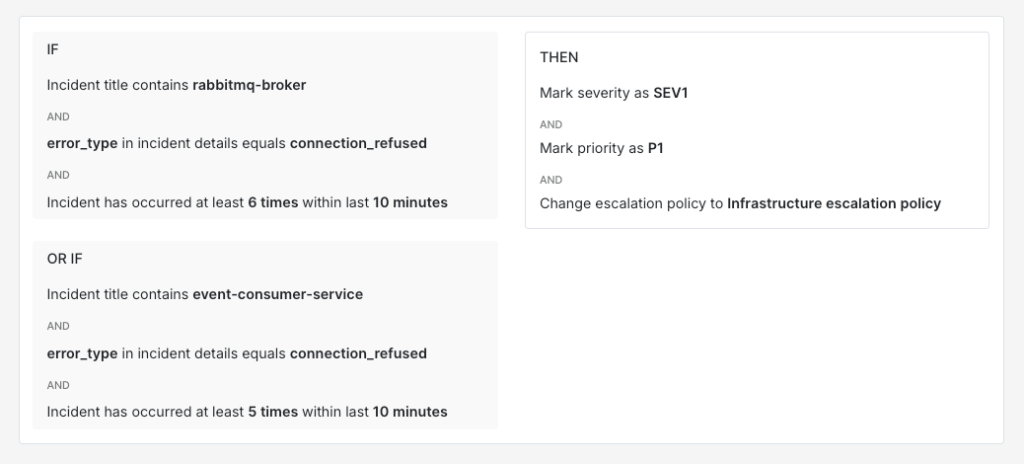
A message broker like RabbitMQ going down is a good example. The broker itself reports connection errors and the services that consume messages from it start failing too. Neither incident alone looks critical but together they point to something worth escalating. A useful approach is to combine title conditions across related services with a frequency threshold.
IF title contains "rabbitmq-broker"AND incident details [key: "error_type"] = "connection_refused"AND incident triggers > 5 times within 10 minutesOR IF title contains "event-consumer-service"AND incident details [key: "error_type"] = "connection_refused"AND incident triggers > 5 times within 10 minutesTHEN mark severity as SEV-1AND mark priority as P1AND load → infrastructure critical escalation policy
Spike’s tip: Use Title Remapper
When your monitoring tool sends raw error codes (like 211007 ) as incident titles, it becomes hard to set up routing rules. In such cases, use Spike’s Title Remapper to set up a template that pulls fields from the payload and turns them into readable titles. So 211007 becomes something like “Destination not reachable” and writing routing rules around that is much simpler.
3 ways critical incidents slip through your routing setup (and how to fix them)
Even a well-built routing setup can sometimes have gaps. These are the three common ways critical incidents get missed and how to fix them.
1. No rule matches the incident
When an incident doesn’t match any routing rule, it falls to the default policy. The default policy sends a Slack message or a push notification, and responders treat those as non-critical by default. So even if the incident is genuinely critical, nobody acts on it with urgency because the delivery channel itself signals low priority.
This gap usually shows up when new services get added without corresponding routing rules. The fix is to review your default queue regularly. Any critical incident landing there is a signal that your rules have a gap worth closing. Once you spot these patterns, you can write a new rule to route that type of incident to the critical policy going forward.
2. A suppression rule is too broad
Suppression rules help with noise reduction but they can quietly absorb critical incidents when written too broadly. A rule that auto-resolves everything from a noisy service will also suppress a genuine critical incident from that same service.
The fix is to make your suppression rules more specific. Instead of suppressing all incidents from a service, add conditions that only suppress when the values are clearly non-critical.
IF title contains "worker-nodes"AND incident details [key: "cpu_pct"] < 85AND incident details [key: "env"] != "production"THEN auto-resolve
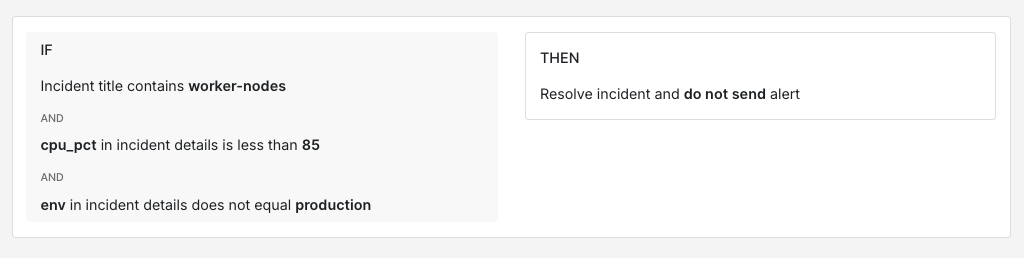
This rule auto-resolves only when the CPU is below 85% and the environment is not production. Anything above that threshold or from production still routes normally. Whenever you write a suppression rule, it’s a good idea to add an explicit exemption for production or customer-facing services.
3. Payload changes silently break rules
A monitoring tool upgrade or a configuration change can alter the payload format without any visible warning. A rule matching on incident details [key: "error_code"] will stop firing if the tool starts sending that field as incident details [key: "errorCode"] instead. Everything looks fine on the surface but incidents stop routing correctly.
The most practical fix is to keep a reference payload sample for each integration alongside your rules. When a rule stops firing as expected, then comparing the live payload against your reference is usually the fastest way to spot the mismatch. It can also be helpful to review your routing rules after any tool upgrade as part of your post-upgrade checklist.
For a deeper look at building reliable payload-based routing rules, check out this guide: How to route incidents based on what their payload says
Critical incidents will always be high-stakes. A routing setup that never misses them isn’t something you build once and forget about. It grows alongside your system. New services get added, payloads change, and your definition of critical evolves as your business does. But the foundation stays the same: clear rules, the right escalation policies, and regular check-ins on what’s landing in your default queue. Get that right and your team can trust that every critical incident reaches the right person at the right time.
If you’re ready to set up routing rules, Spike is a good place to start. It has got everything you need to build a routing setup that never misses a critical incident.
FAQs
How do you keep your definition of critical up to date as your system grows?
The definition you start with will change. New services get launched and existing ones become more or less important over time. A good practice is to revisit the “which incident would wake you up at 3 AM” question every few months, especially after major launches or architecture changes. Post-incident reviews also surface useful signals. If your team keeps manually re-routing incidents to the critical policy, then your definition has probably shifted and your rules need to reflect that.
What’s the right way to handle critical incidents that only affect a single customer?
It depends on who that customer is. If your payload includes a customer tier or account identifier, then you can write rules that treat incidents differently based on that context. An API failure affecting an enterprise customer with an SLA probably deserves the critical policy. The same failure on a free-tier account might be fine in default. The key is having that customer context available in the payload so your rules can act on it.
What’s the best way to handle critical incidents from a third-party service you don’t control?
Third-party services can fail in ways you can’t predict and their payloads are often less structured than your internal tools. The most reliable approach is to route based on the impact rather than the error itself. If your payment provider goes down, the incident that matters is “checkout is broken,” not the specific error code the provider sent. Writing rules around the downstream effect on your own services usually gives you a more stable match than trying to parse a third-party payload that could change without notice.