

Low-priority incidents are easy to deprioritise in the moment. Each one feels small and manageable. But without a proper escalation policy, they pile up quietly and reviewing them later often tells a different story. A simple escalation policy is usually all it takes to keep them from slipping through entirely.
Why low-priority incidents deserve attention
The case for giving low-priority incidents a proper escalation policy starts with understanding what “low priority” actually means. Low priority describes urgency, not importance. It means the incident can wait a few hours but it doesn’t mean it can wait forever or that nobody needs to act on it.
A payment failure and a background job hitting its retry limit are both incidents that need a response. One needs immediate attention and the other can wait until the next working day. That gap is what separates critical incidents from low-priority ones. It’s a gap in urgency, not a gap in whether a response is needed at all.
Without that clarity, low-priority incidents get treated as optional. They trigger, sit on the dashboard, and wait until someone happens to notice them. That’s where things quietly get missed.
Low-priority incidents are also part of your incident history, and they show up in reviews and reports. A background job failing twice a month looks unremarkable on its own but when you see it has triggered forty times over the past quarter, the picture changes considerably. Teams that track these incidents properly often catch patterns well before they grow into something more serious.
Define critical first, everything else follows
Setting up a low-priority escalation policy is much easier once you know where the top of the ladder sits. A useful question to ask is: which incident would wake you up at 3am? That’s your critical incident. Everything below it is low-priority.
The 3am question is worth asking because it draws a sharp line between what needs an immediate response and what can wait. Once that line exists, sorting everything else becomes straightforward. A payment failure sits above it while a background job hitting its retry limit sits below it. Each incident now has a clear reference point and the low-priority bucket becomes much easier to fill in.
What a low-priority escalation policy actually looks like
Once you know what sits in the low-priority bucket, the policy itself is fairly straightforward to set up. The main difference from a critical escalation policy comes down to two things: the channels you use and the time you allow.
Softer channels like Slack, email, and mobile notifications are usually the right fit here. Phone calls are worth keeping off the table for low-priority incidents. A phone call signals urgency and using it for something that can wait a few hours adds alert noise. Over time, it conditions your team to treat phone calls as less meaningful.
The response window is longer too. A critical incident might need acknowledgment within five minutes. A low-priority incident can probably wait a few hours or until the next working day. Setting an explicit window is useful because it gives the responder a clear sense of what’s expected rather than leaving it open-ended.
A basic low-priority policy might look something like this:
- Step 1: Send a Slack notification to the team channel
If not acknowledged in 3 hours, move to Step 2 - Step 2: Send an email to the on-call responder
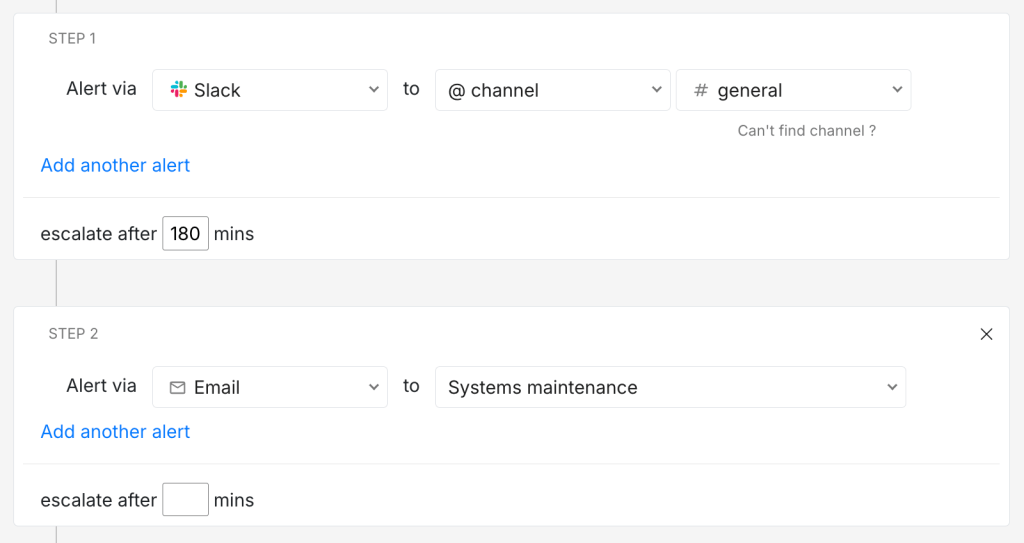
There’s a defined wait time and a deliberate fallback. This makes the incident move rather than waiting for someone to notice.
Low-priority incidents after hours
The basic low-priority policy works well during business hours. But time adds a layer worth thinking about. A low-priority incident that triggers at 10am and one that triggers at midnight call for a different response, even if the incident itself is identical.
Many teams handle this by running a separate after-hours policy rather than tweaking the business hours one. During business hours, starting with a Slack notification and waiting a few hours makes sense because people are at their desks. After hours, starting with a mobile notification and a longer wait window is a better fit because people are away from their computers. The channel and the urgency both shift slightly, even if the incident priority hasn’t changed.
Two policies are usually enough to start: one for business hours and one for off-hours. You can always add more as your incident patterns become clearer.
With Spike’s Alert Rules, you can set time-based conditions to load different escalation policies depending on when an incident triggers. Your business hours policy and your off-hours policy can then run automatically without anyone having to make a manual decision each time.
FAQs
Do I need a low-priority policy if my team is very small?
It’s still useful. A simple one-step policy that routes to Slack takes a few minutes to set up and keeps things tidy. You’ll be glad it’s there once your incident volume grows.
Should low-priority incidents have a response window?
Yes, it’s worth setting one. Without a response window, a low-priority incident sits open-ended and it’s easy for it to get lost. A few hours or the next working day is a reasonable starting point.
Can a low-priority incident move up to critical?
Yes. If the situation changes or new information comes in, you can update the priority. It’s worth deciding upfront who on the team can make that call so priorities don’t get changed inconsistently.