

When a midnight incident triggers, the goal is not to wake your entire team. It’s to reach the one person who can act on it. Everyone else should sleep through it undisturbed.
The difference between a team that handles midnight incidents well and one that doesn’t usually comes down to a few decisions made ahead of time. Which incidents actually need a midnight response? Who should get the call? And what should happen to everything else? This guide walks through those decisions.
Decide what actually needs a midnight response
Not every incident that’s urgent at 11 AM is urgent at 2 AM. And some incidents become more urgent at night precisely because nobody is around to catch them naturally.
A Redis cluster running at 92% memory during business hours is something your team can keep an eye on. The same threshold at midnight is different because there’s no one watching the dashboard. If it hits 100% before morning, your cache layer goes down silently.
The reverse is also true. A log ingestion service falling behind at 2 AM probably doesn’t need anyone out of bed. The logs will queue up and the backlog can be cleared once the team is back online.
It can be useful to think about this as two separate lists. One list for incidents that need a midnight response and one for incidents that can wait until morning.
The “wake someone up” list usually includes anything that directly affects customers, revenue, or data integrity. A payment gateway returning errors, a primary database running out of connections, or an authentication service going down would all probably land here.
The “wait until morning” list often includes internal tooling, non-production environments, and background jobs that have built-in retry logic. A CI runner throwing teardown warnings overnight or a dev cluster scaling down unexpectedly can sit in a queue until someone is at their desk.
The important thing is to write this classification down explicitly. When a responder gets woken up at 3 AM, they shouldn’t have to decide whether the incident is worth their attention. That decision should already be made for them.
Route midnight incidents to the right person
Once you know which incidents need a midnight response, the next step is to make sure they reach the right person and only that person.
A single escalation policy running around the clock usually creates one of two problems. Either it pages the whole team for everything because it was designed for daytime collaboration. Or it sends a Slack message that nobody sees until morning because it was designed to be lightweight. Neither is a good fit for midnight.
A separate off-hours escalation policy solves this. During business hours, a Slack notification to the team channel is often enough because people are at their desks. After hours, a phone call to the on-call responder is probably the right choice because it’s the only channel that cuts through sleep.
Time-based routing can load the right policy automatically. A rule like this handles the switch without anyone thinking about it:
IF time is between 10 PM and 8 AM THEN load → off-hours escalation policy (phone call to on-call responder, 5-minute wait time)
IF time is between 8 AM and 10 PM THEN load → business hours escalation policy (Slack + email to team channel, 15-minute wait time)
This is the foundation. From here, you can get more specific by combining time conditions with payload and severity conditions.
To learn more about how payload, time, and frequency conditions work together, read this guide: How to set up Alert Routing rules effectively
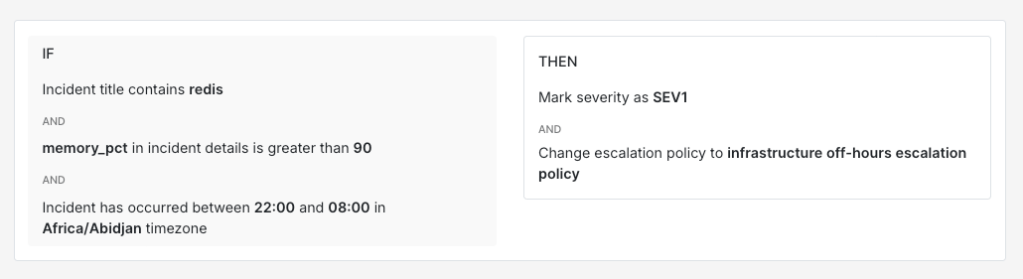
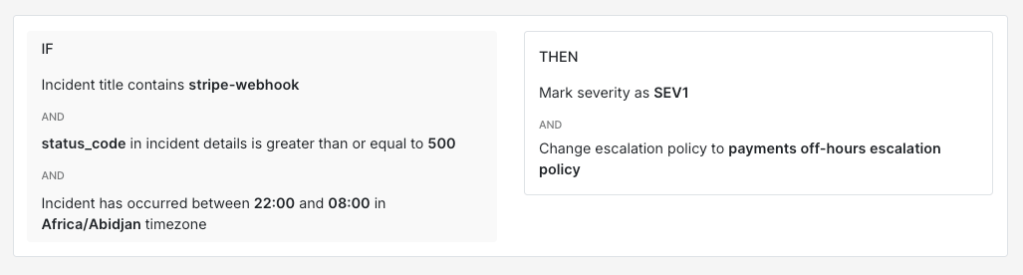
A Redis memory incident overnight probably needs the infrastructure on-call. A Stripe webhook failure overnight probably needs someone from the payments team. Routing rules can handle that distinction automatically.
IF title contains "redis"AND incident details [key: "memory_pct"] > 90AND time is between 10 PM and 8 AMTHEN mark severity as SEV-1AND load → infrastructure off-hours escalation policy
IF title contains "stripe-webhook"AND incident details [key: "status_code"] >= 500AND time is between 10 PM and 8 AMTHEN mark severity as SEV-1AND load → payments off-hours escalation policy
The off-hours policy itself is where you control who gets the call. A good setup usually alerts one person first, the on-call responder, and escalates to a backup if they don’t acknowledge within a few minutes. This keeps the blast radius small. The rest of the team sleeps through it while the right person handles the incident.
It’s also worth keeping phone calls reserved for off-hours critical incidents specifically. When phone calls go out for every incident regardless of time or severity, responders gradually start treating them as background noise. Keeping them exclusive to midnight critical incidents means the signal stays strong.
To learn more about setting up escalation policies, read this blog: A compass for setting up your escalation policy
Keep the noise away from your on-call
The fewer unnecessary wake-ups your on-call person gets, the faster and more alert they’ll be when a real incident comes through. Noise reduction overnight is probably even more important than during business hours because each false page interrupts sleep.
There are a few tools that work well here:
- Auto-resolve works for incidents that always self-correct. A nightly data sync job that briefly spikes error rates before settling down is a good candidate. If the pattern is predictable and has never needed human attention, auto-resolve keeps it off the on-call queue entirely.
IF title contains "nightly-sync" AND incident details [key: "error_rate"] < 5 AND time is between 11 PM and 6 AM THEN auto-resolve
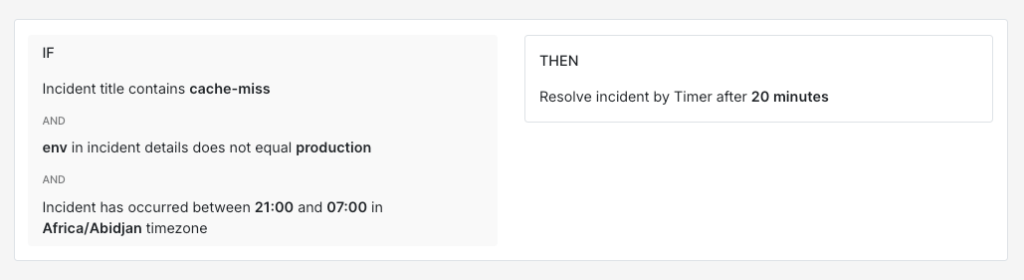
- Resolve by timer works for incidents that are probably fine but worth catching if they persist. A non-production cache miss rate going above the threshold overnight is worth watching but not worth acting on right away. A 20-minute resolve timer gives the system time to self-correct while still catching it if the problem sticks around.
IF title contains "cache-miss" AND incident details [key: "env"] != "production" AND time is between 9 PM and 7 AM THEN resolve by timer (20 minutes)
- Frequency-based conditions help separate a one-off transient error from a sustained problem. A single 503 from your notification service at 1 AM is probably a blip. Twelve of them within five minutes is a pattern worth waking someone up for.
IF title contains "notification-svc" AND incident details [key: "http_status"] = 503 AND incident triggers <= 5 times within 10 minutes THEN auto-resolve
IF title contains "notification-svc" AND incident details [key: "http_status"] = 503 AND incident triggers > 5 times within 10 minutes THEN mark severity as SEV-2 AND load → platform off-hours escalation policy
You can also combine multiple conditions to build rules that are quite precise. A Kubernetes pod restart on a non-critical service in a non-production namespace overnight is very different from a pod crash loop on a customer-facing service in production.
IF title contains "pod-restart"AND incident details [key: "namespace"] != "production"AND incident details [key: "restart_count"] < 3AND time is between 10 PM and 8 AMTHEN do not create incident
IF title contains "pod-restart"AND incident details [key: "namespace"] = "production"AND incident details [key: "restart_count"] >= 3THEN mark severity as SEV-1AND load → infrastructure off-hours escalation policy
The goal is straightforward. When your on-call person’s phone rings at 2 AM, they should be confident it’s something that genuinely needs their attention. That confidence comes from knowing the noise has already been filtered out.
When the call does come through
When a midnight incident does reach the on-call responder, the response path should be as short and clear as possible.
The first priority is to acknowledge the incident. This stops the escalation policy from moving to the next step and prevents unnecessary pages to the backup responder. Acknowledge first, assess second.
From there, the responder works through the incident. If it’s something familiar with a documented fix, they handle it and go back to sleep. If it’s unfamiliar or more complex than expected, early escalation is usually the better choice. Spending an hour troubleshooting alone at 2 AM often leads to a longer resolution time than pulling in the right person after 10 or 15 minutes.
The escalation path for midnight incidents is worth thinking about carefully. The responder should know exactly who to contact if they need help. A well-structured off-hours escalation policy handles this automatically. If the primary responder doesn’t acknowledge within five minutes, the incident moves to the backup. If neither responds, it escalates to the team lead or engineering manager.
Step 1: Phone call to the on-call responder If not acknowledged in 5 minutes, move to step 2
Step 2: Phone call to the backup responder If not acknowledged in 5 minutes, move to step 3
Step 3: Phone call to the engineering manager
Each step adds exactly one person. Nobody else on the team gets woken up unless the incident reaches a point where broader involvement is necessary. And even then, the escalation policy controls who gets called rather than leaving it to a group page.
Midnight incidents will always be part of running production systems. The part you can control is how many people they wake up. When your setup is right, one person handles it while the rest of the team finds out about it over morning coffee. That’s probably the best version of a 2 AM incident you can hope for.
If you’re ready to set up off-hours routing for your team, Spike is a good place to start.
FAQs
What happens when a routing rule auto-resolves an incident that later turns out to be critical?
This is the risk with any suppression setup. The safest approach is to make suppression rules as specific as possible and always add an explicit exemption for production or customer-facing services. It’s also worth reviewing your auto-resolved incident queue regularly to check whether anything meaningful was suppressed. If a genuinely critical incident gets auto-resolved more than once, that’s a clear signal your rule needs tighter conditions.
Can off-hours routing rules account for scheduled maintenance windows?
Yes, and it’s worth setting up. If you have a known maintenance window from 1 AM to 3 AM every Saturday, incidents from the affected services during that window are expected rather than surprising. A routing rule with a day-of-week and time-of-day condition can auto-acknowledge or suppress those incidents for the duration. Without this, your on-call person gets paged for expected behaviour every maintenance night.
Is it worth having separate off-hours policies for weeknights versus weekends?
It depends on your incident patterns. If weekends consistently see different types of incidents than weeknights, separate policies can be useful. A retail platform might see more payment-related incidents on weekends when customer traffic peaks, while weeknight incidents skew towards batch processing and infrastructure. Day-of-week conditions in your routing rules can load different policies for each. That said, a single off-hours policy is often enough to start with. You can always split it later once you have enough incident data to justify it.