
OpsGenie is sunsetting. Atlassian already stopped its new sales in June 2025, and the platform is scheduled to shut down completely on April 5, 2027.
This means you need to move your incident response setup somewhere else. Atlassian points you toward Jira Service Management (JSM).
But I wanted to find out if JSM actually works for incident response. So I signed up, connected a monitoring tool, and ran test alerts. I triaged incidents, started war rooms, and checked how status pages work. I also looked at what happens after an incident closes.
Then, I reviewed Jira Service Management (JSM) based on four key criteria (you’ll know them as you read). And for each criterion, I’ve shared what I liked and what I didn’t.
By the end of this blog, you’ll know whether JSM fits your needs. If it doesn’t, I’ve also included an alternative that might work better.
Let’s dive in!
Table of Contents
Jira Service Management (JSM) Review: My Incident Response Criteria
- Initial Response: How does JSM handle the moment an alert fires? I tested triage controls, acknowledgment from different channels, escalation policies, and automation options.
- Team Collaboration: Can your team coordinate quickly during an incident? I tried war rooms, Slack channels, and ticket creation for tools like Jira and Linear.
- Incident Communication: How do you keep people outside your response team informed? I set up status pages and tested ways to update stakeholders.
- Post-Incident Actions: What tools does JSM give you for learning after an incident? I checked timelines, resolution notes, and postmortem features.
Jira Service Management (JSM) Review for Incident Response
| Criteria | What I liked | What I didn’t like |
|---|---|---|
| Initial Response | Strong manual controls, flexible automation with Alert Policies and Automation, repeat escalation with customizations | Can’t acknowledge from email, escalation timing calculated from the top, no acknowledgment timeout |
| Team Collaboration | Instant Zoom and Teams war room buttons, automatic Slack channel creation, bi-directional Jira sync | No instant war room button on Slack, can’t see ongoing war rooms |
| Incident Communication | Notify Stakeholders button after incident resolution, flexible automation options | No built-in status page, requires paid Statuspage.io integration |
| Post-Incident Actions | Unified activity log, postmortem creation on Premium and Enterprise plans | Postmortem not available on lower plans, resolution notes not saved separately |
1. Initial Response in JSM
JSM carries forward OpsGenie’s approach to manual triage. You can update priority from Slack or the dashboard. For automatic triage, JSM gives you Alert Policies and Automation, which work like if-else-then rules to set priority based on conditions.
What I liked
The manual controls are solid. You can acknowledge alerts from all channels except email. You can do it from Slack, the dashboard, or the mobile app.
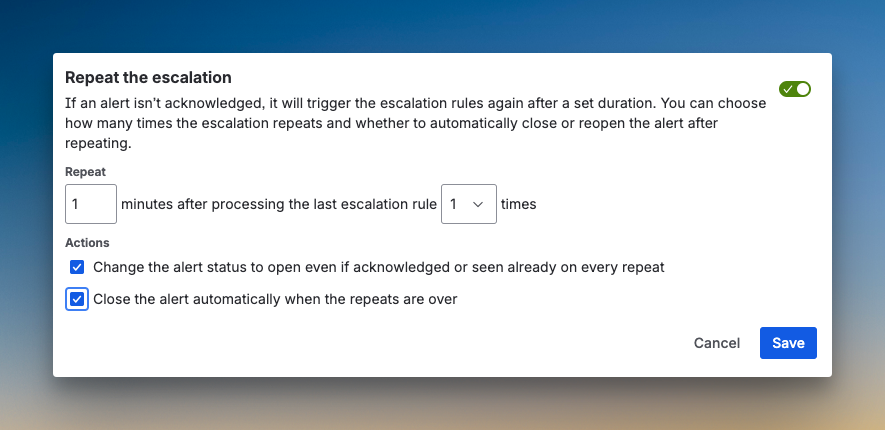
JSM adds repeat escalation with useful customizations. You can set a time delay after processing the last alert, define the number of repetitions, and even close alerts automatically when the repetitions finish. This is a step up from OpsGenie.
The automation options are flexible. Alert Processing Rules work at the integration level. Alert Policies let you create conditional logic for alert filtering and modification. The Automation feature triggers actions based on conditions.
What I didn’t like
You can’t acknowledge alerts from email. This is a limitation if your team relies on email for quick actions.
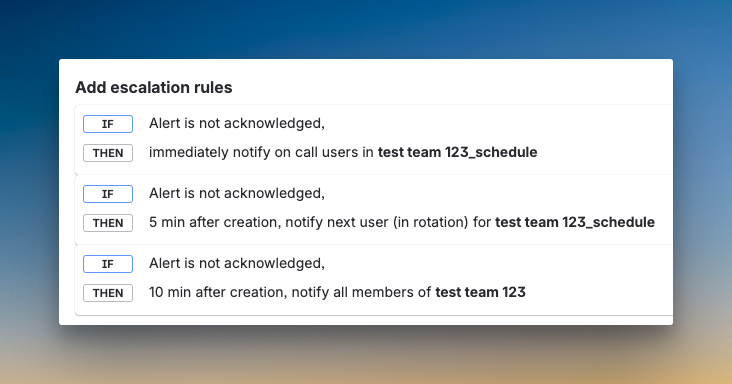
The escalation timing is calculated from the top of the policy, not relative to each step. For example, if you want to escalate after 5 minutes, then after 10 more minutes, you need to calculate 15 minutes from the start. This adds mental overhead.
There’s no acknowledgment timeout. If someone acknowledges an alert but doesn’t resolve it, there’s no automatic re-escalation. You also can’t add multiple alerts in one escalation step without manual time calculations.
2. Team Collaboration in JSM
JSM gives you tools to coordinate during an incident. You can start war rooms, create dedicated Slack channels, and create Jira tickets with bi-directional sync.
What I liked
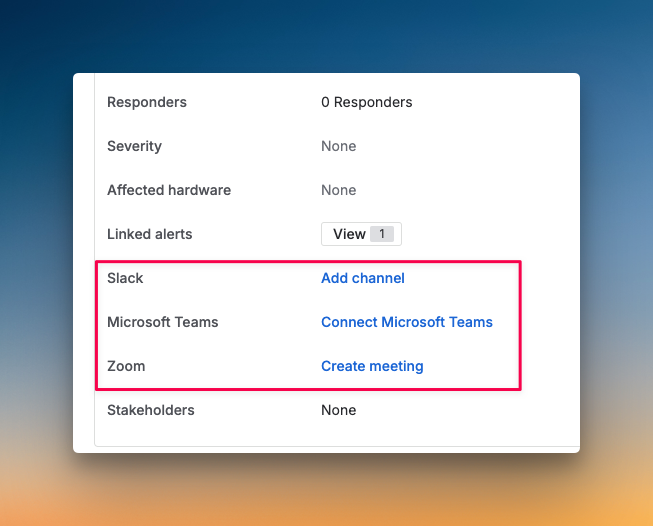
The instant war room buttons for Zoom and Teams are convenient. You can click a button on the incident dashboard and start a call. This makes it easy to pull the team together fast.
JSM maintains OpsGenie’s strong bi-directional sync with Jira. You can create Jira tickets instantly from the dashboard or set up automation to create tickets when alerts match certain criteria. Changes sync both ways, so follow-up work doesn’t slip through the cracks.
Dedicated Slack channels can be created automatically when an alert becomes an incident. You also get an “Add Slack Channel” button on the incident dashboard for manual creation.
What I didn’t like
There’s no instant war room button on Slack. You need to visit the dashboard to start a call. This adds friction during urgent incidents.
You can’t see ongoing war rooms. If multiple incidents are active, you have no way to know which war rooms are live or to request to join them.
3. Incident Communication in JSM
JSM focuses on internal communication. For external communication, it relies on integrations.
What I liked
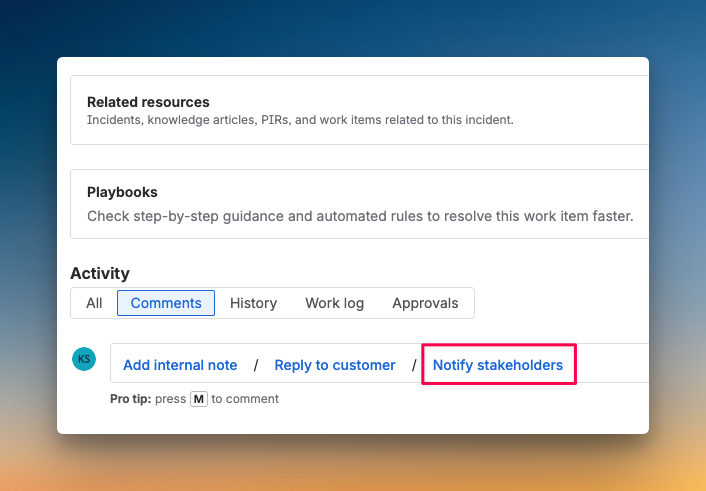
JSM adds a “Notify Stakeholders” button on the incident dashboard after an incident is resolved. This is a simple way to send post-resolution updates.
You can set up automations to send emails or Slack messages to stakeholders during an incident. This gives you flexibility in how you communicate.
What I didn’t like
JSM does not have a built-in status page. You need to integrate with Atlassian’s Statuspage.io, which costs an additional $29-109 per month on top of your JSM subscription.
There’s no button on the dashboard or Slack to create status page updates for an incident. You need to open Statuspage.io separately. Direct automation for status updates is not available. You need to trigger webhooks to achieve this, which adds complexity.
4. Post-Incident Actions in JSM
JSM provides tools for after-action reviews. You get a unified activity log, resolution notes, and postmortem creation.
What I liked
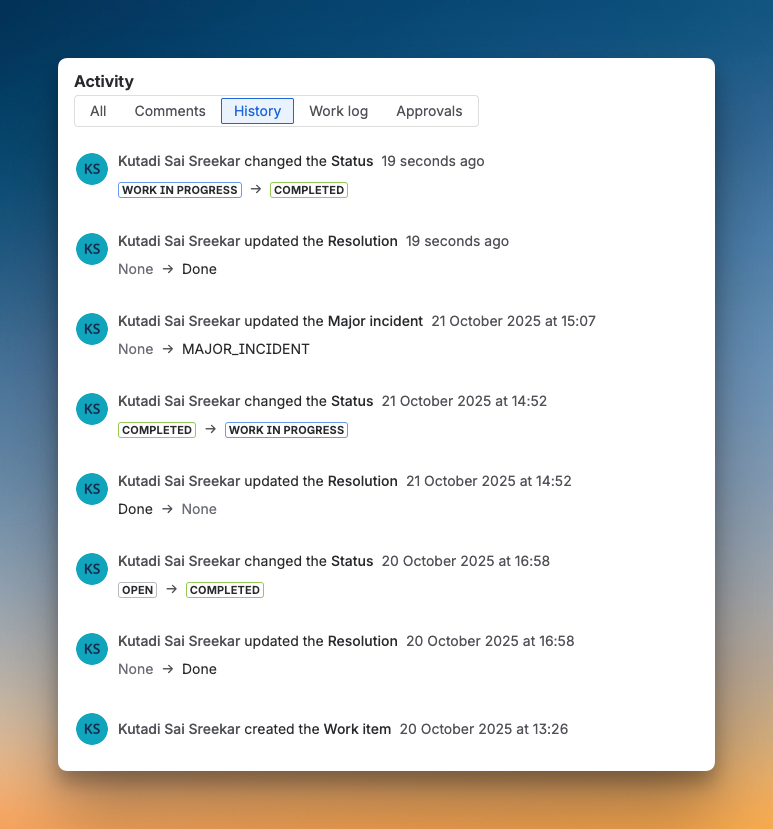
JSM keeps a single, unified activity log. Every action gets logged in one timeline. This makes it easy to trace what happened during an incident.
You can add resolution notes to a closed incident. While they’re not saved separately as resolution notes, you can still document the resolution after closure.
Postmortem creation is now available on both Premium and Enterprise plans. OpsGenie only offered this on Enterprise. JSM provides built-in postmortem templates to help standardize your reviews.
What I didn’t like
Postmortem creation is not available on lower-tier plans. If you’re on a Basic plan, you won’t have access to this feature.
Resolution notes are not saved separately. They appear as regular notes, which makes them harder to find later.
So, Should You Consider Jira Service Management (JSM) for Incident Response?
JSM carries forward OpsGenie’s core features and adds improvements like repeat escalation and a “Notify Stakeholders” button. It maintains strong Jira integration and gives you flexible automation options with Alert Policies and Automation.
However, JSM has clear gaps. It doesn’t have a built-in status page, and you need to pay extra for Statuspage.io. Escalation timing is calculated from the top, which makes setup less intuitive. There’s no acknowledgment timeout, and you can’t acknowledge from email.
Many powerful features, like postmortem creation, are locked behind Premium or Enterprise plans. If you’re on a lower-tier plan, you’ll miss critical tools.
Choose JSM if you already use Jira heavily, need bi-directional sync, and can handle the extra cost for status pages.
If that doesn’t sound like you, there’s a better alternative that might fit your needs.
Spike: A Better Jira Service Management (JSM) Alternative for Incident Response
Spike is a modern incident management platform built for simplicity and speed. It gives you the tools to manage the entire incident lifecycle, from the first alert to the final postmortem, without the complexity or hidden costs.
Here’s why Spike is a better alternative to JSM for your incident response needs:
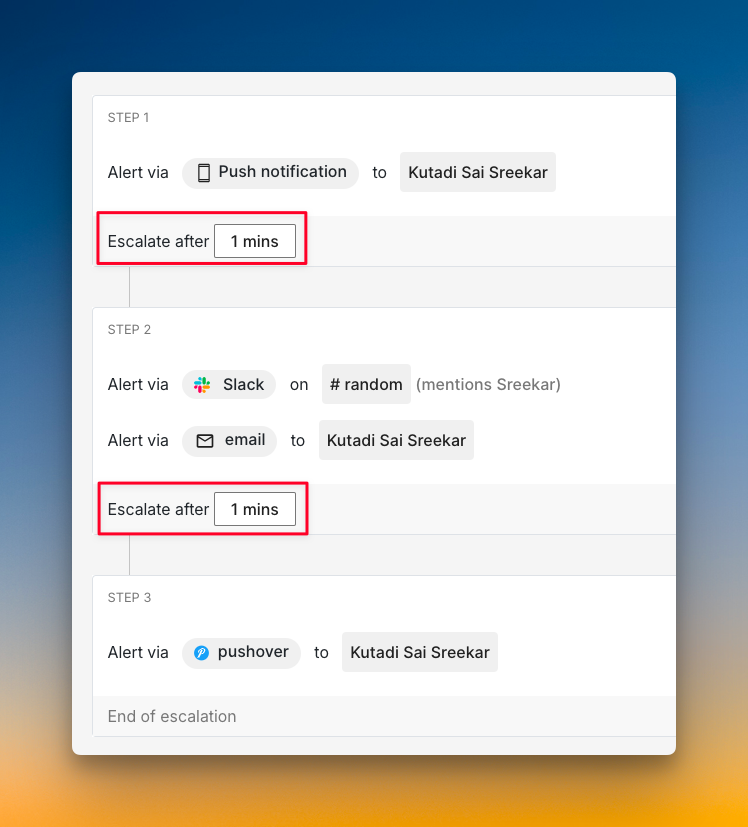
- More flexible escalation policies. Spike lets you set relative escalation timing. You define “escalate after X minutes” for each step, not from the top. You can also add wait time at the start for auto-resolvable incidents. Plus, Spike has an Acknowledge Timeout, which JSM lacks.
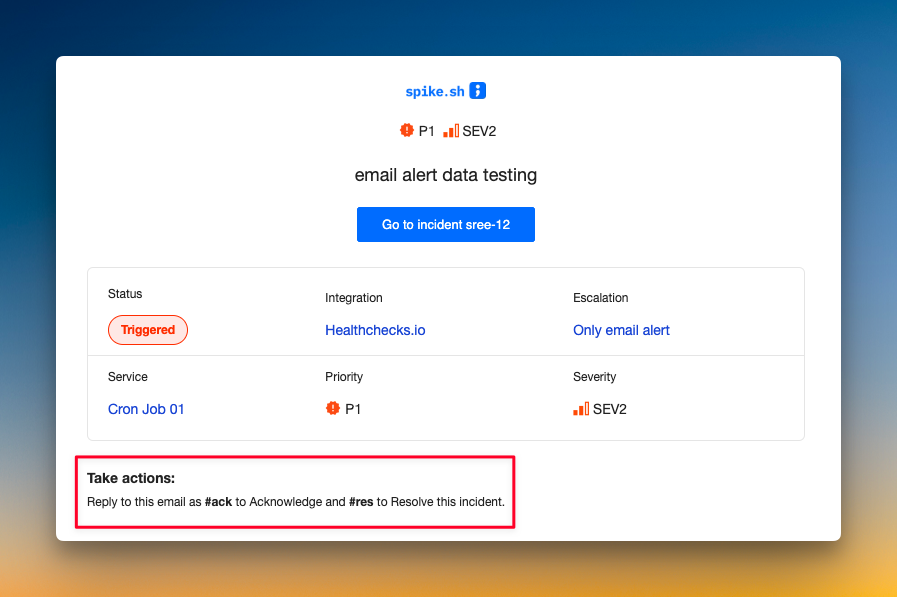
- You can acknowledge from all channels, even email. Unlike JSM, Spike lets you acknowledge incidents by replying to an email. This gives your team more flexibility during urgent incidents.
- Auto-resolve timer prevents stale incidents. Spike’s Resolved by Timer feature automatically resolves incidents after a set period. This keeps your dashboard clean without manual intervention.
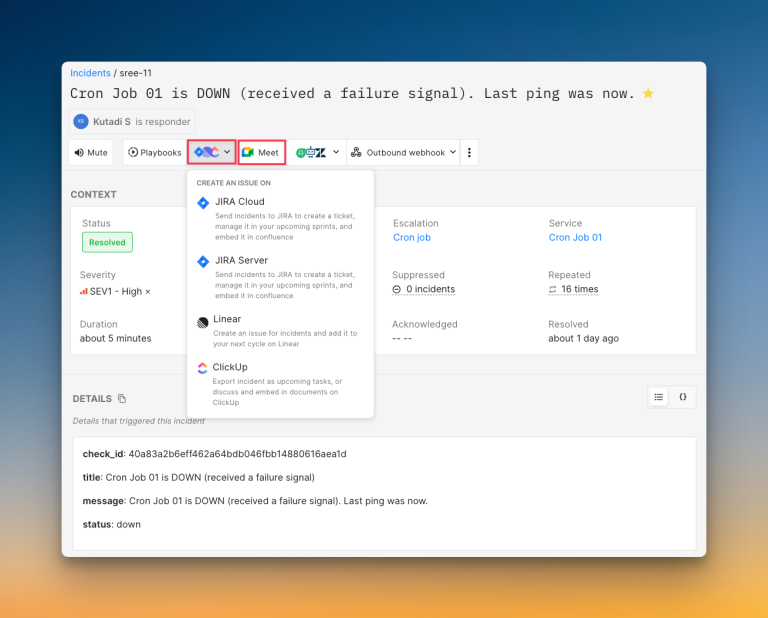
- One-click war rooms with visibility. Spike uses Google Meet for war rooms. You can create one with a single click from the dashboard. A unique feature: You can see all ongoing war rooms and request to join them.
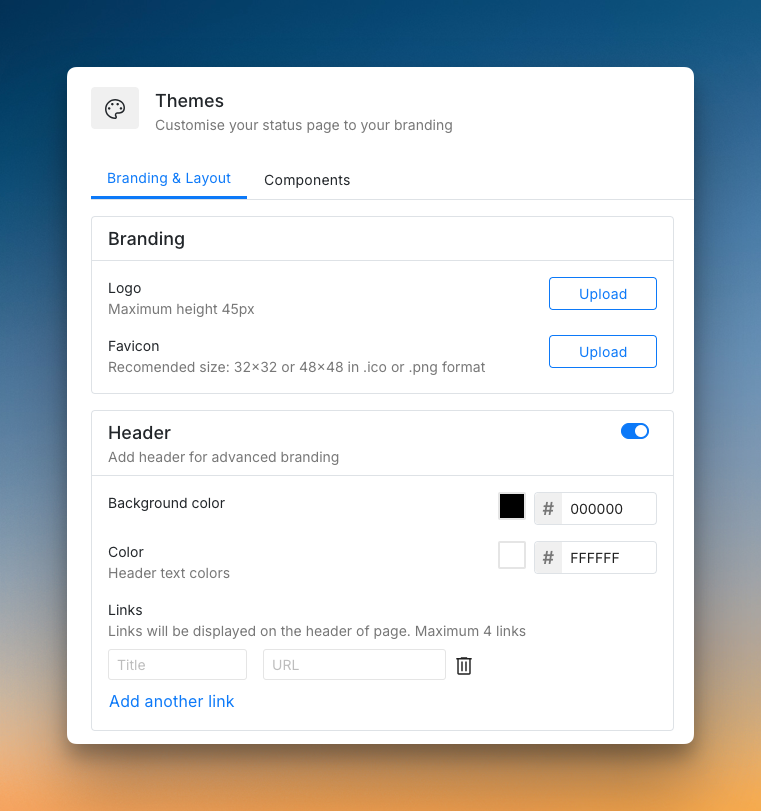
- Built-in status pages at no extra cost. Spike gives you status pages on all its plans. You can create public or private pages, host them on your own domain, and customize branding. There are no surprise costs or subscriber limits.
Check out these example status pages of Spike: AirBnB and SpaceX.
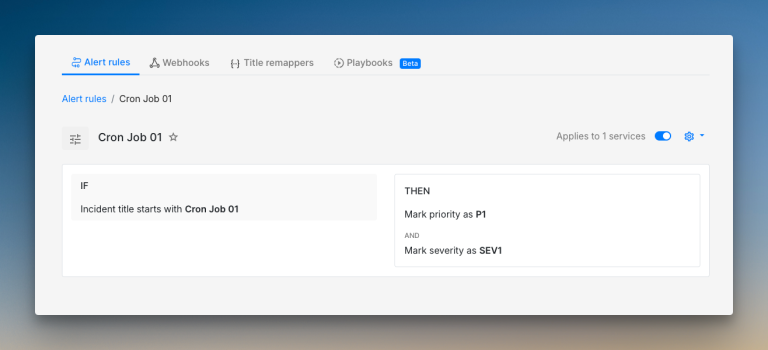
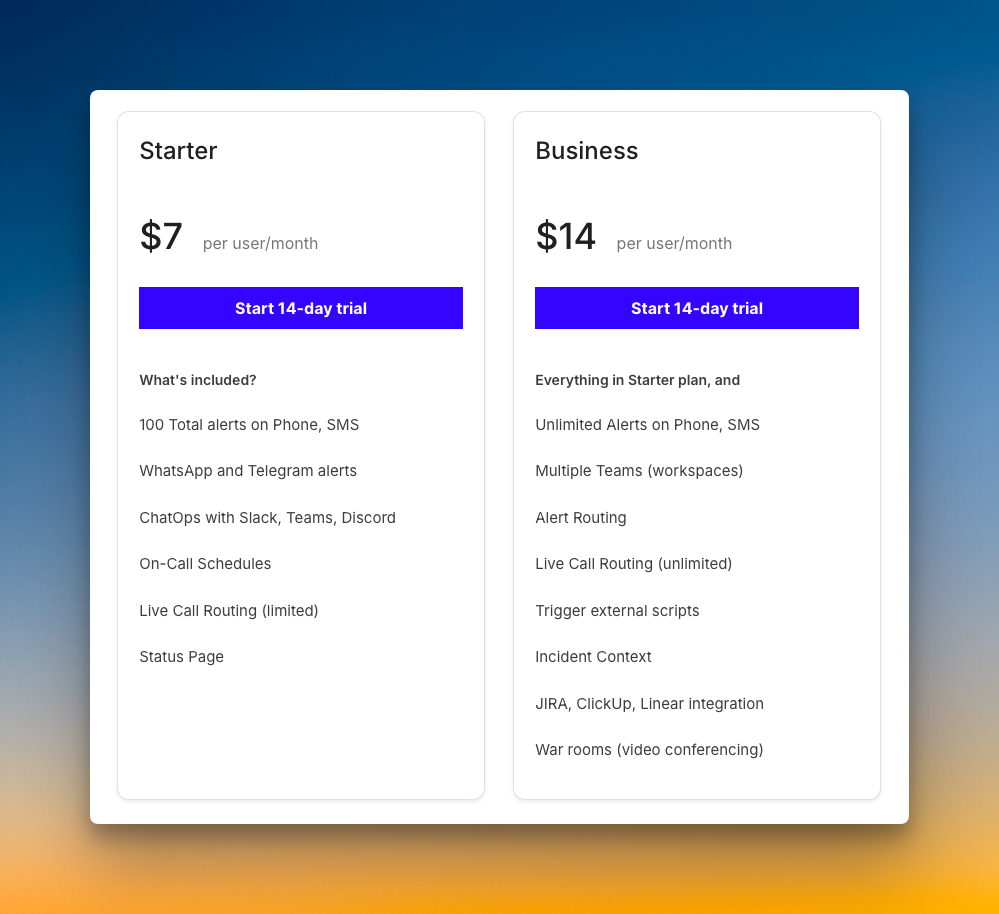
- Simpler automation with Alert Rules and Playbooks. Spike makes automation straightforward. You can create Alert Rules with if/else-then logic and build Playbooks to run a series of actions. All these features are included in the Business plan for just $14/user/month.
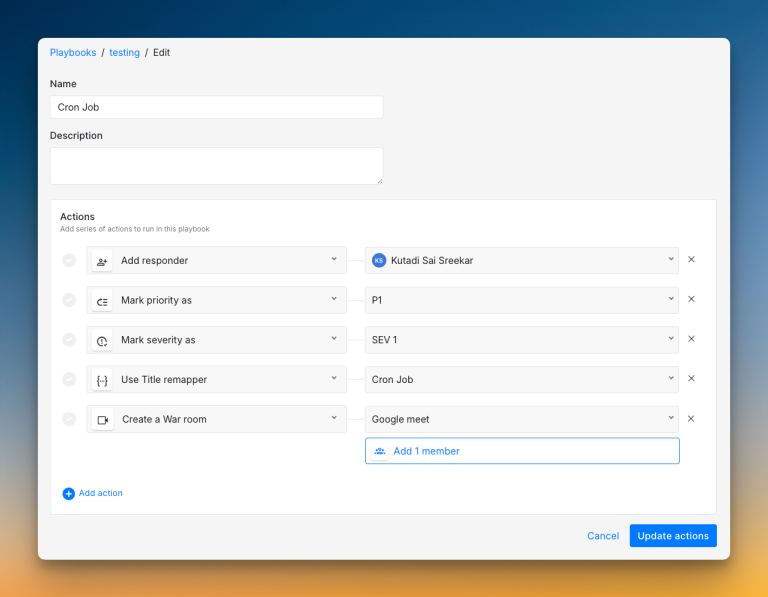
- Webhook-based postmortems for your tools. Instead of built-in templates, Spike lets you send all incident data to your own documentation tools, like Notion. This gives you the flexibility to stick with your team’s existing review process.
All these features come at a fraction of the cost. You get a more flexible and user-friendly platform for about one-third of what you would pay for JSM with similar capabilities.
Read JSM vs. Spike: Incident Response for a detailed comparison.
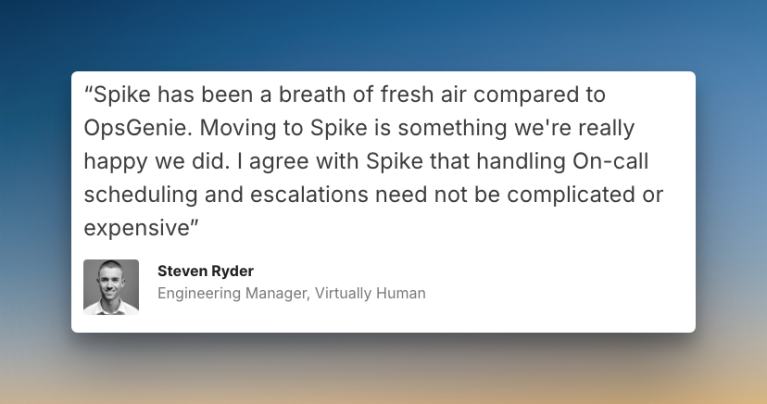
Virtually Human’s Switch From OpsGenie to Spike
Virtually Human builds entertainment products with emerging tech like blockchain. When they needed an OpsGenie replacement, they chose Spike.
Steven Ryder, their former Engineering Manager, led the migration. He could move the team to Spike without any service interruptions.
Virtually Human now manages on-call schedules for 15 engineers across 8 time zones. That kind of global spread makes incident response harder. But Spike handles it without any friction.
Their story shows that leaving OpsGenie doesn’t have to be hard. With the right tool, you can migrate quickly and get back to work.
With OpsGenie shutting down, businesses are switching to Spike with 50% off. Learn more →
Final Thoughts
JSM is a solid tool with strong Jira integration and flexible automation. I was impressed by its repeat escalation customizations, bi-directional Jira sync, and unified activity log.
However, I found key gaps during my testing. Status pages cost extra, escalation timing is calculated from the top, and there’s no acknowledgment timeout. Many essential features are locked behind Premium or Enterprise plans.
Spike solves these problems. It offers a simpler, more flexible platform designed for modern teams. You get all the incident response tools in one straightforward package, at a much lower cost.
OpsGenie is shutting down, and Atlassian points you toward JSM. But JSM isn’t your only option. You don’t have to follow Atlassian’s recommended path just because they suggest it.
Tools like Spike offer more flexibility, no hidden costs, and features JSM lacks. The migration is simple, and you can start using it right away.