
Atlassian is shutting down OpsGenie. New sales stopped on June 4, 2025, and the platform will go offline completely on April 5, 2027.
As an OpsGenie user, you now face a critical decision. Migrate to Jira Service Management (JSM), Atlassian’s recommended path, or choose a purpose-built alternative like Spike.
This decision is a big one. And to make it easier, I did the research for you. I signed up for both JSM and Spike and ran a full, hands-on comparison.
I created integrations and triggered test alerts on each platform. I tested everything from alert triage to team collaboration. I also looked at status pages and post-incident actions.
This post shares what I found. It’s a detailed comparison of Jira Service Management (JSM) vs. Spike for incident response.
My goal is to give you the clarity to pick the right tool for your team.
Let’s get started!
Table of Contents
Jira Service Management (JSM) vs. Spike: My Incident Response Criteria
- Initial Response: I checked how each tool handles the first moments of an incident. This included triage, acknowledgment options, escalation policies, and automation rules.
- Team Collaboration: I looked at how the tools help teams coordinate. This meant starting war rooms, making dedicated Slack channels, and creating project tickets on Jira, Linear, etc.
- Incident Communication: I explored how you communicate with everyone outside the response team. This involved testing status pages and sending updates to stakeholders.
- Post-Incident Actions: I checked the features for after-action reviews. This covered the incident timeline, resolution notes, and creating postmortems.
Jira Service Management (JSM) vs. Spike: Incident Response Comparison
| Criteria | JSM | Spike |
|---|---|---|
| Initial Response | Manual controls, automation via Alert Policies, top-down escalation timing. | Built-in automation with Alert Rules, relative escalation timing, Acknowledge Timeout and Resolved by Timer feature. |
| Team Collaboration | Zoom/Teams war rooms, bi-directional Jira sync, automatic Slack channels. | One-click Google Meet war rooms, simpler ticketing for Jira/Linear/ClickUp. |
| Incident Communication | Requires paid Statuspage.io integration, manual status updates. | Built-in status pages, SEO controls, automatic updates via Playbooks. |
| Post-Incident Actions | Unified activity log, built-in postmortem templates on paid plans. | Unified timeline, webhook-based postmortems for any documentation tool. |
1. Initial Response: JSM vs. Spike
Initial Response in JSM
JSM carries forward the OpsGenie approach to manual triage. You can update priority from Slack or the dashboard. For automatic triage, JSM gives you Alert Policies, similar to OpsGenie’s Policies feature.
You can acknowledge alerts from all channels except email. Auto-acknowledge is possible through Alert Processing Rules or Automation.
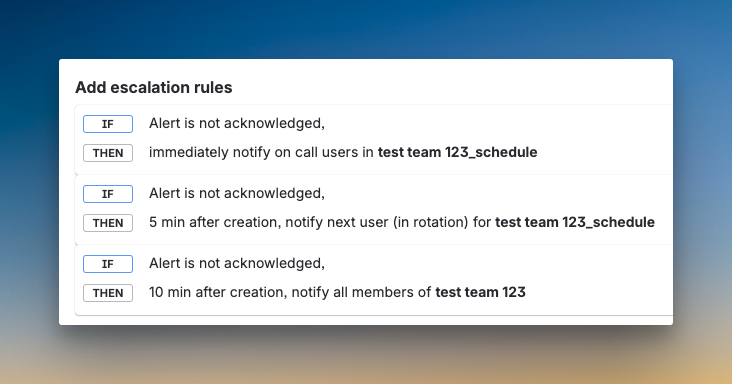
JSM also adds repeat escalation with customizations like time delay, maximum repetitions, and automatic alert closure when repeats finish. However, like OpsGenie, you calculate delay time from the top of the escalation policy, not relative to each step.
Initial Response in Spike
Spike builds automation into its core with Alert Rules. You can create if/else logic to auto-triage, acknowledge, or resolve incidents. Playbooks help trigger pre-defined actions to standardize your response.
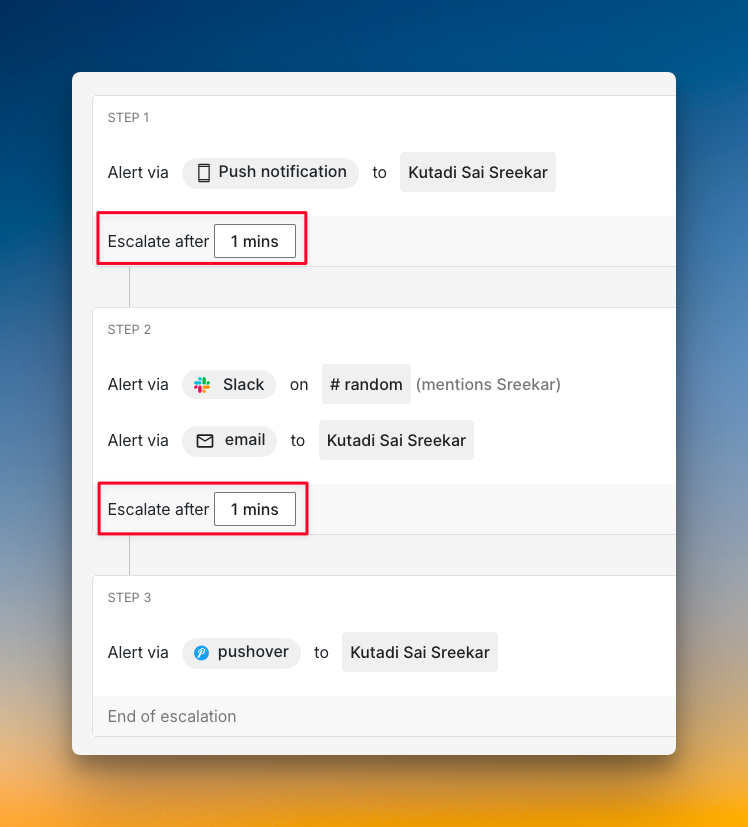
You can acknowledge from all alert channels, even email. Escalation timing is relative, meaning you set “escalate after X minutes” for each step. You can also add wait time at the start for auto-resolvable incidents.
Spike adds an Acknowledge Timeout, which OpsGenie lacks. Plus, Spike’s Resolved by Timer feature automatically resolves incidents after a set period. This prevents stale incidents from cluttering your dashboard.
Who should pick what?
- Pick JSM if you want repeat escalation with customizations like automatic closure when repeats finish, and prefer to calculate escalation timing from the top.
- Pick Spike if you want built-in automation with Alert Rules and Playbooks, relative escalation timing, and features like auto-resolve timer and email acknowledgment.
2. Team Collaboration: JSM vs. Spike
Team Collaboration in JSM
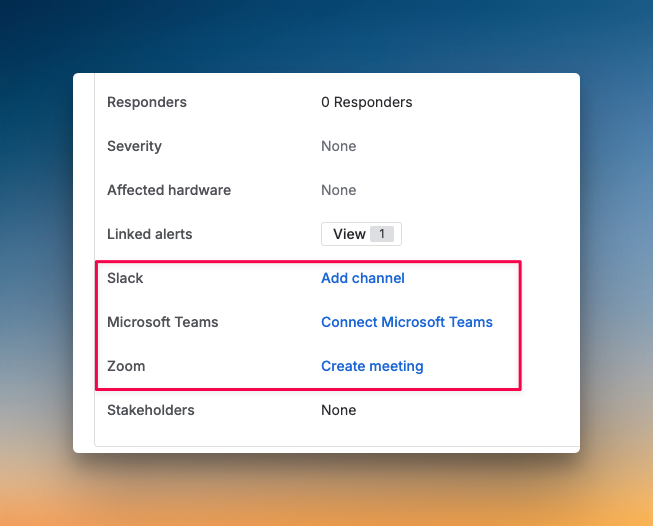
JSM offers instant war room buttons for Zoom and Teams on the incident dashboard. You can also create dedicated Slack channels manually with an “Add Slack Channel” button or automatically when an alert becomes an incident.
For tickets, JSM maintains OpsGenie’s strong bi-directional sync with Jira. You can create Jira tickets instantly from the dashboard or set up automation to create tickets when alerts match certain criteria. However, there’s no instant war room button available on Slack itself.
Team Collaboration in Spike
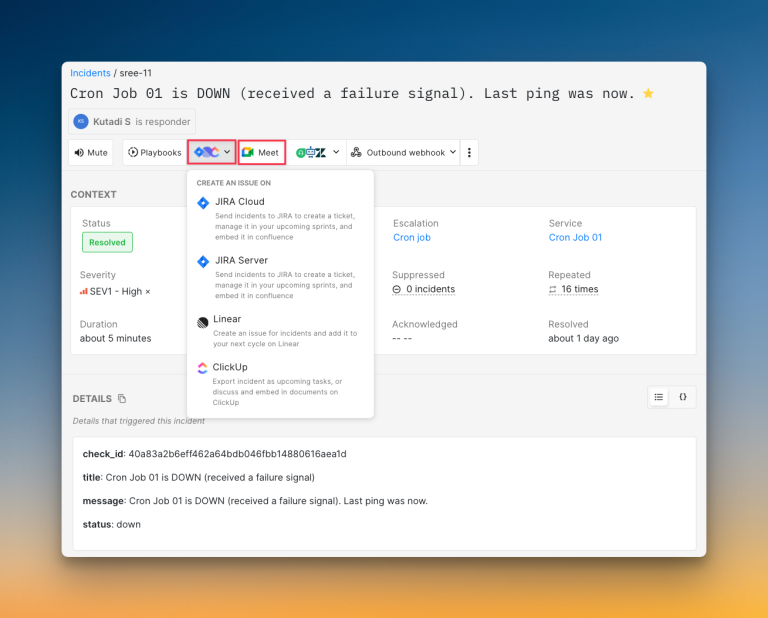
Spike uses Google Meet for war rooms. You can create one with a single click from the dashboard and choose who to add. Playbooks can automatically create war rooms based on specific conditions.
A unique feature is that you can see all ongoing war rooms and request to join. You can create Jira, Linear, or ClickUp tickets manually from the dashboard or automatically with Playbooks. Spike doesn’t offer bi-directional Jira sync, but it provides separate incoming and outgoing Jira integrations. Ticket creation is simpler and works across more project management tools.
Who should pick what?
- Pick JSM if you need bi-directional Jira sync and prefer Zoom or Teams for war rooms with instant buttons on the dashboard.
- Pick Spike if you want to see ongoing war rooms, request to join them, and create tickets across multiple tools like Jira, Linear, and ClickUp with straightforward automation.
3. Incident Communication: JSM vs. Spike
Incident Communication in JSM
JSM does not have a built-in status page. You need to integrate with Atlassian’s Statuspage.io, which costs an additional $29-109/month on top of your JSM subscription.
There’s no button on the dashboard or Slack to create status page updates for an incident. You must open Statuspage.io separately.
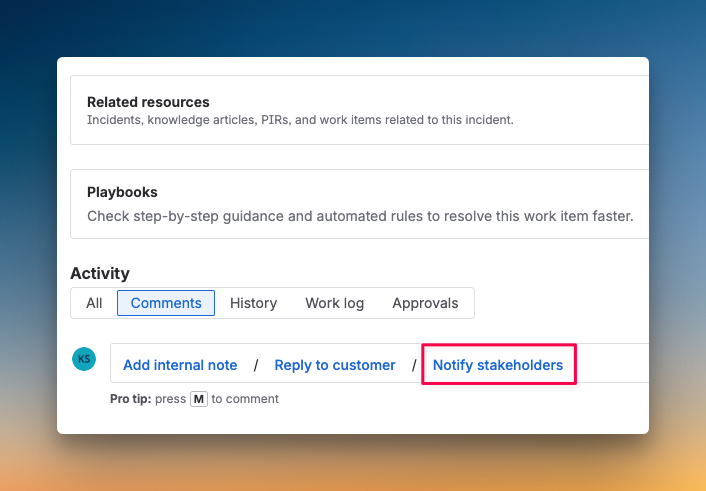
Direct automation for status updates is not available. You need to trigger webhooks to achieve this. JSM does add a “Notify Stakeholders” button on the incident dashboard after an incident is resolved, which OpsGenie lacks.
Incident Communication in Spike
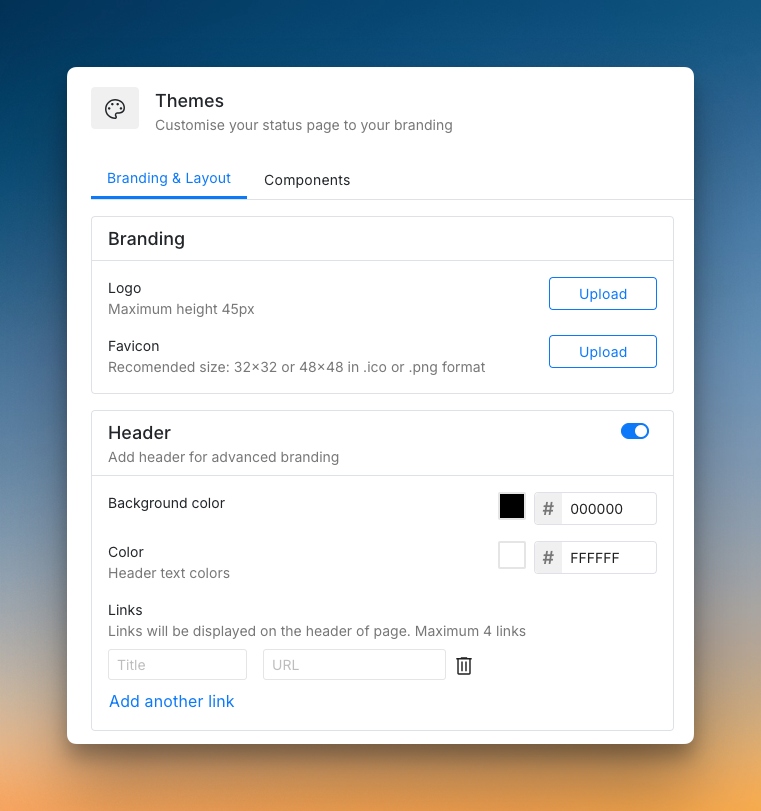
Spike has built-in status pages at no extra cost. Creating one is easy, and you get a live preview as you build. You can create public or private pages and host them on your own domain.
You can change labels to match your organization’s terminology, set up SEO optimization with title and meta description, and customize branding. You can also control who views private status pages by allowing only specific people to access them.
Check out these example status pages of Spike: AirBnB and SpaceX
For stakeholder updates, you can set up Playbooks to send automatic notifications through outbound webhooks when incidents occur or get resolved.
Who should pick what?
- Pick JSM if you already use Statuspage.io and don’t mind the extra cost, or if you need the “Notify Stakeholders” button for post-resolution communication.
- Pick Spike if you want built-in status pages with live preview, deep customization, SEO controls, and simple automation through Playbooks at no additional cost.
With OpsGenie shutting down, businesses are switching to Spike with 50% off. Learn more →
4. Post-Incident Actions: JSM vs. Spike
Post-Incident Actions in JSM
JSM keeps the same unified activity log as OpsGenie. Every action gets logged in a single timeline. You can add resolution notes to a closed incident, though they appear as regular notes, not saved separately as resolution notes.
Postmortem creation is available on both Premium and Enterprise plans in JSM, whereas in OpsGenie, it was Enterprise-only. JSM provides built-in postmortem templates to help standardize your post-incident reviews.
Post-Incident Actions in Spike
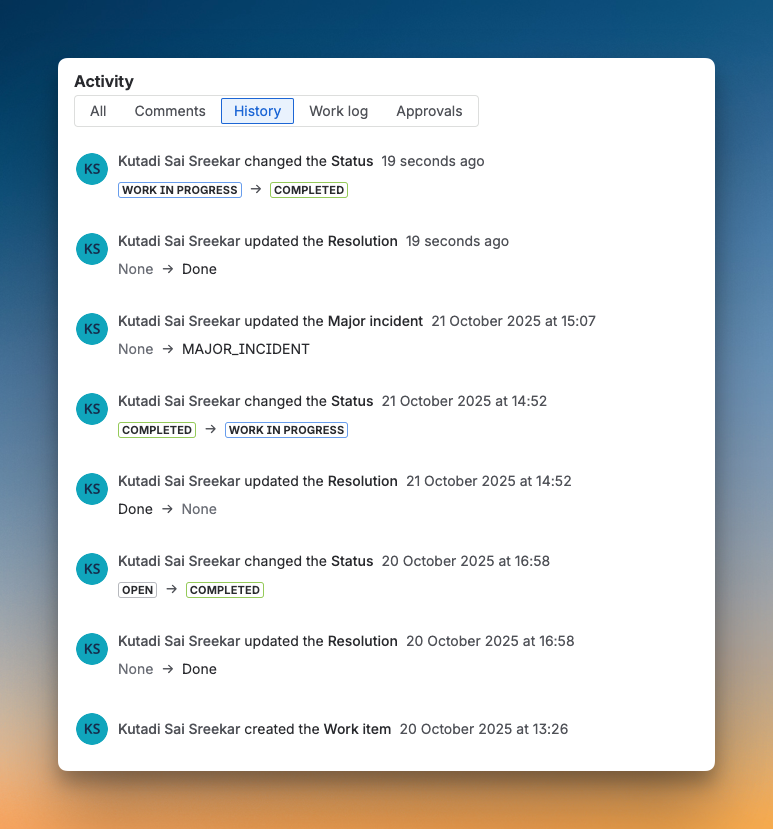
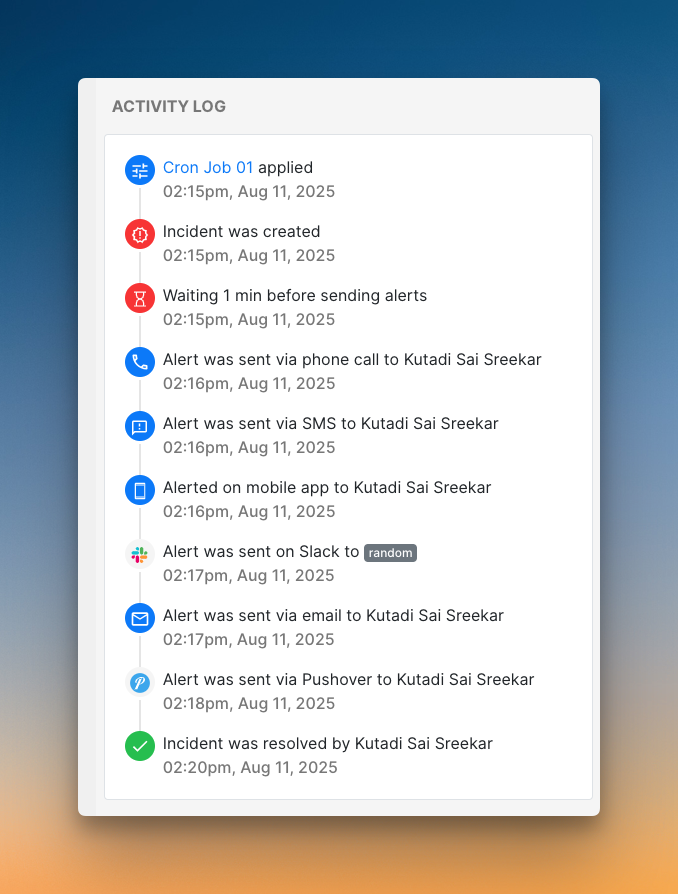
Spike logs everything in a single incident timeline. This includes alert creation, acknowledgment, resolution, and even Playbook triggers. You get a complete view of what happened from start to finish. Also, you can add resolution notes on the dashboard.
Spike focuses on flexibility for postmortems. Instead of built-in templates, you can use webhooks to send all incident data to your own documentation tools, like Notion. This allows you to stick with your team’s existing review process.
Who should pick what?
- Pick JSM if you want built-in postmortem templates and prefer to keep your incident reviews inside the Atlassian ecosystem.
- Pick Spike if you want a clean, all-in-one timeline and the flexibility to export incident data to your team’s favorite documentation tools.
Jira Service Management (JSM) vs. Spike: Incident Response Checklist
I’ve covered the big questions, but when it comes to incident response, some small details can make or break your experience.
Here’s a 10-point checklist comparing both tools side by side so you know exactly what you’re getting.
| Checklist Item | JSM | Spike |
|---|---|---|
| Automatic incident suppression with deduplication | ✅ | ✅ |
| Trigger incidents from incoming emails | ✅ | ✅ |
| Trigger external webhooks automatically | ✅ | ✅ |
| Acknowledge or resolve by replying to email | ❌ | ✅ |
| Auto-resolve incidents when system is healthy | ✅ | ✅ |
| Auto-detect incident severity and priority | ✅ | ✅ |
| Route alerts based on time of day | ✅ | ✅ |
| Ready-to-use templates for escalations and alert rules | ❌ | ✅ |
| Built-in status pages at no extra cost | ❌ | ✅ |
| Built-in postmortem templates | ✅ | ❌ |
Final Thoughts
Both JSM and Spike handle core incident response functions you know from OpsGenie.
JSM is Atlassian’s official migration path. It makes sense if you use Jira heavily, need bi-directional sync, and want built-in postmortem templates. However, status pages cost extra, and many powerful features require Premium or Enterprise plans.
Spike offers a more flexible, purpose-built path forward. You get channel-specific escalation, reply-to-email actions, built-in status pages, and powerful automation with Alert Rules and Playbooks. It keeps what you loved about OpsGenie and adds smart improvements at a better price point.
OpsGenie will shut down completely by April 2027. Now is the time to test your options and migrate on your own terms. This gives you control over the transition instead of rushing at the last minute.
If you want a modern tool that simplifies incident response without the extra costs, Spike is the clear choice.