
If you’re not sure about choosing PagerDuty for alerting, this review will help you decide.
I signed up for PagerDuty and put it through real-world testing. I created a service “Cron Job”, integrated it with Healthchecks.io, designed an escalation policy, and triggered test alerts.
Then, I reviewed PagerDuty’s alerting capabilities across 6 key criteria. You’ll discover them as you read on.
For each criterion, I shared what I liked and what I didn’t. This gives you a balanced look at PagerDuty’s alerting features.
As you finish reading this review, you’ll know if PagerDuty fits your team’s needs. If you decide PagerDuty isn’t right for you, I’ve also included an alternative that might suit you better.
Let’s dive in!
Table of Contents
My Criteria for Evaluating PagerDuty’s Alerting Capabilities
- Alerting Philosophy: How PagerDuty approaches alerting. Does it focus on simplicity or add complexity to the process?
- Setup and Configuration: How fast you can add contact methods, create a service, connect integrations, and design an escalation policy in PagerDuty.
- Alert Channels: How well key alert channels like phone calls, SMS, email, push notifications, and Slack work. I checked the information quality in each alert and what actions you can take directly from notifications.
- On-Call Alerts: How easy it is to get on-call shift notifications when your on-call duty starts or ends, and how flexible these alerts are.
- Alert Fatigue Handling: What options does PagerDuty offer to reduce alert noise and prevent team burnout?
- Pricing: How affordable PagerDuty is for alerting, and whether there are any hidden fees you should know about.
PagerDuty Review for Alerting
| Criteria | What I liked | What I didn’t like |
|---|---|---|
| Alerting Philosophy | Complete freedom for users to choose alert methods. | No team-level alert customization. |
| Setup and Configuration | Separate phone numbers for calls and SMS. Easy test alerts. | Extra steps for Slack channel alerts. No Pushover support. |
| Alert Channels | Powerful Slack actions for managing incidents. | Can’t take action from email replies. |
| On-Call Alerts | Alerts only for critical services reduce noise. | No webhook triggers for shift changes. |
| Alert Fatigue Handling | Machine learning reduces alert fatigue. | ML noise reduction is costly add-on. |
| Pricing | Free plan to test phone and SMS alerts. | Paid plans are expensive, AIOps is costly. |
PagerDuty’s Alerting Philosophy
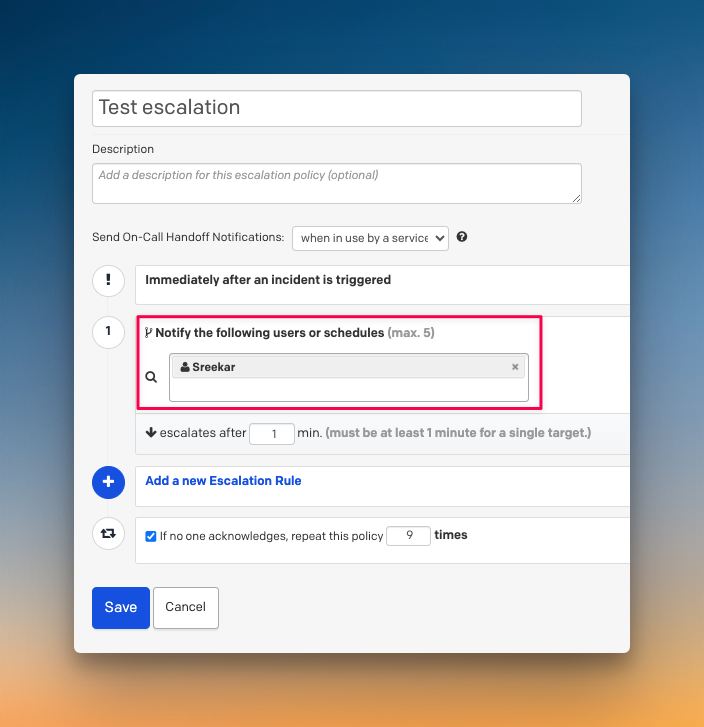
PagerDuty gives control over alerts entirely to individuals. Each user sets their own alert preferences, like time delays, channels, and order.
So, when you create an escalation policy, you can say “Alert Derek” but not specify whether he gets a phone call or SMS. Derek’s personal preferences control that part.
What I liked
I appreciate that PagerDuty gives users complete freedom to choose how they want to be alerted. This respects individual preferences and work styles.

What I didn’t like
Team leads can’t customize how their members get alerted for different situations. While individual freedom is good, having both individual and team-level options would be better. Sometimes managers need to specify alert methods for critical incidents.
Set Up and Configuration in PagerDuty
PagerDuty lets you add contact methods for phone, SMS, email, Slack, push notifications, and more.
Also, creating services, setting up integrations, and designing escalation policies is pretty straightforward.
What I liked
You can use separate phone numbers for calls and SMS alerts. I also liked that you can instantly trigger test alerts to check if your configuration works properly.

What I didn’t like
Getting alerts in specific Slack channels requires extra steps. You have to dig into integration settings to connect services to channels. Also, there’s no native Pushover support.

Alert Channels in PagerDuty
PagerDuty delivers alerts across all standard channels like phone call, SMS, Slack, email, Push, and more.
Each notification provides useful data and ways to act on the incident.
What I liked
Slack alerts offer tons of options: acknowledge, resolve, add notes, create incident channels, assign roles, add tasks, change priority, escalate, and more. This makes managing incidents from chat very convenient.

What I didn’t like
Email alerts don’t let you take action by replying directly. You have to click links and leave your inbox to acknowledge or resolve incidents.

On-Call Alerts in PagerDuty
PagerDuty handles on-call shift notifications through escalation policies. You can control which services trigger handoff alerts.
This means you can get shift notifications only for critical services while keeping non-critical ones quiet.
What I liked
I liked being able to get on-call alerts only for specific services. This reduces noise when you manage many services with different priority levels.

What I didn’t like
PagerDuty doesn’t provide webhook triggers for shift changes. I’d like to automate tasks when shifts start or end, like granting database access to the new on-call engineer.
Alert Fatigue Handling in PagerDuty
PagerDuty automatically handles alert deduplication, grouping, and suppression to reduce repeat notifications.
For advanced noise reduction, PagerDuty offers AIOps, which uses machine learning to find patterns and group related incidents.
What I liked
I appreciate that PagerDuty uses machine learning to reduce alert fatigue. The AI can spot patterns humans might miss and group related incidents intelligently.

What I didn’t like
The ML-based alert noise reduction costs extra. AIOps is a paid add-on at $799 per month, which puts advanced fatigue handling out of reach for many teams.

PagerDuty’s Pricing

PagerDuty offers multiple pricing plans: Free, Professional ($25/user/month), Business ($49/user/month), and Enterprise.
The Free plan includes limited phone and SMS notifications and one escalation policy. The paid tiers add more features like chat integration and advanced incident workflows.
What I liked
I liked that PagerDuty offers a free plan to test phone and SMS alerts before committing to a paid plan.
What I didn’t like
The paid plans are expensive for most teams. AIOps costs an extra $799/month, even on Enterprise plans. There are more affordable alternatives that offer solid alerting capabilities.
So, Should You Choose PagerDuty for Alerting?
PagerDuty gets the core of alerting right. The setup is straightforward, and it gives individual users a lot of control over how they get notified. The alert channels are solid, especially the powerful Slack integration.
However, the platform has some notable gaps. You can’t customize alerts at the team level, email alerts don’t support replies, and advanced features like AIOps cost extra. The pricing adds up quickly for larger teams.
Pick PagerDuty if you need a reliable alerting system and the cost and workflow limitations are not a concern.
Otherwise, I’ve got a better alternative that fills the gaps PagerDuty leaves, offers more flexibility, and comes at one-third of cost.
Spike: A Better PagerDuty Alternative for Alerting
Spike is a modern incident management platform that includes powerful alerting features. It’s designed to make alerting simple, flexible, and team-friendly.
Spike offers everything PagerDuty provides, but it adds the key features that PagerDuty misses, all at a fraction of the cost.
Here’s why Spike is a better alternative to PagerDuty for your alerting needs:
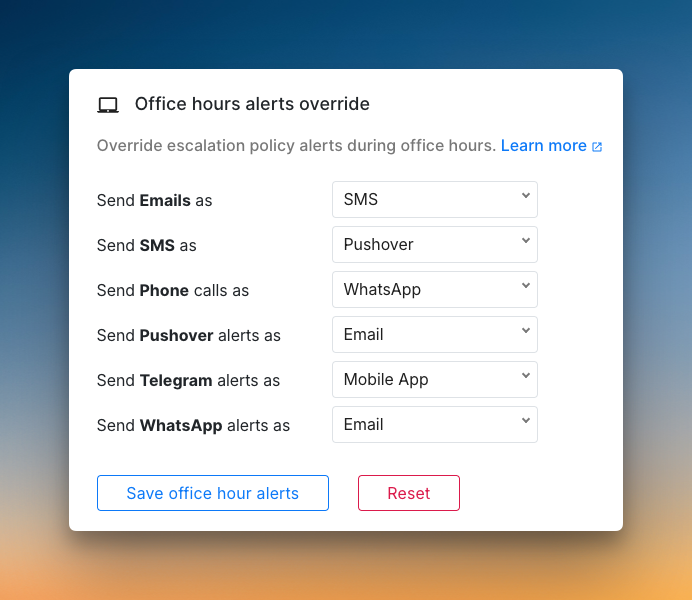
- Spike gives both teams and individuals control over alerts. Managers can set specific alert methods, while users can still set personal overrides.

- You can send alerts to specific Slack channels with
@channel,@hereor@usermentions. No extra configuration steps are needed.

- You can reply to alert emails with #ack or #res to take action. This means you don’t have to leave your inbox.

- Spike supports webhook triggers when on-call shifts change. This lets you automate tasks like granting or revoking database access.

- You get powerful Alert Rules at no extra cost. This allows you to create custom logic to handle alert noise effectively.

- You can customize the voice for phone call alerts. You can change the gender and tempo to fit your preference.

- Spike gives you all these features for about one-third of PagerDuty’s cost. The pricing is straightforward with no expensive add-ons for core features.

Read PagerDuty vs. Spike: Alerting for a detailed comparison.
Final Thoughts
PagerDuty offers flexible escalation policies, solid Slack actions, and gives users full control over their alerts.
However, the gaps show up when teams need shared alert settings, shift-based automations, or affordable noise reduction. Add the high price and paid add-ons, and the platform feels expensive for most teams.
Spike fills those gaps with dual control, email replies, and webhooks. It’s a complete alerting solution for teams of any size, at one-third of PagerDuty’s price.