
Severity and priority are two labels that describe different things about an incident. Severity covers the blast radius: how much of your system or how many customers are affected. Priority covers the urgency: how quickly someone needs to act. Routing rules then use these labels to load the right escalation policy for each incident.
This guide covers how to define your severity and priority levels and map them to escalation policies. You’ll also find a bunch of practical alert routing rule examples throughout.
Table of contents
Why both severity and priority matter
When routing rules only look at severity and ignore priority (or vice-versa), incidents get misrouted. A SEV-1 P1 incident needs an immediate phone call. A SEV-1 P3 incident needs attention too, but a Slack message with a few hours to respond is usually enough. Without both signals working together, these two incidents follow the same escalation path and one of them gets misrouted.
That mismatch is common because severity and priority don’t always align. A distributed cache going down in production affects every dependent service. It’s a high severity and high priority. A memory leak in an internal admin dashboard is also high severity if the service eventually crashes. But the priority might be P3 because no customer is affected and a restart buys time until the next working day.
A good way to anchor what each severity or priority level means for your team is to walk through real incident types and ask two questions for each:
- How wide is the blast radius (severity)
- How fast do we need to respond (priority)
Spike supports three severity levels (SEV-1, SEV-2, SEV-3) and five priority levels (P1 through P5), which gives you enough range to make those distinctions clearly.
Once your team has these severity and priority labels in place, the next step is mapping them to escalation policies. That’s where the severity-priority matrix comes in.
The severity-priority matrix
Which incident would pull you out of bed at 3 AM? That is your critical tier. Everything below it gets a progressively softer response.
| P1 | P2 | P3 | P4 | P5 | |
|---|---|---|---|---|---|
| SEV-1 | Critical | Critical | Moderate | Moderate | Low |
| SEV-2 | Moderate | Moderate | Moderate | Low | Low |
| SEV-3 | Moderate | Low | Low | Low | Low |
Each tier maps to an escalation policy:
- Critical: phone call to the on-call responder, 5-minute wait before escalation, senior responder in the chain
- Moderate: push notification or Slack, 15-30 minute wait, standard on-call rotation
- Low: Slack or email, next business day
Reserving phone calls for the critical tier keeps that signal strong. When every incident triggers a phone call regardless of tier, responders gradually stop treating them as urgent.
This matrix is a starting framework. Your team can shift the boundaries as incident patterns get clearer.
To learn more about escalation policies, read this guide: A compass for designing your escalation policy
Setting up routing rules based on severity and priority
When your monitoring tool sends severity and priority in the payload, routing rules can read those values and load the right escalation policy directly.
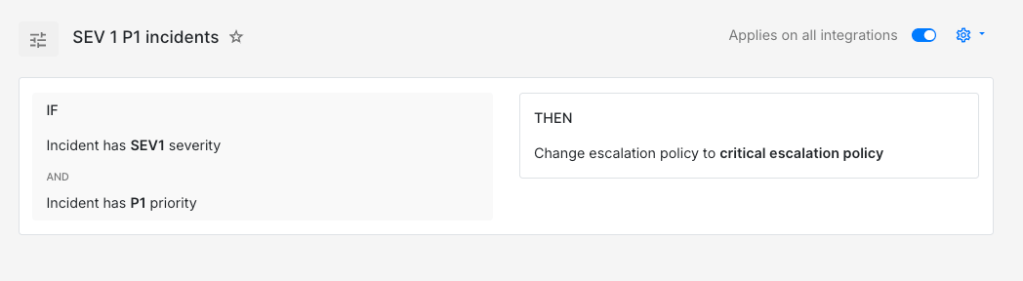
IF severity is SEV-1AND priority is P1THEN load → critical escalation policy (phone call, 5-minute wait time)
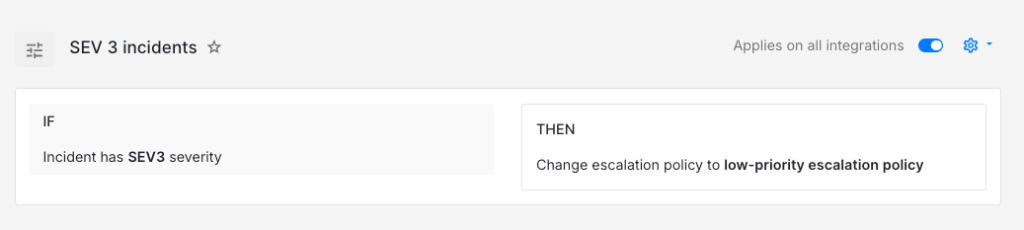
IF severity is SEV-3THEN load → low-priority escalation policy (Slack to team channel, next business day)
Not every monitoring tool sends clean severity and priority values though. In those cases, rules can infer them from other signals in the payload.
A disk usage incident might arrive without any severity label. But the payload carries the mount path and the usage percentage, which is enough to classify it.
IF title contains "disk-usage"AND incident details [key: "mount"] = "/var/lib/postgresql"AND incident details [key: "usage_pct"] > 90THEN mark severity as SEV-1AND mark priority as P1AND load → database critical escalation policy
IF title contains "disk-usage"AND incident details [key: "mount"] = "/tmp"THEN mark severity as SEV-3AND mark priority as P5AND auto-acknowledge
A Postgres data directory at 92% and a temp directory filling up are two very different situations. These two rules give each one a different response automatically.
To learn more about payload-based routing, read this guide: How to route incidents based on what their payload says
Environment is another useful signal. The same error from the same service often deserves a different path depending on whether it triggered in production or staging.
IF title contains "order-service"AND incident details [key: "error"] = "connection_pool_exhausted"AND incident details [key: "env"] = "production"THEN mark severity as SEV-1AND mark priority as P1AND load → commerce team critical escalation policy
IF title contains "order-service"AND incident details [key: "error"] = "connection_pool_exhausted"AND incident details [key: "env"] = "staging"THEN mark severity as SEV-3AND mark priority as P4AND auto-acknowledge
Customer context adds another layer. Enterprise customers with SLA commitments usually warrant a faster response than the same failure on a free-tier account.
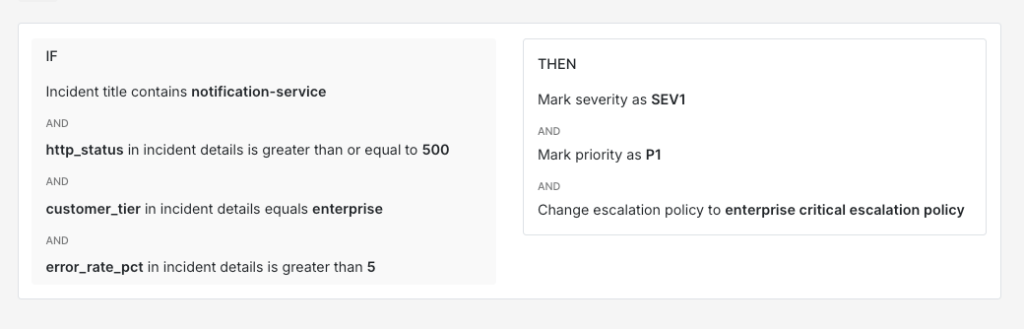
IF title contains "notification-service"AND incident details [key: "http_status"] >= 500AND incident details [key: "customer_tier"] = "enterprise"AND incident details [key: "error_rate_pct"] > 5THEN mark severity as SEV-1AND mark priority as P1AND load → enterprise critical escalation policy
IF title contains "notification-service"AND incident details [key: "http_status"] >= 500AND incident details [key: "customer_tier"] = "free"AND incident details [key: "error_rate_pct"] > 5THEN mark severity as SEV-2AND mark priority as P3AND load → default moderate escalation policy
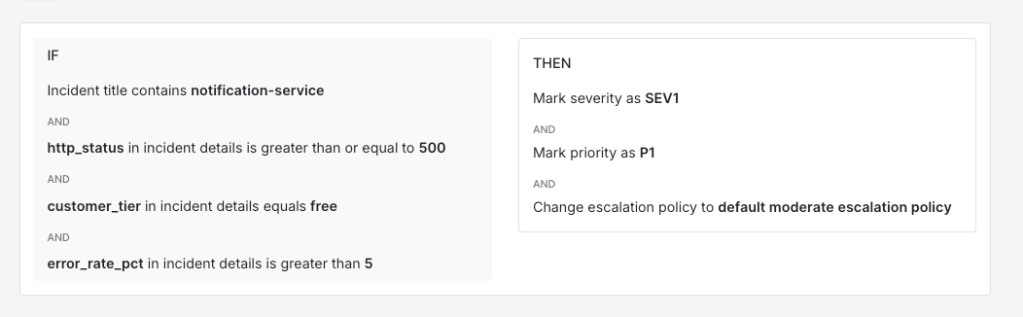
Time-of-day conditions also work well alongside severity. A SEV-2 incident during business hours can follow a moderate path. The same incident at midnight often deserves a faster response because fewer people are around to catch things if they get worse.
IF severity is SEV-2AND time is between 10 PM and 8 AMTHEN mark priority as P2AND load → off-hours moderate escalation policy (push notification, 10-minute wait time)
IF severity is SEV-2AND time is between 8 AM and 10 PMTHEN mark priority as P3AND load → business hours moderate escalation policy (Slack + email, 30-minute wait time)
Spike’s Alert Routing supports everything covered in this guide, from severity and priority matching to payload comparators and time-based conditions. If your team is looking to put these ideas into practice, it’s worth giving it a try.
Keeping severity and priority definitions accurate
What counted as SEV-1 P1 six months ago might not deserve that label today. A team that classified every database connection spike as critical early on might find that most of those incidents now resolve on their own after a connection pool autoscaler was added. The incident is the same but the system around it has changed. If the classification doesn’t change with it, your critical escalation policy fires for incidents that no longer need an immediate phone call.
One way to spot this drift is to watch how responders react after picking up an incident. If they routinely downgrade SEV-1 to SEV-2 or P1 to P3, the original labels are probably too aggressive. If they routinely upgrade, the labels are probably too conservative.
Reviewing a month of incident data once a quarter usually catches these patterns early. Revisiting your severity and priority definitions as your systems evolve keeps your routing rules aligned with how your team actually responds to incidents.
FAQs
How should routing rules handle a SEV-1 P4 where severity and priority seem to conflict?
A production database replica falling several hours behind is a good case. High severity because data loss is a real risk if the primary fails. But if a second healthy replica exists, priority might be P4 because there is no immediate customer impact. The matrix in this guide places SEV-1 P4 in the moderate tier. It still gets same-day attention through a push notification or Slack rather than sitting in the low-priority queue.
Is it better to have monitoring tools set severity or let routing rules assign it?
Both work but they solve different problems. When the monitoring tool sets severity, you get consistency at the source. When routing rules assign severity, you get flexibility because the same incident can carry different severity depending on environment or customer tier. A good middle ground is to let the monitoring tool set a baseline and use routing rules to override when additional context in the payload justifies it.
How should severity and priority work for scheduled tasks that fail outside of business hours?
A nightly ETL job or a scheduled backup that fails at 3 AM might look critical based on the service name alone. But if the job runs again at 6 AM and the failure is recoverable, waking someone up at 3 AM adds no value. A time-based condition paired with a frequency threshold can handle this well. If the job fails once overnight, a SEV-3 P5 classification with auto-acknowledge is probably enough. If it fails three times in a row, upgrading to SEV-2 P2 and paging the on-call responder is worth considering.