
If you’re choosing between Squadcast vs. Spike for incident management, this detailed comparison will help you decide.
I tested both tools extensively, compared their incident management features, and evaluated them across key criteria: Alerting, Incident Response, On-Call Management, and Pricing.
To make it easy for you, I’ve included summary tables for each section and a feature checklist at the end of the post. These give you quick insights into what each tool offers.
Let’s jump in!
Table of Contents
Squadcast vs. Spike: Core Incident Management Criteria
- Alerting: How each platform alerts teams when incidents happen. This includes setup, alert channels, and features to reduce alert fatigue.
- Incident Response: The tools available after an incident is declared. This covers initial response, collaboration, and post-incident actions.
- On-Call Management: How easy it is to create and manage on-call schedules. This includes daily rotations and last-minute changes.
- Pricing: A breakdown of costs, plans, and the overall value of each tool. This helps you know what you get for your money.
Squadcast vs. Spike: Incident Management Comparison
| Criteria | Squadcast | Spike |
|---|---|---|
| Alerting | Team and individual control. Machine learning groups alerts. Complex setup with too many decisions. | Team and individual control. Ready-to-use alert rule templates. Simple setup. |
| Incident Response | Strong automation with Workflows. Manual ticket creation requires webhooks. AI-powered incident summaries. | Built-in automation with Alert Rules and Playbooks. One-click ticket creation. Simple incident timeline. |
| On-Call Management | Three-step schedule creation with gap detection. No instant layer addition. No favorites. | Live preview with templates. Instant layer addition. Clone schedules and mark favorites. |
| Pricing | Free tier available. Paid plans start at $12/user/month. Some features restricted to higher tiers. | Simple transparent pricing. All core features included from starter tier. Paid plan starts at $7/user/month. |
Alerting: Squadcast vs. Spike
To test alerting, I created a service called Cron Job in both Squadcast and Spike. I integrated it with Healthchecks.io, configured different alert channels, and designed escalation policies. Then I triggered identical test alerts to see how each tool handles them.
Here’s a quick overview:
| Criteria | Squadcast | Spike |
|---|---|---|
| Alerting Philosophy | Both teams and individuals can control alerts. | Both teams and individuals can control alerts. |
| Setup & Config | Complex setup with too many decisions. | Simple setup with ready-to-use templates for alert rules and escalations. |
| Alert Channels | Multiple channels with round-robin escalation. | Multi-channel with email acknowledgment via reply. |
| Alert Fatigue | Machine learning groups alerts automatically. | Built-in Alert Rules templates reduce noise. |
Alerting in Squadcast
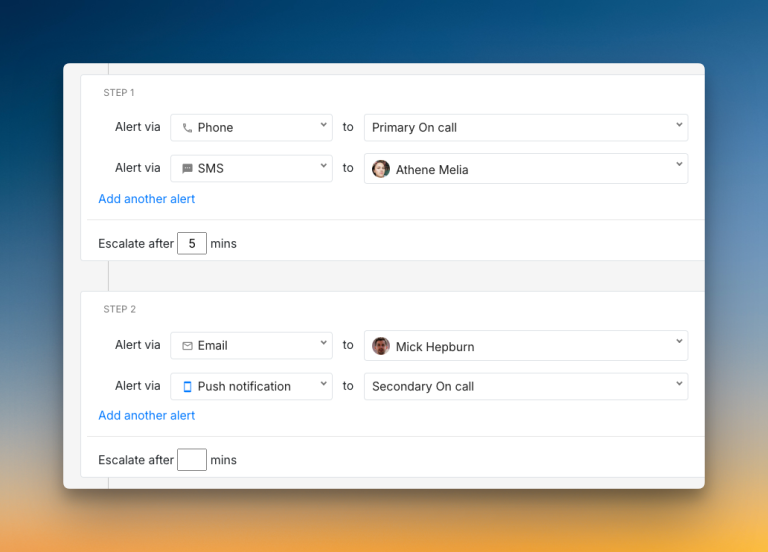
Squadcast gives both teams and individuals control over alerts. Managers can set specific alert methods in escalation policies, while users can still customize their personal preferences.
The platform offers extensive configuration options. You get round-robin escalation, service working hours, and the ability to repeat escalation policies up to 3 times with custom delays. Machine learning automatically groups related alerts to reduce noise.
However, the setup process involves many decisions at each step. While this gives you flexibility, it can feel overwhelming when you just want to get alerts working quickly.

Alerting in Spike
Spike uses a dual-control approach for alerting. Team leads can specify how alerts should be sent, but individuals can also set alert preferences without breaking team workflows.
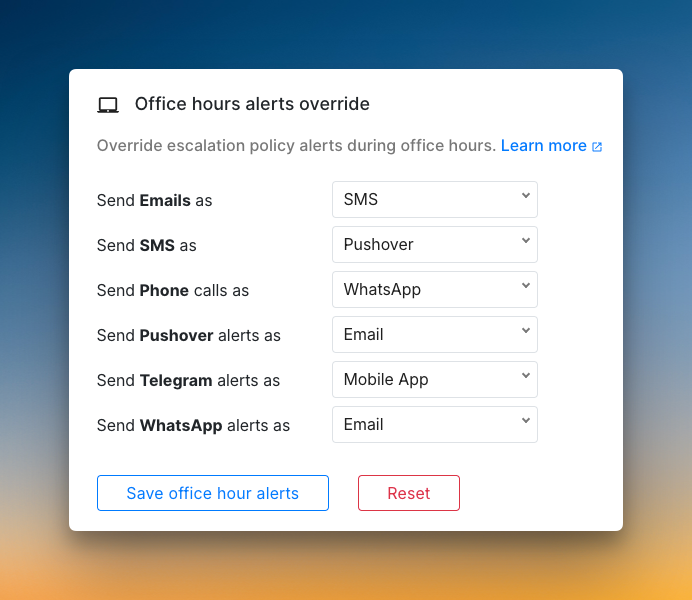
Setup is straightforward with ready-to-use alert rule templates. You can reply to alert emails with ack or res to take action without leaving your inbox. The platform supports native WhatsApp, Telegram, and Pushover alerting with two-way acknowledgment.
Spike sends on-call alerts when shifts start or end. Also, you can trigger webhooks when on-call shifts change to automate tasks like database access management.
Who Should Pick What
- Pick Squadcast if you need extensive configuration options, machine learning-based alert grouping, and don’t mind complex setup processes.
- Pick Spike if you want a simple setup with powerful built-in templates and unique alert channels like WhatsApp and Telegram.
Incident Response: Squadcast vs. Spike
I used the same Cron Job service and Healthchecks.io integration to test incident response workflows, collaboration features, and post-incident actions in both tools. This helped me understand how each tool handles the complete incident lifecycle.
Here’s a quick overview:
| Criteria | Squadcast | Spike |
|---|---|---|
| Initial Response | Manual triage from dashboard. Workflows for automation. | Manual triage from dashboard. Alert Rules for automation. |
| Team Collaboration | No native integration for Google Meet or Zoom. Complex setup to create war rooms or tickets. | Has native Google Meet integration. One-click war rooms and ticketing available. |
| Communication | Custom status pages with templates. | Instant status page preview with SEO optimization. |
| Post-Incident | Built-in postmortem templates. AI-powered incident summaries | Uses webhooks for postmortems, with a clear incident timeline. |
Incident Response in Squadcast
Squadcast provides comprehensive incident response through its Workflows system. You can set triggers, filters, and actions to automate many response steps.
For collaboration, you can create war rooms manually or automatically through Workflows. However, ticket creation requires webhooks for platforms other than Jira, which adds complexity.
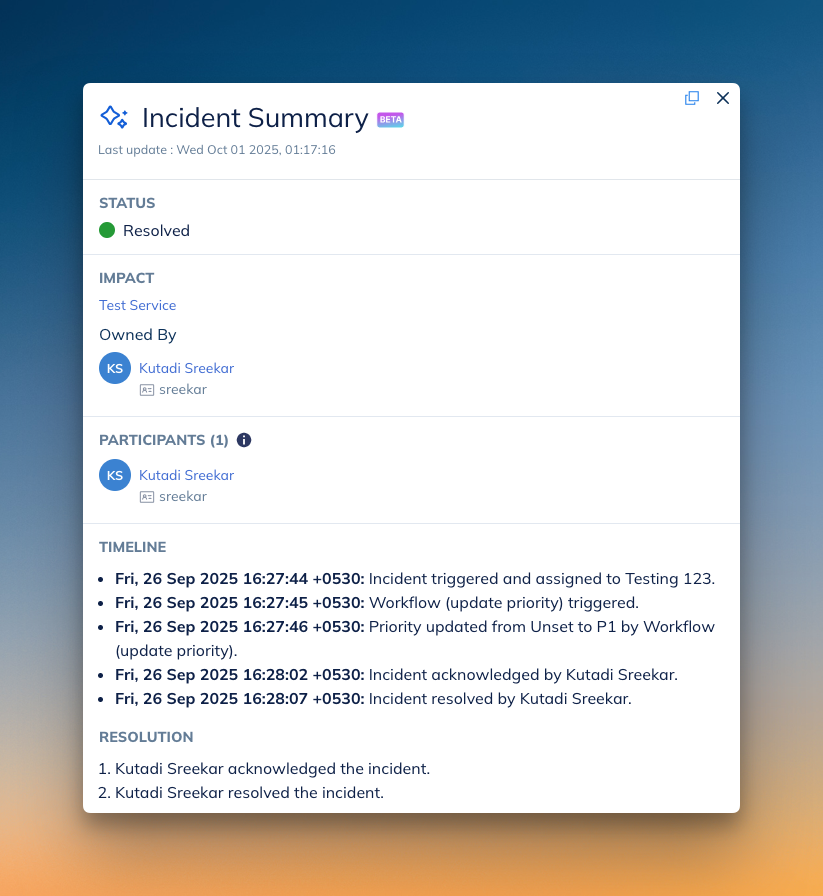
You can create status pages out of ready-made templates and then customize them. And the same goes for postmortems, but you also get AI-powered incident summaries.
Incident Response in Spike
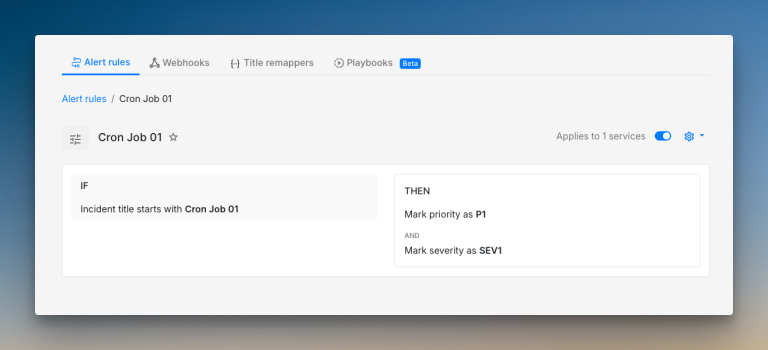
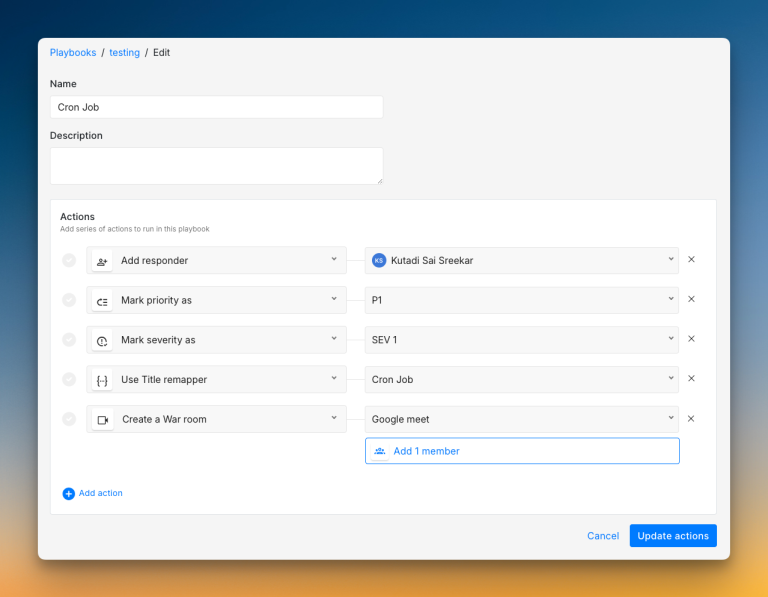
Spike makes automation standard with Alert Rules and Playbooks. Alert Rules handle automatic triage, acknowledgment, and escalation. Playbooks group multiple actions together for complex response workflows.
Team collaboration is simpler with one-click war room creation and direct ticket creation for platforms like Jira, Linear, ClickUp, Zendesk, and Freshdesk. You can also star incidents to save them as favorites for easy access later.
The platform provides a clean, unified incident timeline that shows everything in one view. Status page creation includes instant preview and SEO optimization options.
Who Should Pick What
- Pick Squadcast if you need AI-powered incident summaries, built-in postmortem templates, and don’t mind some extra setup steps for war rooms and ticket creation.
- Pick Spike if you want powerful automation with built-in integrations and prefer one-click actions over complex setup.
On-Call Management: Squadcast vs. Spike
I created actual on-call schedules in both platforms, set up rotations, and tested override functionality. This helped me compare their day-to-day usability for on-call management.
| Criteria | Squadcast | Spike |
|---|---|---|
| Schedule Creation | Three-step process with preset patterns. Gap detection available. | Live preview with templates. Simple configuration. |
| Flexibility | Clone schedules available. No instant layer addition. | Clone schedules. Instant layer addition. Mark favorites. |
| Dashboard | Two views: list and timeline. No activity log. | Clean dashboard with list and calendar view. Activity log available. |
| Overrides | Click on calendar to override. No override history. | Override button or press O. Override history. Different work modes available. |
On-Call Management in Squadcast
Squadcast uses a three-step schedule creation process. You add details, choose rotation patterns from presets like “Daily 24×7” or “Weekly Business Hours,” then customize participants and timing.
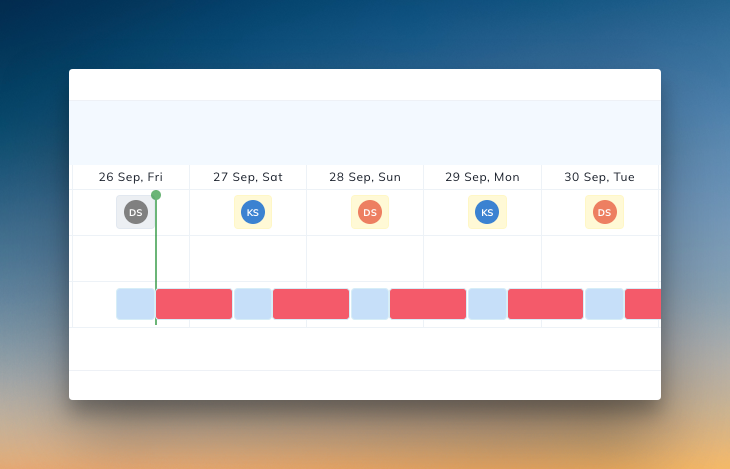
The platform shows coverage gaps in red on the calendar preview. You can clone schedules and export them, but adding new rotations requires multiple clicks through the edit interface.
Overrides work through calendar interaction, but the reason field is mandatory. While this helps with documentation, it slows down quick changes when someone needs immediate coverage.
On-Call Management in Spike
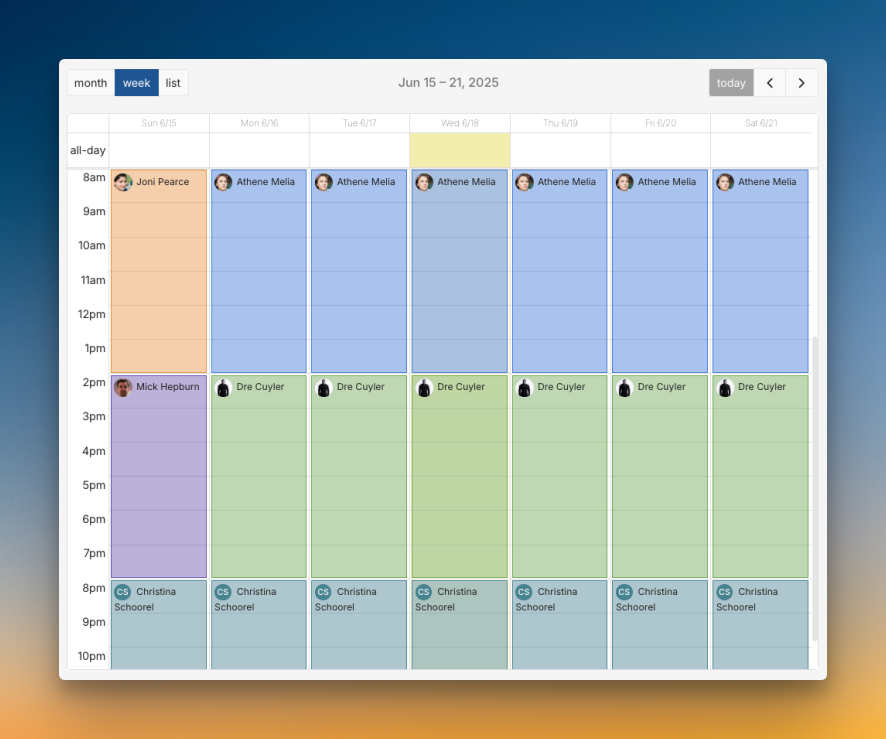
You can create on-call schedules with ready-made templates or build from scratch with an instant preview showing exactly how your schedule will look.
You can clone entire schedules, mark favorites for quick access, and add new layers instantly without disturbing the existing configuration. The override process is simple: click the override button or press O.
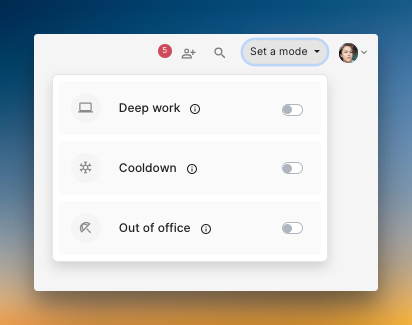
Spike includes work modes for better on-call wellness. Deep Work blocks non-urgent alerts during focus time. Cooldown gives recovery time after incidents. Out-of-Office handles vacation coverage automatically.
Who Should Pick What
- Pick Squadcast if you need detailed gap detection, preset rotation patterns, and overrides with calendar interaction.
- Pick Spike if you want fast setup with live preview, flexible management, and built-in work-life balance features.
Pricing: Squadcast vs. Spike
Both Squadcast and Spike offer competitive pricing in the incident management space, making them attractive options for teams looking for affordable solutions.
| Criteria | Squadcast | Spike |
|---|---|---|
| Free Tier | Available (5 users, 175+ integrations) | No free tier, but a 14-day free trial is available. |
| Starting paid plan | $12/user/month | $7/user/month |
| Core Features | Some features restricted to higher tiers | All core features included from starter tier |
| Implementation Cost | More, due to engineering time for complex configuration. | Zero, due to a quick setup. |
Pricing in Squadcast
Squadcast offers four main plans: Free, Pro ($12/user/month), Premium ($19/user/month), and Enterprise (custom pricing).
The free plan is generous for small teams with 5 users. The Pro plan at $9/user/month provides good value for growing teams. However, some advanced features like unlimited postmortems, status pages, and incident workflows are only available in Premium and Enterprise tiers.
The platform’s extensive configuration options provide a lot of flexibility. However, this means your team will spend more time on initial setup. That time translates into a hidden implementation cost in the form of engineering hours.

Pricing in Spike
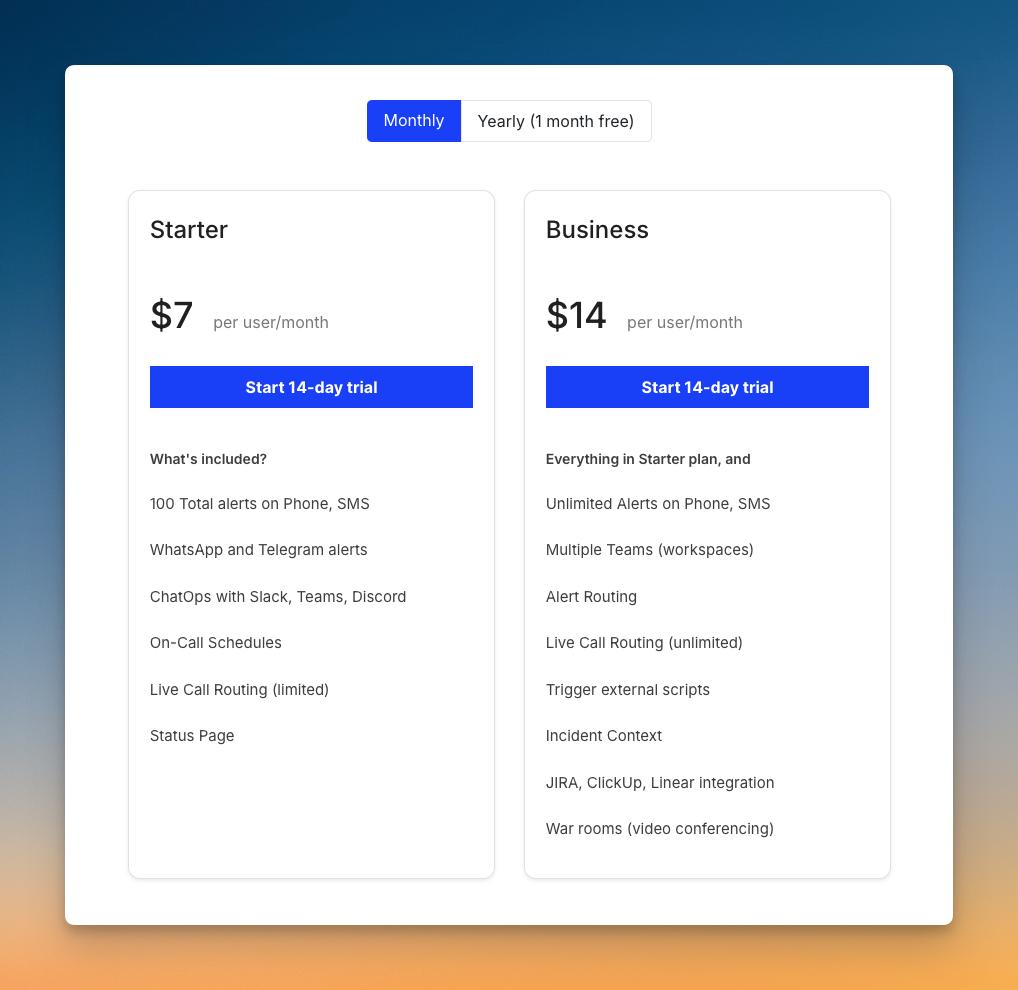
Spike offers straightforward pricing with two plans: Starter at $7/user/month and Business at $14/user/month.
All core incident management features come built-in from the starter tier, including phone calls, SMS, on-call management, integrations, and status pages. The Business plan adds unlimited phone and SMS alerts, multiple teams, and unlimited alert rules & playbooks.
Setup is typically completed in a few hours. This means there are no implementation costs. Your engineers can get started quickly and focus on their main work.
Who Should Pick What
- Pick Squadcast if you want a free plan for testing, don’t mind some feature restrictions in lower tiers, and need extensive configuration options.
- Pick Spike if you prefer transparent pricing with all features available from the start, want quick setup, and value unlimited core features without tier restrictions.
Squadcast vs. Spike: Incident Management Checklist
Apart from the core criteria, there are some features that can significantly impact your daily incident management experience.
Here’s a 12-point checklist comparing the finer details of both tools so you know exactly what each platform offers.
| Feature | Squadcast | Spike |
|---|---|---|
| Separate spaces for teams to manage their incidents | ✅ | ✅ |
| Auto-trigger incidents from incoming emails | ✅ | ✅ |
| Auto-acknowledge incidents | ❌ | ✅ |
| Automatic incident suppression | ✅ | ✅ |
| Trigger external webhooks automatically | ✅ | ✅ |
| Auto-resolve incidents when system is healthy | ✅ | ✅ |
| Route alerts based on severity and priority | ✅ | ✅ |
| Route alerts based on time of day | ✅ | ✅ |
| Out-of-office routing for on-call responders | ✅ | ✅ |
| Auto-update status page incidents | ✅ | ✅ |
| Ready-to-use templates (escalations, alert rules, and on-call) | ❌ | ✅ |
| Automatic postmortem creation | ✅ | ❌ |
Final Thoughts
Both Squadcast and Spike are solid incident management platforms with their own strengths. The right choice depends on your team’s priorities and workflow preferences.
Pick Squadcast if you need extensive configuration options, machine learning-based alert grouping, built-in postmortem templates, and don’t mind complex setup processes.
Pick Spike if you want a simple setup with powerful automation, transparent pricing, work-life balance features, and prefer getting started quickly without sacrificing functionality.
While Squadcast works well for teams that want granular control, Spike offers a modern, streamlined approach with built-in automation that gets teams up and running fast.