Over time, on-call teams build up a quiet layer of knowledge about their systems. Someone learns that a specific error code always points to a known failure in the login service. Someone else figures out that a particular background job fires a warning every night and has never once needed attention.
That knowledge shapes how your team responds to incidents every day. But when it only lives in people’s heads, your response depends entirely on the right person being available at the right time. When that person is asleep or on leave, incidents may end up reaching the wrong team or sitting unnoticed in the default queue. Alert routing rules offer a way to change this.
When you turn your team’s knowledge into routing rules, the judgments your team makes repeatedly become automatic. But the question is how to dig that knowledge and translate it into routing rules. This guide walks you through four ways to do that.
1. The 3 AM question
A simple way to draw out knowledge from your team is to ask one concrete question: which incident would wake you up at 3 AM?
It usually gives clearer answers about severity because people already know which incidents feel critical enough to wake them.
Once you write those incidents down, you will start to notice patterns in the payload (incident title and details). You may notice the same service names or the same keywords showing up again and again. Those repeated patterns are what you route on.
A good place to start before writing any rules is to have separate escalation policies ready. One for critical incidents with phone call alerts and short wait times. One for low-priority incidents. And a default policy that catches everything else. Once those are in place, routing rules simply decide which policy loads for a given incident.
From there, the setup is fairly simple. If an incident payload matches one of those critical patterns, the routing rule loads your critical escalation policy automatically. Everything else goes to the default or low-priority policy. That means a decision your team used to make every time an incident triggers is now made for them.
A payment platform team running this exercise might find that “checkout service unreachable” and “payment gateway timeout” always make the 3 AM list. Setting up routing rules around those phrases in the payload means the system classifies those incidents correctly every time they trigger. Nobody has to decide whether it is critical. The rule already knows.
Some monitoring tools send raw error codes as incident titles. Setting up routing rules against titles like ERR5023 is difficult because you first need to know what the code means.
Spike’s Title Remapper turns those codes into readable titles. ERR5023 becomes “Payment API timeout.” Once the title is clear, setting up routing rules becomes much easier.
2. Incident history
A few weeks of incident history will often surface patterns your team has absorbed intuitively but never formally recorded. The incidents worth focusing on are the ones where someone manually changed the severity mid-incident or switched the escalation policy before taking any other action. Those repeated manual actions are routing decisions your team already makes. They just are not automatic yet.
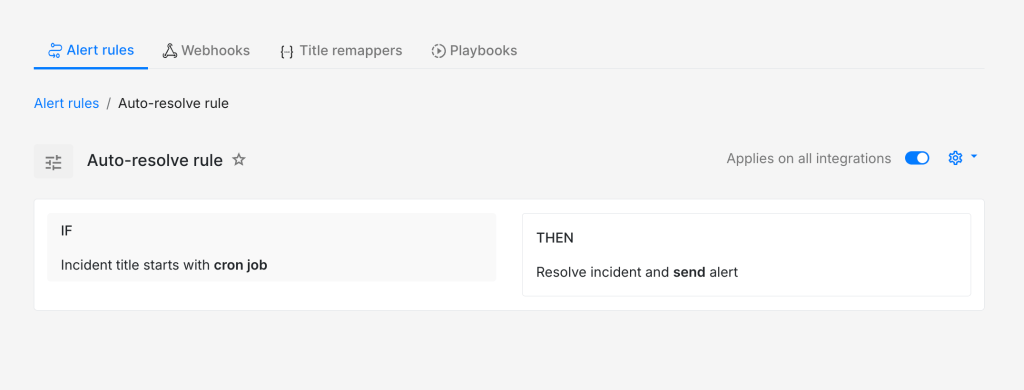
Once you spot those patterns, the translation into routing rules is straightforward. An incident type where someone always reassigns the owner to a specific person points to a routing rule that does that automatically. An incident type that always gets dismissed without action is a good candidate for an auto-resolve or do-not-create-incident rule. And if your history shows incidents that usually clear up on their own within a few minutes, a routing rule can load an escalation policy with a delay so nobody gets paged unnecessarily.
Your incident history is essentially a record of decisions your team has already made dozens of times. Setting those up into routing rules just makes them automatic going forward.
A background job that hits its retry limit is a good example. If your incident history shows it triggering repeatedly and being dismissed every single time, that is a strong signal for an auto-resolve rule. The team already knows it does not need attention. Converting that into a rule means nobody has to make that call again.
3. Expert knowledge
Another place to look is the knowledge your experienced engineers carry after years of handling the same systems. They usually know which signals matter and which ones can be safely ignored. A useful exercise is to sit down with them and ask what they look for first when a noisy or unclear incident triggers. The patterns they describe are almost always routing rules waiting to be set up.
The conversion from knowledge to routing rules here is usually about conditions that are not obvious from the payload alone. A senior engineer might know that a particular incident only needs attention when it triggers during business hours. Another might know that whenever a specific third-party service sends a warning, it almost always precedes a more critical failure within the next few minutes. That kind of knowledge rarely makes it into a routing setup on its own. It has to be asked for explicitly.
A security team might have one engineer who knows that any incident mentioning “authentication failure” alongside an enterprise customer name is worth treating as a priority incident. That knowledge has probably shaped how they respond manually for months. A single routing rule built around those two conditions in the payload makes that judgment automatic for every future incident of that type.
4. Post-incident reviews
Post-incident reviews are a good place to find routing knowledge your team did not realise it was using. Once the urgency is gone, people usually speak more clearly about what felt off in the response. They might say the incident should have gone to a different escalation policy, or that the severity should have been higher from the start. Comments like these are useful because they reveal the judgment calls your team still makes manually.
That is where routing rules come in. If the same kind of correction shows up more than once, it probably should not stay a manual correction. It can be useful to treat every repeated correction as a rule waiting to be written. When your team keeps changing the same severity, loading the same escalation policy, or acting on the same pattern in the payload, that knowledge is ready to move into the routing setup.
Say your team reviews an incident and realises that anything with “payment gateway timeout” should have gone to the critical escalation policy straight away. Until now, the responder may have been making that call manually after reading the incident details. Once you set up a routing rule around that pattern, the system makes the same call automatically the next time it triggers.

Alert routing rules work best when they reflect the decisions your team already makes during incidents. When those decisions move into routing rules, responders spend less time figuring out where an incident should go and more time resolving it. The goal is simply to remove small points of friction from the response process and replace them with clarity. Over time, that clarity adds up to faster responses and less mental load for the people on call.
FAQs
What if your team disagrees on which incidents are critical?
That disagreement is worth having out loud. The 3 AM question cuts through it because people know what would actually wake them up. You can build consensus from there and refine as you see more incidents.
What happens if a routing rule misclassifies an incident?
The on-call responder can always adjust it manually. That adjustment itself becomes useful data for the next post-incident review. Over time, those corrections help refine the rules.
How do you know when to use auto-resolve versus do-not-create?
Auto-resolve works when you want to see an incident once, like a CPU spike from a nightly batch job that always fixes itself. Do-not-create fits signals you never need to see, like a health check ping firing every thirty seconds. Just consider how much visibility you want to keep.