
When an incident triggers, the question is not just what broke but also how urgent it is and who on your team needs to respond. Alert Routing rules answer those questions automatically. You define the conditions once and the right response follows every time an incident triggers.
Every Alert Routing rule does one or more of these three things:
- Triage the incident so the right context is attached
- Route it to the right escalation policy
- Reduce noise so your team only sees what matters
Three conditions drive all of it: incident payload, time of occurrence, and frequency. Each one can triage, route, and reduce noise depending on how you configure it. This guide walks through each condition and shows how to put it to work.
Table of contents
Incident payload
The incident payload is the title and details that arrive with every incident. The title usually tells you which service is affected. The details often tell you how serious it is. Together, they give your rules something specific to match on.
Triaging using incident payload
Broad rules are a reasonable starting point but they lose precision quickly. A rule matching on “auth-service” picks up every incident from that service regardless of what actually failed. Narrowing it to a specific failure class within the service gives you much cleaner triage.
IF title contains "auth-service" AND Incident details [key: "message"] contains "token validation failed"THEN mark severity as SEV-1 AND mark priority as P1
The
keyname here ismessagebecause that is what most monitoring tools use for the main error or event description. Your payload may use a different key. Inspecting a sample payload from your integration is the quickest way to confirm the right key name before writing the rule.
When your payload includes numeric fields, comparators are worth using. They are more precise than keyword matching alone.
IF title contains "api-gateway" AND Incident details [key: "p99_latency_ms"] > 2000THEN mark severity as SEV-2 AND mark priority as P2
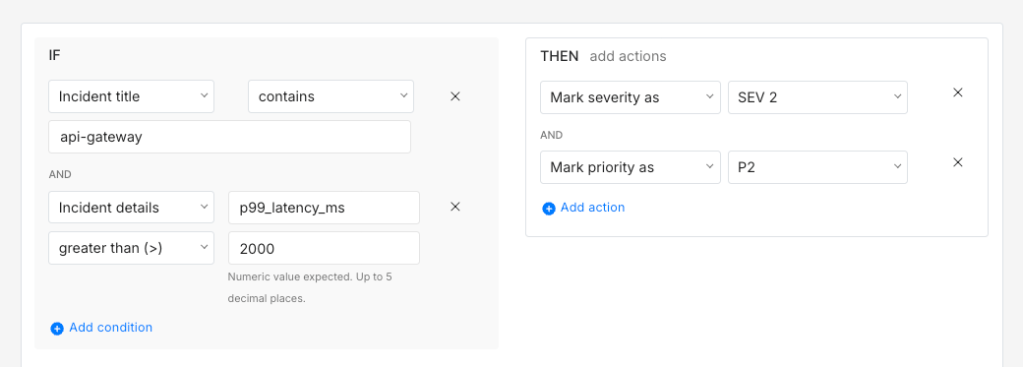
Unlike keyword matching, a numeric condition does not break when your monitoring tool changes how it phrases the title. It checks the metric value directly.
💡 Spike’s tip: Use Title Remapper
Vague incident titles make triage rules hard to set up. When Sentry sends TypeError: Cannot read properties of undefined, there’s nothing specific to act on. You can’t reliably set priority or add context when every incident looks the same.
With Spike’s Title Remapper, you set up a simple template using fields from the Sentry payload to rewrite that title to: checkout-api: TypeError: Cannot read properties of undefined
Now your routing rules have something precise to work with.
Spike’s Alert Routing rule templates are also worth browsing at this point. They include ready-to-use rules that pair well with Title Remapper.
Routing using incident payload
Once the triage rule has set severity and priority, routing acts on those signals. A good starting point is a simple two-policy setup: one policy for critical incidents with phone call alerts and short wait times, and one default policy for everything else. The triage rules you set up earlier already did the work of classifying the incident. Routing just acts on that classification.
IF severity is SEV-1 OR priority is P1THEN load → critical escalation policy (phone call, 5-minute wait time)
This alone covers a lot of ground. As your incident patterns become clearer, you can get more specific. For example, routing a particular class of payment failure directly to the team that owns it is cleaner than a broad rule covering all production incidents.
IF title contains "payment-processor" AND Incident details [key: "message"] contains "idempotency key collision"THEN load → payments on-call escalation policy
The right people get paged for the right class of failure. Nobody else is disturbed.
Title Remapper really pays off in routing. Once your titles are structured, routing rules become straightforward:
- Incident title contains “checkout-api” → route to the checkout escalation policy
- Incident title contains “auth-api” → route to the auth team escalation policy
Clear titles give your routing rules something reliable to match on.
Reducing noise using incident payload
Not every incident that triggers needs a human to act on it. Payload conditions are usually the most direct way to handle that. There are four actions worth building into your rules:
- Auto-acknowledge: Stops the escalation policy from running. Good for known low-priority signals your team tracks but does not need to act on immediately
- Auto-resolve: Works well for known false positives that always self-correct
- Resolve by timer: Waits for a set period and resolves the incident if nothing has changed. Still catches it if it persists beyond the timer
- Do not create incident: Suppresses the incident before it enters your queue. Worth using carefully and only for signals you are completely confident are irrelevant
A rule that covers multiple known low-signal patterns in one setup is usually cleaner than a separate rule for each one.
IF title contains "user"OR IF title contains "issued"OR IF title contains "invoked"OR IF title starts with "ALARM: CPU over 25% on"THEN resolve incident and send alert
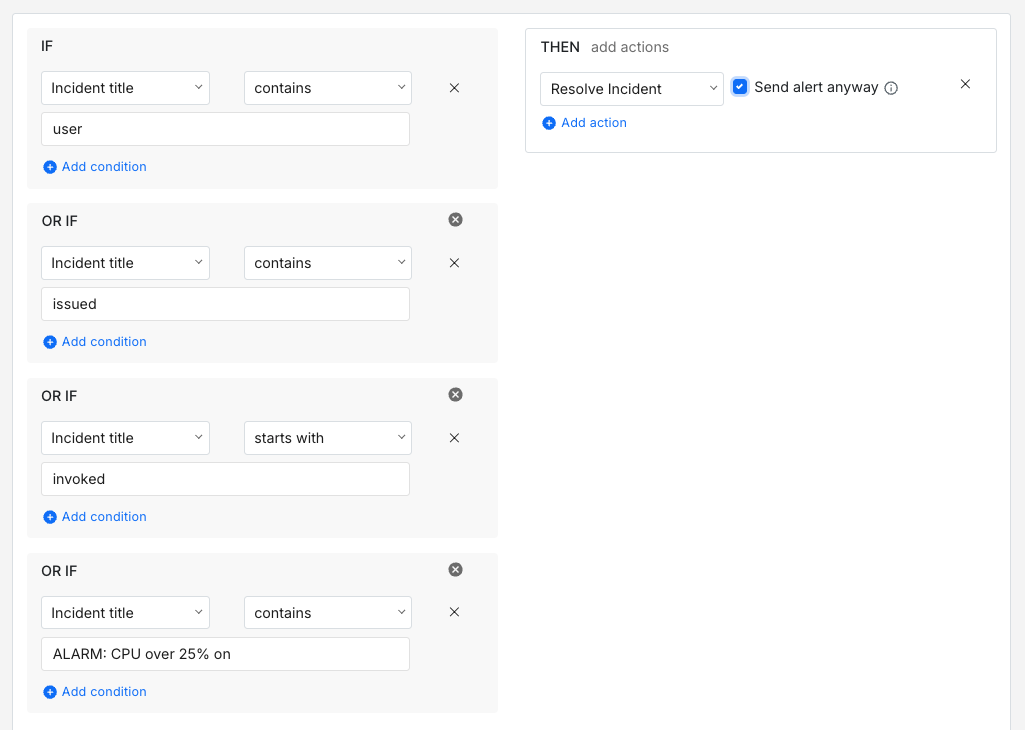
This is a good pattern for incidents that are worth a Slack notification but not a phone call. Multiple trigger conditions, one set of actions. Your team keeps visibility without getting paged.
Not all noise needs even a Slack notification though. A CI pipeline that runs integration tests every hour and always throws a teardown warning is a reasonable suppression candidate. You can stop those before they arrive entirely.
IF title starts with "integration-test: teardown warning" AND title contains "ci-runner"THEN do not create incident
Time of occurrence
The same incident can carry different urgency depending on when it triggers. A Kubernetes pod crash loop at 2 AM is a different situation from the same incident at 11 AM.
- At 11 AM your team is probably already online
- At 2 AM someone needs to be woken up
The incident is the same but the required response is not.
Triaging using time of occurrence
The Time of day and Day of week conditions in Spike are built for exactly this kind of distinction. A rule that adjusts priority based on when the incident triggers means the same service can carry different urgency at different times.
IF title contains "k8s" AND time is between 10 PM and 8 AM THEN mark priority as P1
IF title contains "k8s" AND time is between 8 AM and 10 PM THEN mark priority as P3
Based on that priority, the right escalation policy loads and your team gets alerted accordingly.
Routing using time of occurrence
A P1 incident at 2 AM and the same incident at 11 AM need different escalation paths. During business hours a Slack notification through a lower-priority policy is probably enough. Off-hours, you want a phone call. A time-based routing setup handles that automatically.
IF severity is SEV-1 AND time is between 10 PM and 8 AM THEN load → critical off-hours escalation policy (phone call, 5-minute wait time)
IF severity is SEV-1 AND time is between 8 AM and 10 PM THEN load → business hours escalation policy (Slack + email, 15-minute wait time)
Time conditions work for any service. A payments team, an infrastructure team, or a database team can each have their own off-hours escalation path.
Reducing noise using time of occurrence
Some incidents are worth watching during business hours but not worth acting on off-hours. A staging environment going offline overnight is a practical example. Nobody needs it until the next morning, so a resolve by timer keeps it off your on-call queue while still catching it if it persists.
IF title contains "staging" AND time is between 8 PM and 8 AM THEN resolve by timer (30 minutes)
Day of week conditions work well here too. Dev cluster noise over the weekend is worth suppressing entirely when nobody is working on it.
IF title contains "dev-cluster" AND day is Saturday OR Sunday THEN do not create incident
Incident frequency
A single incident from a service is often just a transient blip. A sustained burst of the same incident within a short window is a different situation altogether. Frequency is what separates a minor hiccup from a service actively degrading.
Triaging using incident frequency
A single HTTP 503 from your search service is probably not worth escalating. But fifteen such blips within ten minutes tell a different story. Spike’s incident has occurred within condition is built for exactly this. Pairing it with payload conditions gives you enough precision to cover an entire service layer in one rule.
IF title contains "search-service" AND incident triggers > 5 times within 15 minutesOR IF title contains "elastic-search" AND incident triggers > 5 times within 15 minutesTHEN mark severity as SEV-1 AND mark priority as P1
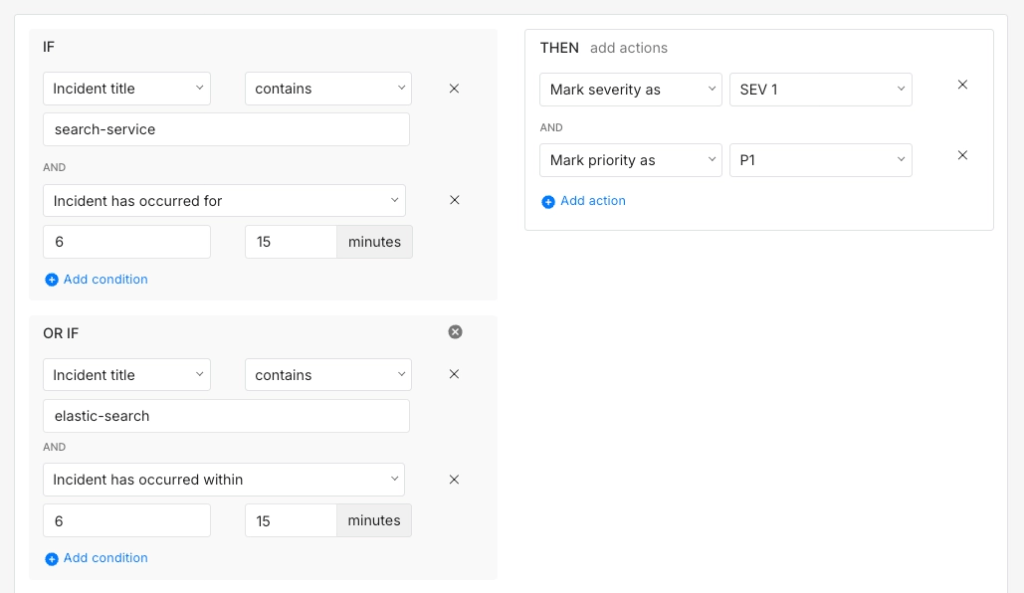
This keeps noise from inflating your severity scores while still catching the cases that actually need attention.
Routing using incident frequency
A single connection timeout from your message broker is probably not worth waking anyone up. A sustained burst of them within a short window almost certainly is. Frequency-based routing gives you a way to act on that difference without any manual action.
IF title contains "rabbitmq" AND incident triggers > 8 times within 10 minutes THEN load → infrastructure on-call escalation policy
The frequency threshold is what separates a quiet acknowledgement from a phone call at 2 AM.
Reducing noise using incident frequency
Frequency conditions help separate a noisy signal from a genuine problem. A CloudWatch alarm set at 25% CPU can fire repeatedly if the metric keeps bouncing just above and below that threshold. Each incident is real but none of them individually need someone to act on them. What matters is whether the pattern persists.
IF title starts with "ALARM: CPU over 25% on" AND incident triggers ≤ 3 times within 30 minutes THEN auto-resolve
IF title starts with "ALARM: CPU over 25% on" AND incident triggers > 3 times within 30 minutes THEN mark severity as SEV-2 load → infrastructure escalation policy
Below the threshold it self-resolves quietly. Above it your infrastructure team gets paged. That balance is usually what keeps a noise reduction setup from being either too aggressive or too permissive.
The real value of a well-built routing setup shows up over time. In the early days, a handful of rules covering your most critical services is probably enough to get started. As you learn more about your incident patterns you add rules that reflect what you actually see in production. The conditions get sharper and the noise gets quieter.
Incidents that do not matter stop reaching your team. The ones that do arrive with the right severity, priority, and escalation policy already attached. Your on-call responder picks up the incident and already knows what it is and how urgent it is. What starts as a handful of rules gradually becomes a setup that actively works for your team.
If you are ready to set up Alert Routing rules for your team, Spike is a good place to start. It has everything covered in this guide, from payload-based triage to time-based routing and noise reduction, all in one place.
FAQs
What should I do when a monitoring tool changes its payload format and breaks existing rules?
This is more common than it seems, especially after a tool upgrade. It is a good idea to keep a reference payload sample for each integration alongside your rules so you can spot format changes quickly. When a rule stops firing as expected, comparing the current payload against your reference is usually the fastest way to find the problem.
Can routing rules handle nested JSON fields in the payload or only top-level fields?
Most routing rule engines match on the incident title and details that get parsed from the payload rather than on raw JSON keys. If you need to route on a deeply nested field, the more reliable approach is to use a webhook transformer or Title Remapper to surface that value into the incident title or details first. That way your routing rules stay simple and predictable.
How should I think about routing rules when my services follow a microservices architecture with hundreds of services?
Writing individual rules for hundreds of services is not practical. A better approach is to establish a consistent naming convention for your service names and incident titles and write rules that match on patterns rather than exact names. A rule matching on a team prefix like “payments-” covers every payments service without needing a separate rule per service.
How do regex-based conditions in routing rules differ from simple keyword matching in terms of reliability?
Regex conditions give you more precision but they are also more fragile. A regex that matches on a specific error code format can break if the monitoring tool changes how it formats that code. Keyword conditions are broader but more resilient to minor formatting changes. It is usually worth using regex only when keyword matching genuinely cannot express the condition you need.