

When choosing an incident management software, it’s important to look beyond the sticker price. You need to know the add-ons, feature limitations, and implementation overhead.
Incident.io, a popular Slack-native incident management tool, presents a pricing model that seems straightforward at first glance, but a closer look reveals a structure that can significantly increase your total cost of ownership.
This blog breaks down Incident.io’s pricing. We’ll cover the base plans, add-ons, setup time, and long-term costs that affect your budget.
By the end of the blog, you’ll have clarity on what you pay and what you get when you choose Incident.io.
Let’s dive in!
Table of Contents
Incident.io Pricing Explained (2026)
Incident.io’s pricing is separated into Incident Response and an optional On-call add-on. However, for most teams, on-call isn’t optional. It’s a core requirement, making the add-on a mandatory extra cost for a complete solution.
| Plan | Incident Response Price | On-call Price | Effective Price | Ideal For |
|---|---|---|---|---|
| Basic | Free | N/A (single-team on-call only) | Free | Small teams, testing |
| Team | $19/user/month | $12/user/month | $31/user/month | Small-to-mid teams |
| Pro | $25/user/month | $20/user/month | $45/user/month | Growing organizations |
| Enterprise | Custom | Custom | Approximately $50/user/month | Large organizations |
Incident.io’s Pricing Tiers: What You Pay and What You Get
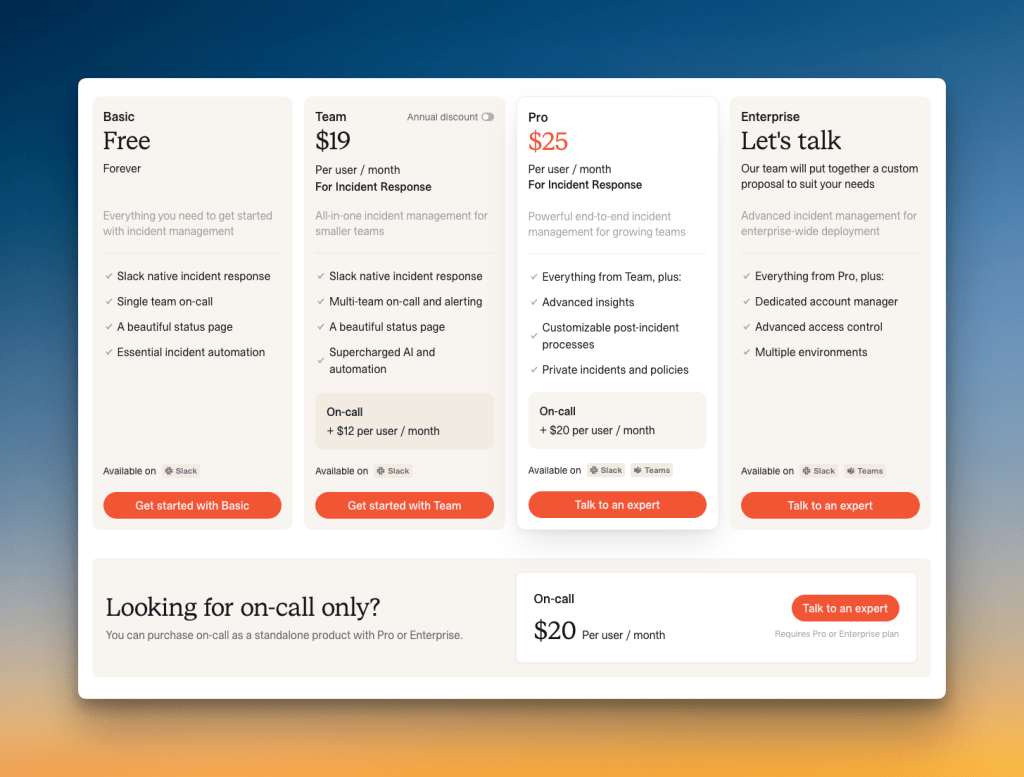
- Basic Plan (Free)
The free tier supports up to 5 users forever. You get Slack-native incident response, single team on-call, a status page, and essential incident automation.
This plan works for very small teams just getting started. But you’re limited to 1 on-call schedule, 2 integrations, and 1 workflow. No API access or webhooks either.
2. Team Plan ($19/user/month + $12/user for on-call)
The Team plan costs $19 per user per month. It includes multi-team on-call and alerting, Slack-native incident response, a status page, and AI-powered incident response automation.
On-call management costs an extra $12 per user per month. This means your real cost is $31 per user per month if you need on-call capabilities, which most teams do.
You get 2 on-call schedules, unlimited integrations, API access, and 3 workflows. But there’s no advanced insights, no private incidents, and no custom post-incident flows.
3. Pro Plan ($25/user/month + $20/user for on-call)
The Pro tier costs $25 per user per month for incident response. It includes everything from Team plus advanced insights, customizable post-incident processes, private incidents and policies, and custom incident types.
On-call management costs an extra $20 per user per month on this tier. Your actual cost is $45 per user per month with full capabilities.
You also get 3 custom dashboards, 1 policy, and 1 live call routing number. The advertised $25 price nearly doubles once you add on-call.
4. Enterprise Plan (Contact Sales)
The highest tier requires a conversation with their sales team. Reports from community discussions suggest Enterprise pricing is around $50 per user per month.
It includes everything from Pro plus a dedicated account manager, advanced access control, multiple environments, unlimited dashboards and policies, audit logs, and Slack Enterprise Grid support.
Incident.io’s Additional Costs
- On-Call Add-on: For a tool to be effective at incident management, it needs to alert the right people. By making this a paid add-on, the advertised price is not representative of what a team will actually pay.
- Limited Status Pages: Only the Enterprise plan offers unlimited status pages. The Pro plan is limited to one external and one internal status page, which can be a major constraint for organizations with multiple products or services.
- Time-Intensive Configuration: While Incident.io offers a high degree of customization, this can also translate into more cognitive load, consuming valuable engineering hours.
3-Year Total Cost of Ownership (TCO) Projection for Incident.io
Looking at the long-term financial impact means calculating beyond year one. Here’s what a typical three-year TCO looks like for Incident.io:
Year 1 Costs:
- Base subscription fees (varies by plan)
- On-call add-on fees ($12-20 per user per month)
- Setup and training time (Depending on plan)
Years 2 & 3 Costs:
- Annual subscription renewals (often with 5-10% increases)
- Continued on-call add-on fees
- Additional seats as your team expands
- Possible tier upgrades as you outgrow current plan limitations
Let’s look at two scenarios to understand the real numbers:
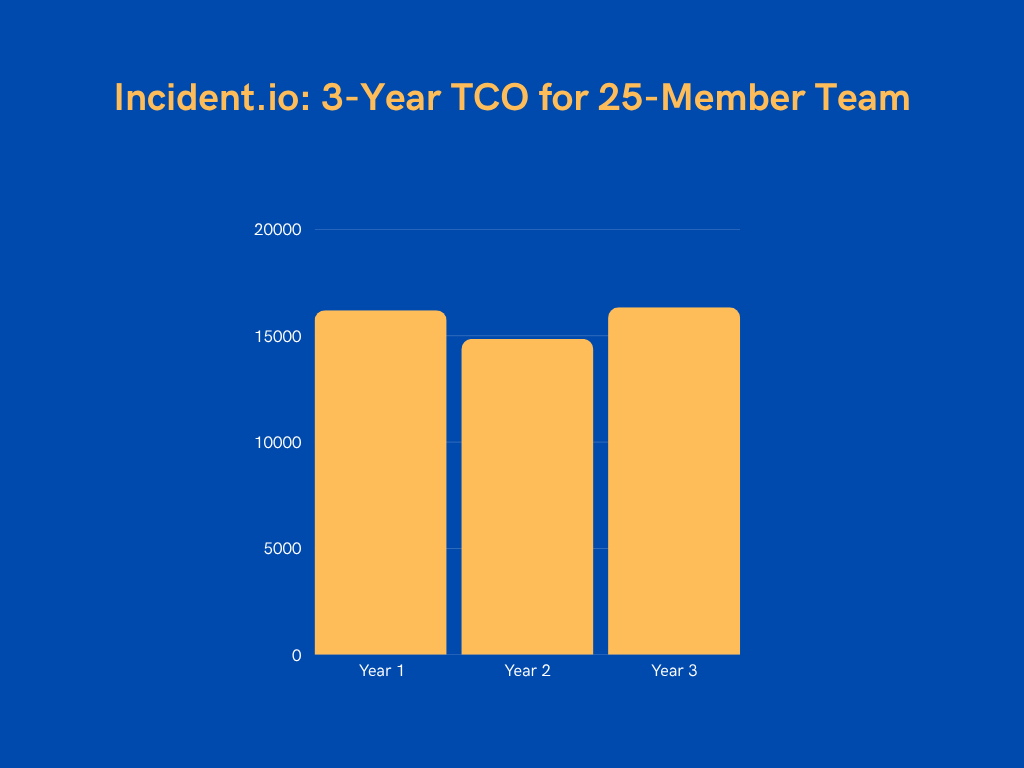
Example 1: For a team of 25 users on the Pro plan with on-call capabilities, here’s the 3-year breakdown:
- Year 1: $16,200
- Base subscription: $7,500 ($25 × 25 users × 12 months)
- On-call add-on: $6,000 ($20 × 25 users × 12 months)
- Setup and training costs: $2,700 (one-time, non-recurring cost)
- Year 2: $14,850 (with 10% increase on base subscription and on-call add-on)
- Year 3: $16,335 (with 10% increase on base subscription and on-call add-on)
Total 3-year TCO: $47,385
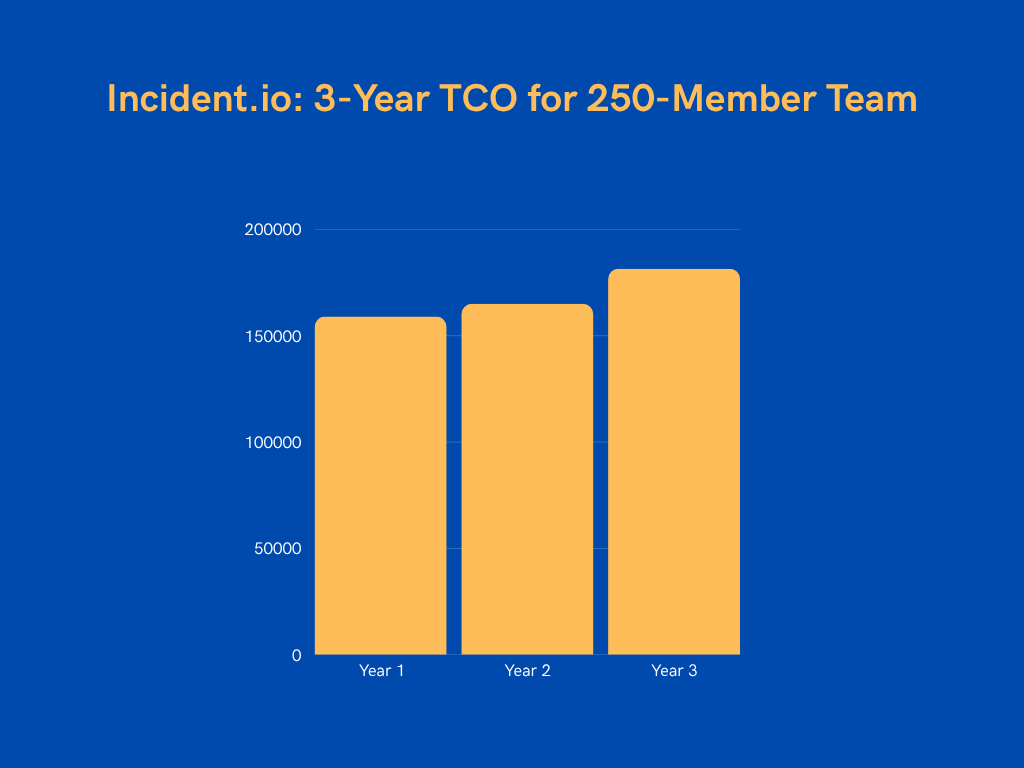
Example 2: For a larger deployment with 250 users on the Enterprise plan, the costs rise significantly:
- Year 1: $159,000
- Base subscription: $150,000 ($50 × 250 users × 12 months)
- Setup and training costs: $9,000
- Year 2: $165,000 (with 10% increase on base subscription and on-call add-on)
- Year 3: $181,500 (with 10% increase on base subscription and on-call add-on)
Total 3-year Enterprise TCO: $505,500
Instead of allocating over half a million dollars to Incident.io, consider affordable yet powerful alternatives like Spike that deliver the same capabilities at a fraction of the cost.
The substantial savings can be strategically reinvested in additional DevOps talent or improving infrastructure.
Spike: A Better, More Affordable Incident.io Alternative
Spike is a modern incident management platform trusted by teams across 40+ countries. With over 15 million incidents processed and 90,000+ on-call shifts rotated, it’s proven to handle incident management at scale while maintaining ease of use.
It offers an intuitive interface, powerful automation, and flexible on-call management—all at an affordable price.
Here’s a quick overview of Incident.io vs. Spike pricing, including other related factors:
| Comparison Factor | Incident.io | Spike |
|---|---|---|
| Starting Price | $19/user/month + $12 on-call | $7/user/month |
| On-Call Management | Separate add-on cost | Included in base price |
| Implementation Time | 1-2 days | 1-2 hours |
| Time to First Alert | 30-60 mins | 5 mins |
| Learning Curve | Moderate (requires training) | Minimal (intuitive interface) |
| Time to Team Adoption | 1-2 days | Immediate |
| Training Time | 1-2 hours per user | No training needed |
Now, let’s get into more details.
Spike Pricing Tiers: What You Pay And What You Get
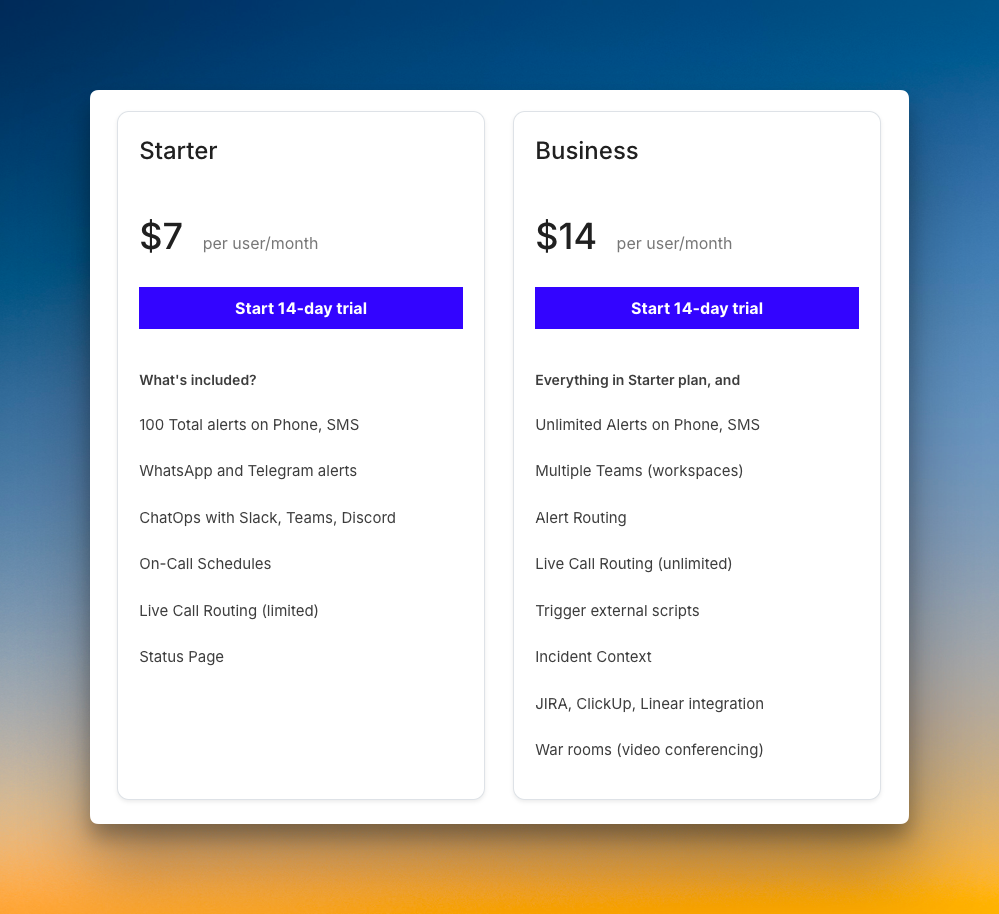
- Starter Plan ($7/user/month)
Spike’s entry plan is built for small teams and startups. It includes 100 total alerts on phone and SMS, unlimited alerts on WhatsApp and Telegram, ChatOps integration with Slack and Teams, on-call schedules, live call routing (limited), and a status page.
Everything you need to manage incidents is available from day one. There are no separate charges for on-call management or basic features.
2. Business Plan ($14/user/month)
The Business plan doubles your capabilities without hidden fees. It includes everything in Starter plus unlimited alerts on phone and SMS, multiple teams, unlimited alert routing rules, trigger external scripts, incident context, JIRA/ClickUp/Linear integration, and war rooms for video collaboration.
These additions support growing teams without forcing you to jump to an enterprise tier. You can also add or remove team members anytime. No bulk purchasing required.
3. Enterprise Plan (Custom Pricing)
For larger organizations, Spike offers an Enterprise plan (~$15/user/month) with priority support and custom requirements. This tier includes everything in Business plus SSO, a dedicated Customer Success Manager, a private Slack or Microsoft Teams channel with support, unlimited status pages, and custom reports.
Enterprise customers get pricing based on their actual needs without paying for features they won’t use.
Cost Savings With Spike
Let’s compare three real-world scenarios to see the actual impact of switching from Incident.io to Spike:
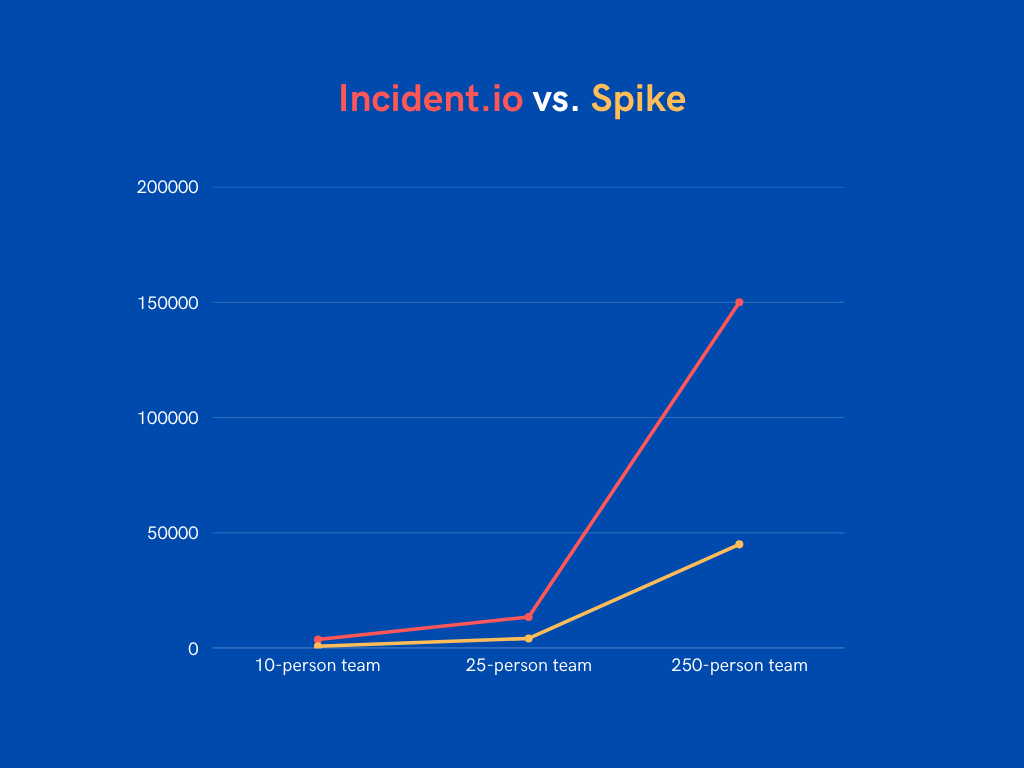
- Scenario 1: 10-Person Team
- Incident.io Team with on-call ($31/user/month): $3,720/year
- Base subscription: $2,280
- On-call add-on: $1,440
- Spike Starter ($7/user/month all-inclusive): $840/year
Total savings: $2,880 (77%)
2. Scenario 2: 25-Person Team
- Incident.io Pro with on-call ($45/user/month): $13,500/year
- Base subscription: $7,500
- On-call add-on: $6,000
- Spike Business ($14/user/month all-inclusive): $4,200/year
Total savings: $9,300 (69%)
3. Scenario 3: 250-Person Team
- Incident.io Enterprise ($50/user/month): $150,000/year
- Spike Enterprise ($15/user/month): $45,000/year
Total savings: $105,000 (70%)
Beyond Direct Savings: The ROI of Switching to Spike
The financial savings are just part of the value. Switching to Spike delivers operational benefits that impact your team’s effectiveness:
- Fast Time to Value: Incident.io requires 1-2 days for full setup. Spike can be completely configured in 1-2 hours. Your team starts managing incidents the same day.
- Minimal Training: Spike needs no formal training compared to Incident.io’s 1-2 hours per user. This frees up engineering time for actual development work.
- Smooth Migration: Spike’s straightforward setup and familiar workflows minimize disruption during the switch.
- Easy Integrations: Popular monitoring, project management, and ticketing tools connect with one-click setup. You can have your entire stack integrated in hours, not days.
Hear What Customers Say About Spike
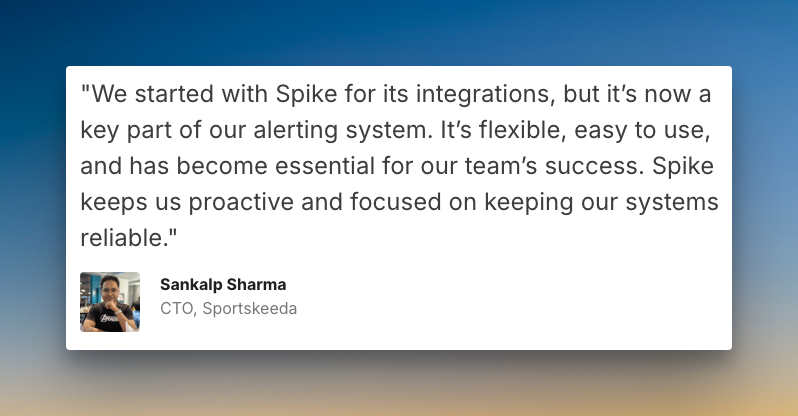
Sankalp Sharma, CTO of Sportskeeda
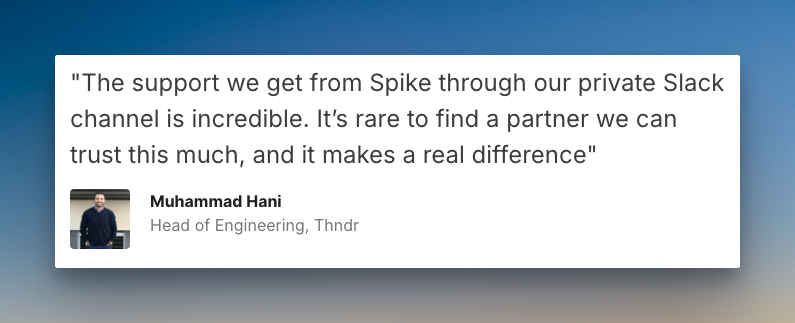
Mohammad Hani, Head of Engineering at Thndr
Making the Switch: Migration Path from Incident.io to Spike
Moving from Incident.io to Spike is a quick process that takes hours, not weeks. Here’s the typical flow:
- Platform Setup (10 mins): Create your Spike account, invite team members, and configure basic organization settings.
- Integration Setup (15 mins): Connect your monitoring tools and chat platforms to Spike using built-in integrations.
- On-Call Schedule Creation (15 mins): Build your team’s on-call schedules and escalation policies in Spike.
- Alert Rules Configuration (15 mins): Set up your alert routing rules in Spike to match your current Incident.io configurations.
- Final Cutover (10 mins): Complete the migration by pointing your alert sources to Spike and deactivating Incident.io.
Spike offers ready-to-use templates for escalations, Alert Rules, and on-call schedules. With these, you can further cut down your migration time.
Common Migration Questions
- How long does migration from Incident.io to Spike take?
Most teams finish their complete migration within 1-2 hours. Smaller teams often complete it faster.
2. Will our team need training on Spike?
No training needed. Teams can start using Spike right away, thanks to its intuitive user interface.
3. We have 50+ integrations with Incident.io. Will Spike support them?
Yes. Spike supports all major monitoring tools, chat platforms, and ticketing systems. The platform includes 80+ pre-built integrations. If you need a specific integration that’s not available, we build new integrations quickly—typically within 1 business day.
4. What alert channels does Spike provide?
Spike supports all standard alert channels, including SMS, phone calls, mobile push notifications, WhatsApp & Telegram, Slack, Microsoft Teams, and more. All channels are included at no extra cost.
Have more questions about migration? Talk to a Spike specialist →
Final Thoughts
Incident.io’s pricing seems straightforward at first. But the separate on-call add-on tells a different story. The price you see isn’t what you’ll actually pay for a complete solution.
This approach makes it hard to budget accurately. Teams need on-call capabilities. Paying extra for this essential feature drives up the total cost significantly.
Spike takes a simpler, more transparent path. Its pricing is all-inclusive with on-call management included in every plan, not as an expensive add-on.
You get the same powerful features, save up to 70%, and reduce implementation time from days to hours.