
OpsGenie is shutting down. Atlassian stopped new sales on June 4, 2025, and the platform will shut down completely on April 5, 2027.
For existing OpsGenie users, Atlassian recommends moving to Jira Service Management (JSM). But JSM is a broad service management platform, not a dedicated incident management tool like OpsGenie was.
More importantly, JSM’s pricing structure can catch you off guard. What looks affordable at first glance comes with hidden costs that add up fast.
This blog breaks down JSM’s pricing in detail. You’ll see what each plan costs, what features you actually get, and what you’ll pay extra for. By the end, you’ll know if JSM fits your budget or if you need a better alternative.
Let’s dive in!
Table of Contents
Jira Service Management (JSM) Pricing Explained (2026)
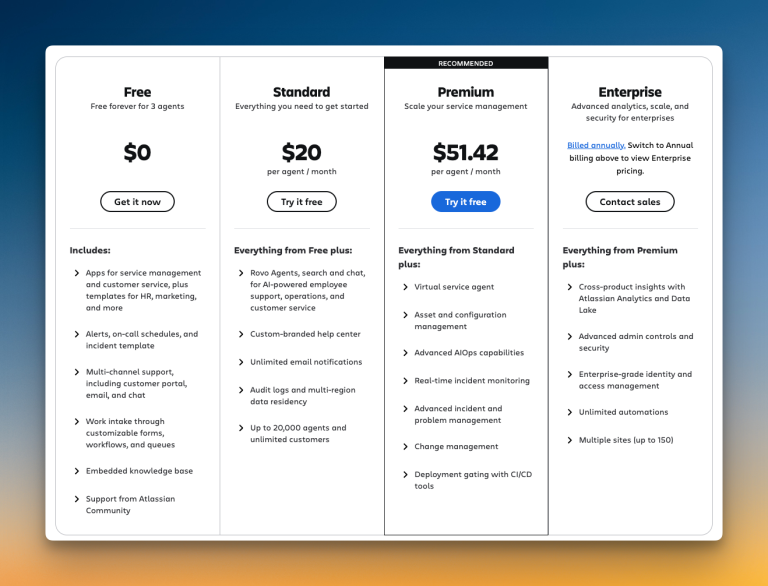
JSM offers four pricing tiers. Each tier targets different team sizes and needs.
The advertised prices look straightforward. But the real cost depends on team size, add-ons, and feature limitations that force you to upgrade.
| Plan | Price per Agent/Month | Ideal For |
|---|---|---|
| Free | $0 | Testing, up to 3 agents |
| Standard | $20 | Small teams starting with ITSM |
| Premium | $51.42 | Growing teams needing advanced features |
| Enterprise | Custom (~$157,000/year for 800 agents) | Large organizations |
The jump from Standard to Premium is steep. You pay 2.5x more per agent. And if you need Enterprise, you’re looking at six-figure annual contracts.
Jira Service Management (JSM) Pricing Tiers: What You Pay and What You Get
1. Free Plan ($0)
The Free plan supports up to 3 agents. You get basic service management features, a customer portal, and email support.
It’s fine for testing JSM. But you’re limited to 2 GB of storage and 100 email notifications per day. No real alerting capabilities here.
For incident management, this plan won’t work.
2. Standard Plan ($20/agent/month)
The Standard plan costs $20 per agent each month. You get unlimited email notifications, 250 GB of storage, and 5,000 automation rule runs per month. You can add up to 20,000 agents. Custom branding is included.
But here’s what’s missing: No asset management. No advanced incident features. No postmortem tools. And automation is capped at 5,000 rules per month, which runs out fast for active teams.
3. Premium Plan ($51.42/agent/month)
Premium costs $51.42 per agent per month. This is where JSM starts to feel complete for incident management.
You get asset and configuration management, advanced AIOps capabilities, change management, and unlimited storage. Real-time incident monitoring and 24/7 support are included. Automation increases to 1,000 rule runs per user per month. You also get a 99.9% uptime SLA.
But Premium still has limits. You get 1,000 virtual service agent conversations per month. After that, you pay extra. The same goes for Assets objects—you get 50,000 included, then it’s $0.02 per object per month.
4. Enterprise Plan (Custom pricing)
Enterprise pricing is custom. Based on industry reports, it starts around $157,000 per year for 800 agents, depending on features and volume discounts.
You get everything from Premium, plus unlimited automations, multiple sites (up to 150), and advanced admin controls. SSO is included.
This tier is for large organizations that need centralized governance and multi-instance management.
Jira Service Management (JSM) Additional Costs
JSM’s advertised prices don’t tell the full story. Here’s what you’ll pay extra for:
Status Pages
JSM doesn’t include a built-in status page. You need to integrate with Atlassian’s Statuspage.io, which costs an extra $29 to $109 per month.
OpsGenie also required this same integration. So if you’re migrating from OpsGenie, the status page cost remains the same. But it’s still an extra monthly expense on top of your JSM subscription.
Virtual Service Agent Conversations
Premium and Enterprise plans include 1,000 assisted conversations per month. After that, you pay $0.30 per conversation. If you rely on AI-powered support, this adds up fast.
Assets Objects
Premium includes 50,000 Assets objects. Enterprise includes 500,000. Beyond these limits, you pay $0.02 per object per month. For teams managing large infrastructure, this becomes a recurring cost.
Setup and Training Time
JSM is complex. Setup times vary based on workflow complexity, but expect 1 to 2 weeks. Training takes 2 to 4 hours per user. This is cognitive overhead that OpsGenie users aren’t used to.
3-Year Total Cost of Ownership (TCO) Projection for Jira Service Management (JSM)
Looking at the long-term financial impact means calculating beyond year one. Here’s what a typical three-year TCO looks like for JSM:
Year 1 Costs:
- JSM subscription fees (varies by plan)
- Status page integration costs
- Setup and training time (one-time, non-recurring cost)
Years 2 & 3 Costs:
- Annual subscription renewals (often with 10% increases)
- Continued status page costs
- Additional seats as your team expands
- Possible tier upgrades as you outgrow current plan limitations
Let’s look at three scenarios to understand the real numbers:
| Team Size & Plan | Year 1 | Year 2 | Year 3 | 3-Year Total |
|---|---|---|---|---|
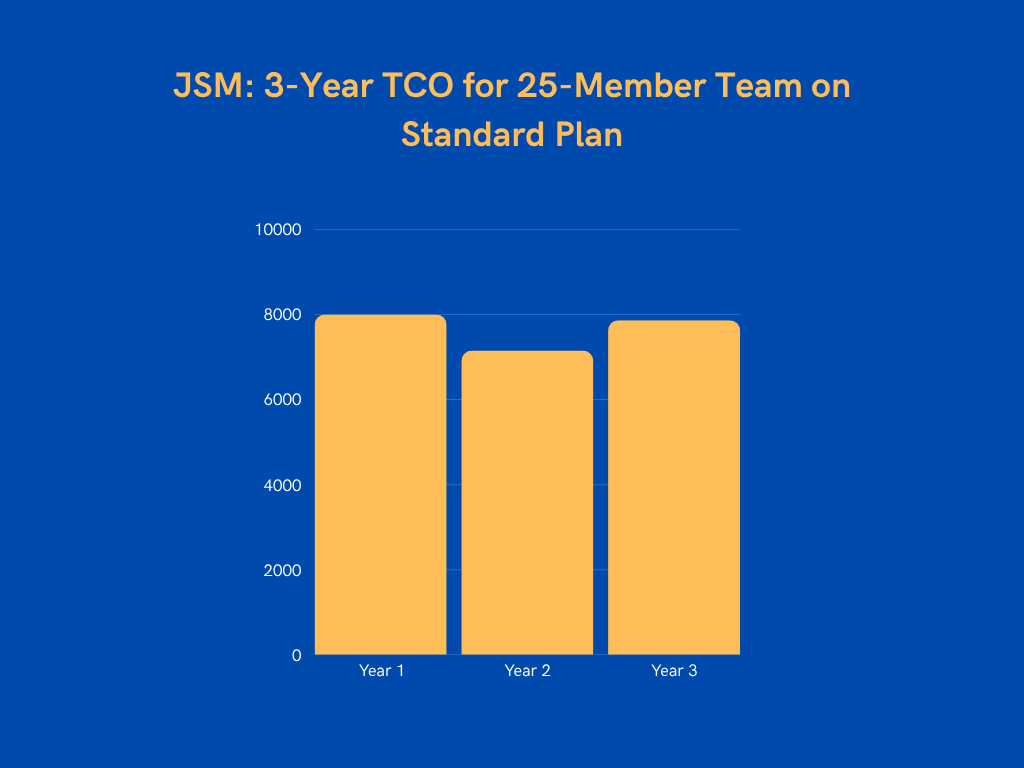
| 25 agents (Standard) | $8,000 | $7,150 | $7,865 | $23,015 |
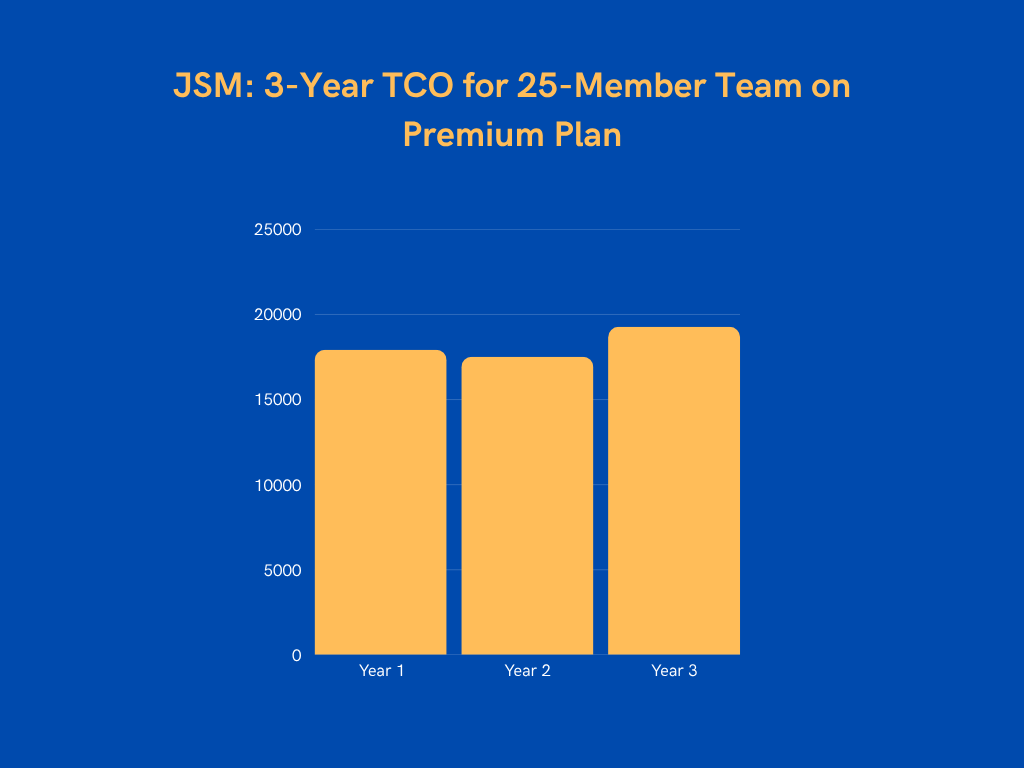
| 25 agents (Premium) | $17,926 | $17,519 | $19,270 | $54,715 |
| 800 agents (Enterprise) | $460,000 | $495,000 | $544,500 | $1,499,500 |
Example 1: 25-Member Team on Standard plan
Year 1: $8,000
- JSM subscription: $6,000 ($20 × 25 agents × 12 months)
- Status page: $500
- Setup and training costs: $1,500 (one-time, non-recurring cost)
Year 2: $7,150 (with 10% increase on JSM subscription and status page)
Year 3: $7,865 (with 10% increase on JSM subscription and status page)
Total 3-year TCO: $23,015
Example 2: 25-Member Team on Premium plan
Year 1: $17,926
- JSM subscription: $15,426 ($51.42 × 25 agents × 12 months)
- Status page: $500
- Setup and training costs: $2,000 (one-time, non-recurring cost)
Year 2: $17,519 (with 10% increase on JSM subscription and status page)
Year 3: $19,270 (with 10% increase on JSM subscription and status page)
Total 3-year TCO: $54,715
Example 3: 800-Member Team on Enterprise plan
Year 1: $460,000
- JSM subscription: $450,000
- Setup and training costs: $10,000 (one-time, non-recurring cost)
Year 2: $495,000 (with 10% increase on JSM subscription)
Year 3: $544,500 (with 10% increase on JSM subscription)
Total 3-year Enterprise TCO: $1,499,500
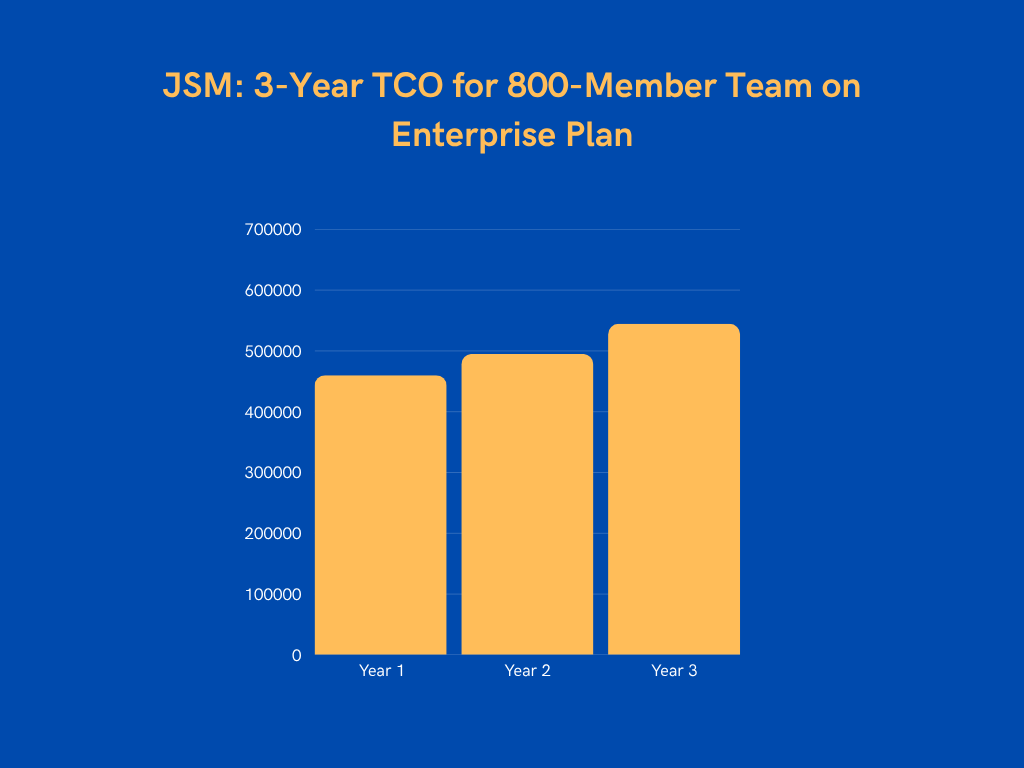
These projections assume moderate annual increases and don’t account for scaling beyond initial user counts.
From OpsGenie to Jira Service Management (JSM): The Real Cost Increase
OpsGenie had simple, transparent pricing. JSM does not. Let’s compare what you paid with OpsGenie versus what you’ll pay with JSM.
| Team Size | OpsGenie | JSM Premium | Cost Increase |
|---|---|---|---|
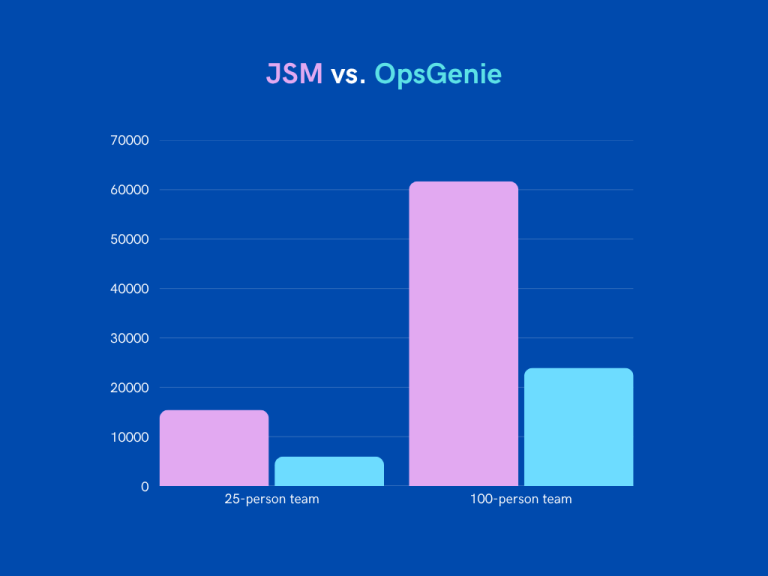
| 25 members | $5,985 | $15,426 | +$9,441 (158%) |
| 100 members | $23,940 | $61,704 | +$37,764 (158%) |
For a 25-Member Team
- OpsGenie Standard: $19.95/user/month = $5,985/year
- JSM Standard: $20/user/month = $6,000/year (but no advanced incident features)
- JSM Premium (needed for full incident management): $51.42/user/month = $15,426/year
Cost increase: 158% more per year
For a 100-Member Team
- OpsGenie Standard: $19.95/user/month = $23,940/year
- JSM Premium: $51.42/user/month = $61,704/year
Cost increase: 158% more per year
What OpsGenie Users Actually Need from Jira Service Management (JSM)
OpsGenie was built for incident management. JSM is a service management platform. Here’s what OpsGenie users actually need:
- Fast alert delivery across multiple channels
- Flexible on-call schedules with easy overrides
- Incident response workflows with escalation policies
- Postmortem tools
JSM offers these features, but not all at once. Standard lacks advanced incident tools. Premium has them, but costs 2.5x more.
For teams that only need incident management, JSM feels bloated and overpriced.
Spike: A Better, More Affordable Jira Service Management (JSM) Alternative
Spike is a dedicated incident management platform. It’s built for teams migrating from OpsGenie who want simplicity and transparent pricing.
Here’s how Spike compares to JSM:
| Feature | JSM | Spike |
|---|---|---|
| Starting Price | $20/user/month (Standard) | $7/user/month (Starter) |
| Core Incident Features | Premium plan required ($51.42/user/month) | Included in all plans |
| Status Pages | Extra cost ($29-109/month via Statuspage.io) | Included in all plans |
| Phone/SMS Alerts | Limited on lower tiers | 100 total on Starter, unlimited on Business |
| Setup Time | 1-2 weeks | 1-2 hours |
| Training Required | 2-4 hours per user | None (intuitive interface) |
Spike Pricing Tiers: What You Pay And What You Get
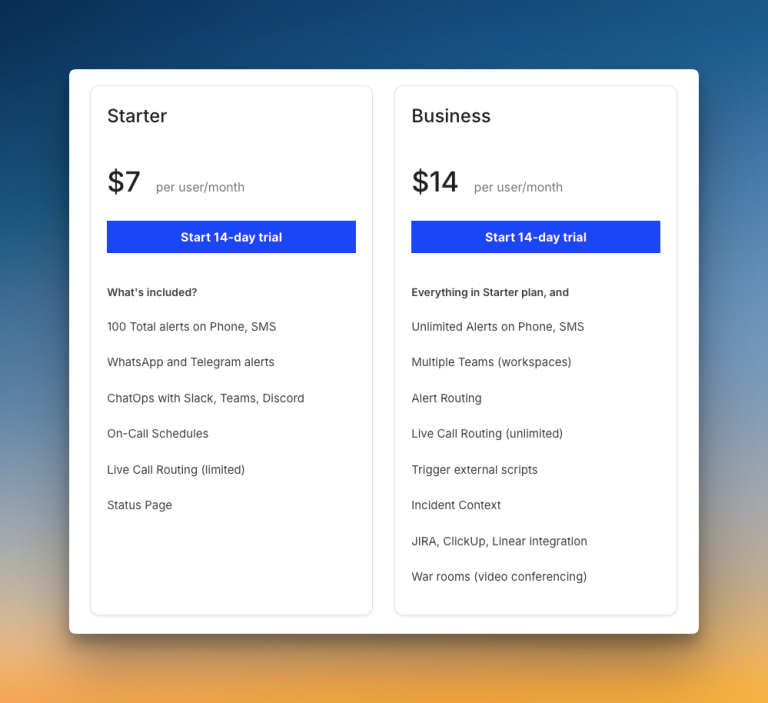
1. Starter Plan ($7/user/month)
The Starter plan costs $7 per agent per month. You get 100 total alerts on phone and SMS, unlimited WhatsApp and Telegram alerts, ChatOps integration with Slack and Teams, on-call schedules, and a status page. All core features you need for incident management are included. No separate charges.
2. Business Plan ($14/user/month)
The Business plan costs $14 per agent per month. You get everything in Starter plus unlimited phone and SMS alerts, multiple teams, unlimited alert routing rules, and war rooms for video collaboration. You also get integrations with Jira, ClickUp, and Linear.
3. Enterprise Plan (~$15/user/month)
For larger teams, Spike offers an Enterprise plan at approximately $15 per user per month. This includes everything in Business plus SSO, a dedicated Customer Success Manager, priority support, and custom reports.
Cost Savings With Spike
Let’s compare JSM and Spike across four scenarios:
| Team Size | JSM Cost | Spike Cost | Annual Savings | Savings % |
|---|---|---|---|---|
| 25 members | $15,426 | $4,200 | $11,226 | 73% |
| 100 members | $61,704 | $16,800 | $44,904 | 73% |
| 250 members | $154,260 | $42,000 | $112,260 | 73% |
| 800 members | $450,000 | $144,000 | $306,000 | 68% |
Scenario 1: 25-Member Team
- JSM Premium (needed for full incident management): $15,426/year
- Spike Business: $4,200/year
Total savings: $11,226 (73%)
Scenario 2: 100-Member Team
- JSM Premium: $61,704/year
- Spike Business: $16,800/year
Total savings: $44,904 (73%)
Scenario 3: 250-Member Team
- JSM Premium: $154,260/year
- Spike Business: $42,000/year
Total savings: $112,260 (73%)
Scenario 4: 800-Member Enterprise Team
- JSM Enterprise: $450,000/year
- Spike Enterprise: $144,000/year
Total savings: $306,000/year (68%)
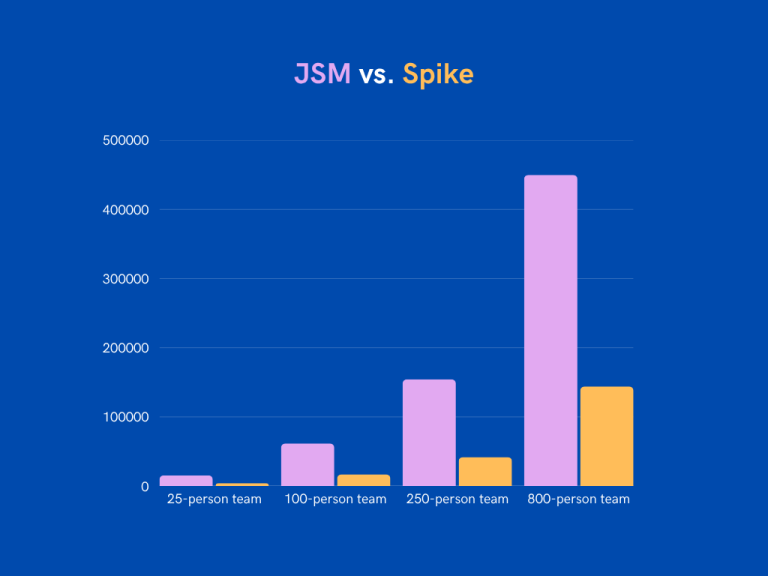
At enterprise scale, you save $306,000 per year, or $918,000 over three years. That’s nearly a million dollars that can be reinvested in infrastructure improvements or additional engineering talent.
Plus, the operational benefits become even more valuable at scale. Faster setup means less disruption across 800+ users. Built-in status pages save $1,200+ annually. And a purpose-built platform means easier team adoption and lower training overhead.
Beyond Direct Savings: The ROI of Switching to Spike
The cost difference is just part of the value. Spike delivers operational benefits that save time and reduce friction:
- Fast Setup: JSM takes 1 to 2 weeks to set up. Spike takes 1 to 2 hours. Your team starts managing incidents the same day.
- No Training Needed: JSM requires 2 to 4 hours of training per user. Spike’s interface is intuitive. No formal training needed.
- Purpose-Built for Incident Management: JSM is a service management platform. Spike is built specifically for incident management. You get the features you need without the bloat.
- Built-In Status Pages: Unlike both OpsGenie and JSM (which require Statuspage.io integration), Spike includes status pages in every plan at no extra cost. This saves you $29 to $109 per month.
With OpsGenie shutting down, businesses are switching to Spike with 50% off. Learn more →
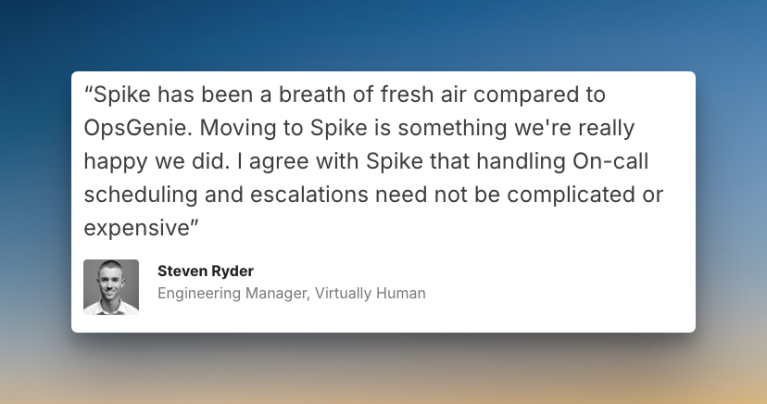
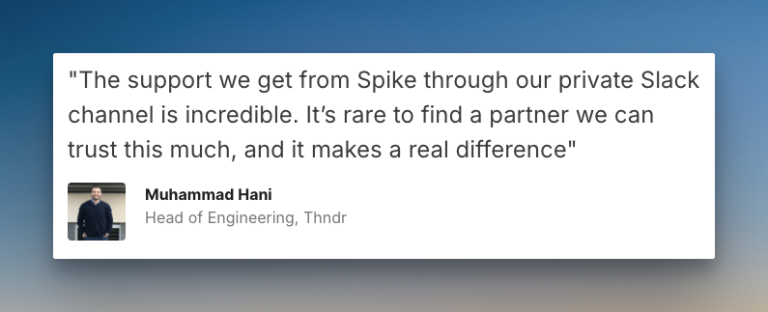
Hear What Customers Say About Spike
Steven Ryder, former Engineering Manager at Virtually Human
Mohammad Hani, Head of Engineering at Thndr
Making the Switch: Migration Path from OpsGenie to Spike
Moving from OpsGenie to Spike is fast. Most teams finish in under 2 hours. Here’s the typical flow:
- Platform Setup (10 mins): Create your Spike account, invite team members, and set up basic organization settings.
- Integration Setup (15 mins): Connect your monitoring tools and chat platforms to Spike with built-in integrations.
- On-Call Schedule Creation (15 mins): Build your on-call schedules with ready-to-use templates.
- Alert Rules Configuration (15 mins): Set up alert routing rules to match your current OpsGenie setup.
- Final Cutover (10 mins): Point your alert sources to Spike and deactivate OpsGenie.
Spike offers templates for escalations, alert rules, and on-call schedules. These cut down migration time even further.
Common Migration Questions
1. How long does migration from OpsGenie to Spike take?
Most teams complete the migration in 1 to 2 hours. Smaller teams often finish faster.
2. Will our team need training on Spike?
No. Spike’s interface is intuitive. Teams start using it immediately.
3. We have 50+ integrations with OpsGenie. Will Spike support them?
Yes. Spike supports all major monitoring tools, chat platforms, and ticketing systems with 80+ pre-built integrations. If you need a specific integration that’s not available, Spike builds new integrations within 1 business day.
4. What alert channels does Spike provide?
Spike supports SMS, phone calls, mobile push notifications, WhatsApp, Telegram, Slack, Microsoft Teams, and more. All channels are included at no extra cost.
5. Does Spike include status pages?
Yes. Status pages are included in every plan, including the Starter plan. This is different from both OpsGenie and JSM, which require separate Statuspage.io subscriptions.
Final Thoughts
Jira Service Management (JSM) pricing looks simple at first. But the real cost comes from feature limitations, add-ons, and complexity.
OpsGenie users need a dedicated incident management tool, not a broad service management platform. JSM forces you to pay for features you don’t need while charging extra for essentials like virtual agents and asset management.
Spike takes a different approach. It’s built specifically for incident management with transparent, all-inclusive pricing. You get the same features OpsGenie offered, save up to 73%, and reduce setup time from weeks to hours.
Plus, unlike both OpsGenie and JSM, Spike includes status pages in every plan at no extra cost.
If you’re migrating from OpsGenie, Spike is the clear choice.