
If you’re stuck choosing between PagerDuty vs. Spike for alerting, you’re in the right place.
I wrote this blog post to help you make a clear choice. To do this, I signed up for both tools and ran a full, hands-on comparison to see which one performs better in real-world scenarios.
This detailed analysis will show you the key differences, declare a clear winner based on a 25-point scoring system, and give you the confidence to pick the right tool for your team.
Let’s get started.
Table of Contents
How I Tested and Scored the Tools
To keep this comparison fair and transparent, here’s the exact process I followed.
My Hands-On Test
I set up a real-world test by creating a service named “Cron Job” in both PagerDuty and Spike. I then integrated it with Healthchecks.io to trigger identical test alerts on both platforms. This allowed for a direct, side-by-side comparison of their alerting capabilities.
My Scoring Framework
I’ve compared the tools across two areas:
- 5 Core Criteria: Covering the most important aspects of alerting
- 15-Point Checklist: For the finer details that can make or break your experience
The scoring is simple: Each core criterion is worth 2 points. If there’s a winner, they get 2 points; if it’s a tie, both get 1. The checklist adds another 15 points (1 per feature), for a total of 25 points.
PagerDuty vs. Spike: Core Alerting Criteria
- Alerting Philosophy: I looked at how each platform thinks about alerting. Is the core idea built around simplicity, or does it lean toward complexity?
- Setup and Configuration: This covers getting started. How fast can you add contact methods, create a service, connect an integration, and design an escalation policy? I tested the process from start to finish.
- Alert Channels: I compared key channels like phone calls, SMS, email, push, and Slack. How rich is the information in each alert? What actions can you take directly from a notification?
- On-Call Handoff Notifications: This focuses on notifications for on-call shift changes. I checked how easy and flexible it is to get notifications when your on-call duty starts or ends.
- Alert Fatigue Handling: This is about cutting down on noise. I looked at what options each tool provides to help prevent team burnout.
PagerDuty vs. Spike: Alerting Comparison
| Criteria | PagerDuty | Spike | Verdict |
|---|---|---|---|
| Alerting Philosophy | Individual control only – users set their own preferences, no team-level customization | Dual control – both team managers and individuals can customize alerting | Spike wins (2 points) |
| Setup and Configuration | Separate phone/SMS numbers, complex Slack setup, 5-user limit per escalation step | Native Pushover, simple Slack setup, auto-resolve wait times, unlimited users | Spike wins (2 points) |
| Alert Channels | Strong multi-channel alerts, rich Slack actions, no email reply actions | Multi-channel alerts, email reply actions (#ack/#res), Pushover integration | Tie (1 point each) |
| On-Call handoff notifications | Service-specific handoff notifications via escalation policies | Channel-specific notifications plus webhook automation for shift changes | Tie (1 point each) |
| Alert Fatigue Handling | Core deduplication/grouping, ML-powered AIOps (paid add-on) | Built-in deduplication/grouping, powerful Alert Rules with templates (no extra cost) | Tie (1 point each) |
1. Alerting Philosophy: PagerDuty vs. Spike
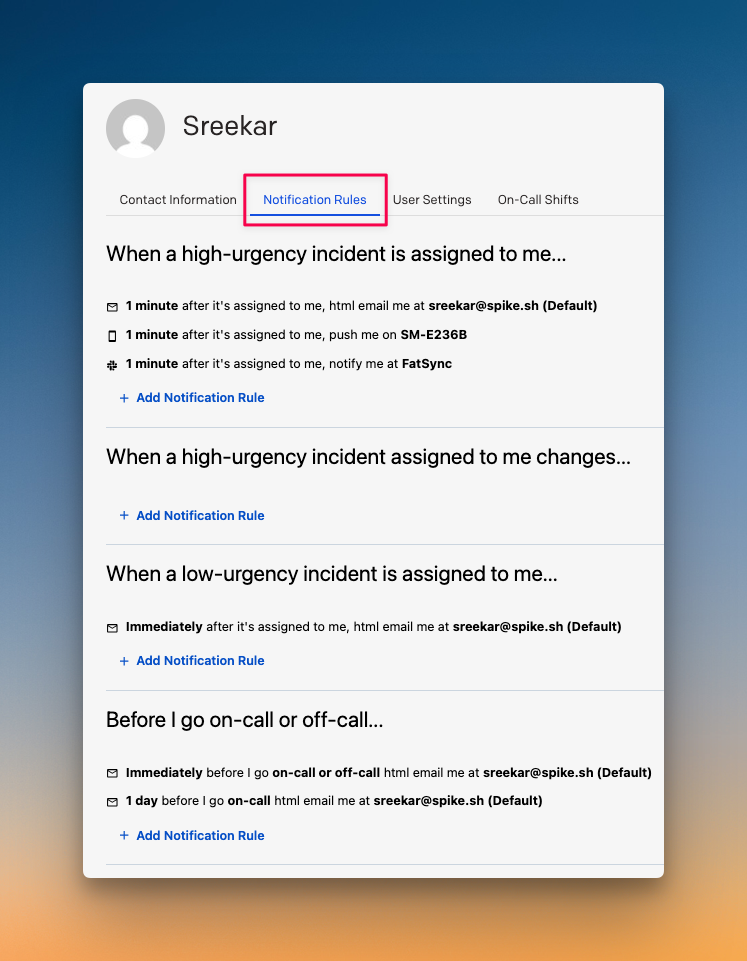
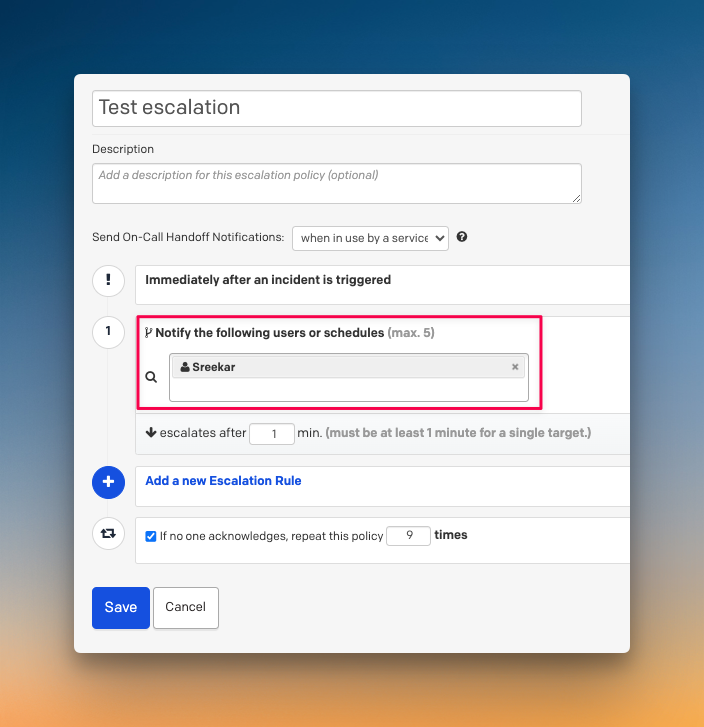
PagerDuty puts control in individual hands. Each user sets their own alert preferences, like time delays, channels, and order. Team leads can’t decide how someone gets alerted.
For example, when you create an escalation policy, you can say “alert Daman” but not specify whether he gets a phone call or SMS. Daman’s personal preferences control that part. This gives users full autonomy but limits team-level control.
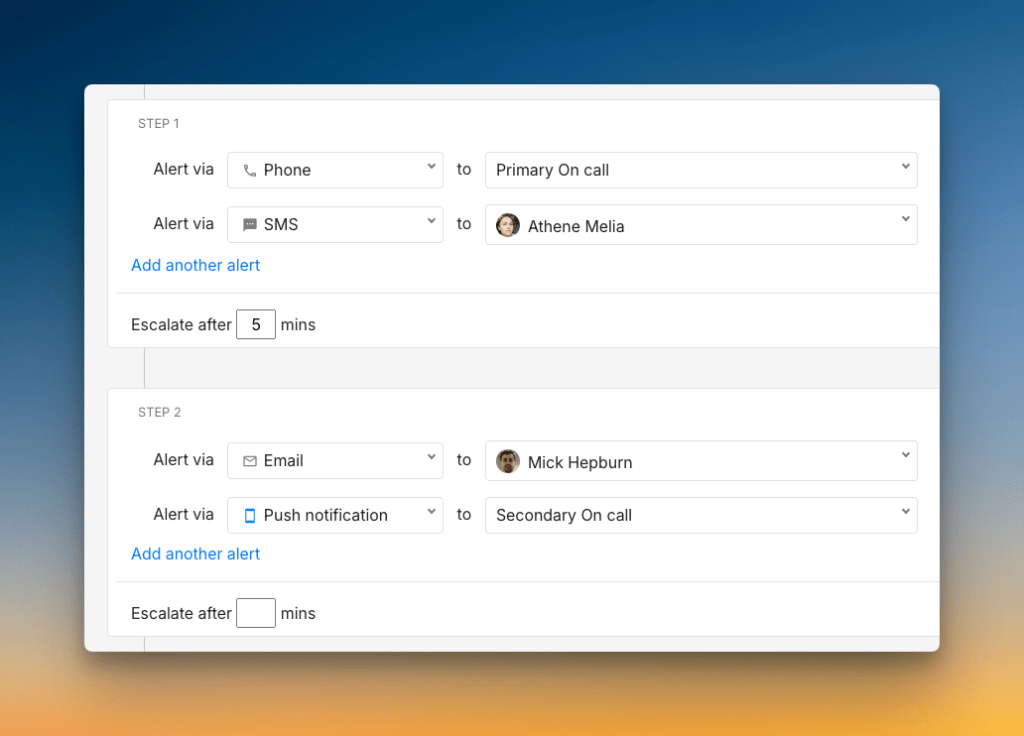
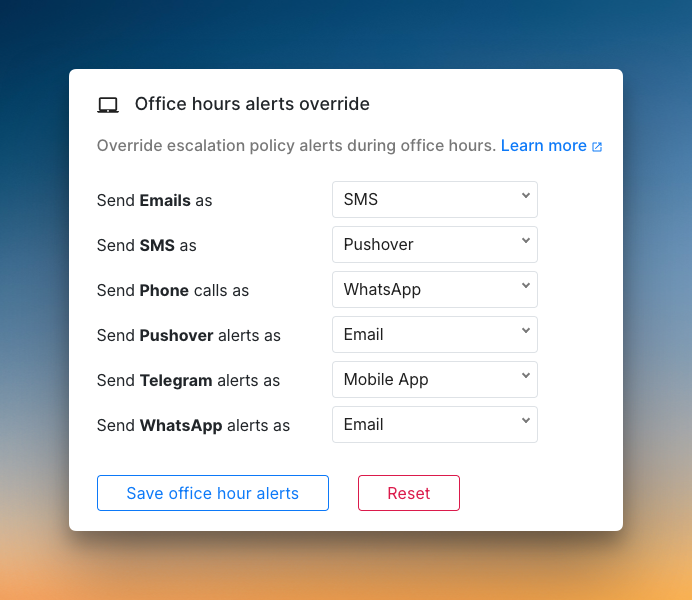
Spike takes a dual approach. It gives both teams and individuals control over alerting. Managers can create escalation policies that specify exactly how someone gets alerted, and at the same time, individual users can set alert preferences.
For example, you can tell Spike to call Daman directly in an escalation policy. But Daman can still configure how he wants to receive alerts in his settings. He might override phone calls to SMS while keeping the escalation logic intact.
Who should pick what?
- Pick PagerDuty if you want complete individual control and don’t need team-level alert customization
- Pick Spike if you want both team control and individual flexibility for alerting
Verdict: Spike wins. The ability to customize alerts at both team and individual levels gives you more flexibility to handle different types of incidents effectively.
2. Setup and Configuration: PagerDuty vs. Spike
PagerDuty lets you add contact methods for phone, SMS, email, Slack, and push notifications. You can set separate numbers for calls and SMS, which is handy. However, push notifications only work through their mobile app; no native Pushover support.
Setting up Slack alerts requires extra steps. You pick a workspace but can’t choose channels directly. To get alerts in specific channels, you need to dig into integrations, find connectors, and map services. Creating escalation policies is straightforward, but you can only add up to 5 users per step.
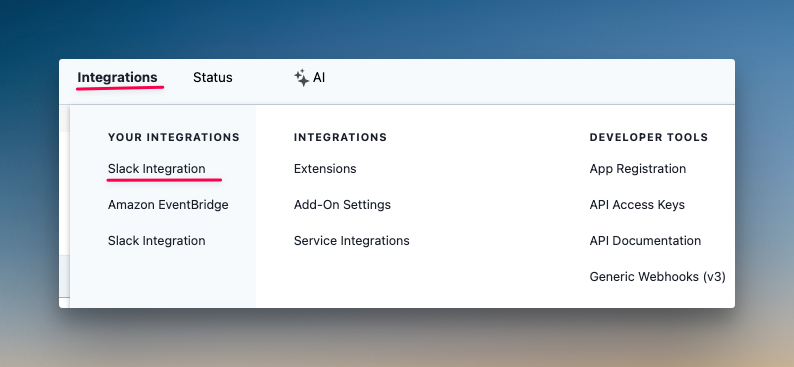
Spike covers the same contact methods but takes a simpler approach. It has native Pushover integration built in, so you don’t need third-party tools. You can customize phone call voice (gender and speed), set office hours routing, and schedule out-of-office periods directly.
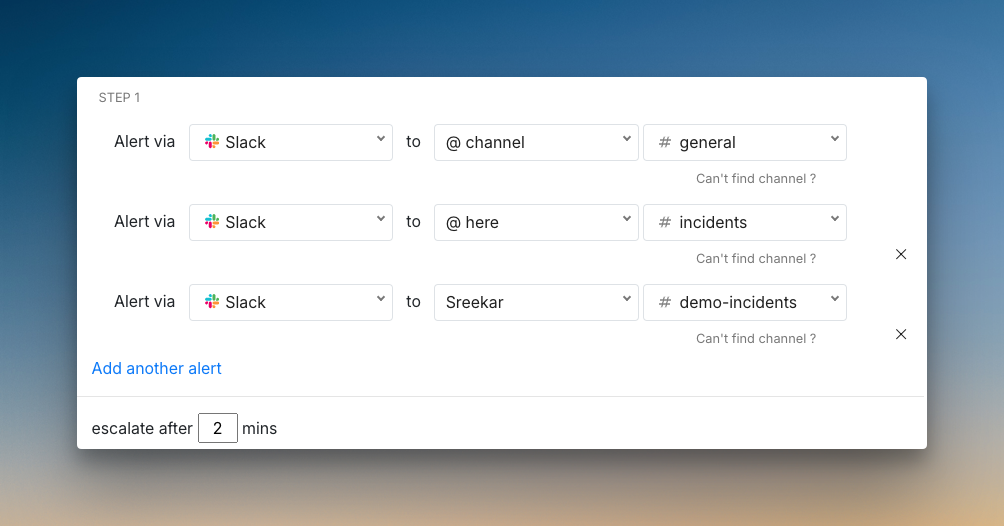
The real difference shows up in escalation policies. Spike lets you add wait times so incidents can auto-resolve before triggering alerts. You can also alert people in specific Slack channels with @here, @channel, or @user mentions. No extra configuration steps needed.
Who should pick what?
- Pick PagerDuty if you need separate phone and SMS numbers and don’t mind extra setup steps
- Pick Spike if you want a streamlined setup, native Pushover support, and auto-resolve wait times
Verdict: Spike wins. The simpler Slack setup, native Pushover integration, and auto-resolve features make getting started much faster.
3. Alert Channels: PagerDuty vs. Spike
PagerDuty delivers alerts across all standard channels. Each notification comes with useful data and ways to act on the incident.
- Phone Call: You get a call that reads the incident details. You can press keys to acknowledge (4), resolve (8), or escalate (6).
- SMS: The text message includes incident details and a link. You can reply with commands like “ack” or “res” to take action.
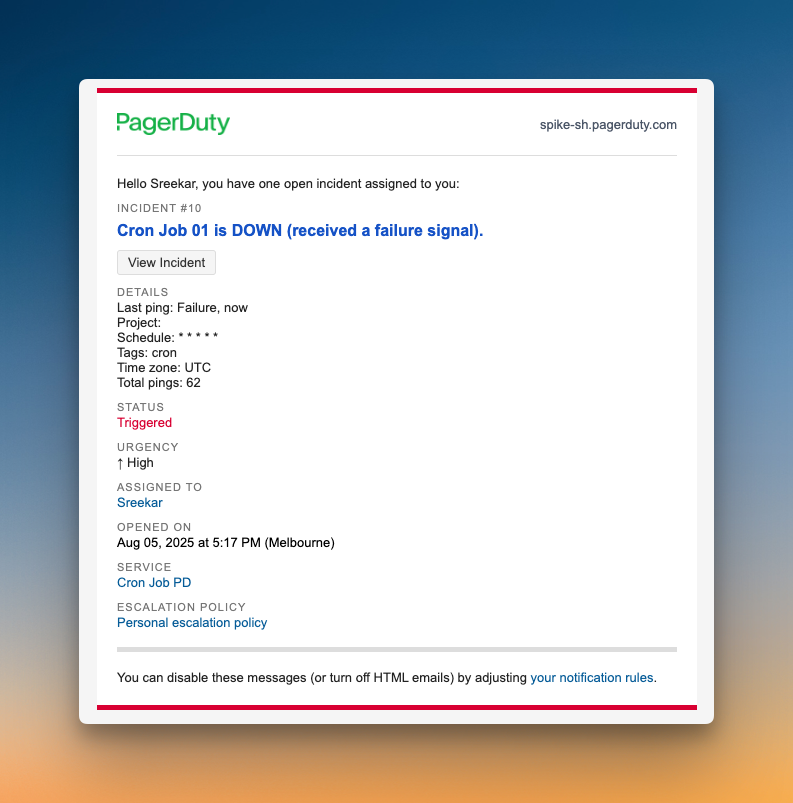
- Email: You get a detailed email with a link to the incident. However, you can’t take action by replying to the email itself.
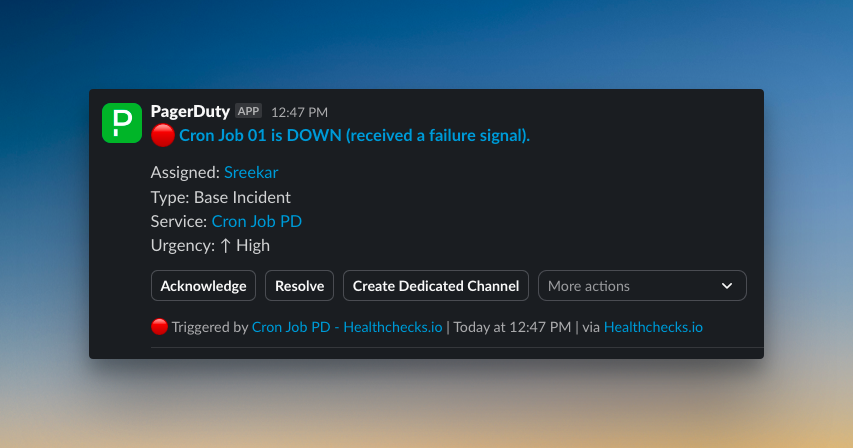
- Slack: Alerts are rich with data and offer many actions. You can acknowledge, resolve, add notes, and even create a dedicated incident channel.
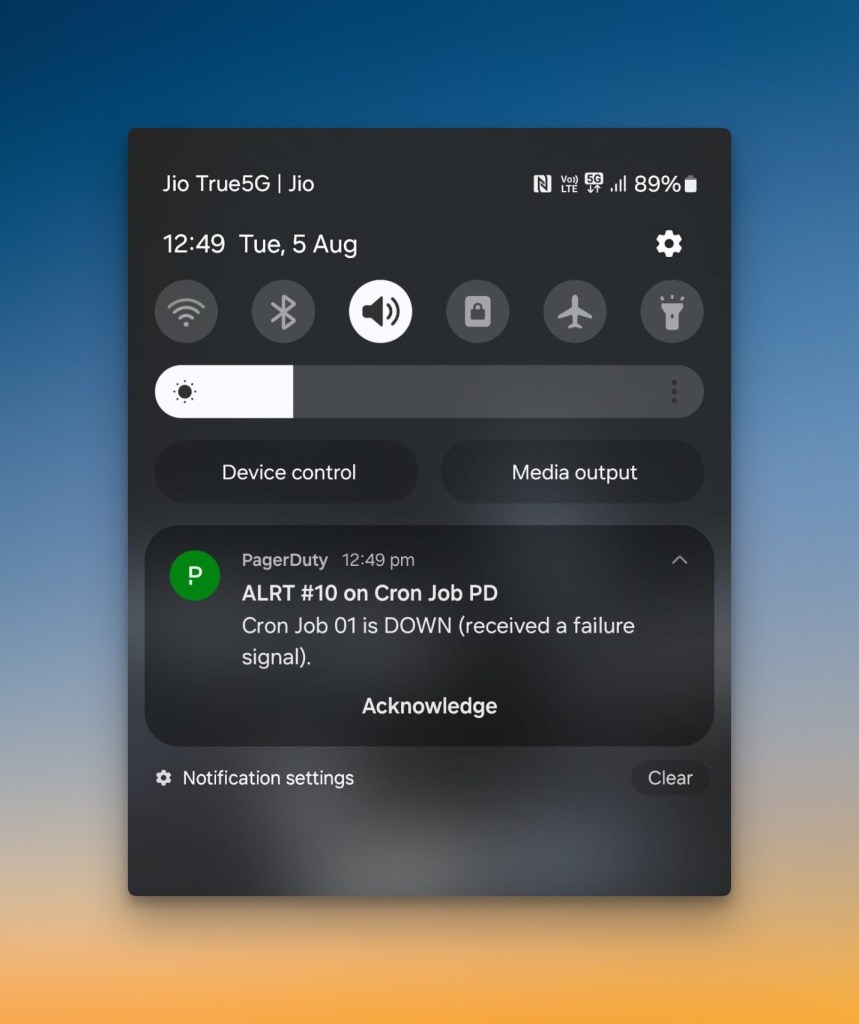
- Push: You get a notification on your phone. It has an instant acknowledge option. When you tap on the alert, it opens the incident in PagerDuty’s mobile app for more actions.
Spike also provides solid alerting on all the same channels. It focuses on making actions quick and simple from any notification.
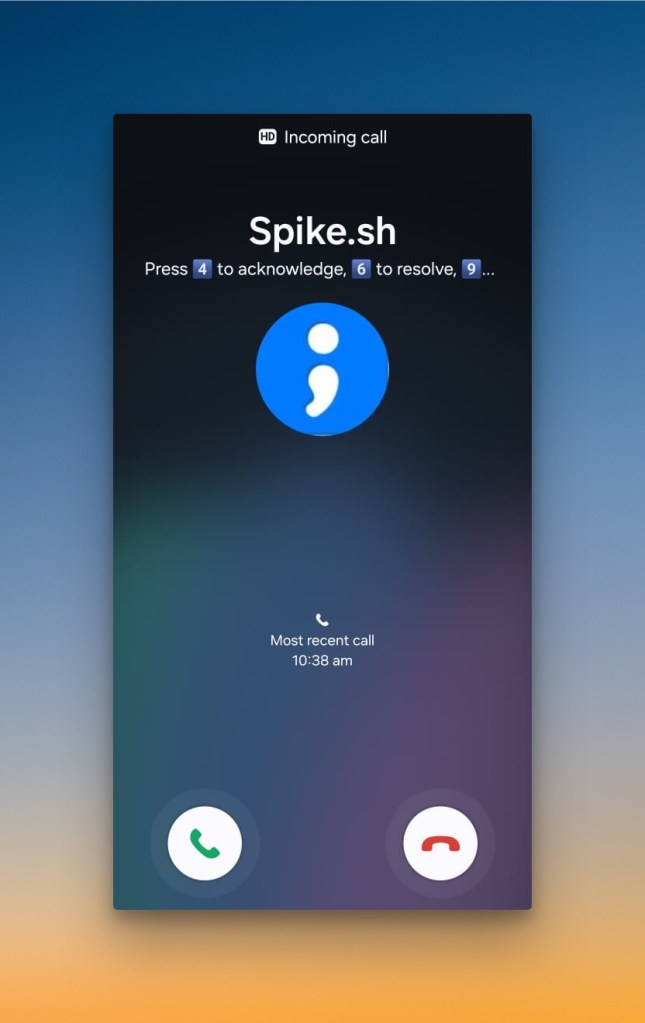
- Phone Call: When your phone rings, you see the actions on screen. The call gives you voice prompts to acknowledge, resolve, or escalate.
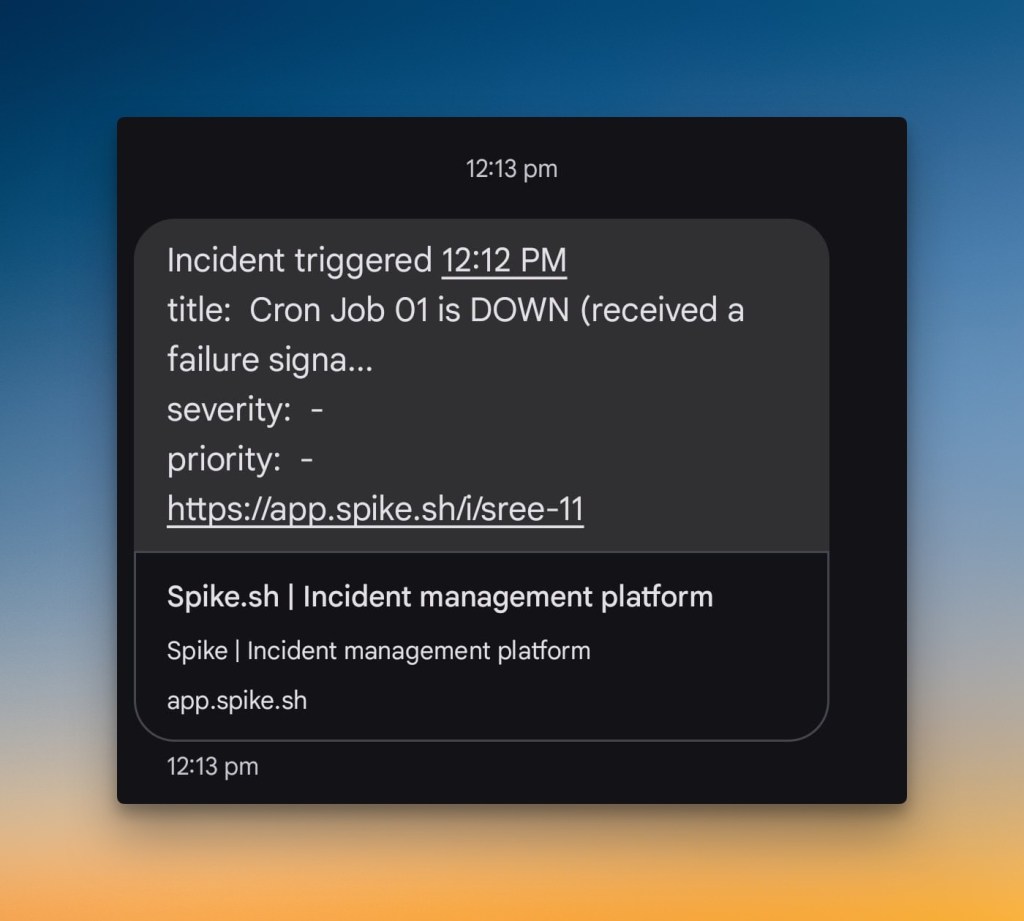
- SMS: You get a text with the incident title and a link. You can reply directly to the message to acknowledge, resolve, or escalate.
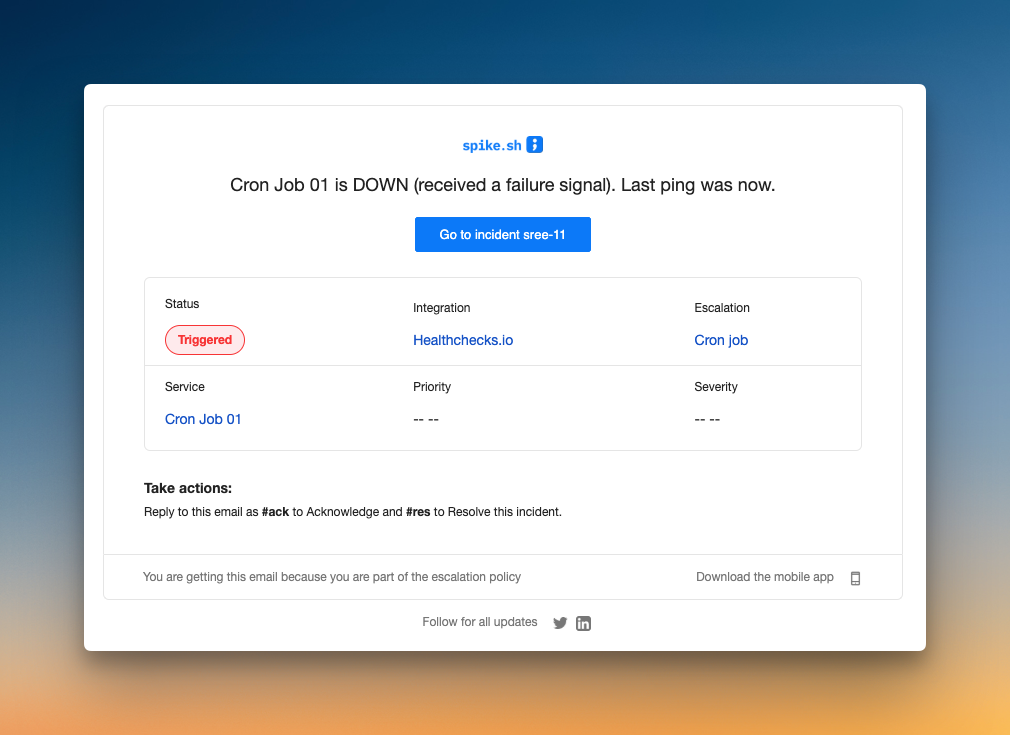
- Email: The email includes key alert data. You can reply with
#ackor#resto take action without leaving your inbox.
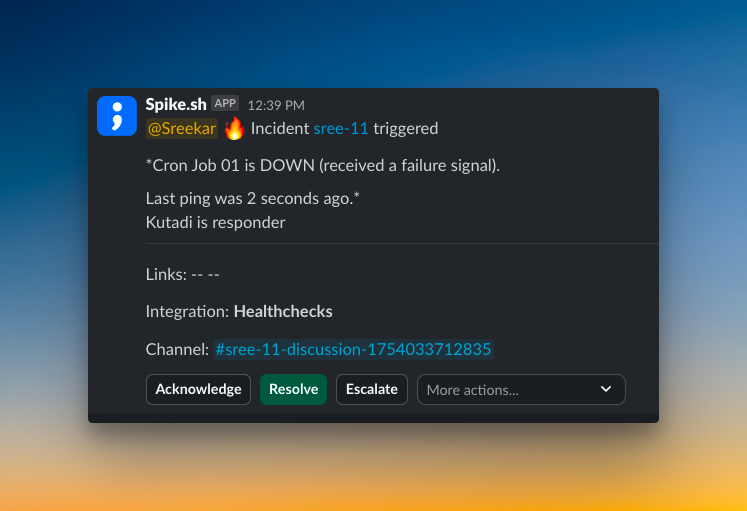
- Slack: Alerts can mention specific users,
@here, or@channel. You can acknowledge, resolve, escalate, or create a discussion channel right away.
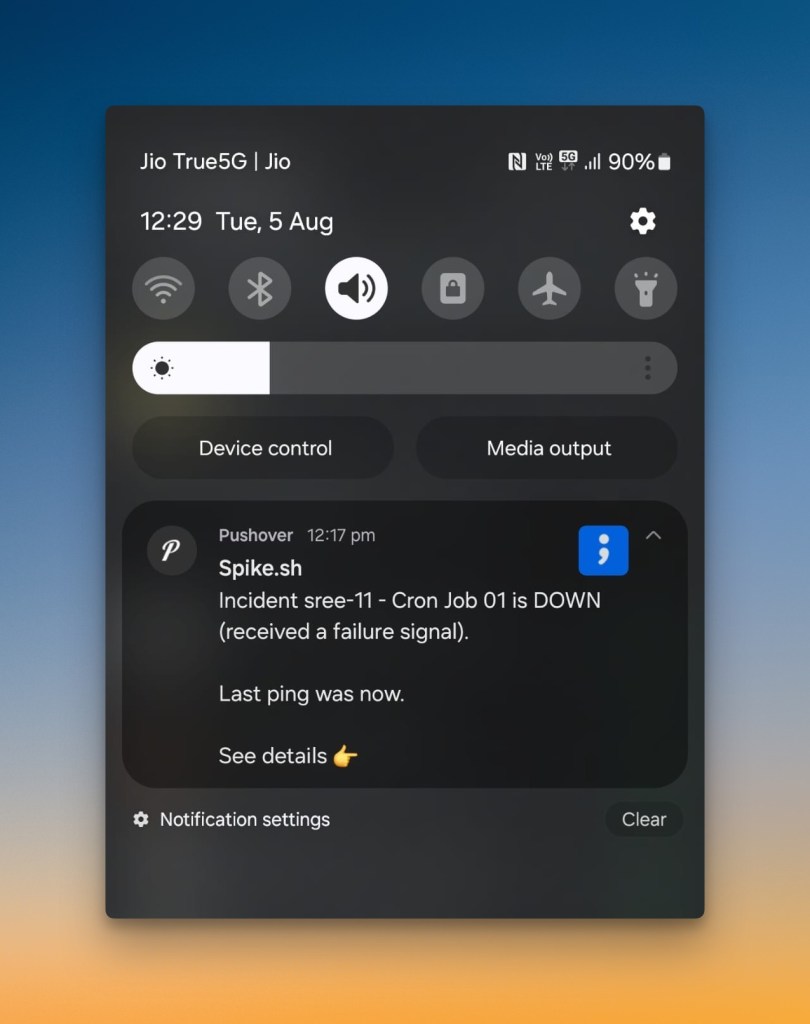
- Push: You get a notification with the incident title. Tapping it opens the full incident in the Spike app. Pushover integration is also available.
Who should pick what?
- Pick PagerDuty if you want a detailed email alert
- Pick Spike if you prefer the convenience of acting on alerts by replying to an email
Verdict: It’s a tie. Both PagerDuty and Spike offer strong, actionable alerts across all essential channels. They just have slightly different approaches to how you interact with them.
4. On-Call Handoff Notifications: PagerDuty vs. Spike
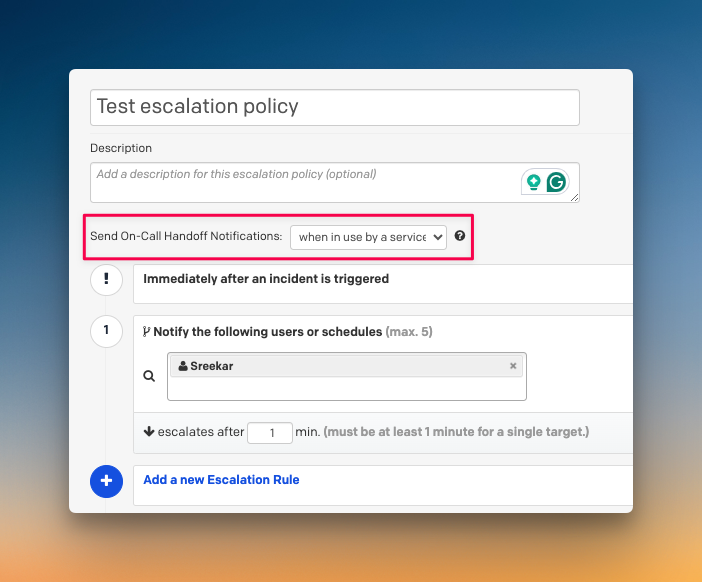
PagerDuty handles on-call handoff notifications through its escalation policies. This gives you control over which services trigger these handoff alerts.
You can decide to send handoff alerts only for critical services, while keeping non-critical ones quiet. This helps reduce alert noise for teams that manage many services with different priorities.
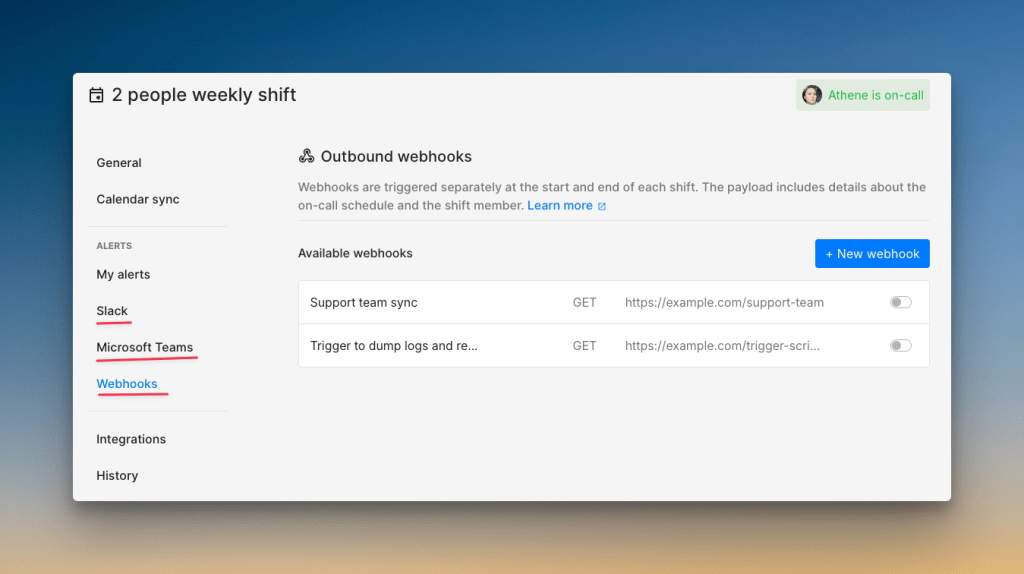
Spike sends shift change notifications to specific Slack or Teams channels. This means the backend team sees only backend alerts, and the frontend team sees theirs, cutting down on noise.
Spike also supports webhook triggers whenever a shift changes. This lets you automate things like running custom health checks, creating tickets, sending mobile alerts, or even granting database access when the on-call rotation updates.
Who should pick what?
- Pick PagerDuty if you need on-call handoff notifications for specific services
- Pick Spike if you want channel-specific alerts and to automate tasks when shifts change
Verdict: It’s a tie. Both tools solve the problem well. Your choice depends on whether you need PagerDuty’s service-based on-call handoff notifications or Spike’s powerful webhook automation.
5. Alert Fatigue Handling: PagerDuty vs. Spike
PagerDuty automatically handles alert deduplication, grouping, and suppression. This helps reduce repeat notifications from a single underlying issue.
For more advanced noise reduction, PagerDuty offers AIOps. This feature uses machine learning to find patterns and group related incidents. These powerful capabilities are available as a paid add-on.
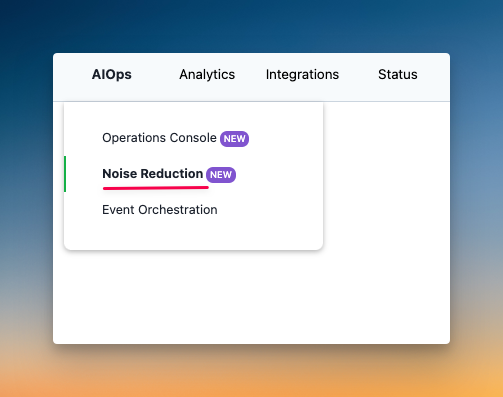
Spike also tackles alert fatigue with built-in features. It includes alert grouping, deduplication, and suppression as part of its core platform. You get these essential tools without needing any add-ons.
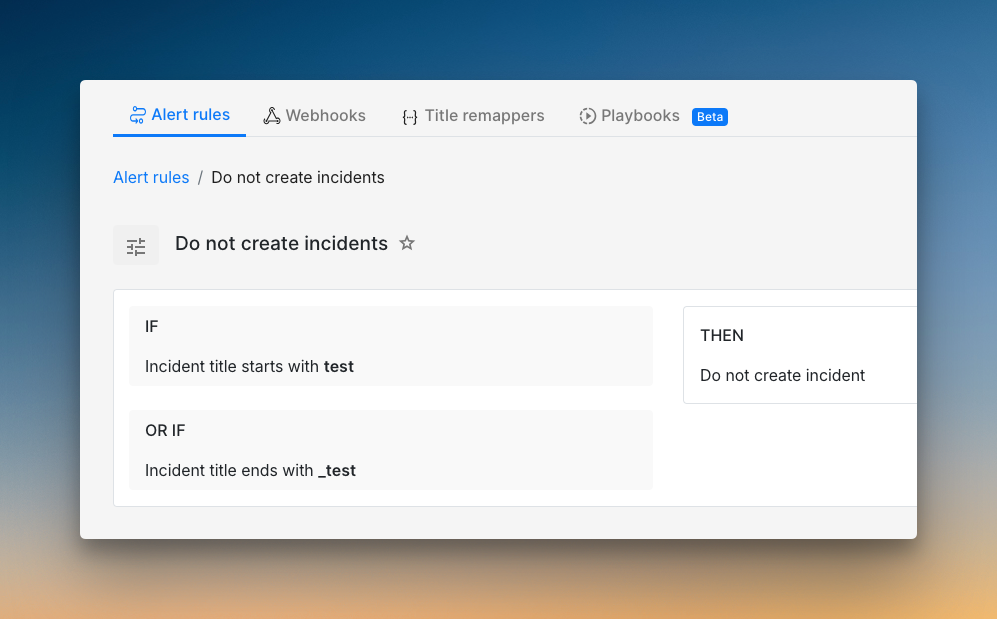
Spike also has a feature called Alert Rules. This lets you create powerful, custom logic to control alerts before they ever reach your team. Ready-to-use alert rule templates help you get started quickly, all at no extra cost.
Who should pick what?
- Pick PagerDuty if you need machine learning-driven noise reduction and have the budget
- Pick Spike if you want powerful, rule-based control over alert noise without paying extra
Verdict: It’s a tie. PagerDuty offers advanced AI for a price, while Spike delivers powerful, cost-effective rule-based tools. Both are effective, just with different approaches and costs.
PagerDuty vs. Spike: Alerting Checklist
I’ve covered the big questions, but when it comes to alerting, some small details can make or break your experience.
Here’s a 15-point checklist comparing both tools side by side so you know exactly what you’re getting.
| Criteria | PagerDuty | Spike |
|---|---|---|
| Ready-to-use escalation and alert rule templates | ❌ | ✅ |
| Alert title or payload rewriting/remapping | ✅ | ✅ |
| Native alert deduplication, grouping, and suppression | ✅ | ✅ |
| Time-based escalations (business hours, off-hours) | ✅ | ✅ |
| Channel-specific escalation rules (e.g. phone for primary, push for secondary) | ❌ | ✅ |
| Auto-skip unavailable on-call responders (overrides, vacation, out of office) | ✅ | ✅ |
| Acknowledgment timeouts with automatic re-alerting | ✅ | ✅ |
| DND/silence bypass for only critical alerts | ✅ | ✅ |
| Granular control over alert suppression | ✅ | ❌ |
| “No mention” option for Slack alerts | ❌ | ✅ |
| Separate numbers for phone call and SMS | ✅ | ❌ |
| Multiple phone calls with redial | ✅ | ✅ |
| Acknowledge/resolve/comment from chat apps (Slack, Teams) | ✅ | ✅ |
| On-call shift change notifications | ✅ | ✅ |
| Real-time, filterable audit log across channels | ✅ | ✅ |
Final Thoughts
After comparing PagerDuty vs. Spike across 5 core criteria and a 15-point checklist, here’s the final score breakdown:
- Core Criteria Score: PagerDuty – 3, Spike – 7
- Checklist Score: PagerDuty – 12, Spike – 13
Final Score: PagerDuty – 15/25, Spike – 20/25
Spike is the clear winner. It offers more flexibility with its dual-control alerting philosophy and powerful automation through webhooks and built-in alert rules. Features that cost extra in PagerDuty are standard in Spike.
PagerDuty is a capable tool with solid core features. It handles alerting well, but its approach is less flexible, and advanced capabilities require paid add-ons.
If you want a powerful, flexible, and cost-effective alerting tool that respects your time, Spike is the better choice.