
If you’re stuck choosing between PagerDuty vs. Spike for incident response, this comparison is for you.
I signed up for both tools, tested their incident response capabilities, and compared them across the core criteria and a checklist (you’ll find out more about these as you read).
For each criterion and checklist item, I awarded points for both tools. And at the end, I declared a clear winner.
Curious to see who won the incident response battle? Let’s dive in!
Table of Contents
How I Tested and Scored the Tools
To keep this comparison fair and transparent, here’s the exact process I followed.
My Hands-On Test
I created a service named Cron Job in both PagerDuty and Spike. Then I integrated it with Healthchecks.io to trigger identical test alerts on both platforms.
This allowed me to test different response actions and checkout coordination features. I also explored the communication tools and post-incident actions in both tools.
My Scoring Framework
I compared the tools across two areas:
- 4 Core Criteria: Covering the most important aspects of incident response
- 12-Point Checklist: For the finer details that can make or break your incident response
The scoring is simple: Each core criterion is worth 2 points. If there’s a winner, they get 2 points; if it’s a tie, both get 1. The checklist adds another 12 points (1 per feature), for a total of 20 points.
PagerDuty vs. Spike: Core Incident Response Criteria
- Initial Response: I looked at the first steps you take when an incident occurs. This covers triage, acknowledgment, escalation, other actions, and automation.
- Team Collaboration: I tested how well teams can work together to fix a problem. This included looking at war rooms, Slack channels, and creating Jira or Linear tickets.
- Incident Communication: I checked how easy it is to keep people updated. This meant testing status pages and how you can send updates to stakeholders.
- Post-Incident Actions: I reviewed the tools for learning after an incident is over. I looked at features for incident timeline, resolution notes, and postmortems.
PagerDuty vs. Spike: Incident Response Comparison
| Criteria | PagerDuty | Spike | Verdict |
|---|---|---|---|
| Initial Response | Rich options on Slack, limited free automation, no auto-acknowledge, expensive AIOps add-on. | Built-in automation with Alert Rules, flexible escalations, auto-acknowledge, Playbooks. | Spike wins (2 points) |
| Team Collaboration | War rooms and ticket creation require expensive paid plans ($25/mo), complex setup. | One-click war rooms, simpler ticket creation in an affordable plan ($14/mo), easy automation. | Spike wins (2 points) |
| Incident Communication | Enterprise features like audience-specific pages and human approval workflows. | Easy setup, deep customization, SEO controls, simpler automation via Playbooks. | Tie (1 point each) |
| Post-Incident Actions | Granular, separate logs for analysis, built-in postmortem templates, notes from Slack. | Simplified, all-in-one timeline, no built-in templates, uses webhooks for postmortems. | PagerDuty wins (2 points) |
1. Initial Response: PagerDuty vs. Spike
Initial response is what happens right after an alert fires. I compared how PagerDuty vs. Spike handle these first critical moments.
Here’s what I looked at:
- Triage: Sorting incidents by priority and severity to know what to fix first
- Acknowledgment: Confirming an alert so the team knows you are on it
- Escalation: Notifying the next person if an alert is missed
- Other Actions: Other steps you can take, like adding notes or merging incidents
- Automation: Rules that handle incidents for you
Initial Response in PagerDuty
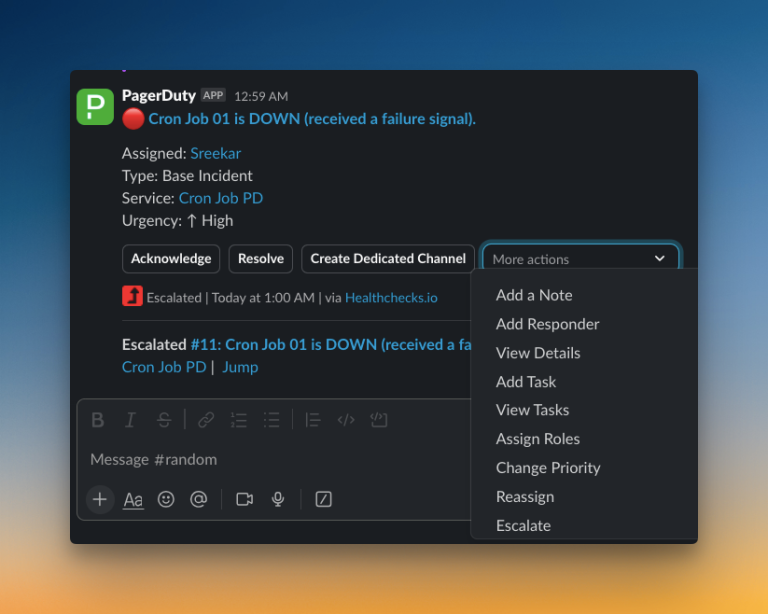
PagerDuty offers a rich set of manual controls for initial response, especially within Slack. Without leaving your chat, you can change an incident’s priority, add responders, create a dedicated channel, and even assign roles.
But the process feels rigid where it counts. You can’t auto-acknowledge incidents. You also can’t add a wait time to escalation policies, which creates noise for minor, self-resolving issues.
While basic automation is possible with Event Rules, powerful features are locked behind expensive plans. Accessing advanced automation like AIOps will cost you $799/month.
Initial Response in Spike
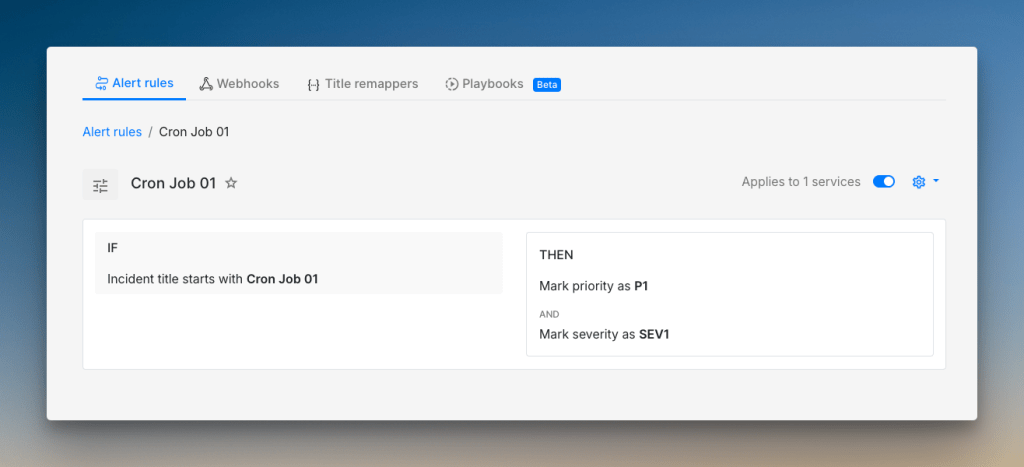
Spike builds automation into its core. You can create Alert Rules with simple if/else logic to automatically triage, acknowledge, or even resolve incidents.
For example, you can set a rule to auto-acknowledge an incident after it occurs twice. Escalation policies are more flexible. You can add a wait time at the start to avoid unnecessary alerts.
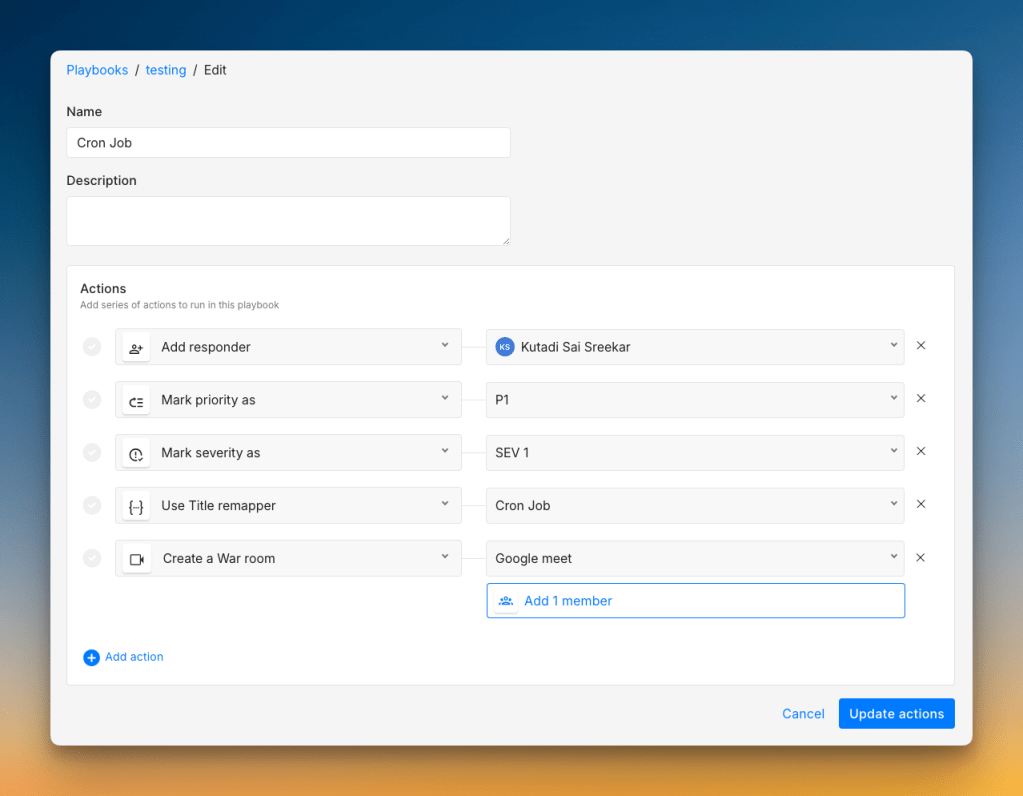
Spike gives both teams and individuals control over alert preferences. You can also trigger Playbooks, which are sets of pre-defined actions. This helps standardize your response to common incidents.
Who should pick what?
- Pick PagerDuty if you need a wide range of manual actions from Slack and are willing to pay for advanced automation features.
- Pick Spike if you want powerful, flexible automation right from the start without needing expensive add-ons.
Verdict: Spike wins because its built-in automation is more powerful and accessible. Features like Alert Rules and Playbooks help you respond faster and smarter, right out of the box.
2. Team Collaboration: PagerDuty vs. Spike
Effective team collaboration can make or break your incident response. I looked at how PagerDuty vs. Spike helps teams work together when things go wrong.
Here’s what I compared:
- Incident War Rooms: Creating video calls for teams to meet and resolve issues
- Dedicated Chat Channels: Setting up specific Slack channels for an incident
- Project Tickets: Creating tasks in tools like Jira or Linear to track follow-up work
Team Collaboration in PagerDuty
PagerDuty has a native integration with Zoom for war rooms. However, you can’t instantly start a call from the dashboard. Instead, you must set it up with Incident Workflows, available from the price plan $25/user/month.
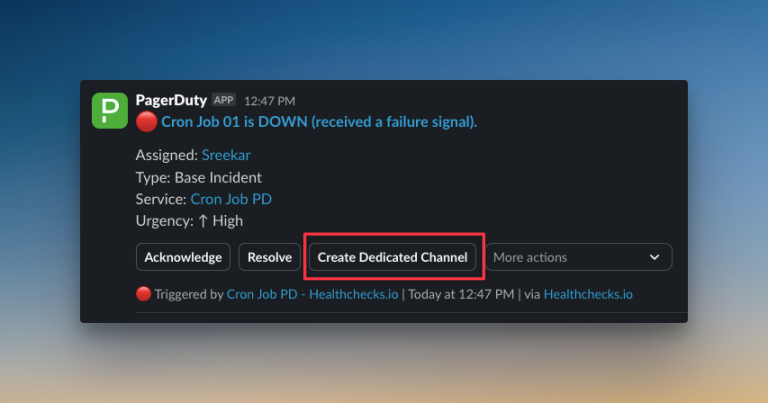
You can create a dedicated Slack channel for an incident. For project tickets, PagerDuty has a strong, bi-directional sync with Jira. However, creating tickets for Jira, ClickUp, or Linear also requires using Incident Workflows. There is no simple button for manual ticket creation.
Team Collaboration in Spike
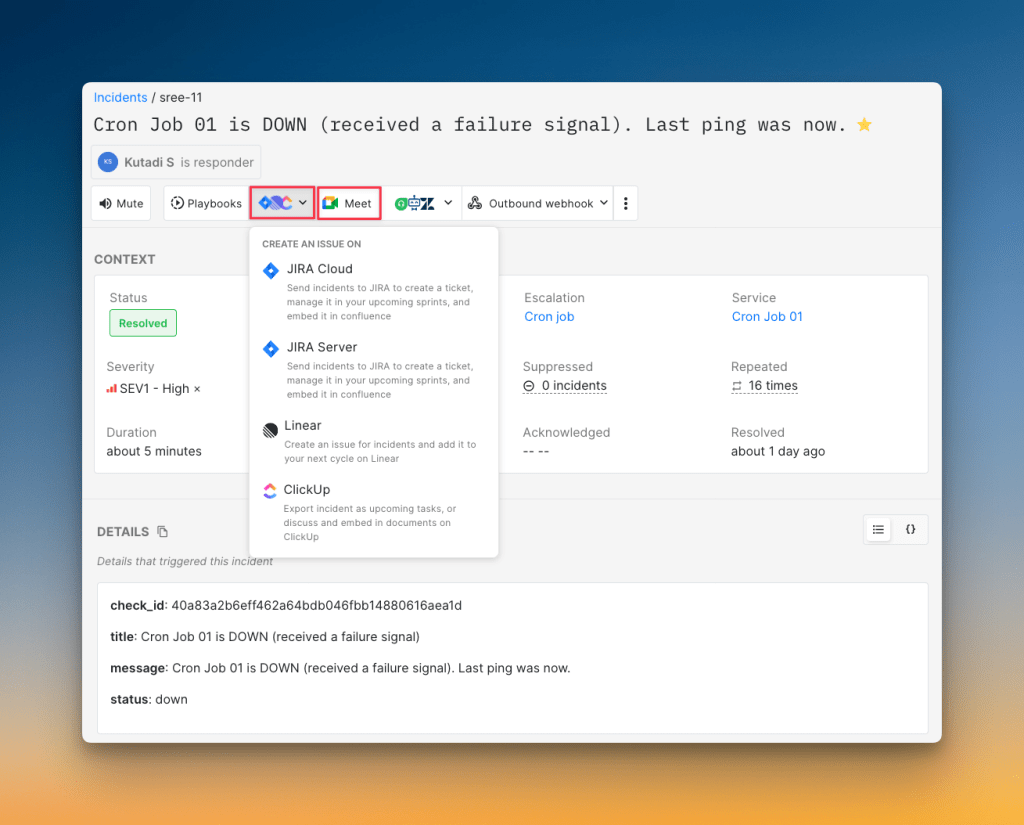
Spike offers a more direct approach to collaboration. It has a native Google Meet integration. You can start a war room with a single click from the dashboard. You can also automate it with Playbooks. Spike lets you see all ongoing war rooms and even request to join.
Creating a dedicated Slack channel is simple. You can also create Jira, Linear, or ClickUp tickets manually from the dashboard or automatically with Playbooks. This is available in the Business Plan ($14/user/month), which is far more affordable than PagerDuty.
Who should pick what?
- Pick PagerDuty if your team needs bi-directional Jira sync and you have the budget for their higher-tier plans. Be ready to pay $25/user/month to access key collaboration features.
- Pick Spike if you want powerful collaboration tools at a much better price. Its Business plan, which includes ticket creation, is only $14/user/month.
Verdict: Spike wins. Its collaboration tools are more accessible and easier to use. It provides essential features like one-click war rooms and simple ticket creation at a significantly lower cost than PagerDuty.
3. Incident Communication: PagerDuty vs. Spike
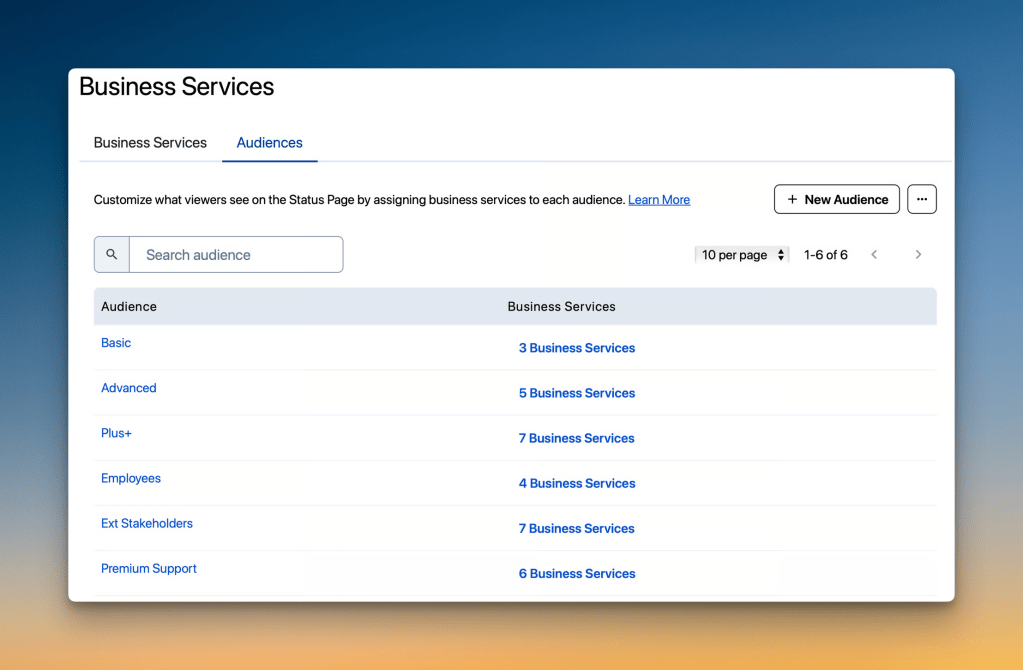
PagerDuty offers powerful status pages on its paid plans. Its standout feature is audience-specific pages. This lets you send tailored updates to different groups, like technical details for engineers and business impact for stakeholders.
It also has human-in-the-loop automation. This feature asks for approval before an update goes live, which is perfect for sensitive communications.
Spike focuses on ease of use and deep customization. It gives you a live preview as you build your status page. You can create public or private pages and host them on your own domain.
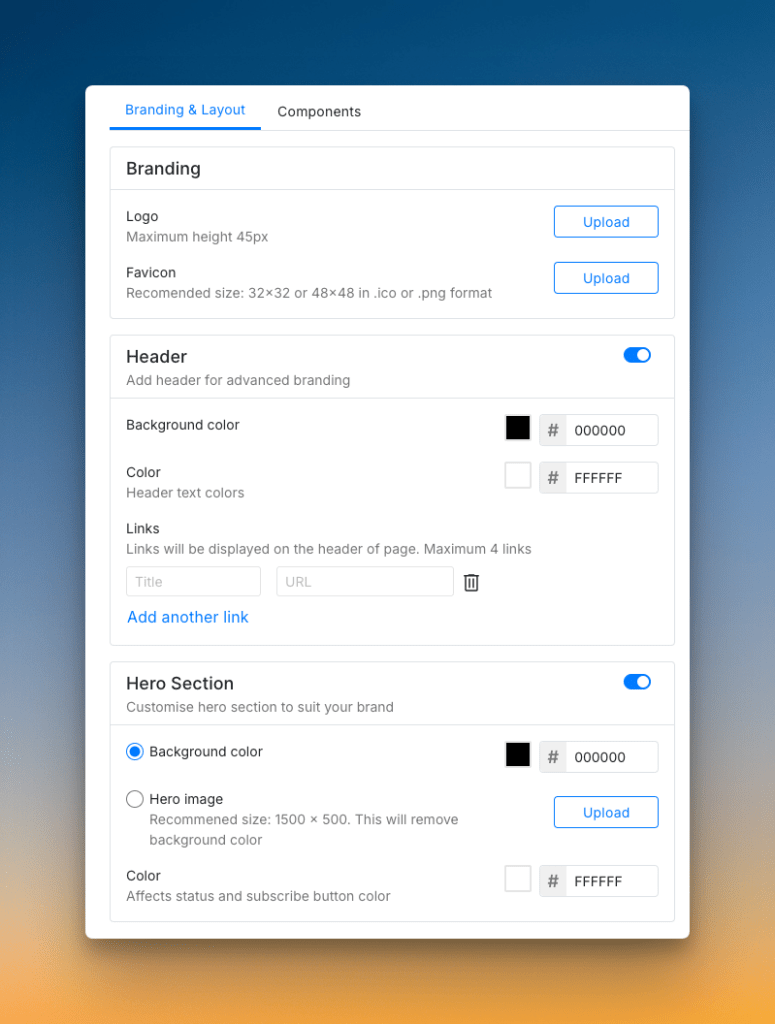
Customization is a key strength. You can change branding, labels, and even fine-tune SEO settings. Automating status page updates is done easily through Playbooks.
Check out these example status pages of Spike: AirBnB and SpaceX
Who should pick what?
- Pick PagerDuty if you need enterprise-grade control with features like audience-specific updates and manual approval workflows.
- Pick Spike if you want a flexible, highly customizable status page that is simple to set up and manage.
Verdict: Tie. Both tools provide strong communication features. PagerDuty excels with its enterprise-level controls, while Spike shines with its flexibility and ease of use.
4. Post-Incident Actions: PagerDuty vs. Spike
PagerDuty provides very detailed incident timelines. It keeps separate logs for alerts, status updates, and automation actions. This gives you a granular view of everything that happened.
You can add resolution notes from Slack, which is convenient. PagerDuty also offers postmortem templates. These templates help you standardize how your team reviews and documents incidents.
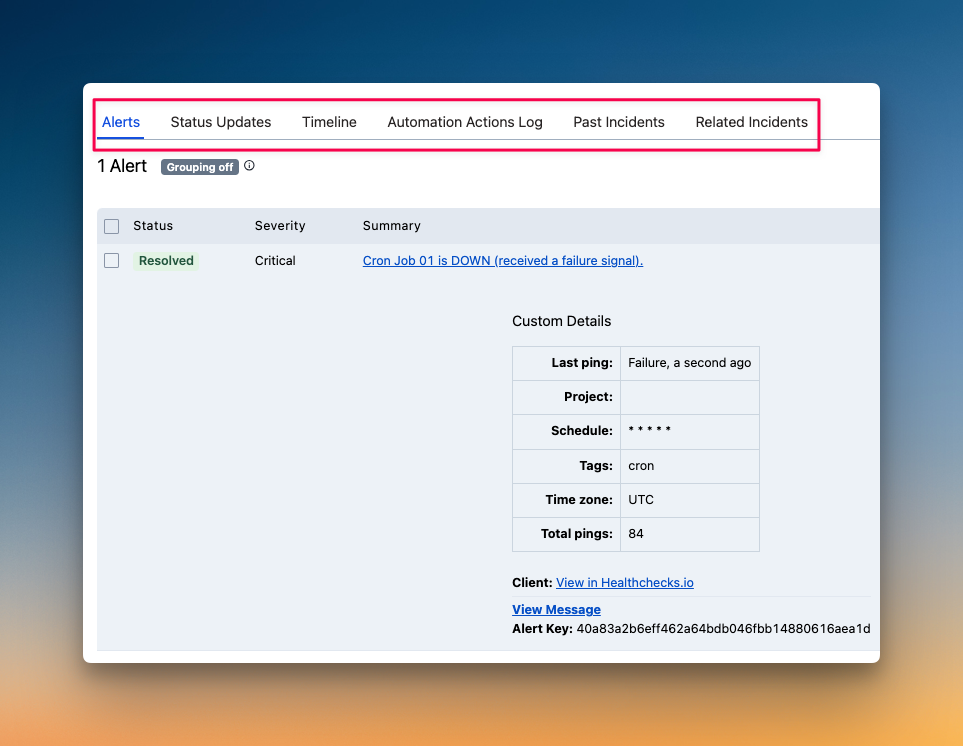
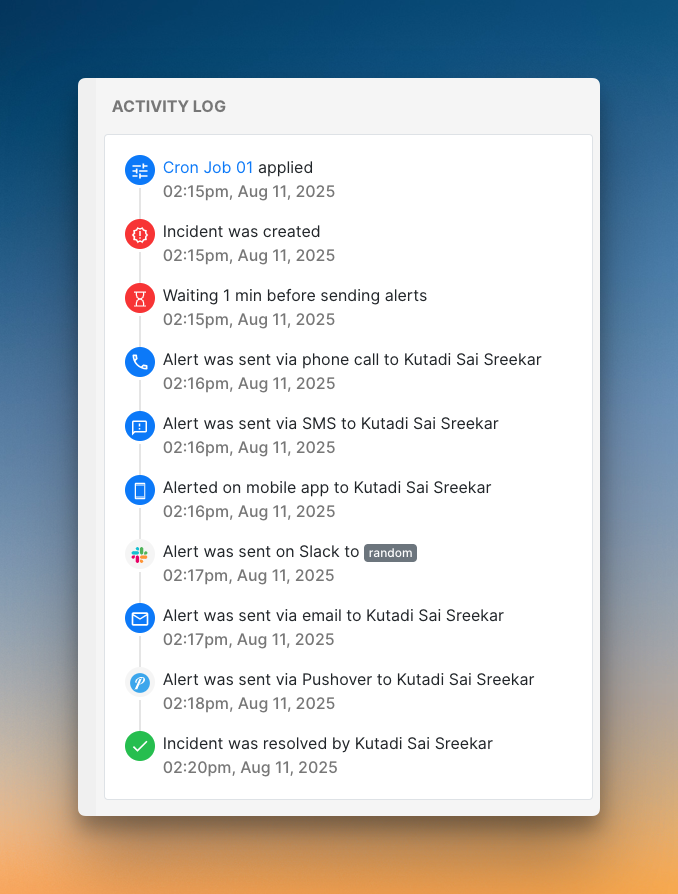
Spike simplifies the timeline. It logs every event, from the initial alert to playbook triggers, in a single, unified view. This makes it easy to follow the story of an incident from start to finish.
You can add resolution notes on the dashboard. To create a postmortem, you can use webhooks to send incident data to your own documentation tools. However, Spike does not offer built-in postmortem templates.
Who should pick what?
- Pick PagerDuty if your team needs built-in postmortem templates and prefers highly detailed, separate logs for analysis.
- Pick Spike if you want a clean, all-in-one incident timeline and have your own process for creating postmortems.
Verdict: PagerDuty wins. Its granular view of incident timeline and postmortem templates provide better support for the post-incident review process.
PagerDuty vs. Spike: Incident Response Checklist
Though I discussed all the core criteria, some finer details can make or break your incident response.
Here’s a 12-point checklist covering those finer details and comparing both tools side-by-side so you know exactly what you’re getting.
| Checklist Item | PagerDuty | Spike |
|---|---|---|
| Separate spaces for teams to manage their incidents | ✅ | ✅ |
| Automatic incident suppression | ✅ | ✅ |
| Granular control over incident suppression | ✅ | ❌ |
| Trigger incidents from incoming emails | ✅ | ✅ |
| Trigger external webhooks automatically | ✅ | ✅ |
| Auto-resolve incidents when system is healthy | ✅ | ✅ |
| Auto-detect incident severity and priority | ✅ | ✅ |
| Route alerts based on severity or priority | ✅ | ✅ |
| Route alerts based on time of day | ✅ | ✅ |
| Out-of-office routing for on-call responders | ✅ | ✅ |
| Auto-update status page incidents | ✅ | ✅ |
| Ready-to-use templates (escalations, alert rules, and on-call) | ❌ | ✅ |
Final Thoughts
After comparing PagerDuty vs. Spike across 4 core criteria and a 12-point checklist, here is the final score breakdown:
- Core Criteria Score: PagerDuty – 3, Spike – 5
- Checklist Score: PagerDuty – 11, Spike – 11
- Final Score: PagerDuty – 14/20, Spike – 16/20
While the score is close, Spike excels where it matters most. It provides powerful automation through Alert Rules and Playbooks.
PagerDuty is a very capable tool. It excels in post-incident analysis and offers deep enterprise features. But its best capabilities are often locked behind higher-priced tiers.
If you want a modern, fast, and cost-effective incident response tool designed to simplify your workflow, Spike is the better choice.