

TL;DR
Both PagerDuty and Spike are capable incident management tools, but they fit different teams. Pick PagerDuty if you need built-in postmortem templates, granular logs, and have the budget for enterprise add-ons. Pick Spike if you want powerful automation built in, flexible on-call management, and transparent pricing without hidden costs. This post compares both tools across alerting, incident response, on-call management, and pricing.
If you’re stuck between PagerDuty vs. Spike for incident management, this comparison will help you decide.
I signed up for both tools, tested their incident management capabilities, and compared them across some key criteria and a checklist (you’ll find out more about these as you read).
To make things easy, I have added several summary tables throughout the post. They give you a quick overview of the information you need.
Let’s dive in!
PagerDuty vs. Spike: Core Incident Management Criteria
- Alerting: How each platform alerts teams when incidents occur, including setup ease, alert channels, and features to prevent alert fatigue.
- Incident Response: The tools and workflows available once an incident is declared, covering initial response, team collaboration, stakeholder communication, and post-incident learning.
- On-Call Management: I‘ll compare how easy it is to create, manage, and override on-call schedules to handle everything from daily rotations to last-minute changes.
- Pricing: Breakdown of costs, plans, and overall value of each tool to help you understand what you get for your money.
PagerDuty vs. Spike: Incident Management Comparison
| Criteria | PagerDuty | Spike |
|---|---|---|
| Alerting | Individual control over alerts. Features like AIOps are paid add-ons. | Flexible team and individual control. Powerful alert rules are built-in. |
| Incident Response | Strong post-incident analysis. Key automation requires expensive plans. | Automation and collaboration tools are built-in and affordable. |
| On-Call Management | Multiple timeline views for schedule coverage. No instant add-layer button. | Fast and flexible management with cloning and automated overrides. |
| Pricing | Complex tiers with expensive add-ons and hidden costs. | Simple, transparent pricing with all core features included. |
The main difference between PagerDuty and Spike is complexity: PagerDuty splits its most useful capabilities, like AIOps and postmortem automation, into paid add-ons across multiple pricing tiers, while Spike includes automation, alert rules, and transparent pricing in every plan. The breakdown below compares both tools criterion by criterion.
Alerting: PagerDuty vs. Spike
To test alerting, I created a service called Cron Job in both PagerDuty and Spike. I integrated it with Healthchecks.io, configured different alert channels, and designed escalation policies. Then I triggered identical test alerts to see how each tool handles them.
Here’s a quick overview:
| Criteria | PagerDuty | Spike |
|---|---|---|
| Alerting Philosophy | Individuals control their own alert preferences. | Both teams and individuals can control alerts. |
| Setup & Config | Extra steps for Slack setup. No native Pushover. | Simple Slack setup. Native Pushover support. |
| Alert Channels | Strong multi-channel alerts. Rich Slack actions. | Multi-channel alerts. Acknowledge/resolve options available on email. |
| On-Call Alerts | Handoff notifications tied to specific services. | Channel-specific alerts plus webhook automation for on-call shifts. |
| Alert Fatigue | Basic features are included. AIOps is a paid add-on. | Powerful alert rules are built-in at no extra cost. |
Alerting in PagerDuty
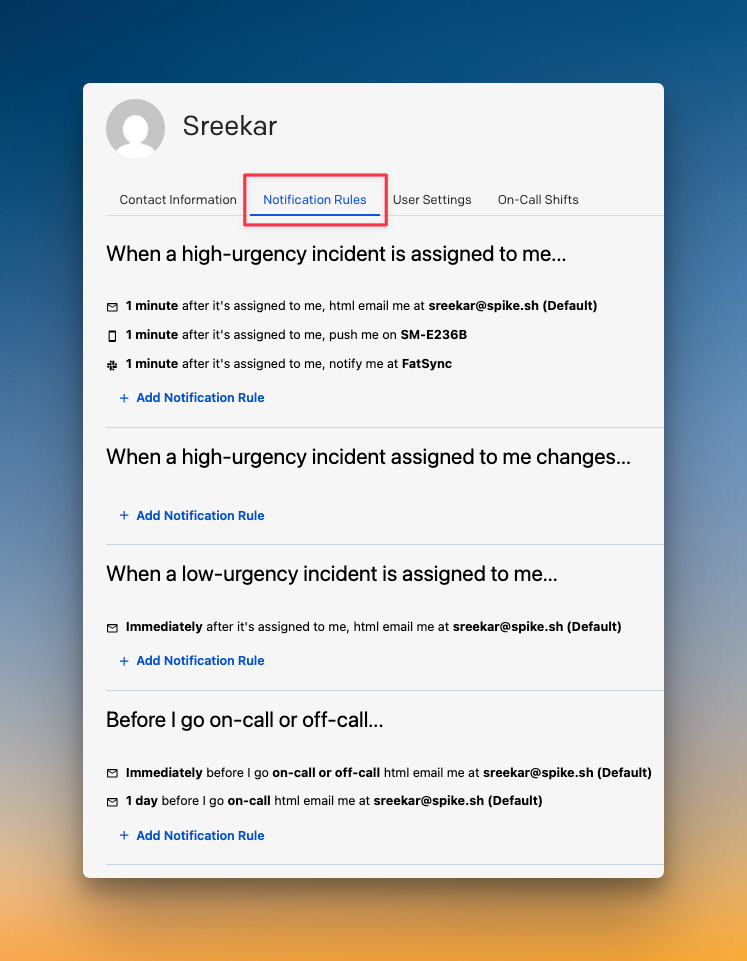
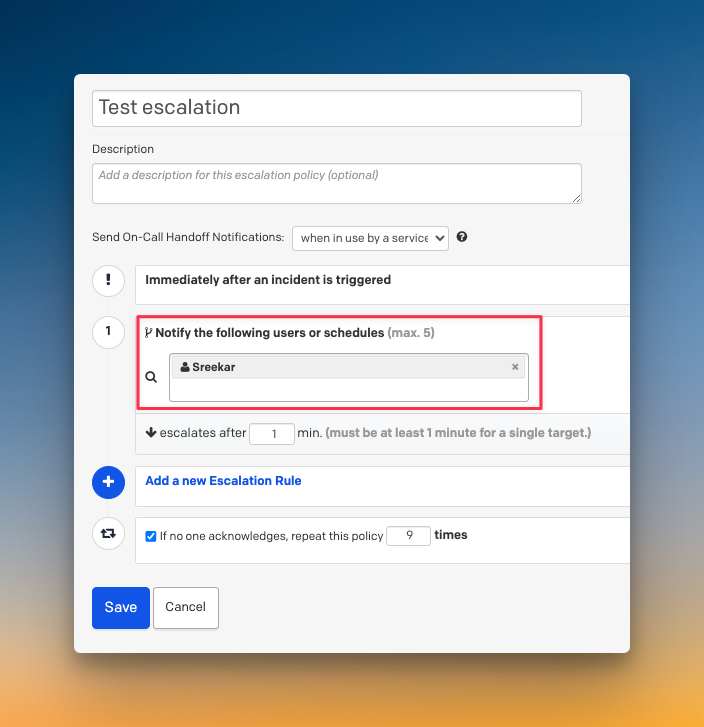
PagerDuty gives full control to individual users. Each person sets their own alert preferences, like alert channel and time delay. Managers can’t specify whether someone gets a phone call or an SMS in an escalation policy. This offers user autonomy but limits team-level control.
The setup process requires a few extra steps to configure specific Slack channels. For alert fatigue, PagerDuty includes core features like deduplication and grouping. More advanced noise reduction with machine learning is available as a paid AIOps ($799/month) add-on.
Alerting in Spike
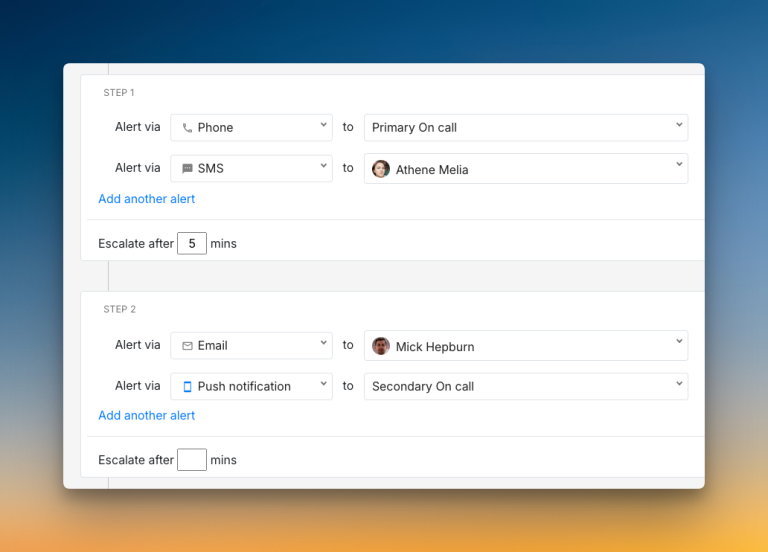
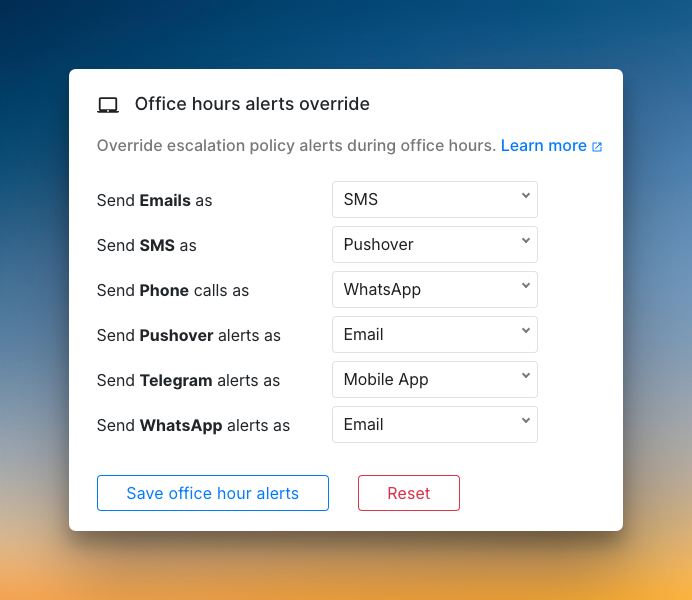
Spike uses a dual-control approach for alerting. Managers can set alert methods, like specifying a phone call in an escalation. At the same time, individuals can use alert overrides to customize their own experience without changing the team’s rules.
The setup is simpler, with native Pushover support and direct Slack mentions (@here, @channel, @user, no mention). Spike also provides powerful, built-in tools for alert fatigue. You can create custom Alert Rules to control noise before it reaches your team, all at no extra cost.
Who Should Pick What
- Pick PagerDuty if you want complete individual control over alerts and have the budget for advanced, AI-powered noise reduction.
- Pick Spike if you want a simpler setup with flexible, dual-control alerting and powerful, cost-effective tools to manage alert noise.
Incident Response: PagerDuty vs. Spike
I used the same Cron Job service and Healthchecks.io integration to test incident response. This let me try out different response actions and check the collaboration features. I also explored the communication tools and post-incident actions in both tools.
Here’s a quick overview:
| Criteria | PagerDuty | Spike |
|---|---|---|
| Initial Response | Rich options on Slack. Key automation is a paid add-on. | Built-in automation with Alert Rules and Playbooks. |
| Team Collaboration | War rooms and ticketing require expensive plans. | One-click war rooms and ticketing are in an affordable plan. |
| Communication | Audience-specific status pages. Approval workflows. | Highly customizable status pages. Simple setup. |
| Post-Incident | Built-in postmortem templates. Granular, separate logs. | Simplified, all-in-one timeline. Uses webhooks for postmortems |
Incident Response in PagerDuty
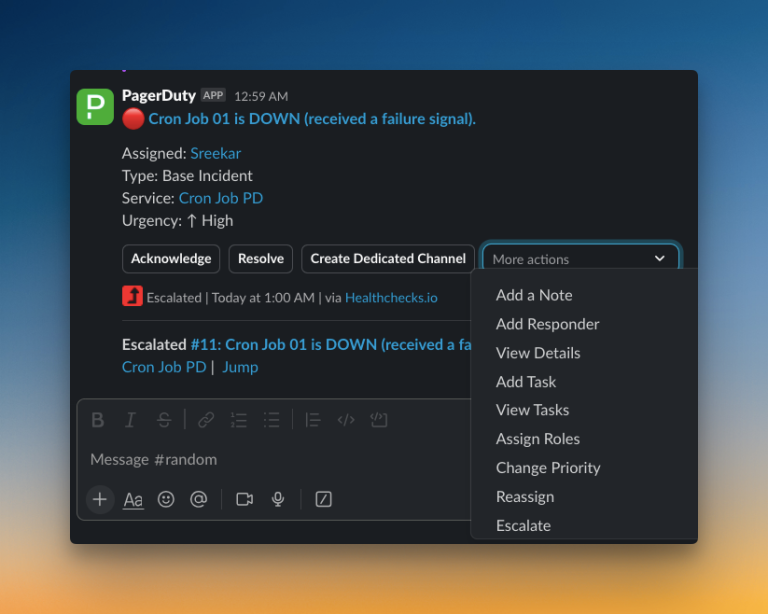
PagerDuty provides many manual response options directly within Slack. You can add responders or change an incident’s priority without switching tools. However, key automation and collaboration features, like war rooms or ticketing, are part of expensive plans.
For post-incident analysis, PagerDuty offers great tools. It provides built-in postmortem templates to help standardize your reviews. It also keeps very detailed, separate logs for alerts and status updates, giving you a granular view of what happened.
Incident Response in Spike
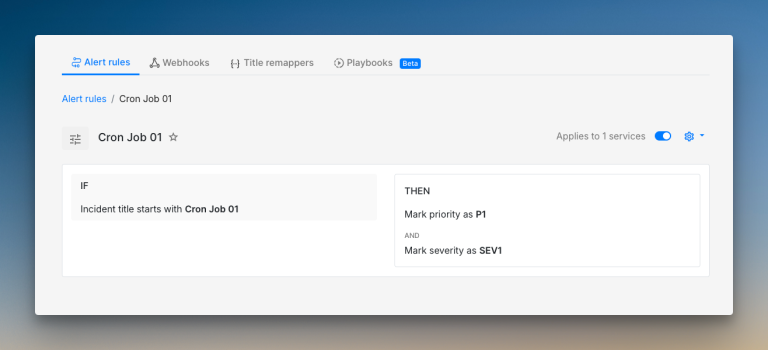
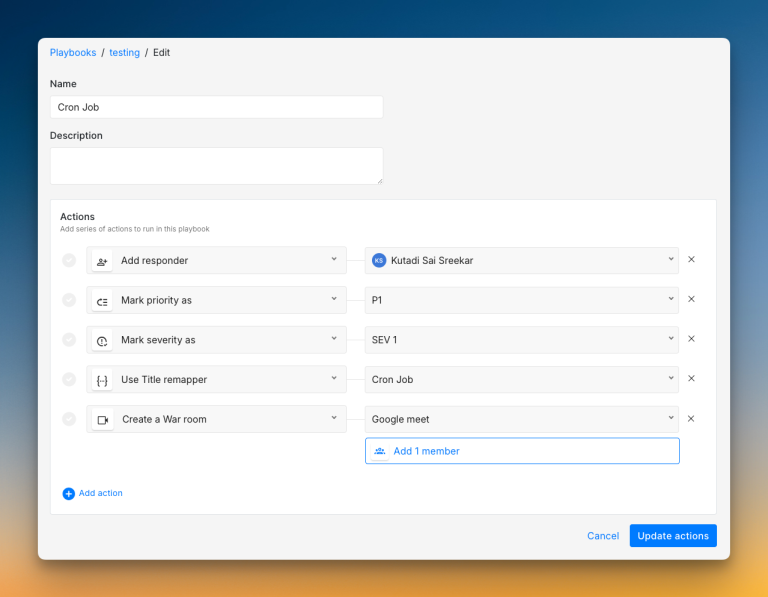
Spike makes automation a standard part of incident response. You can use Alert Rules and Playbooks to automate triage, acknowledgment, and other response actions. Collaboration tools are also more accessible. You can start war rooms or create tickets with one click on an affordable plan.
Communication is simple and flexible. You can create highly customized status pages with ease. For post-incident review, Spike gives you a clean, all-in-one timeline that shows every event in a single view. It uses webhooks to connect to your existing documentation tools for postmortems.
Who Should Pick What
- Pick PagerDuty if your team needs built-in postmortem templates, granular logs, and has the budget for enterprise-grade features.
- Pick Spike if you want a tool with powerful automation and collaboration features built in, available at a much lower cost.
On-Call Management: PagerDuty vs. Spike
I designed actual on-call schedules in each platform, set up rotations, and created overrides. This helped me test how easy everything was to use for day-to-day on-call management.
| Criteria | PagerDuty | Spike |
|---|---|---|
| Schedule Creation | Three-step process with layer duplication. | Simple setup with templates and a live preview. |
| Flexibility | No instant add-layer button. No cloning. | Clone entire schedules. Mark favorites for quick access. |
| Dashboard | Multiple timeline views for schedule coverage. | Clean dashboard with full activity logs and override history. |
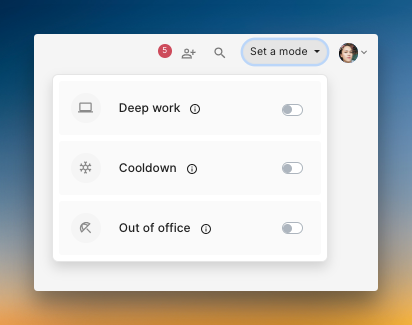
| Overrides | Basic overrides without comments or history. | Add comments for context. Use “Out of Office” mode. |
On-Call Management in PagerDuty
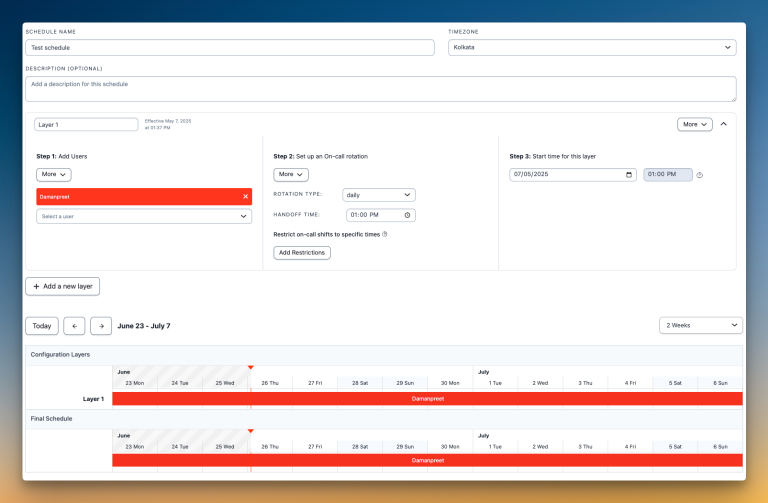
PagerDuty uses a three-step process to build schedules: add users, set rotations, and pick start times. You can duplicate schedule layers to save time. The calendar preview sits at the bottom of the page, which makes it less convenient to see changes as you build.
Managing schedules requires manual work. You have to open and edit each schedule individually since there’s no instant add-layer button. PagerDuty also doesn’t offer schedule cloning or favorites, which can slow down quick adjustments when your team needs changes in coverage.
On-Call Management in Spike
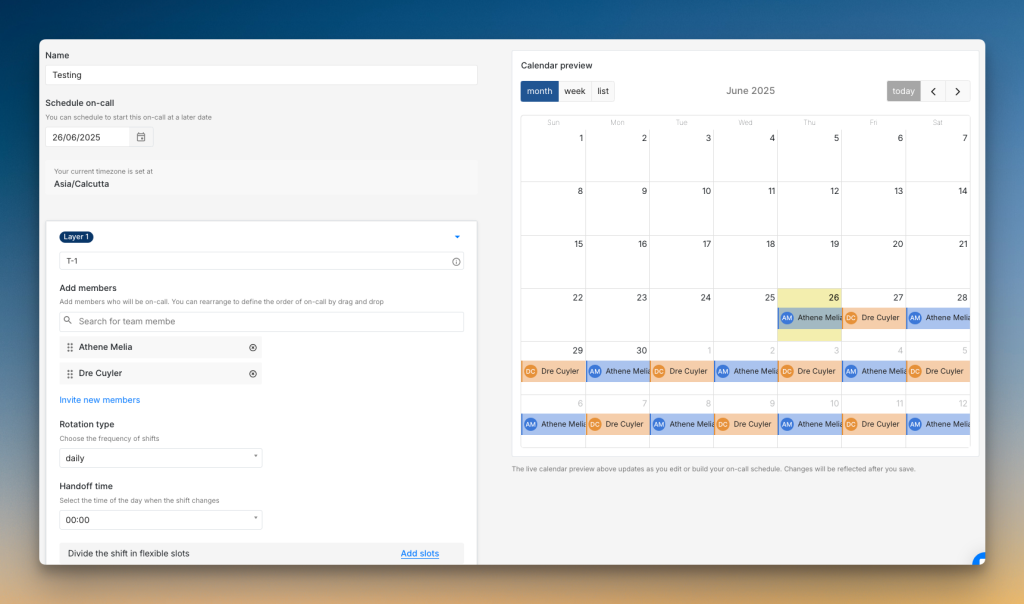
Spike makes schedule creation simple with a live calendar preview right beside your settings. Changes show up instantly as you build. Ready-to-use on-call templates help you get started in minutes instead of configuring everything from scratch.
Day-to-day management is fast and flexible. You can clone entire schedules, mark favorites for quick access, and add new layers with one click. Spike also offers work modes like out of office that automatically hand over all your on-call duties when you need time off.
Who Should Pick What
- Pick PagerDuty if you need multiple timeline views for coverage and prefer to configure schedules with layer duplication.
- Pick Spike if you want fast setup, flexible editing, and automated coverage options for time off and breaks.
Pricing: PagerDuty vs. Spike
| Criteria | PagerDuty | Spike |
|---|---|---|
| Pricing Model | Complex tiers | Simple, all-inclusive plans |
| Starting Price | $25/user/month | $7/user/month |
| Core Features | Gated behind expensive plans and add-ons. | Included in all plans, even the starter tier. |
| Hidden Costs | Yes, for features like AIOps and advanced workflows. | None. What you see is what you pay. |
Pricing in PagerDuty
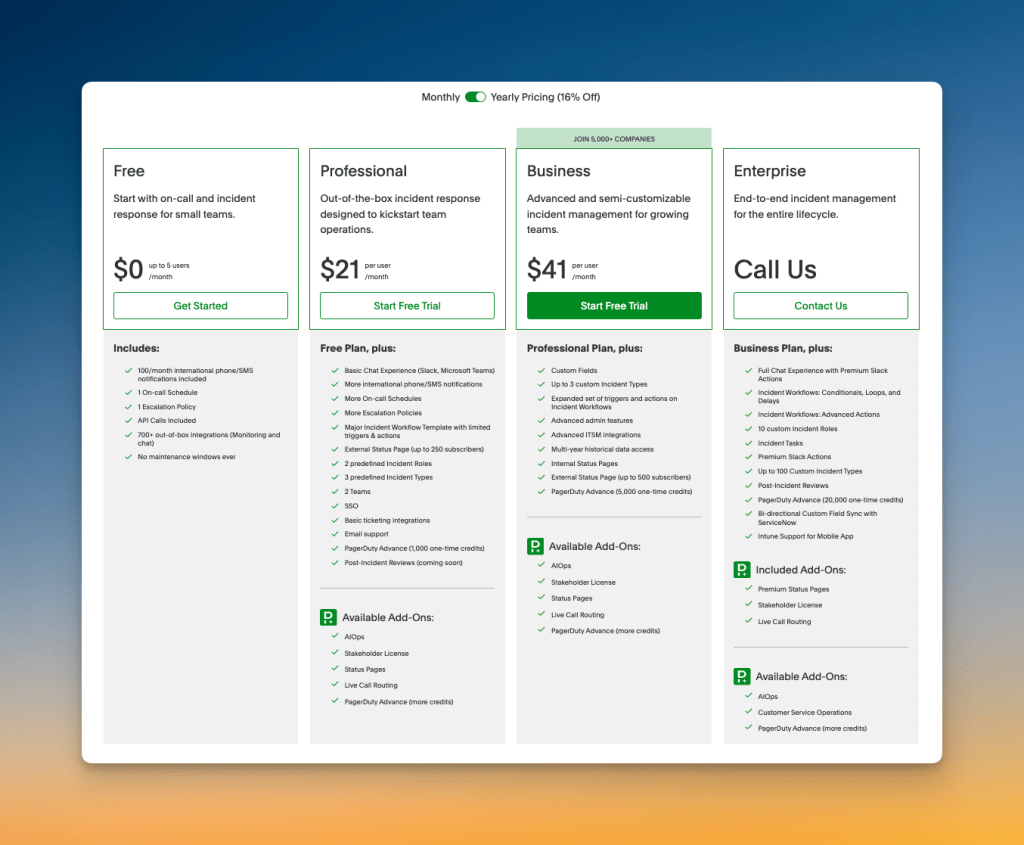
PagerDuty uses tiered plans starting at $25/user/month. Many vital features, like AI noise reduction (AIOps costs $799/month) or status pages ($89 per 1000 subs per month), need extra paid add-ons. You pay more as your team’s needs grow, and setup can take weeks.
Over time, the true cost is much higher than the advertised rate. Adding users often means committing to bulk licenses you might not need. Annual renewals bring typical price hikes, and staff training takes up more engineering hours.
For a detailed PagerDuty pricing breakdown, read the blog: PagerDuty Pricing Breakdown 2026 (And How To Save Up To 86%)
Pricing in Spike
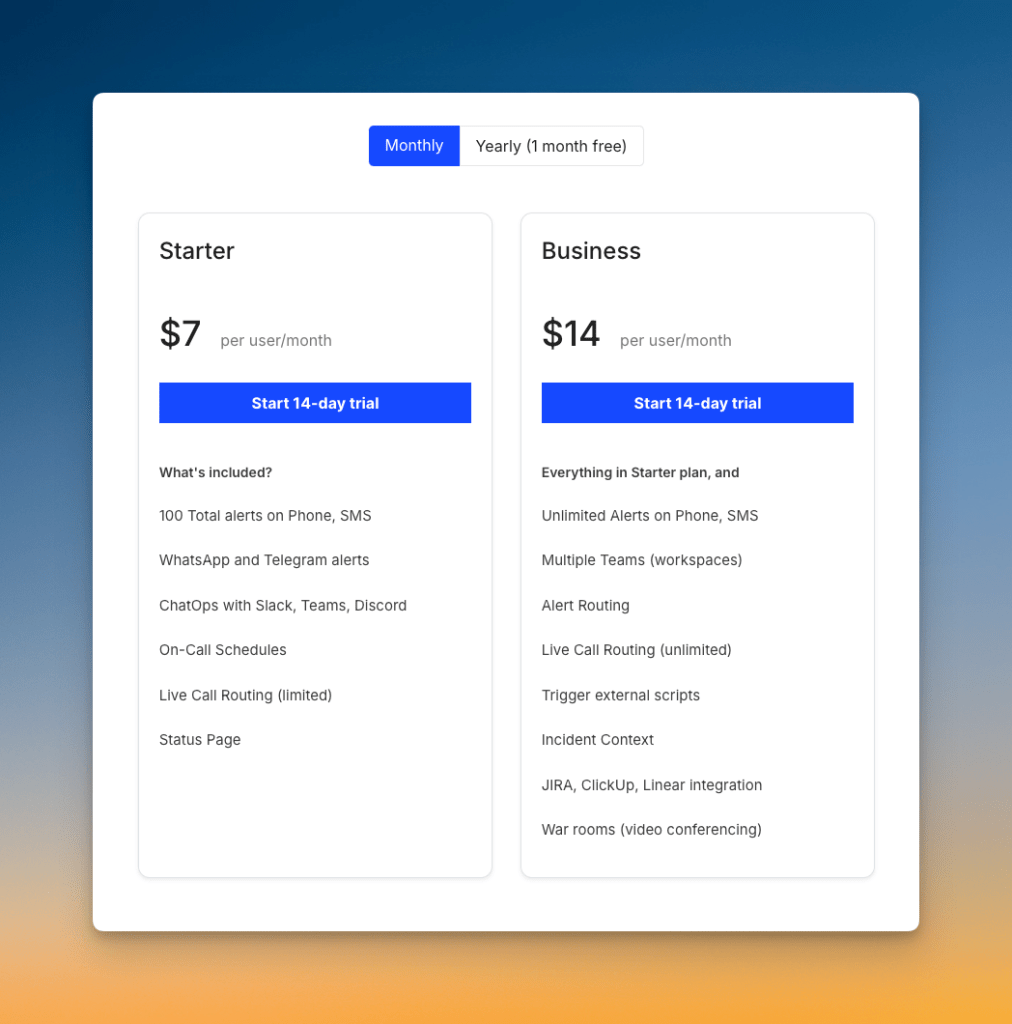
Spike starts at $7/user/month. All incident management features come built in—phone calls, SMS, on-call management, integrations, and status pages. No feature gating, no forced upgrades.
Setup is simple and quick, usually done within hours. You can add or remove users anytime. The price you see is the price you pay.
Who Should Pick What
- Pick PagerDuty if your organization needs enterprise features, can invest in add-ons, and doesn’t mind setup time or higher costs.
- Pick Spike if you want transparent pricing, full features in every plan, and quick onboarding with no hidden charges.
PagerDuty vs. Spike: Incident Management Checklist
Beyond the core criteria, there are some features that can significantly impact your daily incident management experience.
Here’s a 10-point checklist comparing the finer details of both tools so you know exactly what each platform offers.
| Checklist item | Spike | PagerDuty |
|---|---|---|
| Ready-to-use escalation, on-call, and alert rules templates | ✅ | ❌ |
| Time-based escalations (business hours, off-hours) | ✅ | ✅ |
| DND/silence bypass for only critical alerts | ✅ | ✅ |
| Channel-specific escalation rules (e.g. phone for primary, push for secondary) | ✅ | ❌ |
| Acknowledge/resolve/comment from chat apps (Slack, Teams) | ✅ | ✅ |
| Granular control over incident suppression | ❌ | ✅ |
| Trigger incidents from incoming emails directly | ✅ | ✅ |
| Auto-update status page incidents | ✅ | ✅ |
| On-call shift change notifications | ✅ | ✅ |
| No separate pricing for on-call | ✅ | ✅ |
Final Thoughts
Both PagerDuty and Spike are capable incident management tools. The right choice depends on your team’s priorities, budget, and the features you value most.
Pick PagerDuty if you need built-in postmortem templates, granular logs, and have the budget for enterprise features and add-ons.
Pick Spike if you want powerful automation built in, flexible on-call management, and transparent pricing without hidden costs.
While PagerDuty works well for large enterprises, its complexity and pricing can be challenging. Spike offers a modern, cost-effective alternative with the same core capabilities, more flexibility, and powerful automation right out of the box.
“Getting timely alerts through Spike has helped us prevent issues from turning into customer-facing problems.”
Vlad Ardelean, Co-Founder & CTO, SocialBee
Spike is rated 4.9/5 from 17 reviews on G2.