
TL;DR
Atlassian is shutting down OpsGenie, and their recommended path is Jira Service Management (JSM). JSM carries the same alerting limitations OpsGenie had, inside a more complex ITSM interface. Spike is the best OpsGenie replacement because it mirrors OpsGenie’s on-call and alerting workflows. It starts at $7/user/month and offers 50% off for OpsGenie users for the first six months.
What Atlassian is offering OpsGenie users
Atlassian announced that OpsGenie would be consolidated into Jira Service Management (JSM). New OpsGenie sales and trials stopped in June 2025. Full shutdown is scheduled for April 5, 2027.
Atlassian built a “Move from OpsGenie” wizard inside JSM that transfers teams, on-call schedules, escalation policies, and integrations. Most of the process is automated, and Atlassian gives you a temporary overlap period where both tools remain accessible.
But here is what that migration actually means: OpsGenie was a standalone alerting and on-call tool. JSM is an IT Service Management platform with alerting and on-call inside a much larger product. The migration moves your data, but it also changes the product you are working in. You go from a focused incident management tool to a service desk suite that also manages incidents.
For some teams, that is an upgrade. For others, it is a broader tool than they need.
Key point: The OpsGenie to JSM migration transfers your data but changes the product category. You move from a focused alerting tool to a full ITSM platform with a more complex interface.
What changes when you move from OpsGenie to JSM
Here are the specific differences between OpsGenie and JSM, based on hands-on testing of both platforms.
Alert delivery channel control
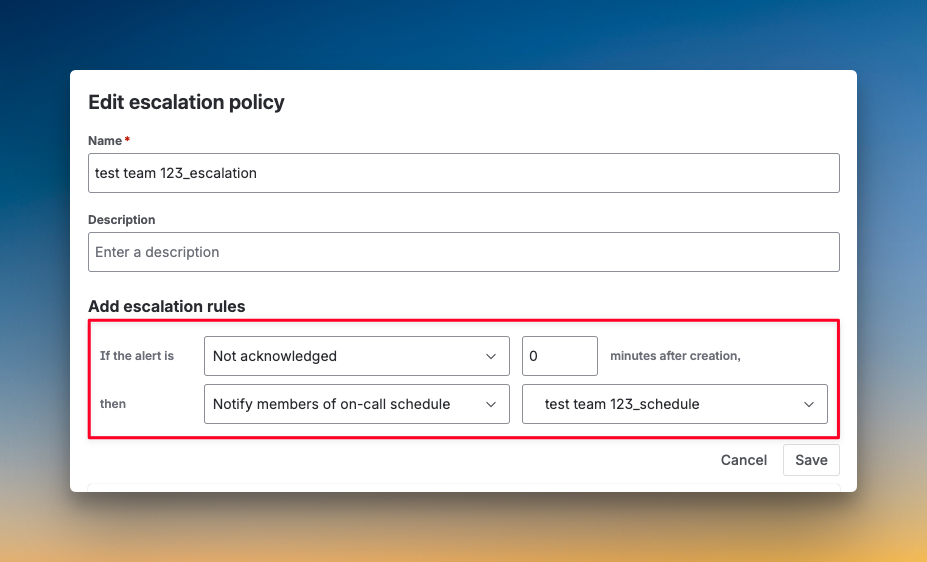
With OpsGenie, you could define who gets alerted at each escalation step, but not how. You could say “alert Priya in step 2,” but you could not say “call Priya, then SMS Daman, then ping #backend-oncall on Slack.” JSM works the same way. Each step controls the recipient, not the delivery method. The delivery channel is still controlled entirely by each user’s personal notification preferences.
Status pages
OpsGenie never had built-in status pages. It relied on Atlassian’s statuspage.io, which is a separate product starting at $29/month. JSM has the same dependency. There is no built-in status page in JSM. If your team was paying for statuspage.io alongside OpsGenie, you will keep paying after the migration.
On-call activity log
OpsGenie logged every on-call action in an activity stream: Schedule changes, override creation, and escalation triggers. JSM does not have an on-call activity log. When you create a schedule, add a rotation, or override a shift, those actions are not recorded anywhere.
Email acknowledgment
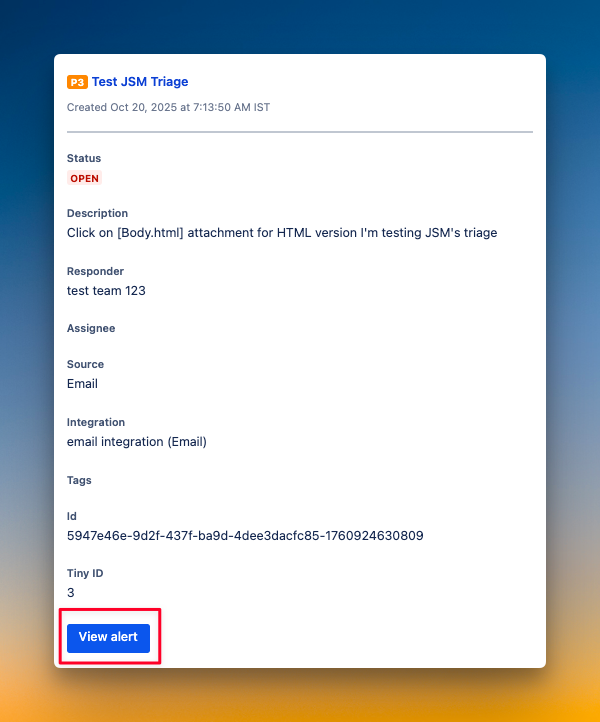
OpsGenie did not support acknowledging or resolving alerts by replying to the notification email. JSM does not either. In both tools, you receive an email alert but must click through to the dashboard or use another channel to take action.
UI complexity
OpsGenie had a flat, focused interface built for DevOps and SRE teams. JSM nests alerting and on-call management inside its broader ITSM structure. Even finding where to add contact methods is not obvious. Settings that took two clicks in OpsGenie can take four or more in JSM.
What JSM adds over OpsGenie
JSM is not all downgrades. The escalation policy engine gained a few features:
- Repeat escalation is now available with customizable time delay, maximum repetitions, and an option to reopen acknowledged alerts on each repeat
- You can escalate to whoever is next or previous in the on-call rotation, instead of a fixed person
- The Rovo AI can surface similar past alerts and suggest responders
- Automation rules for triggering workflows on alert creation, status changes, and other events
These additions matter for teams already embedded in the Atlassian ecosystem. But they do not address the core alerting limitations that frustrated OpsGenie users in the first place.
| Feature | OpsGenie | JSM | Change |
|---|---|---|---|
| Delivery channel per escalation step | No | No | Same limitation |
| Built-in status page | No (statuspage.io add-on) | No (statuspage.io add-on) | Same limitation |
| On-call activity log | Yes | No | Not available in JSM |
| Email acknowledgment (#ack / #res) | No | No | Same limitation |
| Repeat escalation | No | Yes, with customization | JSM improved |
| Slack @here / @channel mentions | No | No | Same limitation |
| UI depth to reach on-call | 2 clicks | 4+ clicks (nested) | JSM is more complex |
Key point: JSM replicates most of OpsGenie’s alerting limitations, including the lack of delivery channel control per escalation step. The migration transfers your data into a more complex UI without fixing the gaps that frustrated OpsGenie users.
When JSM is the right call
JSM makes sense for certain teams. Here is when it fits.
If your team already runs Jira for ticketing, Confluence for documentation, and Bitbucket for code, JSM slots into an ecosystem you already manage and pay for. Keeping one vendor for service desk, alerting, and incident management reduces procurement overhead.
If your primary use case is ITSM and you treat incident management as one part of a broader service delivery workflow, JSM was built for that. It handles service requests, change management, and knowledge bases alongside alerting. OpsGenie only did the alerting.
If you have teams that span both IT operations and software engineering, JSM’s breadth can be an advantage. ITSM teams use the service desk. Engineering teams use the alerting. Both operate on the same platform.
The deciding factor is how deep your Atlassian investment already is. Teams running three or more Atlassian products get real value from keeping everything in one ecosystem.
Key point: JSM is the right choice for teams already deep in Atlassian’s ecosystem. The alerting limitations matter less when unified ticketing, ITSM workflows, and billing consolidation are the priority.
Why some teams look beyond JSM
The case for choosing a different tool from JSM comes down to four questions.
- Do you actually need an ITSM platform? OpsGenie users chose OpsGenie because it was a focused incident management platform. If that is all your team needs, JSM adds ITSM capability you may never use. And that unused capability adds interface complexity.
- Are you planning to leave Atlassian’s ecosystem anyway? The OpsGenie shutdown has prompted many teams to reevaluate their entire Atlassian dependency. If you are also considering alternatives to Jira or Confluence, migrating to JSM locks you deeper into an ecosystem you are actively evaluating.
- Do you need a built-in status page? OpsGenie required a separate statuspage.io subscription ($29–109/month). JSM has the same dependency. If your team wants status pages included without paying for a second product, JSM does not solve that. Most dedicated incident management tools include built-in status pages.
- Do the alerting limitations matter to your team? If your team has worked around the lack of per-step delivery channel control for years, and it does not bother you, JSM is fine. But if that limitation was a real pain point in OpsGenie, moving to JSM means carrying the same problem into a more complex UI.
Teams that answer “no, yes, yes, yes” to these four questions benefit most from evaluating a third option before committing to JSM.
Key point: The strongest case for looking beyond JSM is when your team does not need ITSM features. It gets stronger if you are reconsidering your Atlassian dependency, need built-in status pages, or were already frustrated by alerting limitations that JSM does not fix.
Why Spike is the best OpsGenie replacement
If you have decided JSM is not the right fit, the next question is what to move to. For most OpsGenie users, Spike is the closest match. The structure is familiar: on-call schedules, escalation policies, and alert routing all map directly from OpsGenie. The difference is in what Spike adds on top.
OpsGenie gave you control over who gets alerted at each escalation step. Spike gives you control over who gets alerted and how. You can tell Spike to call one person, send an SMS to another, and ping a specific Slack channel, all within the same escalation policy. OpsGenie could not do this. JSM cannot either.
Beyond that, Spike includes several things OpsGenie users had to pay extra for or go without entirely:
- Built-in status pages: Public and private status pages, custom domain support, included on every plan. OpsGenie required statuspage.io ($29–109/month). JSM still does.
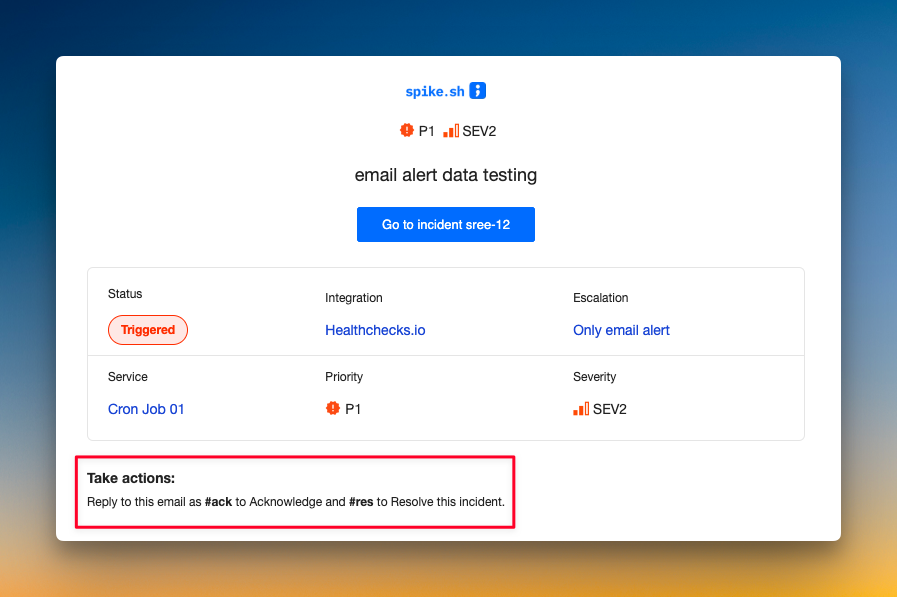
- Email acknowledgment by reply: Send
#ackor#resdirectly from the notification email to acknowledge or resolve an alert. OpsGenie did not support this.
- Slack mentions: Spike supports Slack
@here,@channel, and@specific-usermentions in escalation policies, whereas JSM doesn’t.
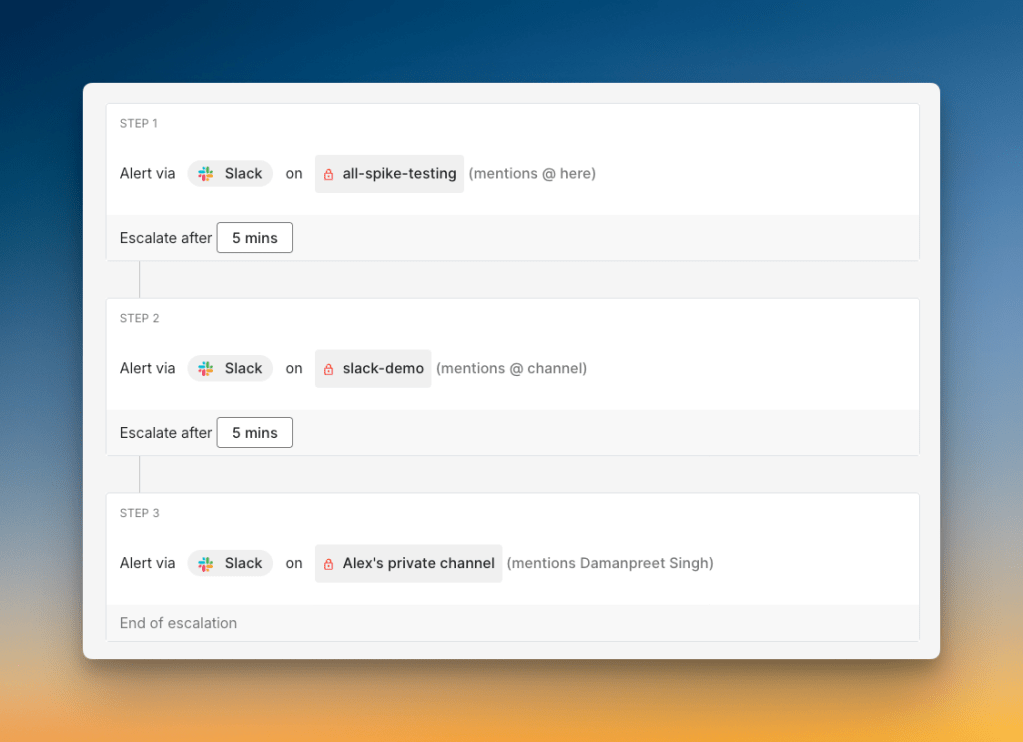
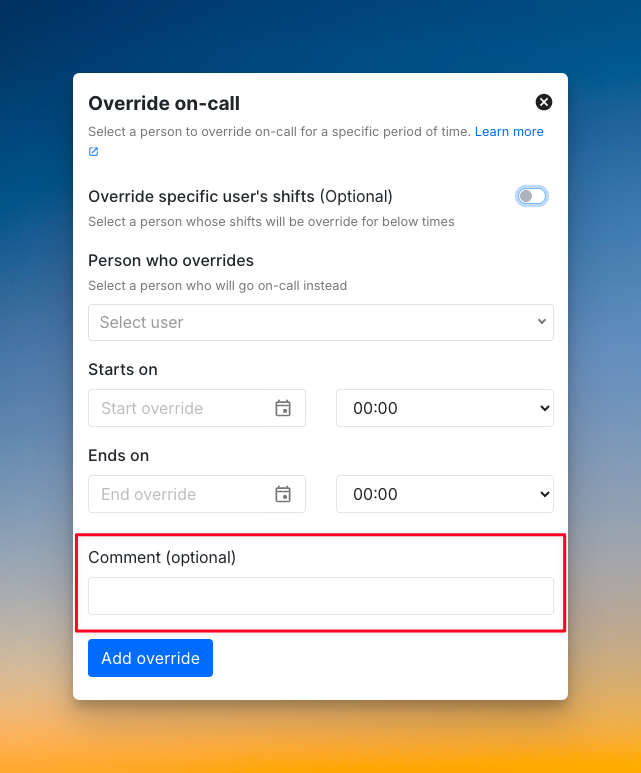
- Override comments: When someone covers your shift, they can see why and get context. A small thing that matters when you are handing off at 2 AM.
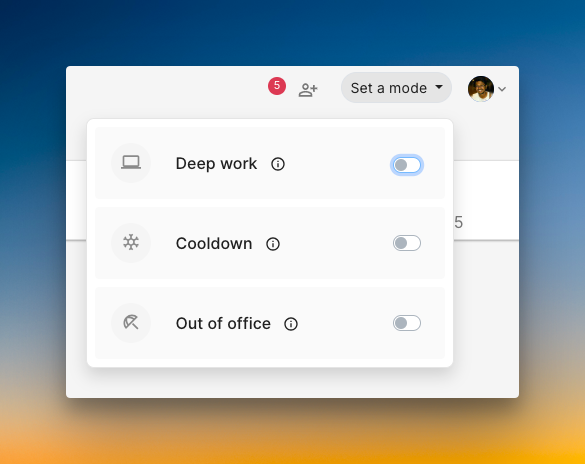
- On-call well-being modes: Deep work mode, cooldown mode, and out-of-office modes are available on Spike.
Spike starts at $7/user/month. And OpsGenie users get 50% off their first six months.
Ready to move? Here is how to migrate from OpsGenie to Spike step by step.
Key point: Spike mirrors OpsGenie’s on-call and alerting structure. It adds per-step delivery channel control, built-in status pages, and email acknowledgment. And it starts at $7/user/month, with 50% off for the first six months for OpsGenie users.
Making the call
By now, you have enough to decide. If your team is already deep in Atlassian’s ecosystem and needs ITSM alongside incident management, JSM is the logical next step. However, if you want a focused incident management platform that mirrors OpsGenie’s workflow without the ITSM overhead, Spike is the closer fit.
OpsGenie shuts down on April 5, 2027. That gives you time to migrate properly. Test alert delivery, rebuild your on-call schedules, and train your team before the deadline. Teams that wait until the final weeks take on unnecessary risk.
If you want to try Spike, OpsGenie users get 50% off their first six months.
FAQs
When is OpsGenie shutting down?
OpsGenie shuts down on April 5, 2027. Atlassian stopped new OpsGenie sales and trials in June 2025. Existing customers retain full access until the shutdown date.
What happens to my OpsGenie data after the shutdown?
Atlassian has not published a detailed data retention policy for post-shutdown accounts. The JSM migration wizard transfers teams, schedules, escalation policies, and integrations. If you are moving to a third-party tool instead, export your configuration before the shutdown date. OpsGenie’s API remains available during the active period for data extraction.
Is JSM free for OpsGenie users?
JSM has a free plan for up to 3 agents that includes basic alerting, on-call schedules, and incident templates. Paid plans start at $20/agent/month for Standard. Atlassian is offering migration support and overlap periods for OpsGenie customers, but there is no blanket free upgrade for existing OpsGenie users.
What is the cost difference between OpsGenie, JSM, and Spike?
OpsGenie Essentials was $9/user/month. Spike’s Starter plan is $7/user/month, and OpsGenie users get 50% off their first six months, bringing it to $3.5/user/month during that period. JSM Standard is $20/agent/month, and Premium is $51.42/agent/month. For a 10-person team, Spike costs $70/month at full price, and JSM Standard costs $200/month for the same team size.
Can I use Spike if I still use Jira or Confluence?
Yes. Spike integrates with Jira for ticket creation. You can create Jira tickets manually from the Spike dashboard or automatically through playbooks. Spike does not require you to leave the Atlassian ecosystem. You replace OpsGenie’s alerting and on-call functions with Spike while keeping Jira, Confluence, and any other Atlassian products.
Does Spike work with the same monitoring integrations as OpsGenie?
Spike supports integrations with the most common monitoring, observability, and logging tools, including Grafana, Prometheus, Datadog, and others. If you have a custom alert source, Spike supports inbound webhooks. Most OpsGenie integrations have a direct equivalent in Spike.
Can I run Spike and OpsGenie at the same time during the transition?
Yes. You can connect your monitoring tools to both Spike and OpsGenie during the transition period, run your on-call schedules on Spike, and keep OpsGenie active as a fallback until you are confident the migration is complete. OpsGenie remains fully functional until April 5, 2027.
How long does it take to migrate from OpsGenie to Spike?
Most teams complete the migration in under two hours. Spike’s structure maps closely to OpsGenie’s. Services, integrations, escalation policies, and on-call schedules are all direct equivalents.
Is OpsGenie still adding new features?
No. OpsGenie is in maintenance mode. Atlassian stopped new sales in June 2025 and is directing all development efforts toward JSM. OpsGenie will continue to function until April 5, 2027, but no new features, integrations, or major updates are expected.
Should I wait until closer to the April 2027 deadline to migrate?
No. Migrating earlier gives your team time to run both tools in parallel, test alert delivery, and train on the new platform without deadline pressure. If you hit unexpected integration issues in the final weeks, you have no buffer. Teams that migrate early can iterate on their escalation policies and on-call schedules before going fully live.