
If you’re comparing OpsGenie vs. PagerDuty, there’s something important you need to know right away: OpsGenie is shutting down.
OpsGenie has been a trusted ally for incident teams for over a decade. In our Ode to OpsGenie, we celebrated its legacy—from simplifying on-call rotations to reducing alert noise effectively.
As of June 4, 2025, Atlassian has stopped new sales of OpsGenie, with a complete shutdown scheduled for April 5, 2027.
If you’re using OpsGenie today, you’ve got two years to find a new home—which isn’t as much time as it sounds when you’re managing critical incidents.
We get it—change is tough. That’s why we wrote:
- What You Need to Know And Next Steps (for teams stressed about switching)
- 12-Point Checklist and 6 Alternatives (for folks who are looking for options)
Though we’ll compare OpsGenie and PagerDuty, the shutdown means most users aren’t just choosing between two tools—they’re seeking a long-term successor.
So, here’s your shortcut: Check out Spike’s section to learn how this modern alternative combines the best of both worlds (OpsGenie and PagerDuty) while addressing their shortcomings. Plus, Spike offers 50% off your first year.
“But I still want the comparison!”
No worries—we’ll break down how PagerDuty and OpsGenie stack up across key criteria—from incident response capabilities to pricing structures.
Let’s dive in!
Table of Contents
OpsGenie vs. PagerDuty: Key Criteria for Comparison
When comparing OpsGenie vs. PagerDuty, it’s essential to evaluate them across these seven key areas:
- Incident Response: Automation, collaboration tools, and war rooms
- Alerting: Delivery channels, customization, and Noise reduction
- Oncall Management: Scheduling flexibility, escalation workflows, and oncall wellbeing
- Integration: The integration ecosystem, API capabilities, and ease of setup
- Incident Communication & Transparency: Status pages, stakeholder communication, and postmortem tools
- User Experience and Interface: Ease of use, mobile app functionality, and learning curve
- Pricing and TCO: Base pricing, add-ons, and total cost of ownership (TCO)
OpsGenie vs. PagerDuty: The Comparison
TL;DR
Note: This comparison is relevant only for existing OpsGenie customers.
| Criteria | OpsGenie | PagerDuty | Verdict |
| Incident Response | Centralized dashboard, tailored workflows | Predictive automation, ML-driven recommendations | PagerDuty wins (self-learning automation) |
| Alerting | Customizable alerts, noise control, flexible escalations | ML-powered grouping, auto-triage for alert storms, advanced escalation chains | PagerDuty wins (scales better for high-volume alerts) |
| Oncall Management | Flexible scheduling, instant overrides | Multi-layered schedules, flexible rotations | Tie (OpsGenie for agility, PagerDuty for comprehensive scheduling) |
| Integration Ecosystem | 200+ tools and tight Atlassian integration (Jira, Confluence) | 700+ tools (Splunk, ServiceNow), enterprise-grade workflows | PagerDuty wins (broader compatibility) |
| Incident communication & transparency | Status pages at no extra cost, audience-specific alerts | Paid role-based status pages ($89+/month), detailed incident timelines | OpsGenie wins (cost-efficient transparency) |
| User Experience & Interface | Clean UI, mobile-first design, quick onboarding | Advanced controls, real-time dependency tracking | OpsGenie wins (low learning curve) |
| Pricing & TCO | Lower base cost and TCO | Higher base price, steep add-ons, and higher TCO | PagerDuty wins (No new sales for OpsGenie) |
1. Incident Response: OpsGenie vs. PagerDuty
Incident response involves spotting, handling, and fixing critical issues quickly to reduce downtime and keep customers happy.
OpsGenie uses a centralized dashboard to track incidents and lets teams create tailored workflows. For example, if your payment API crashes, OpsGenie can automatically tag it as “P1-Payment,” route it to the payments team, and start pre-defined checks for recent deploys or third-party status.
PagerDuty leans into predictive automation using past incidents to suggest fixes. During a database latency surge, PagerDuty can deploy ML models to recommend fixes from resolved tickets, auto-add the SRE who patched a similar issue last week, and spin up a Zoom war room with linked dashboards and runbooks.
Who should pick what?
- PagerDuty for teams wanting context-aware automation that learns from history.
- OpsGenie for engineers needing hands-on control over workflows.
Verdict: PagerDuty wins by a hair for its self-learning response system.
2. Alerting: OpsGenie vs. PagerDuty
Alerting means getting the right notifications to the right people at the right time—critical for cutting downtime during outages.
OpsGenie prioritizes customizable alerts, noise control, and flexible escalations. For example, if a server hits 90% CPU, OpsGenie can send alerts via SMS, email, or push notifications, attach logs/runbooks directly to alerts, and let teams mute non-critical alerts.
OpsGenie’s escalation policies allow for multi-step notification processes, where alerts can be automatically escalated to different team members or groups if not acknowledged within specified timeframes.
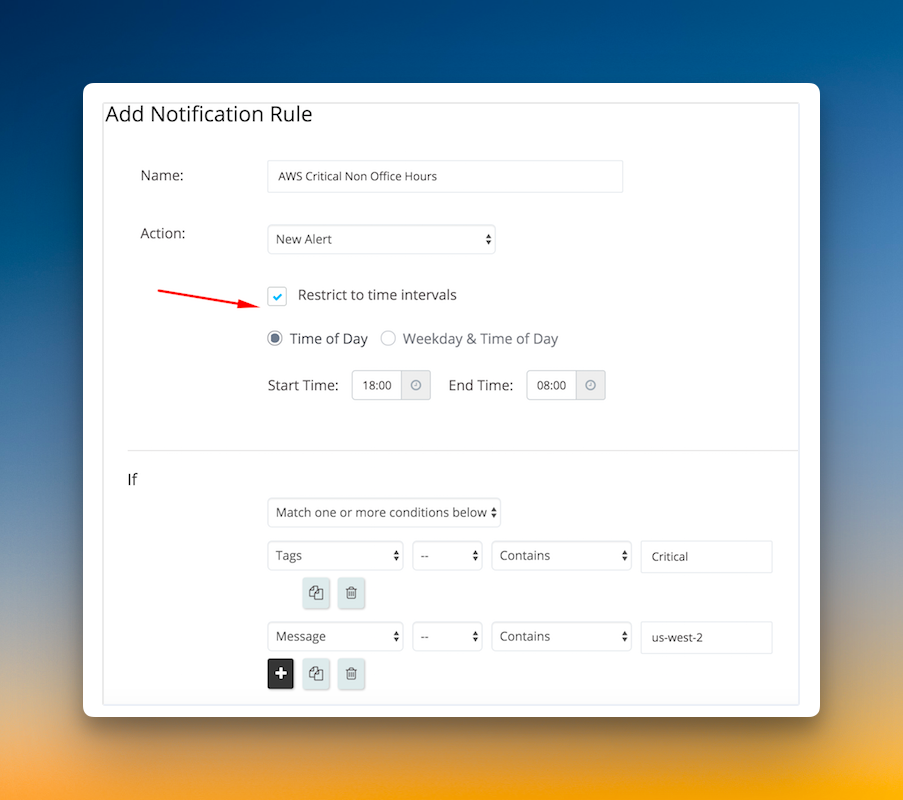
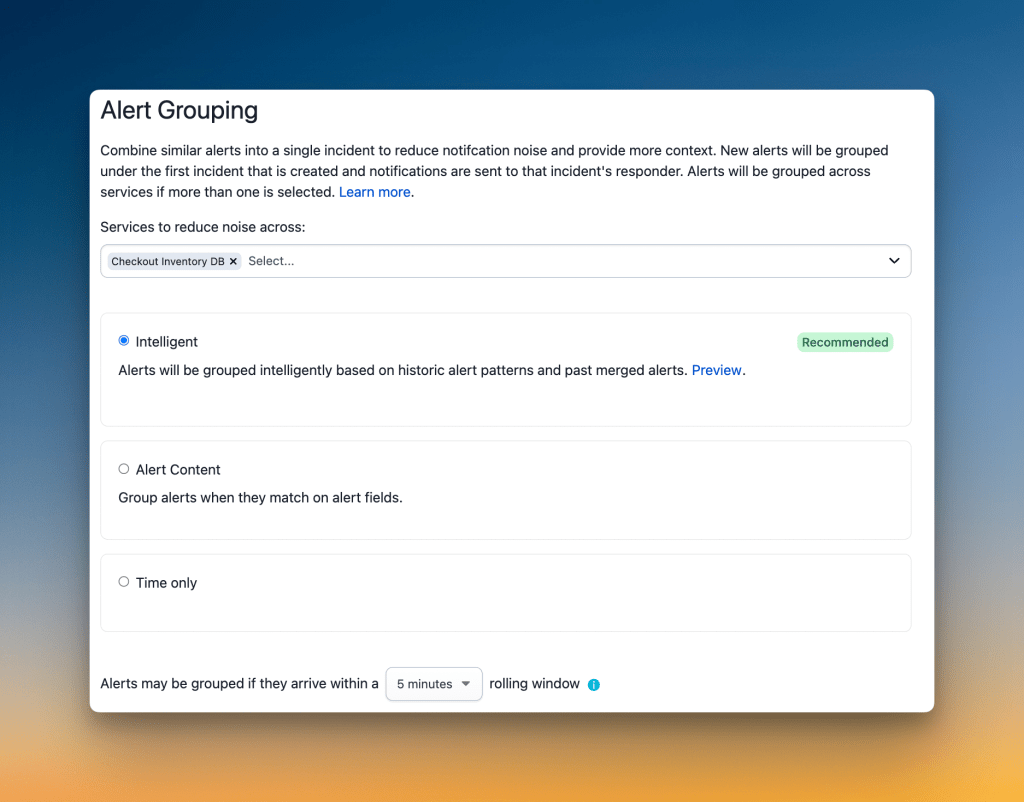
PagerDuty focuses on smart alert grouping, ML-powered filtering, and advanced escalation chains. During a cloud provider outage triggering 100+ alerts, PagerDuty can bundle related alerts into a single incident, prioritize critical alerts using historical patterns, and send Slack alerts during work hours with phone calls after-hours.
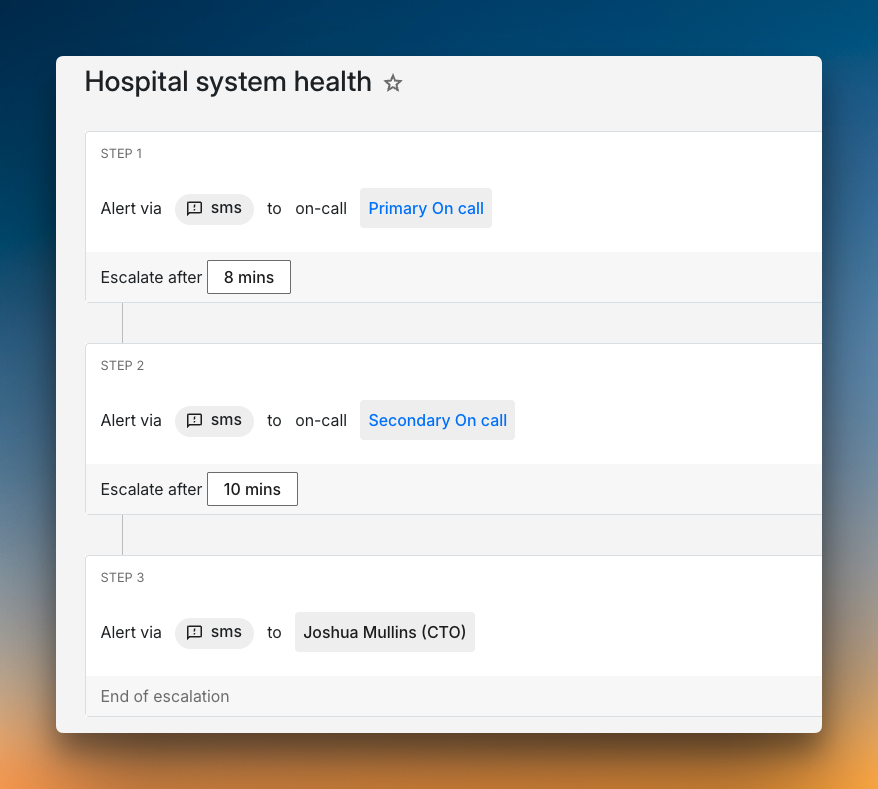
For escalations, during a hospital EHR system failure at night, PagerDuty can route the first alert to the primary oncall via SMS, escalate to a backup responder after 8 minutes, and page the CTO if unresolved for 15+ minutes.
Who should pick what?
- OpsGenie for teams needing fine-grained alert customization.
- PagerDuty for orgs drowning in alert noise wanting auto-triage.
Verdict: PagerDuty takes the edge for its ability to tame alert storms at scale.
3. Oncall Management: OpsGenie vs. PagerDuty
Oncall management keeps teams available 24/7 while balancing workloads and reducing burnout.
OpsGenie focuses on flexible scheduling and quick overrides. For example, engineers can create follow-the-sun rotations for global teams, swap shifts instantly via the override feature, and auto-skip alerts when marked “on Paid Time Off (PTO).”

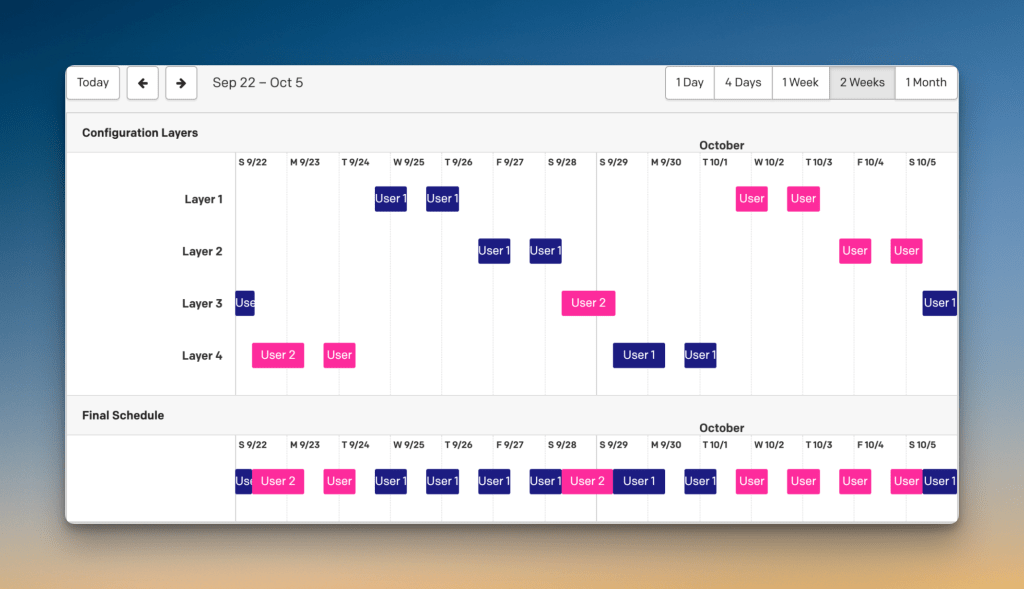
PagerDuty provides multi-layered scheduling and flexible rotation options. Teams can set up daily, weekly, or custom rotations with time zone awareness for global coverage. PagerDuty’s “My On-Call Shifts” view allows engineers to manage all their shifts in one place, quickly toggle between monthly, weekly, and daily views, and create overrides when needed.
Who should pick what?
- OpsGenie for teams needing last-minute changes.
- PagerDuty for orgs with complex rotation patterns.
Verdict: Tie—OpsGenie’s agility matches PagerDuty’s comprehensive scheduling for different use cases.
4. Integration Ecosystem: OpsGenie vs. PagerDuty
Integration ecosystems determine how easily your incident tool works with existing apps. It’s critical for reducing manual work during outages.
OpsGenie supports 200+ tools and integrates tightly with Atlassian products like Jira and Confluence. For example, when AWS CloudWatch detects a server crash, OpsGenie can auto-create Jira tickets with logs, post incident updates to Confluence postmortems, and sync resolution status with Bitbucket deployments.
PagerDuty supports 700+ tools, including Splunk and ServiceNow. During a Shopify store outage, PagerDuty can pull metrics from New Relic and Datadog into one timeline, auto-trigger ServiceNow tickets for IT teams, and share root cause analysis via Microsoft Teams.
Who should pick what?
- OpsGenie for teams already using Atlassian products.
- PagerDuty for orgs with diverse, enterprise-grade tools.
Verdict: PagerDuty wins for broader compatibility but OpsGenie dominates in Atlassian environments.
5. Incident Communication & Transparency: OpsGenie vs. PagerDuty
Operational transparency means keeping teams and stakeholders informed during outages to build trust and reduce confusion.
OpsGenie offers customizable status pages (for no extra cost) and audience-specific alerts. For example: During a CDN outage, OpsGenie can update public status pages in real time, sends engineers Slack alerts with outage details, and auto-drafts emails for customer support teams.
PagerDuty provides role-based status pages (paid add-on) and detailed incident timelines. For example: For a fintech app’s database crash, PagerDuty can share high-level updates with executives privately, log troubleshooting steps for engineers, and status page for external stakeholders.
Who should pick what?
- OpsGenie for teams needing cost-efficient transparency tools.
- PagerDuty for enterprises requiring role-specific updates.
Verdict: OpsGenie wins—its status pages with no extra cost beat PagerDuty’s premium model.
6. User Experience and Interface: OpsGenie vs. PagerDuty
User experience and interface determine how quickly teams adapt to tools and handle incidents under pressure.
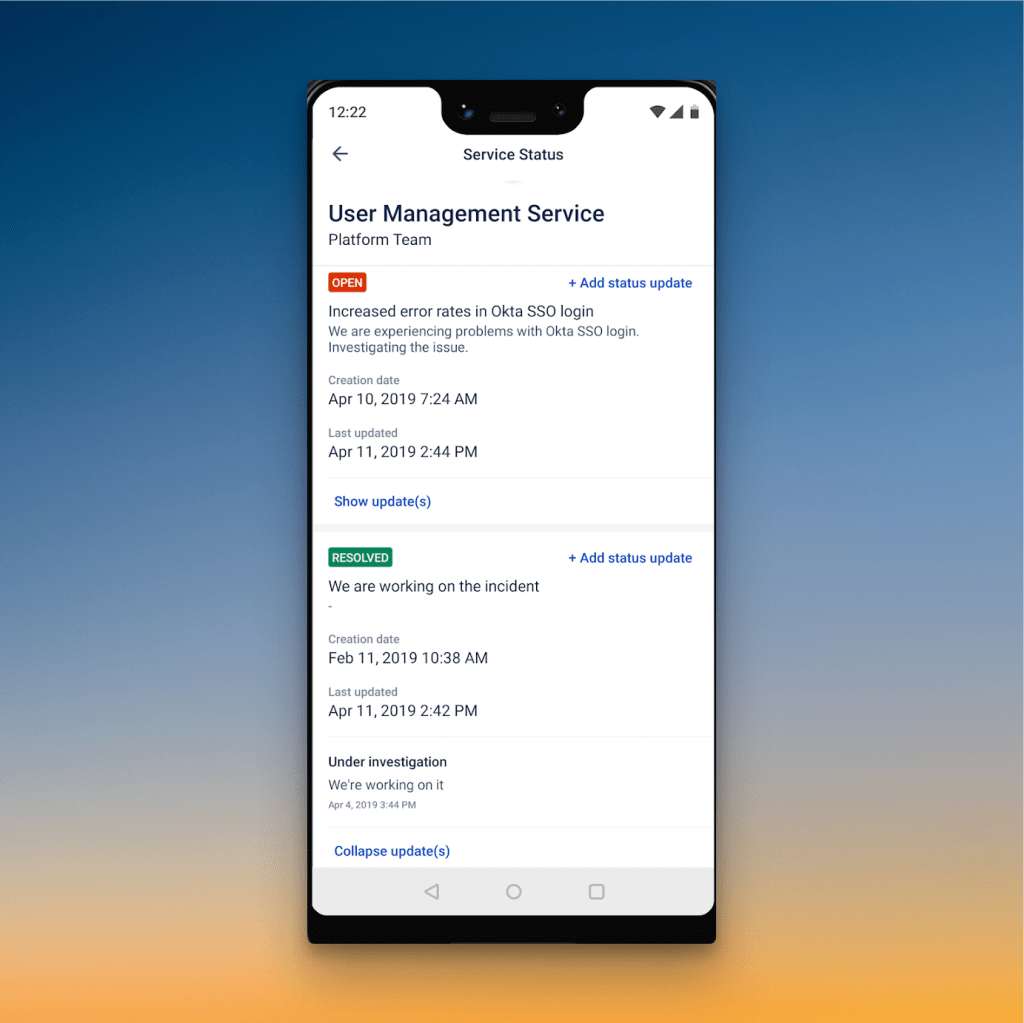
OpsGenie uses a clean, intuitive dashboard and mobile-first design. Teams can typically onboard and start using OpsGenie effectively within 1-2 days. During an outage, new engineers can view active incidents at a glance, acknowledge alerts via two-tap mobile actions, and access runbooks directly from the incident panel.
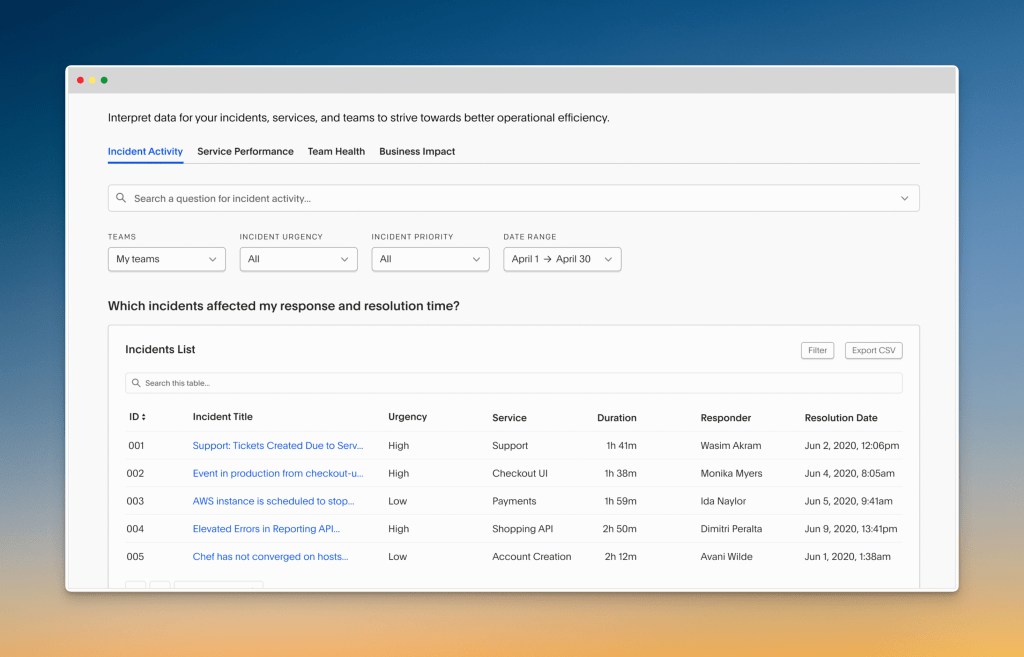
PagerDuty offers a detailed interface with advanced controls. PagerDuty’s onboarding process usually takes 3-4 days for teams to become proficient. For a multi-service failure, senior SREs can track dependencies across 10+ microservices, coordinate responses via integrated chat, and monitor progress with real-time graphs.
Who should pick what?
- OpsGenie for teams needing quick onboarding and mobile responsiveness.
- PagerDuty for experts managing complex, multi-layered incidents.
Verdict: OpsGenie wins for its low learning curve.
7. Pricing & TCO: OpsGenie vs. PagerDuty
Pricing and TCO determine long-term costs beyond base plans, including add-ons, training, and hidden fees.
While no longer available for new sales, OpsGenie’s pricing structure is an important reference for existing customers planning their next move. It offered a free tier and scaled from $9.45/user/month (Essentials) to $31.90/user/month (Enterprise) billed annually. Current users can renew subscriptions until the end-of-support date but cannot start new trials or purchases.
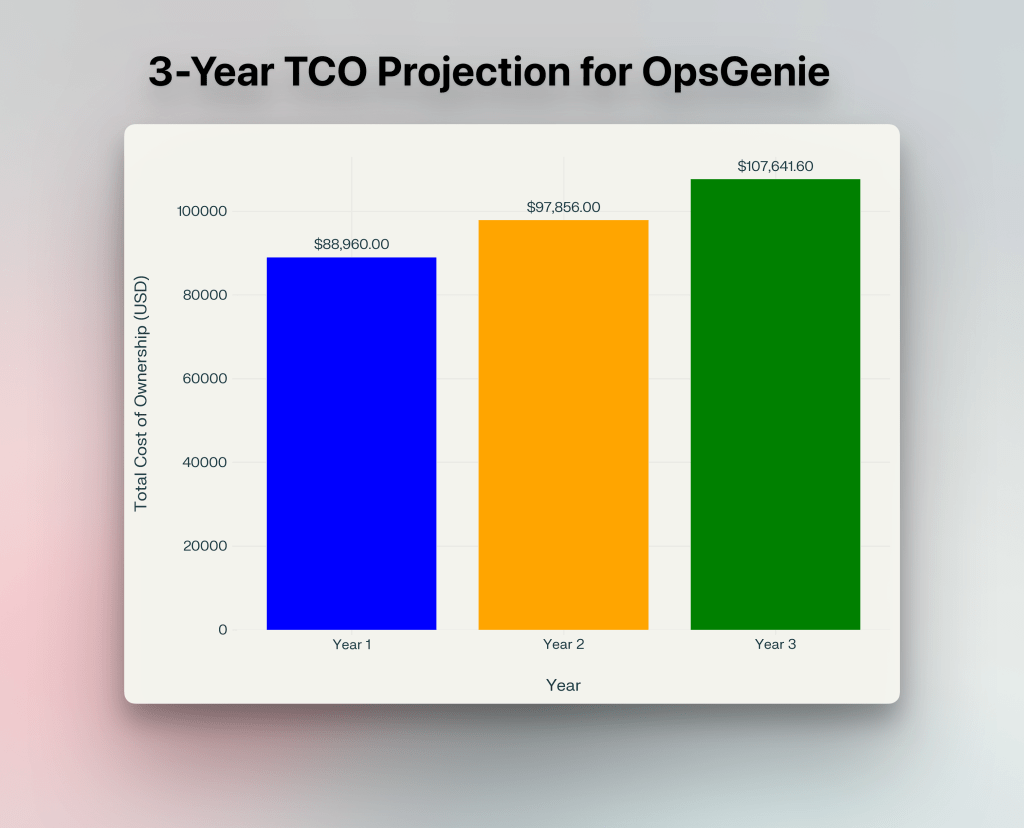
OpsGenie TCO for 200 users:
- Base: 200 users × $31.90 × 12 = $76,560
- Add-ons:
- Phone Support: $10/number/month (eg: 10 phone numbers = $10 × 10 × 12 = $1,200)
- SMS Alerts: $0.10/SMS/month (eg: 1,000 SMS/month = $0.10 × 1,000 × 12 = $1,200)
- Total Add-ons Cost: $1,200 (phone) + $1,200 (SMS) = $2,400
- Setup & training: $10,000 (engineer time for custom workflows)
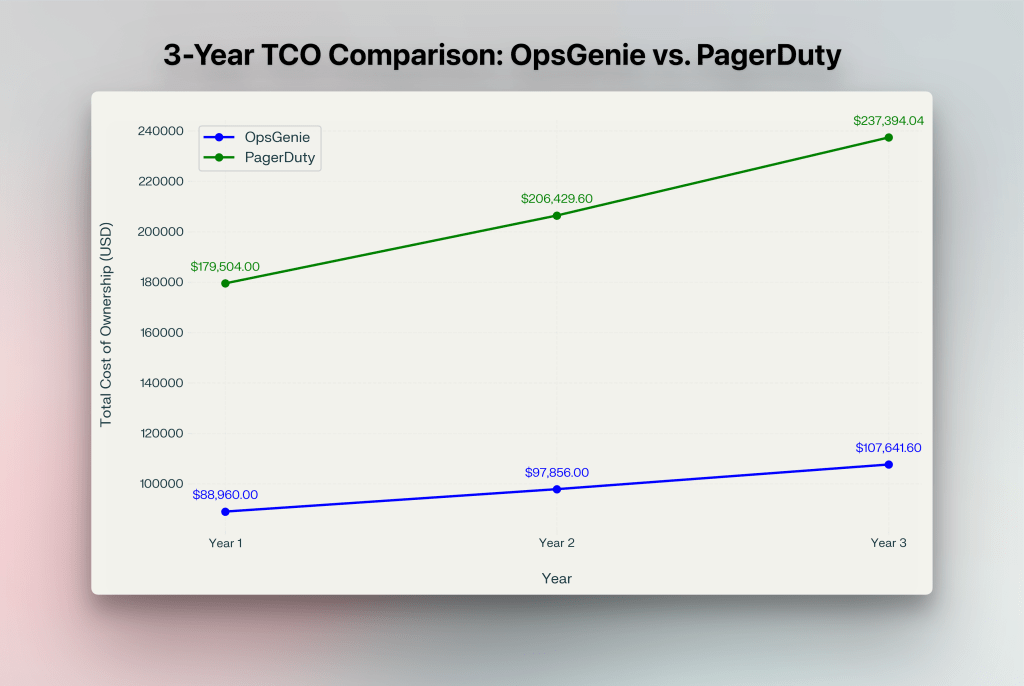
- Total 1-year TCO: $76,560 + $2,400 + $10,000 = $88,960
- Total 3-Year TCO with 10% hike per year: $294,457.60
PagerDuty also offers a free tier and scales from $21/user/month (Professional) to Enterprise (~$60/user/month) billed annually. Plus, extra charges for features like status pages ($89/1000subs/month), AIOps ($699/month), and PagerDuty Advance ($415/month).
PagerDuty TCO for 200 users:
- Base: 200 users × $60 × 12 = $144,000
- Add-ons:
- Status Pages: $89/page/month (2 status pages = $89 × 2 × 12 = $2,136)
- AIOps: $699/month (Annual cost = $699 × 12 = $8,388)
- PagerDuty Advance: $415/month (Annual cost = $415 × 12 months = $4,980)
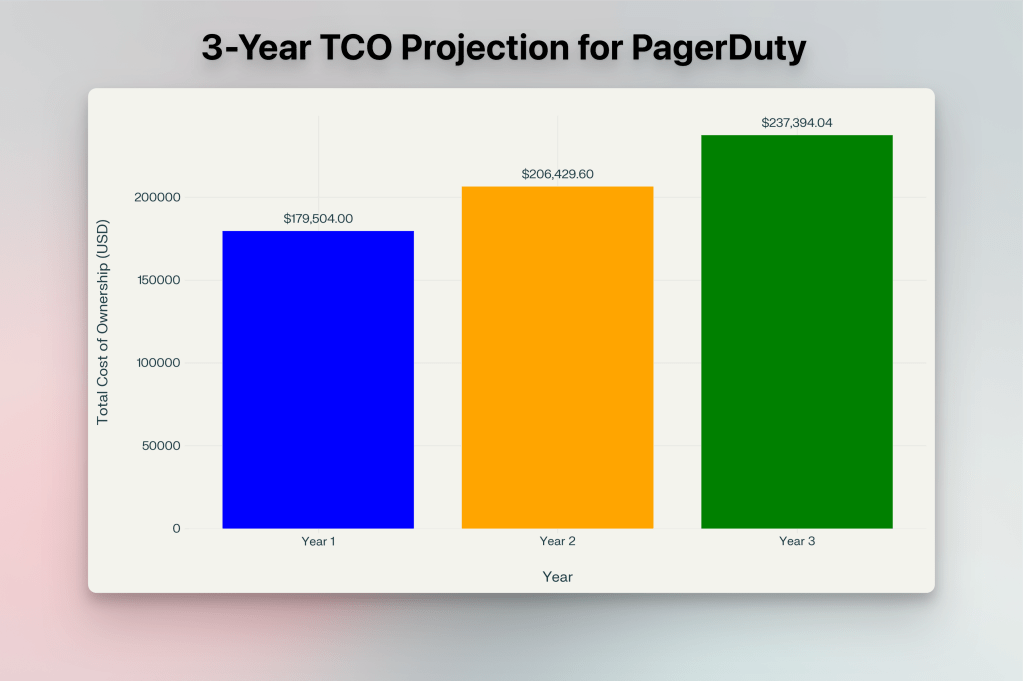
- Total Add-ons Cost: $2,136 + $8,388 + $4,980 = $15,504
- PagerDuty setup & training: 100 engineer hours × $200/hour = $20,000
- Total 1-year TCO: $144,000 + $15,504 + $20,000 = $179,504
- Total 3-year TCO with 15% hike per year: $623,329
To get a more clear picture on PagerDuty’s pricing, check out the blog post: PagerDuty Pricing Breakdown 2026.
Who should pick what?
- OpsGenie is no longer available for new customers. Existing OpsGenie users can continue until April 2027, but all new teams must choose an alternative.
- PagerDuty remains the leading option for enterprises needing advanced AI features despite higher TCO.
Verdict: PagerDuty wins for new customers since OpsGenie is no longer available for new sign-ups.
Spike: Best of Both OpsGenie and PagerDuty
TL;DR
Note: This comparison is relevant only for existing OpsGenie customers.
| Criteria | Spike | OpsGenie | PagerDuty | Spike’s Edge |
| Incident Response | Central dashboard, Custom workflows, war rooms | Centralized dashboard, tailored workflows | Predictive automation, ML-driven recommendations | Balances automation with hands-on control |
| Alerting | Multiple alert channels (Phone, SMS, Slack, etc.), auto-resolve, unlimited alerts | Custom alerts, noise control, SMS/phone add-ons | ML-powered grouping, paid SMS/phone | Includes all channels without add-on fees |
| Oncall Management | Follow-the-sun, cooldown/OOO modes, backup escalations | Flexible scheduling, instant overrides | Multi-layered schedules, flexible rotations | Prioritizes on-call wellbeing with cooldown/OOO modes |
| Integrations | 80+ tools, custom integrations on request | Atlassian-heavy (Jira, Confluence) | 700+ tools (Splunk, ServiceNow) | Offers flexibility with custom integrations on request |
| Incident Communication & Transparency | Unlimited status pages (base plan), custom branding | Status pages at no extra cost, audience-specific alerts | Role-based status pages ($89+/month) | Unlimited status pages in base plan |
| User Experience | Intuitive interface, mobile-first, pre-built templates | Low learning curve, clean UI | Advanced controls, dependency tracking | Simplifies setup with templates while retaining depth |
| Pricing & TCO | $36k/year (all-inclusive) for 200 licenses | $88k/year (+$2.4k add-ons) for 200 licenses | $179k/year (+$15k add-ons) for 200 licenses | Saves 80%+ vs PagerDuty and 60%+ vs OpsGenie with all-inclusive pricing |
If OpsGenie’s shutdown leaves you torn between its simplicity and PagerDuty’s depth, Spike bridges the gap.

Here’s how Spike addresses the seven key criteria:
1. Incident Response
Spike combines OpsGenie’s workflow control with PagerDuty’s automation—but without the complexity. Teams can auto-tag incidents by severity, build custom workflows (like rerouting alerts during holidays), and collaborate in shared war rooms.
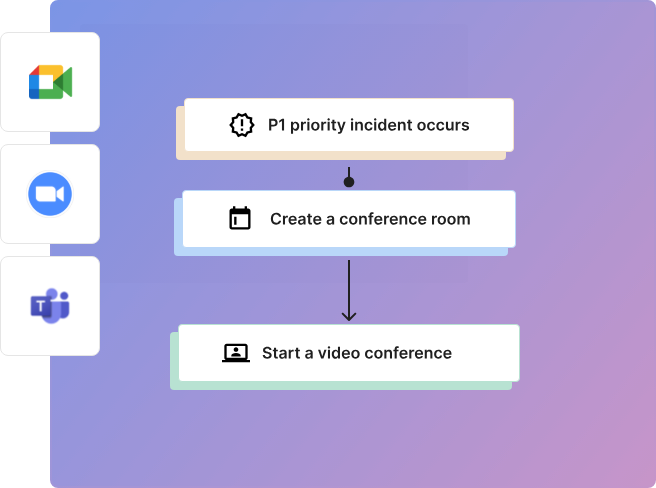
For example, during a payment API crash, Spike auto-flags it as “Critical,” assigns responders based on schedules, and links runbooks directly to the incident dashboard.
Why it’s better: Spike balances automation with hands-on control, letting teams adapt workflows without sacrificing visibility.
2. Alerting
Spike sends alerts via Slack, Teams, SMS, phone calls, WhatsApp, Discord, and mobile push notifications with unlimited alerts on its Business plan. Its auto-resolve feature silences alerts once issues fix, while routing rules prioritize critical alerts via phone/SMS and route low-priority ones to Slack.
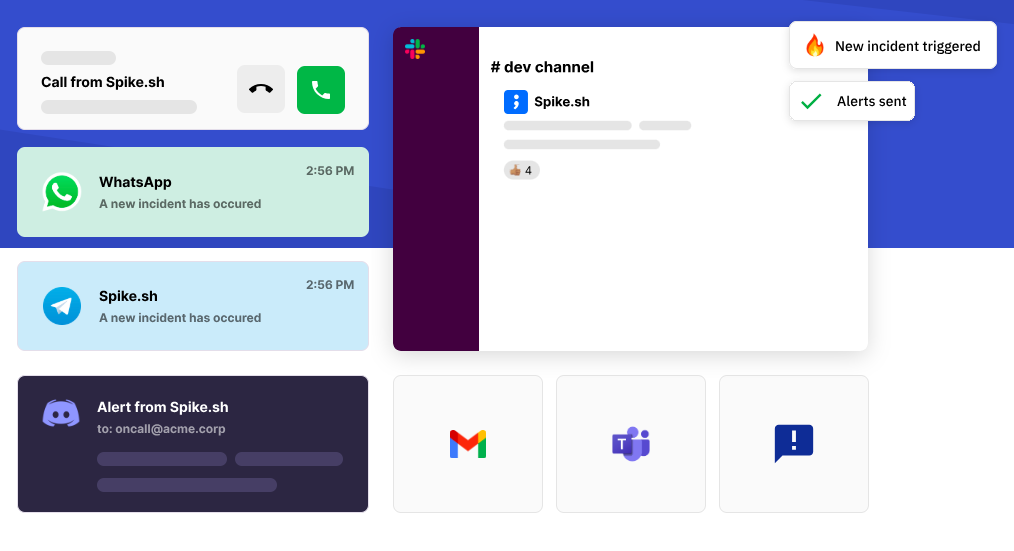
For example, recurring server downtime alerts group into a single incident thread. If the server recovers within 15 minutes, Spike auto-resolves the incident and notifies responders via Slack.
Why it’s better: Spike includes multi-channel alerts in its base pricing—unlike PagerDuty or OpsGenie’s add-on fees.
3. Oncall Management
Spike simplifies oncall scheduling with follow-the-sun rotations, cooldown periods after shifts, and out-of-office auto-skips. Teams can layer backup responders (like PagerDuty) while allowing last-minute swaps (like OpsGenie).

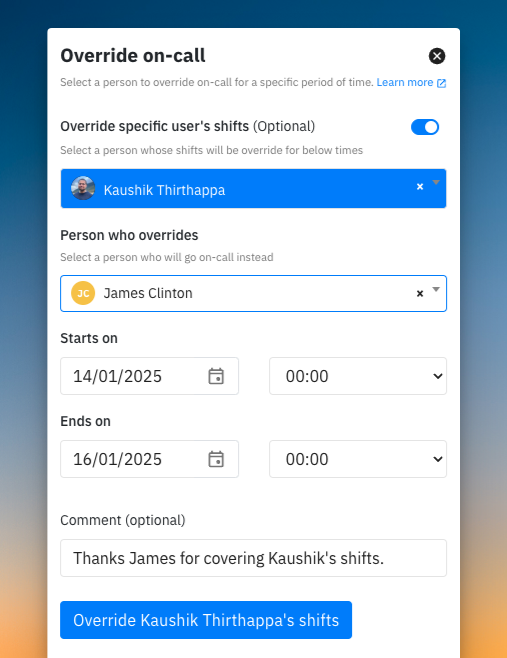
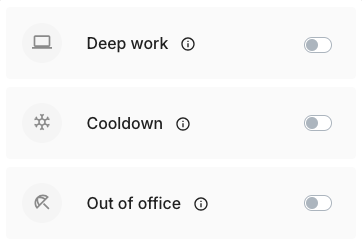
For example, a global team can use Spike’s follow-the-sun schedule to cover time zones. After a week on-call, engineers can enter a 2-day cooldown, and those on PTO are auto-skipped—no manual overrides.
Why it’s better: Spike combines OpsGenie’s flexibility and PagerDuty’s reliability while adding wellbeing-focused features like cooldowns—all included in its base pricing.
4. Integration Ecosystem
Spike connects to 80+ tools including monitoring tools (Datadog, Prometheus), ticketing systems (Jira, Freshdesk), and collaboration apps (Slack, Teams). It also provides Webhook support. Teams can even request custom integrations built by Spike’s engineers.
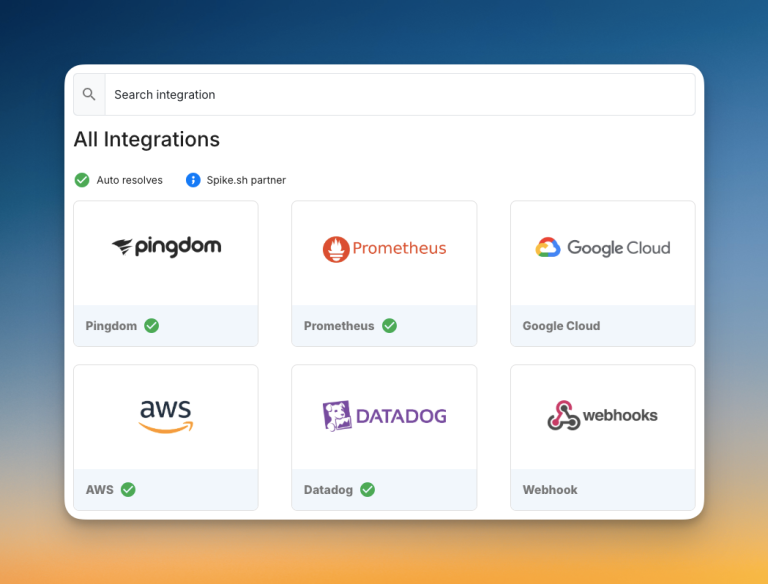
A DevOps team can trigger Spike incidents from Datadog alerts, generate Jira tickets, and share resolved incidents on Slack channels.
Why it’s better: Spike offers essential integrations out-of-the-box (unlike OpsGenie’s Atlassian-heavy focus) and avoids PagerDuty’s complex setup for custom tools.
5. Incident Communication & Transparency
Spike provides unlimited status pages (public and private) in its base pricing, with real-time updates and custom branding.
Follow Spike’s status page to keep up with updates.
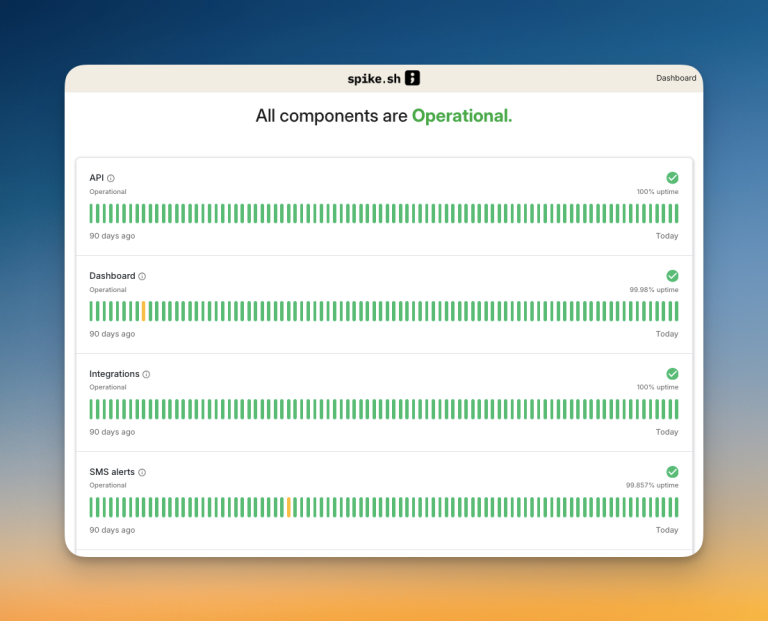
For example, during a shipment tracking outage, Spike can auto-update public status page while giving internal teams detailed incident timelines.
Why it’s better: Spike includes status pages in its base pricing (unlike PagerDuty’s $89+/month add-on) and matches OpsGenie’s operational transparency capabilities.
6. User Experience and Interface
Spike combines beginner-friendly design with pro-level controls in a clutter-free interface. Its one-click mobile actions let engineers acknowledge alerts, update status pages, or join war rooms on the go.
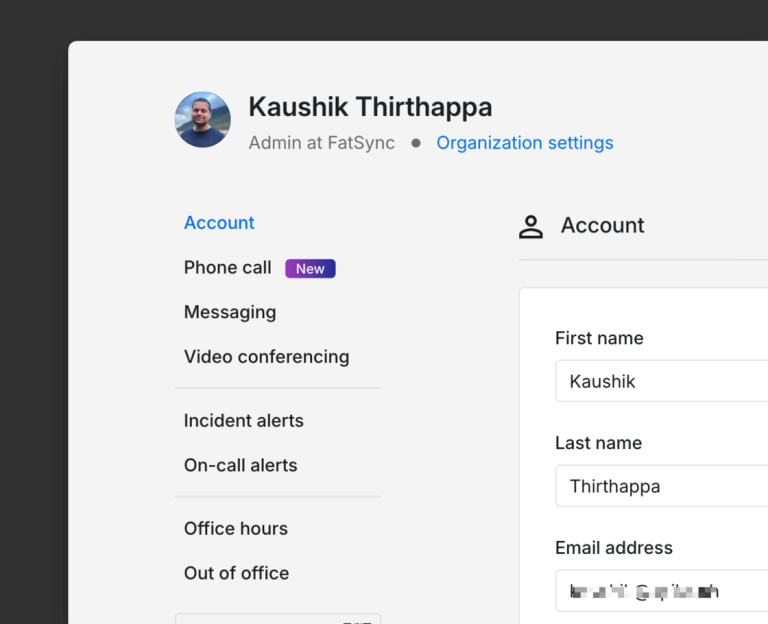
For example, a retail company’s DevOps team can resolve a Black Friday checkout outage using Spike’s mobile app—acknowledging alerts, joining war rooms, and updating status pages—all while managing crowds in-store.
Why it’s better: Spike matches OpsGenie’s simplicity and onboarding speed (thanks to its handy templates) while offering PagerDuty’s depth (advanced controls)—all in a unified interface that avoids overwhelming users.
7. Pricing & TCO
Spike’s pricing includes: Starter plan ($6.4/user/month) and Business plan ($12.8/user/month) billed annually. For Enterprise plan, you can contact the sales.
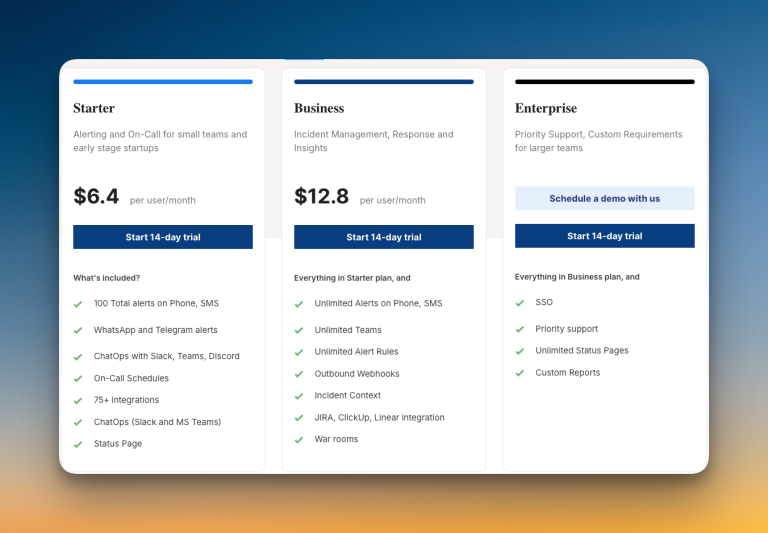
Spike’s TCO for 200 users:
- Base: 200 × $15 × 12 = $36,000
- Add-ons: $0 (SSO, Priority support, Unlimited Status Pages, Custom Reports)
- Setup & training: $0 (Quick setup with no training needed)
- Total 1-year TCO: $36,000
- Total 3-year TCO with 5% hike per year: $113,490
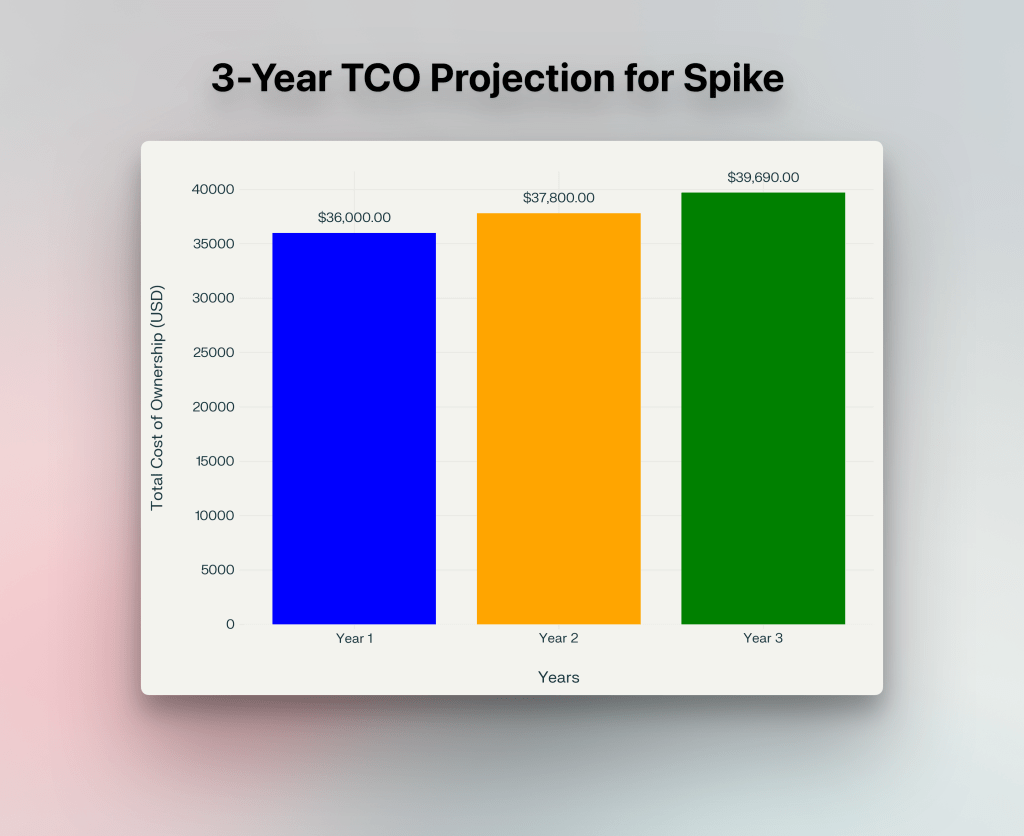
Why it’s better: Spike’s all-inclusive pricing saves teams $180,967+ vs OpsGenie and $509,839+ vs PagerDuty over three years—while offering comparable (or better) features.

Hear What Customers Say About Spike
Steven Ryder, former Engineering Manager at Virtually Human, about Spike:

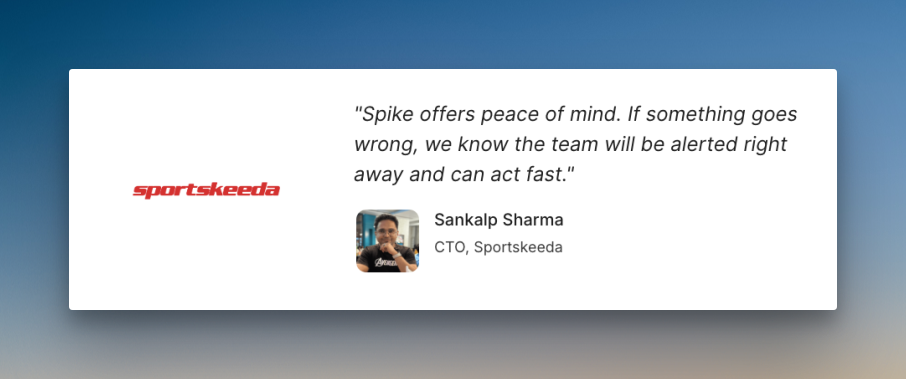
Sankalp Sharma, CTO of Sportskeeda, about Spike:
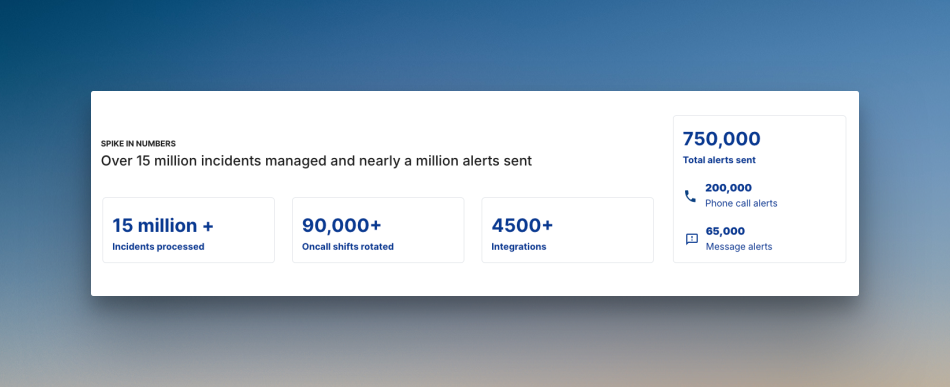
Spike in numbers
Make Your Move: The Clock is Ticking
With OpsGenie’s shutdown approaching, your choice between incident management tools is more than a feature comparison—it’s about finding a long-term partner for your team’s success.
While PagerDuty offers robust automation and OpsGenie provides user-friendly interfaces, Spike delivers the best of both worlds at a fraction of the cost.
Whether you’re seeking powerful incident response, flexible alerting, or team-friendly oncall scheduling, Spike’s all-inclusive platform saves you $105k+ vs OpsGenie and $434k+ vs PagerDuty over three years while eliminating the complexity that slows teams down.
Don’t wait until OpsGenie’s sunset—choose/switch to Spike today and future-proof your incident management!