
This in-depth analysis examines PagerDuty’s pricing structure for 2026, going far beyond the advertised rates to uncover the true total cost of ownership. We break down the additional fees, essential add-ons, implementation timelines, and ongoing maintenance costs that most organizations discover only after committing. Also, we demonstrate how Spike delivers identical incident management functionality at a fraction of the cost—saving teams up to 86% on direct expenses while reducing implementation time by 98%.
Introduction
When your incident management bill exceeds your cloud infrastructure costs and your team spends countless hours managing the platform instead of resolving incidents, it’s time to take a closer look at what you’re really paying for—both in dollars and time.
Understanding the true cost of your incident management software isn’t just about checking a pricing page—it’s about uncovering the additional fees, limitations, time investments, and long-term impact of your platform choice.
This comprehensive analysis breaks down PagerDuty’s pricing model, exposes the often-overlooked costs and time commitments, and provides a clear comparison with more cost-effective and time-saving alternatives like Spike.
Whether you’re considering PagerDuty for the first time or evaluating your current spending, this guide will equip you with the insights needed to make an informed decision that benefits both your operations and your budget—while reclaiming valuable engineering time.
PagerDuty Pricing Explained (2026 Edition)
TL;DR
| Plan | Price | Ideal For | What’s Included | What’s Missing | Time to Set Up |
|---|---|---|---|---|---|
| Free | $0 | Small teams, testing | Basic on-call, integrations | Some essential features | 20 mins |
| Professional | $21/user/month | Small-to-mid teams | Basic incident response, limited workflows | Advanced automation, custom roles | 1-3 days |
| Business | $41/user/month | Growing organizations | More customization, some automation | Full AI capabilities, advanced integrations | 1-2 weeks |
| Enterprise | Contact Us | Large organizations | Most features included | Several premium features still require add-ons | 2-4 weeks |
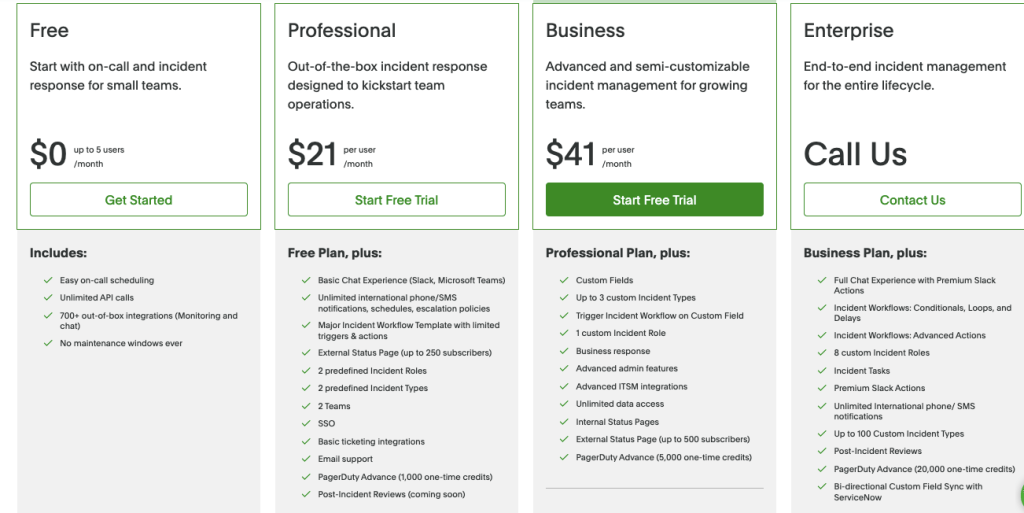
Looking at PagerDuty’s pricing page reveals a tiered structure that seems straightforward at first glance. However, the reality of what you’ll actually pay—and how long it takes to implement—tells a different story.
Base Plan Breakdown
- Free Plan
The Free tier limits you to just 5 users with basic on-call scheduling and integrations. While it offers unlimited API calls and 700+ integrations, you’ll quickly hit limitations as your team grows. Also, the free plan lacks phone call alerts—a critical feature even for small teams and individual developers who need reliable notifications during incidents. - Professional Plan ($21/user/month)
This tier adds a basic chat experience, unlimited notifications, and simple workflow templates. You get limited customization with only 2 predefined incident roles, 2 incident types (categories like “Security Incident” or “Major Outage” that determine response workflows), and 2 teams. The external status page is capped at 250 subscribers. Most teams outgrow this tier within months as teams scale. - Business Plan ($41/user/month)
The Business tier offers 3 custom incident types, trigger-based workflows, custom incident roles, business response capabilities, advanced admin features, unlimited data access, and expanded status page options supporting up to 500 subscribers—still with significant limitations that push toward Enterprise. - Enterprise Plan (Price hidden)
The highest tier requires contacting sales. It includes more comprehensive features like advanced incident workflows with conditionals and loops, 8 custom incident roles, and up to 100 custom incident types. While it bundles some add-ons like Premium Status Pages, critical features like AIOps still require additional purchases.
Additional Costs & Time Investments
The base subscription fees are just the beginning. PagerDuty’s pricing model includes numerous add-ons and time commitments that significantly increase your total cost:
- Costly Essential Add-ons: Critical features like AIOps ($699/month) for noise reduction and PagerDuty Advance ($415/month) for AI capabilities require separate purchases.
- Time-Intensive Configuration: On top of the PagerDuty setup, each add-on typically needs its own configuration and management, adding hours of engineering time per feature.
- Forced Tier Upgrades: As your needs grow, you’ll face strategic feature placement that requires moving to higher tiers for capabilities that could be considered core functionality.
- Inflexible User Licensing: PagerDuty requires bulk purchasing of user licenses with no option to add just one or two seats as needed, forcing you to commit to more licenses than you might actually use.
- Retraining Time: Every new feature or add-on requires additional team training time, pulling engineers away from their primary responsibilities.
- Annual Price Increases: PagerDuty typically charges an approximate 10-15% increase during annual renewals, requiring additional budget planning each year.
- Add-on Management Overhead: Managing multiple add-ons creates administrative complexity that consumes IT and procurement resources.

Three-Year Total Cost of Ownership (TCO) Projection for PagerDuty
Understanding the long-term financial impact of PagerDuty requires looking beyond the first-year costs. Here’s what a typical three-year TCO looks like for PagerDuty:
Year 1 Costs:
- Initial subscription fees (varies by tier)
- Essential add-ons like AIOps ($699/month) and PagerDuty Advance ($415/month)
- Implementation and training time (1-4 weeks of engineering effort)
Years 2 & 3 Costs:
- Annual subscription renewals (often with 10-15% increases)
- Ongoing add-on fees
- Additional seats as teams expand
- Bulk license purchasing requirements, forcing you to commit to more seats than needed
Let’s take a couple of examples to understand it better:
Example 1: For a team of 25 users on the Business plan ($41/user/month), here’s the 3-year TCO breakdown:
- Year 1: $28,356
- Base subscription: $12,300 ($41 × 25 users × 12 months)
- Essential add-ons: $14,436 (AIOps $699/month + PagerDuty Advance $415/month + Status Page $89/month)
- Additional costs: $1,620 (implementation and training)
- Year 2: $30,746 (with 15% increase)
- Year 3: $35,358 (with another 15% increase)
Total 3-year TCO: $94,461
Example 2: For enterprise deployments with 200 users, the costs are substantially higher:
- Year 1: $165,636
- Base subscription: $144,000 ($60 × 200 users × 12 months)
- Essential add-ons: $14,436 (AIOps $699/month + PagerDuty Advance $415/month + Status Page $89/month)
- Additional costs: $7,200 (implementation and training)
- Year 2: $190,481 (with 15% increase)
- Year 3: $219,054 (with another 15% increase)
Total 3-year Enterprise TCO: $575,171
Instead of allocating over half a million dollars to PagerDuty, consider affordable yet powerful alternatives like Spike that delivers the same capabilities at a fraction of the cost.
The substantial savings can be strategically reinvested in additional DevOps talent—driving faster deployments, accelerating innovation, and creating more business value.
What Users Say About PagerDuty’s Pricing
Don’t just take our word for it. Let’s look at what real users are saying about PagerDuty’s pricing across review platforms and social media:
G2 Reviews
On G2, a leading software review platform, PagerDuty’s pricing is consistently mentioned as a pain point.
In their Cons section, “Expensive” and “Pricing Issues” are among the most common complaints with 17 and 14 mentions respectively.
One reviewer specifically notes: “Pagerduty is expensive as compared to its competitors in the market”.

While another lists their top three dislikes as “1. Complexity of initial set-up, 2. Pricing, 3. Not a very user-friendly UI”.

Even positive reviews of PagerDuty often mention the high cost as the primary drawback.
Reddit Discussions
On Reddit, pricing frustrations are even more explicit.
In a thread titled PagerDuty is too expensive, an engineering team manager writes:

Even commenters who defend PagerDuty’s features acknowledge the price concern: “What’s that, roughly $30 per person? Yeah, seems a bit expensive, although PagerDuty is feature-rich from what I remember”.
The Spike Advantage: Transparent Pricing for Modern Teams
TL;DR
| Comparison Factor | PagerDuty | Spike |
|---|---|---|
| Starting Price | $21/user/month billed annually | $6.4/user/month billed annually |
| Necessary Features in All Plans | No | Yes |
| Additional Costs | Multiple add-ons | None |
| Implementation Time | 1-4 weeks | 2-3 hours |
| Time to First Alert | 1-2 days | 5 mins |
| Learning Curve | Steep (2-3 hours/user) | No learning curve, it’s quite intuitive |
| Time to Team Adoption | 1-2 days | Can start immediately |
| Training Time | 2-3 hours per user | No training required |
After seeing PagerDuty’s complex pricing structure and additional costs, let’s look at how Spike offers a refreshingly different approach to incident management pricing.
Spike Pricing Structure (billed annually)
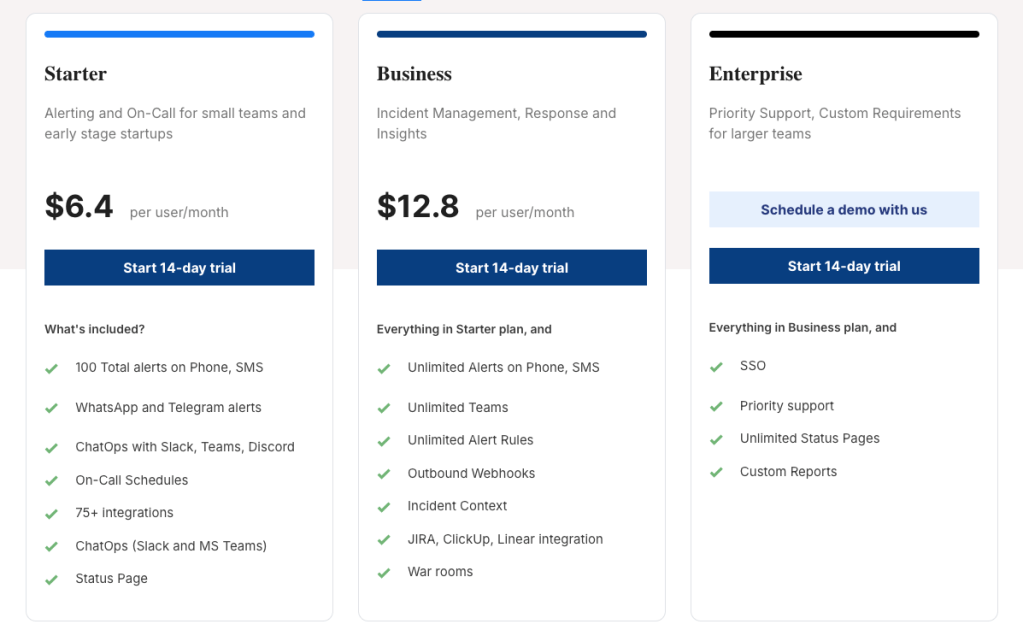
- Starter Plan ($6.4/user/month)
Spike’s entry-level plan is designed for small teams and early-stage startups focusing on alerting and on-call management. The plan includes 100 total alerts on phone and SMS (and unlimited alerts on WhatsApp, Telegram, Slack, and other platforms), ChatOps integration with Slack, Teams, and Discord, on-call schedules, 80+ integrations, and a status page.
Unlike PagerDuty’s approach, Spike provides essential incident management features at an affordable price point. You get everything you need to manage incidents effectively from day one without breaking the bank. - Business Plan ($12.8/user/month)
The Business plan expands capabilities for incident management, response, and insights. It includes everything in the Starter plan plus unlimited alerts on phone and SMS, unlimited teams, unlimited alert rules, outbound webhooks, incident context, JIRA/ClickUp/Linear integration, and war rooms for collaborative incident response.
These are meaningful expansions that support growing teams, not artificial limitations designed to force upgrades. Also, unlike PagerDuty, Spike allows you to add or remove team members at will—you’re never locked into purchasing bulk seats. It’s your choice, and we won’t force you to commit to licenses you don’t need. - Enterprise Plan (Talk to us)
For larger organizations, Spike offers an Enterprise plan with priority support and custom requirements. This tier includes everything in the Business plan plus SSO, a dedicated Customer Success Manager, a private Slack or Microsoft Teams channel with our support team, unlimited status pages, and custom reports.
Enterprise customers get personalized pricing based on actual needs rather than paying for unnecessary features or facing arbitrary restrictions.
Spike vs PagerDuty Pricing Philosophy
- Simpler Pricing Structure: PagerDuty uses a complex matrix of tiers, add-ons, and usage-based components that make total cost difficult to predict, while Spike offers simple per-user pricing with no additional costs.
- More Value Per Dollar: PagerDuty strategically places essential features across different tiers to encourage upgrades, whereas Spike makes all core incident management features available to all customers regardless of plan level.
- Transparent, Predictable Costs: With PagerDuty, the advertised price is just the starting point before add-ons but Spike delivers complete transparency where what you see is exactly what you pay.
Familiar Experience, Faster Adoption
Switching incident management tools doesn’t have to mean starting from scratch—Spike was designed to feel instantly familiar to PagerDuty users.
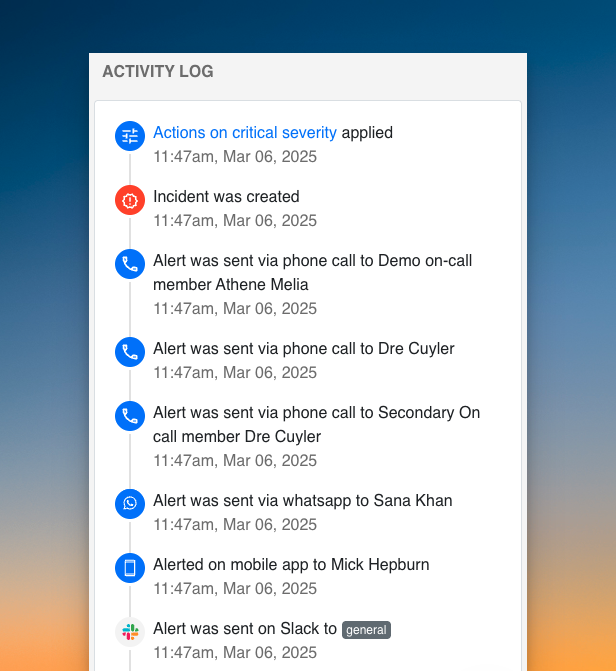
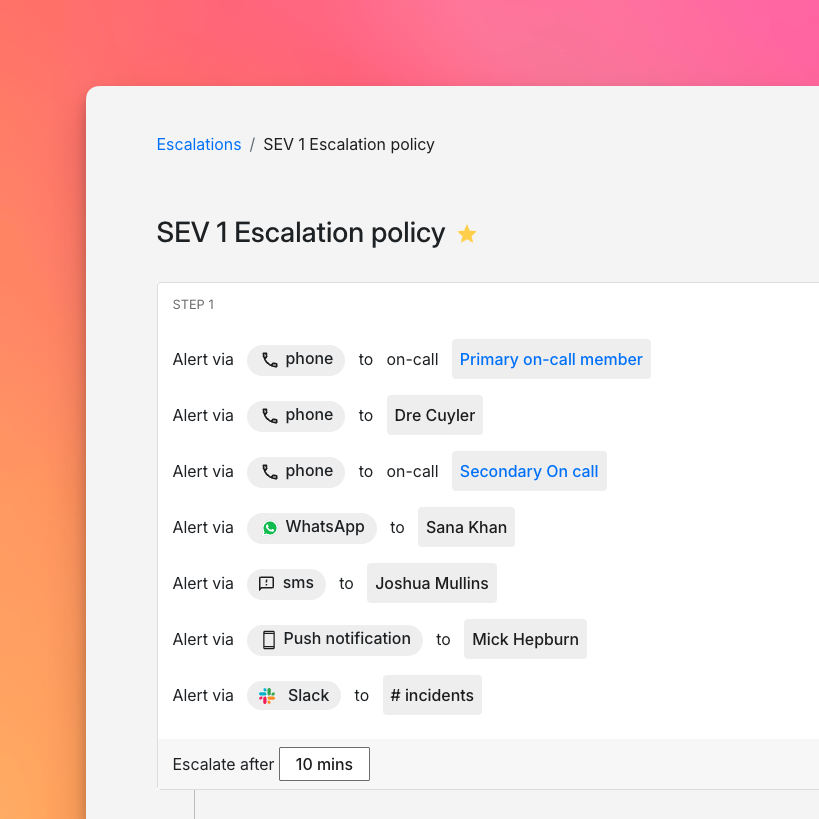
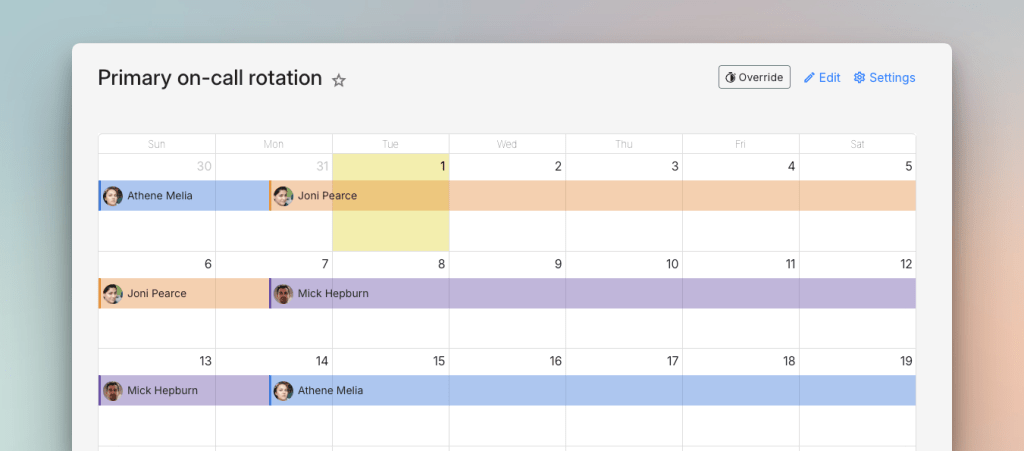

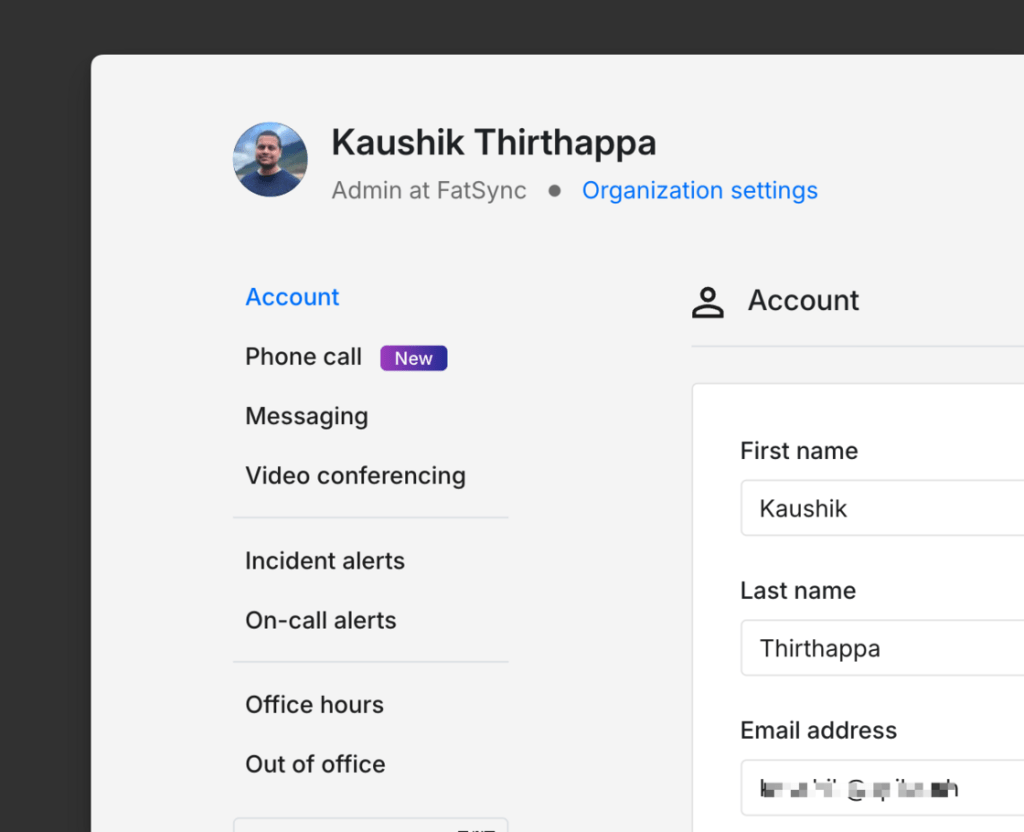

- Similar, Intuitive Interface: Spike’s thoughtfully designed dashboard mirrors PagerDuty’s layout, with familiar on-call schedules, escalation policies, and alert management screens that let your team hit the ground running.
- Consistent Terminology: We use the same incident management language you already know—incidents, escalations, schedules, and rotations all work the way you expect, eliminating confusion during transition.
- Zero learning curve: Users familiar with PagerDuty can start using Spike with minimal transition time. Plus, the mobile apps share similar interfaces and notification patterns.
Cost & Time Savings With Spike
Let’s examine three common team scenarios to see the real-world impact of switching from PagerDuty to Spike in terms of both cost and implementation time:
Scenario 1: 10-Person DevOps Team:
- PagerDuty Professional ($21/user/month base + essential add-ons): $5,508/year with 1-2 weeks setup time
- Base subscription: $2,520/year
- Add-ons (AIOps, Status Pages): $2,988/year
- Spike Starter ($6.4/user/month all-inclusive): $768/year with 2-3 hours setup time
- Total savings: $4,740 (86%) and approximately 2 weeks of engineering time
Scenario 2: 25-Person SRE Team:
- PagerDuty Business ($41/user/month + required add-ons): $28,356/year with 1-3 weeks implementation
- Base subscription: $12,300/year
- Essential add-ons: $14,436/year (AIOps $699/month + PagerDuty Advance $415/month + Status Page $89/month)
- Implementation and training: $1,620
- Spike Business ($12.8/user/month all-inclusive): $3,840/year with 2-3 hours setup
- Total savings: $24,516 (86%) and approximately 2-3 weeks of engineering time
Scenario 3: 200-Person Enterprise Team:
- PagerDuty Enterprise ($60-90/user/month + add-ons): $165,636/year with 2-4 weeks implementation
- Three-year TCO with 15% annual increases: $575,171
- Base subscription: $144,000/year
- Essential add-ons: $14,436/year
- Implementation and training: $7,200
- Spike Enterprise (custom pricing, approximately $15/user/month): $36,000/year with 2-3 hours setup
- Total savings: $129,636 (78%) first year and $539,171 (94%) over three years
Beyond Direct Savings: The ROI of Switching to Spike
Not just financial savings—switching to Spike delivers significant operational benefits that impact your bottom line:
- Immediate Time to Value: PagerDuty requires 1-4 weeks for full implementation, while Spike can be completely set up in just 2-3 hours. This allows you to start managing incidents immediately, delivering reduced downtime and faster incident resolution from day one.
- Reduced Training Burden: Spike requires only 30 minutes of training per user compared to PagerDuty’s 2-3 hours, freeing up to 75% more engineering time that can be redirected to valuable development work.
- Seamless Transition: Spike’s familiar interface and compatible workflows minimize disruption during migration, allowing your team to maintain full incident response capabilities throughout the switch.
- Easy Integrations: With a one-click setup for the most popular tools, Spike lets you connect your entire monitoring stack in just hours.
Hear What Customers Say About Spike
Sankalp Sharma, CTO of Sportskeeda, about Spike:

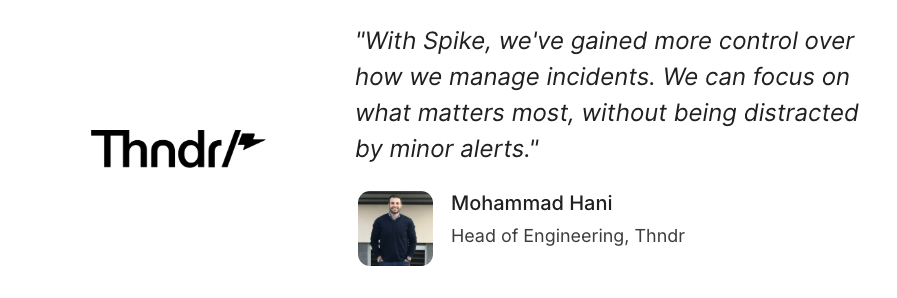
Mohammad Hani, Head of Engineering at Thndr, about Spike
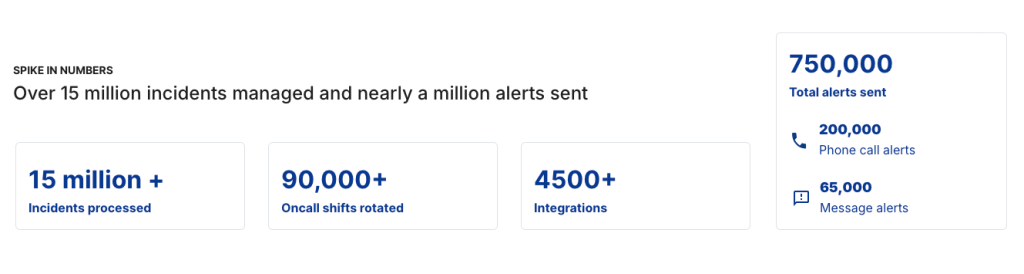
Spike in numbers
Plus,
- Average migration time: 2-3 hours
- Average user training time: No training required
Making the Switch: Migration Path from PagerDuty to Spike
Moving from PagerDuty to Spike is a straightforward process that takes hours, not weeks. Here’s how it works:
- Initial platform setup (15 mins): Create your Spike account, invite team members, and configure basic settings.
- Integration configuration (30 mins): Connect your monitoring tools and communication channels to Spike using built-in integrations.
- Alert routing automation (30 mins): Create your alert rules in Spike matching your existing PagerDuty configurations.
- On-call schedules (40 mins): Recreate your team’s on-call schedules and escalation policies within Spike. You can also try ready-to-use templates for quick setup.
- Complete cutover (10 mins): Transfer your incident data history from PagerDuty, finalize configurations, and fully switch operations to Spike.
Typical Timeline Comparison
- PagerDuty implementation: 1-4 weeks
- Spike implementation: 2-3 hours
- Time savings: 98%
- Value: Faster return on investment and immediate operational improvements
Common Migration Questions
We’ve helped many teams switch from PagerDuty—here are the questions we hear most often:
- On average, how long does it take to migrate from PagerDuty to Spike?Most teams complete their full migration within 2-3 hours, with some smaller teams finishing sooner.
- How long will it take our team to learn Spike?No training time needed—teams can start using Spike immediately thanks to its intuitive interface and straightforward terminology.
- Will we lose our incident history if we switch?Spike allows incident data transfer during migration, so you can bring over your historical incident records.
- We have 25+ integrations with PagerDuty. Can Spike handle all of them?Yes. Spike supports all major monitoring tools, chat platforms, and ticketing systems. Our platform includes 80+ pre-built integrations and a flexible webhook system for custom connections. If you need a specific integration that isn’t available yet, we fast-track building new integrations—typically releasing them within just 1 working day.
- What alert channels does Spike provide?Spike supports all standard notification channels including SMS, phone calls, mobile push notifications, WhatsApp & Telegram, Slack, Microsoft Teams, and more. All channels are included at no additional cost.
Have more migration questions? Talk to a Spike specialist →
Conclusion
PagerDuty’s pricing might look straightforward at first glance, but as we’ve shown, the additional costs and time investments add up quickly.
Between expensive add-ons, lengthy implementation, and complex pricing tiers, you end up paying far more than the advertised rates—both in dollars and engineering hours.
Spike delivers the same incident management capabilities at a fraction of the cost. You’ll save up to 86% on direct expenses while cutting implementation time by 98%.
The switch is quick, seamless, and risk-free. So, why wait weeks and overpay when you could be up and running in hours?
Migrate to Spike today and save both time and money!